
Data Studio template
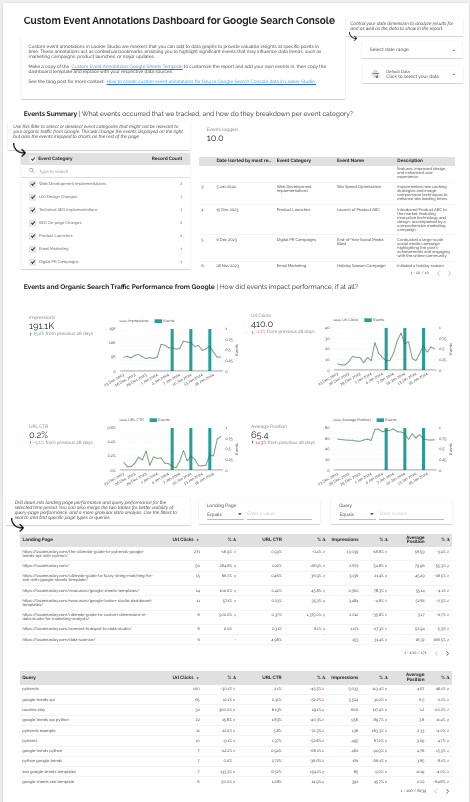
Custom Event Annotations for Search Console Data Studio template
SEO Free
Best for: For SEOs and agencies who want site changes, campaigns and algorithm updates marked on their Search Console charts, so cause and effect sit on the same chart.
Overview
A free Data Studio template I built to blend a Google Sheet of dated events with Search Console data. Log a release, a migration, a campaign or a Google update once, and it appears on the performance charts for that date, so nobody has to remember why clicks moved in March. I cover the setup in my tutorial on lazarinastoy.com.
Who it's for
For SEOs and agencies who want site changes, campaigns and algorithm updates marked on their Search Console charts, so cause and effect sit on the same chart.
Questions it answers
- Did clicks or impressions move after a release, migration or campaign?
- Which Google updates line up with changes in organic performance?
- What happened on the dates the charts change direction?
Key features
- Event annotations from a Google Sheet blended with Search Console data
- Events shown on the date they happened
- A Google Sheets event log template to copy
- Step-by-step setup tutorial
Set it up in minutes
- Copy the events Google Sheet template: https://docs.google.com/spreadsheets/d/1lzvhMjlRxCA7_nn1IrNDJvqgQ0vzzN9VbRT61X8SXdA/edit?usp=sharing
- Open the Data Studio template, make a copy, and connect your Search Console property and your copy of the Sheet.
- Follow the tutorial for the blend: https://lazarinastoy.com/how-to-create-custom-event-annotations-in-looker-studio/
FAQs
Is the template free?
Yes. The template and the Sheet are free, and both data sources use Google's own connectors.
What counts as an event?
Anything you want on the timeline: releases, migrations, campaigns, outages, Google updates.
Where is the setup guide?
In my tutorial: https://lazarinastoy.com/how-to-create-custom-event-annotations-in-looker-studio/