
Data Studio template
Display & Video 360 (DV360) Inventory Data Studio dashboard template
PPC / Paid Media Free
Best for: For programmatic media buyers and campaign managers who need real-time DV360 inventory insight beyond manual console reporting.
Overview
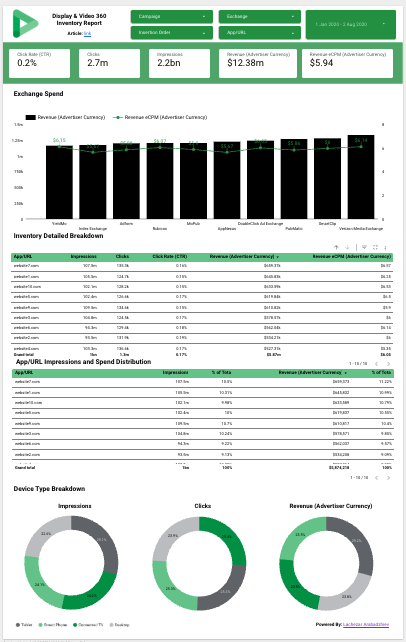
This free Data Studio template automates Display & Video 360 (DV360) inventory tracking by visualising publisher properties, exchange performance and device availability. It consolidates subdomain- and app-level data to reveal true media-spend patterns across sources, so buyers can see where ads actually run and how CPMs vary by exchange. It uses Data Studio's native DV360 connector.
Who it's for
For programmatic media buyers and campaign managers who need real-time DV360 inventory insight beyond manual console reporting.
Questions it answers
- Where are ads appearing across exchanges?
- Which publisher URLs command different CPMs by channel?
- How does device availability vary by exchange?
- What is the consolidated spend per publisher property?
What's inside
4 report pages:
1Inventory by exchange and URL/app
2Device-type visualisations
3Publisher grouping views
4Performance by insertion order and line item status
Key features
- Combines subdomains and app variants via CASE logic
- Compares CPM variations across exchanges for identical properties
- Segments impression delivery by device type per exchange
- Line item and insertion order status indicators
- Creative type and inventory source categorisation
- Device-specific campaign planning analysis
Set it up in minutes
- Open the report in Data Studio.
- Use File → Make a copy to save your own editable version.
- Connect your Display & Video 360 account as the data source.
- Optionally add Campaign Manager for post-view revenue.
FAQs
Is the template free?
Yes — open the live report and use "Make a copy" to get your own editable version.
What data do I need?
An active Display & Video 360 account; Campaign Manager is optional for post-view revenue.
Can I customise it?
Yes. Once copied, edit the tables, charts, filters and calculated fields to fit your inventory.
Who built it?
Lachezar Arabadzhiev (datastudio.ca).