
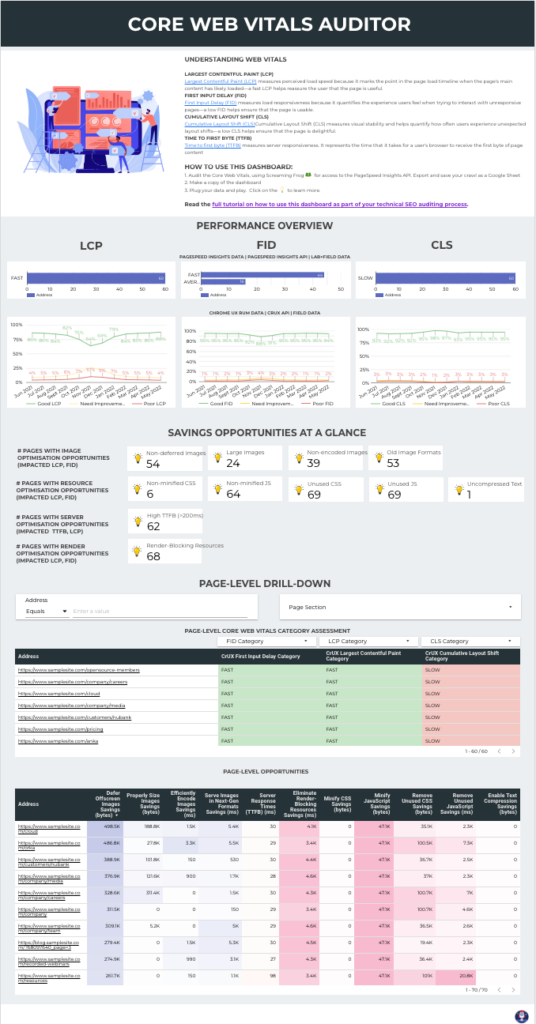
Core Web Vitals Auditor Data Studio dashboard
Best for: For SEOs and web developers running page experience audits who want lab and field Core Web Vitals data, and the fixes it points to, in one place.
Inside the report
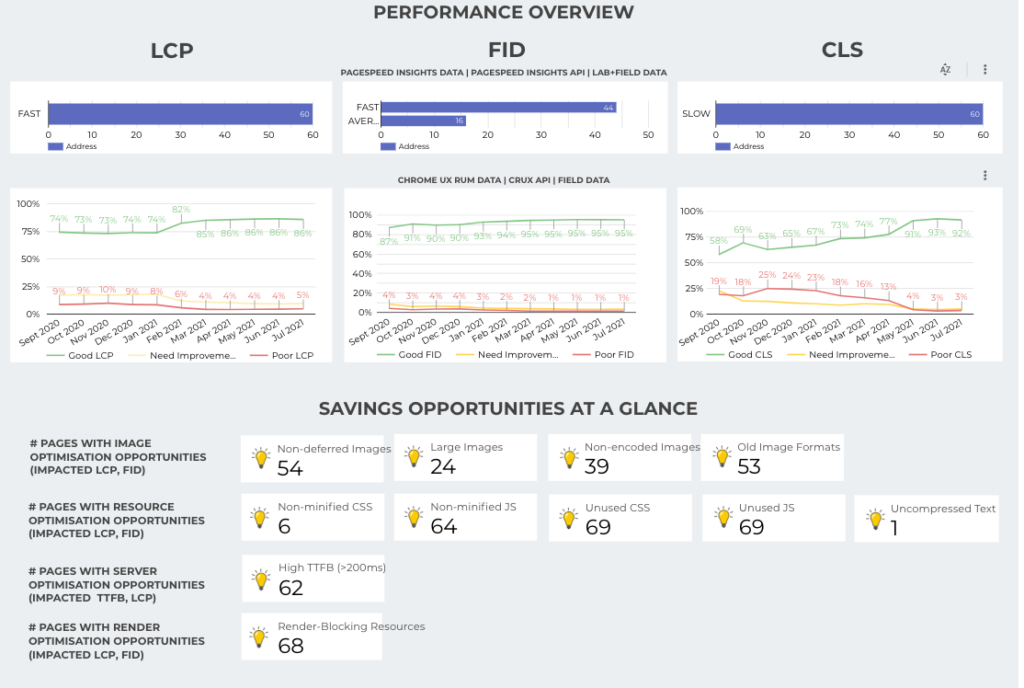
Overview
A free Data Studio dashboard I built in 2021 for page experience audits. Page experience and Core Web Vitals can make or break a website, for user experience and for rankings, and it's a shared cause between users, developers and SEOs. The goal of an audit is arguably not the audit itself, but the recommendations we can give and the solutions we can find by looking at the data. This dashboard is built to get you there faster.
It combines two types of data: PageSpeed Insights results for every page (collected with a Screaming Frog crawl with the PageSpeed Insights API switched on) and Chrome UX Report field data over time. You see how many pages pass each metric, savings opportunities at a glance (images, CSS and JavaScript, server response time, render-blocking resources), and a page-level drill-down you can filter by metric category, by keywords in the URL, or by page groups such as site sections, templates, organisational silos or language versions. Blend in GA4 or Search Console to prioritise by KPIs, add Chrome UX Report data for competitors, and log your fixes in the companion progress-tracking Sheet to map their impact.
I presented it at brightonSEO's MeasureFest, and Google Analytics featured it on its own channels.
Two things have changed since I built it. Interaction to Next Paint (INP) replaced First Input Delay (FID) as a Core Web Vital in March 2024, so swap the FID fields for INP when you connect your crawl. And Google retired its Chrome UX Report connector for Data Studio at the end of November 2025, so the field-data trend charts need a new source: the CrUX dataset in BigQuery, connected with your own credentials.
What people say
Wow! It's amazing to see data wizard and fellow #SEO Pythonista Lazarina being featured by @googleanalytics for her awesome Core Web Vitals Data Studio dashboard! 🔥👏 Check it out if you haven't already!
Looking at how to improve your CWV’s? @lazarinastoy has created a Data Studio Dashboard to combine both lab and live data across all a websites pages #BrightonSEO #MeasureFest
Who it's for
For SEOs and web developers running page experience audits who want lab and field Core Web Vitals data, and the fixes it points to, in one place.
Questions it answers
- How many pages pass or fail LCP, INP and CLS?
- How have field Core Web Vitals trended month by month?
- Which pages have image, CSS, JavaScript, server or render-blocking savings opportunities, and how many?
- Which pages, sections or templates should the developers fix first?
- What impact did each change have?
Key features
- Performance overview from two types of data: PageSpeed Insights (lab and field) and Chrome UX Report field data
- Savings opportunities at a glance: images, CSS and JavaScript, server response time, render-blocking resources
- Page-level drill-down with each page's Core Web Vitals category
- Filter pages by metric category or by keywords in the URL
- Sort and filter pages by savings opportunities and values
- Group pages by site section, template, organisational silo or language version
- Blend with GA4 or Search Console to prioritise by KPIs
- A companion progress-tracking Sheet to log changes and map their impact
Set it up in minutes
- Bulk-audit Core Web Vitals with Screaming Frog: connect the PageSpeed Insights API, crawl the site and export the results to a Google Sheet.
- Open the Data Studio template, make a copy, and connect your exported crawl as the data source. Use INP where the template shows FID.
- Connect the field-data trend charts to the Chrome UX Report dataset in BigQuery, or remove them.
- Optional: copy the progress-tracking Sheet to log the changes you ship and map their impact: https://docs.google.com/spreadsheets/d/1de9cWAIcPGM6wrRisB7EqVW8W5aaTk1zGgCDuOvb75U/edit?usp=sharing
- If anything errors, my tutorial includes a troubleshooting process: https://www.datastudioformarketers.com/core-web-vitals-dashboard-data-studio/