
Data Studio template
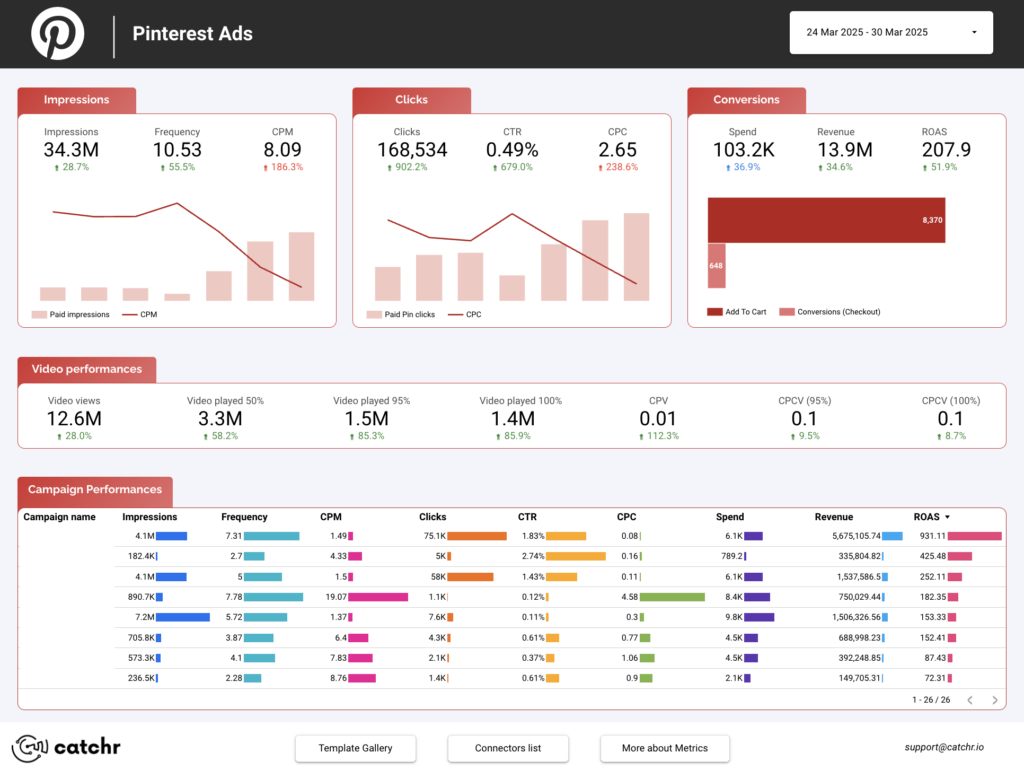
Pinterest Ads Data Studio dashboard template
By catchr
PPC / Paid Media Free
Best for: Built for freelancers, agencies, and marketing practitioners needing reusable dashboards for Pinterest Ads reporting and client performance reviews.
Overview
This Pinterest Ads Looker Studio template gives freelancers, agencies, and marketing teams a focused view of paid Pinterest performance by campaign, ad account, and date. It moves from delivery metrics through to conversion and commerce outcomes without manual report rebuilding. Track paid impressions, CPM, clicks, CPC, spend, ROAS, add to cart, checkout conversions, and video view metrics.
Who it's for
Built for freelancers, agencies, and marketing practitioners needing reusable dashboards for Pinterest Ads reporting and client performance reviews.
Questions it answers
- What can I track with this Pinterest Ads Looker Studio template?
- Can I compare campaigns?
- Is this useful for ecommerce reporting?
- Does it include video ad metrics?
- Who is this template built for?
Key features
- Track paid impressions, frequency, CPM, paid outbound clicks, CPC, and spend
- Monitor commerce outcomes: ROAS (checkout), order value, add to cart, checkout conversions
- Analyze paid video views and video played at 50%/95%/100% with CPV and CPCV
- Compare performance by campaign name, ad account name, and date
Set it up in minutes
- Get the template.
- Connect your data through Catchr (no manual exports).
- Open the report in Data Studio — it refreshes automatically.
FAQs
Is the template free?
Yes — the template is free to copy and use. Catchr's connector powers the data and may need a subscription after its free trial.
Do I need technical skills?
No. Connect your account through Catchr and open the report — nothing is built from scratch.
Can I customise it?
Yes. Once you copy it, edit the charts, metrics, filters, colours and layout to match your reporting.
How often does the data update?
It refreshes automatically through Catchr, so the report stays current without manual exports.
Can I use it for client reporting?
Yes. Copy the template, connect the client's account, customise and share straight from Looker Studio.
Who is it for?
Marketers, agencies, freelancers and teams who want faster, ready-made reporting.