
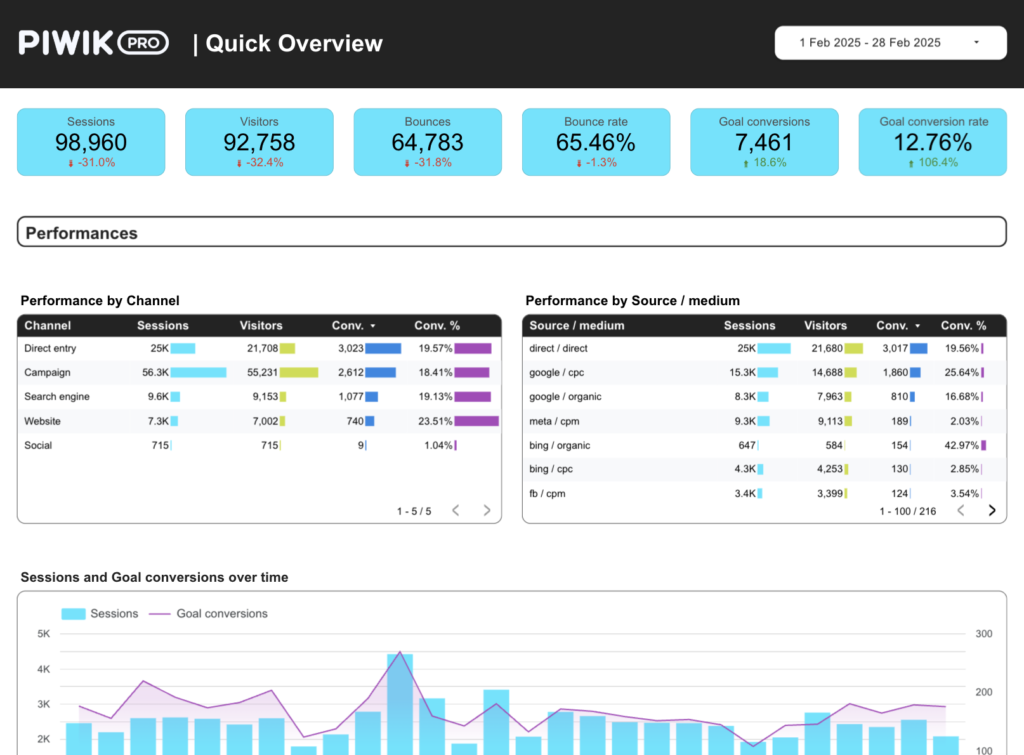
Piwik PRO Looker Studio dashboard template
By catchr
Best for: Designed for freelancers, agencies, and marketing practitioners needing ready-to-use dashboards for website analytics reporting, client updates, campaign reviews, and conversion monitoring.
Overview
This template transforms Piwik PRO analytics data into a clear reporting view for performance, audience behavior, and conversion monitoring. It enables freelancers, agencies, and marketing teams to monitor sessions, visitors, bounces, bounce rate, goal conversions, goal conversion rate, and events without rebuilding dashboard structures. It tracks traffic trends by date, compares engagement by country or device type, and reviews how events and goals contribute to marketing performance.
Who it's for
Designed for freelancers, agencies, and marketing practitioners needing ready-to-use dashboards for website analytics reporting, client updates, campaign reviews, and conversion monitoring.
Questions it answers
- What can I track with this Piwik PRO Looker Studio template?
- How does this template help with conversion reporting?
- Can I analyze audience and traffic quality with this dashboard?
- Does this template save time when building Looker Studio reports?
Key features
- Monitor sessions, visitors, bounces, and bounce rate
- Track goal conversions, goal conversion rate, and events
- Track traffic trends by date
- Compare engagement by country or device type
- Review how events and goals contribute to marketing performance
Set it up in minutes
- Get the template.
- Connect your data through Catchr (no manual exports).
- Open the report in Data Studio — it refreshes automatically.