
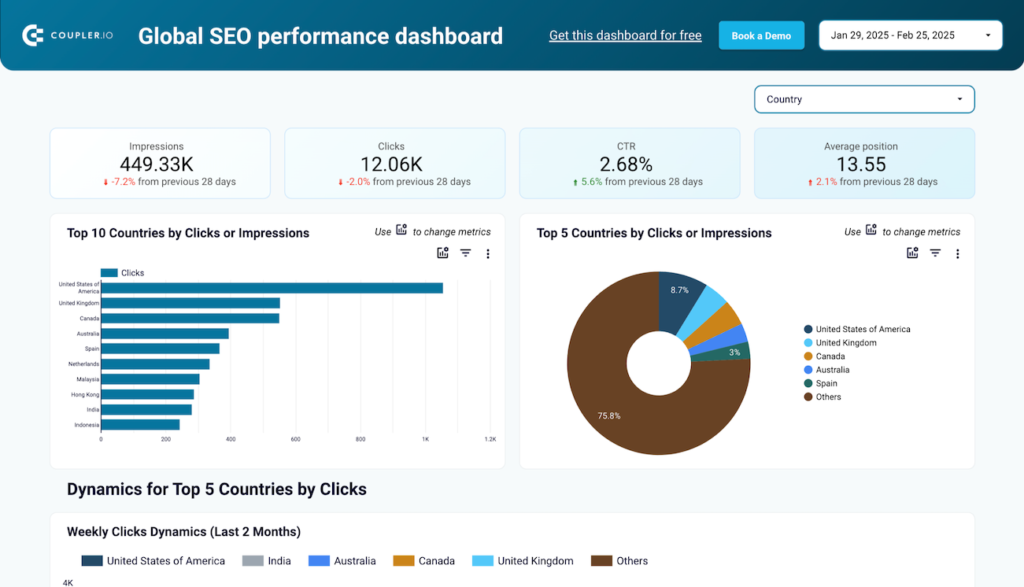
Data Studio template
International SEO Data Studio dashboard template
By Coupler.io
SEO Free
Best for: For SEO teams managing multi-region or multilingual sites and planning international expansion.
Overview
This Data Studio template pulls Google Search Console data to show organic performance broken down by country and localized URL path. It reports clicks, impressions, CTR, and average position per region, with 30-day comparisons and daily charts to reveal growing or declining markets. Country and page filters help verify that localized content reaches its intended audience.
Who it's for
For SEO teams managing multi-region or multilingual sites and planning international expansion.
Questions it answers
- Which countries drive the most organic traffic to your site?
- How are your localized pages performing in target markets?
- Which regions are growing or declining?
- Are your pages reaching the right international audiences?
What's inside
4 report pages:
1Multi-country performance overview
2Regional traffic dynamics tracking
3Localized page (URL path) performance
4Country and page filters
Key features
- Clicks, impressions, and CTR by country
- Average position by region
- URL path tracking (e.g. /en-ca/, /fr/)
- 30-day comparison tables
- Daily performance charts
- Country-level trend analysis
Set it up in minutes
- Make a copy of the template.
- Connect your sources through Coupler.io — 400+ integrations, no code.
- Your dashboard populates and refreshes automatically in Data Studio (also available for Sheets, Power BI and Tableau).
FAQs
Is the template free?
Yes — the template is free to copy and use. Coupler.io's connectors power the data and may need a paid plan after the free trial.
Do I need technical skills?
No. Connect your accounts through Coupler.io and open the report — nothing is built from scratch.
Can I customise it?
Yes. Once you copy it, edit the charts, metrics, filters, colours and layout to match your reporting.
How often does the data update?
It refreshes automatically on a schedule through Coupler.io, so the dashboard stays current without manual exports.
Which destinations are supported?
The same dashboard is available for Looker Studio (Data Studio), Google Sheets, Power BI and Tableau.
Which data sources can I connect?
Coupler.io connects 400+ marketing and business sources, so you can extend the template well beyond its default connector.