
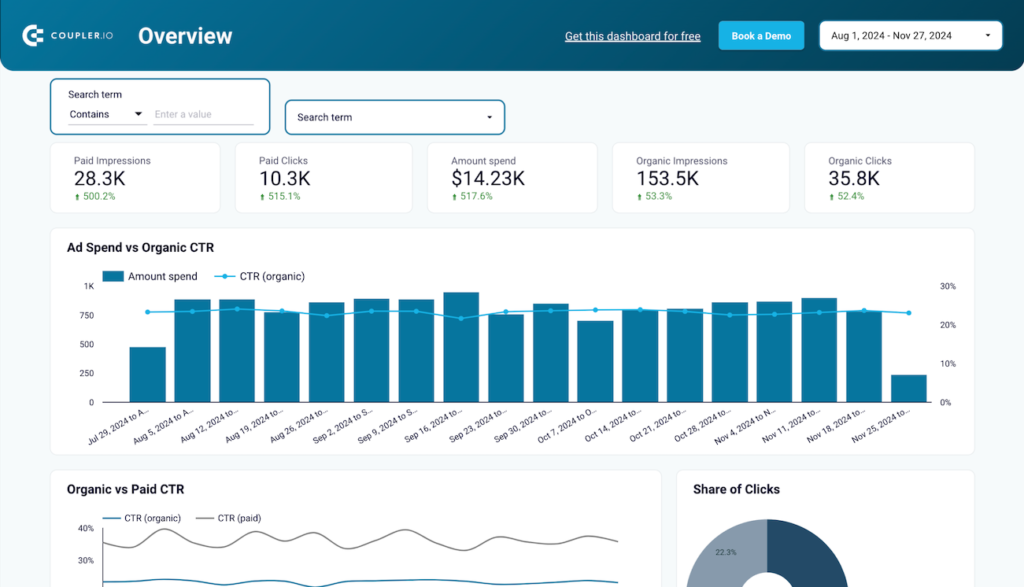
Paid Search Data Studio dashboard template
By Coupler.io
Best for: For search marketers and SEO/PPC teams who want paid and organic search performance, plus ad editing, in one Google-focused report.
Overview
This Data Studio template brings Google Search Ads and Google Search Console data together through Coupler.io to report on paid search performance. It tracks impressions, clicks, CTR, CPC, and conversions, compares paid versus organic branded search, and breaks down traffic by search type such as Web, Image, Video, News, and Discover. One report also structures ad edits for direct upload to Google Ads Editor, and Coupler.io keeps the data refreshed on a schedule.
Who it's for
For search marketers and SEO/PPC teams who want paid and organic search performance, plus ad editing, in one Google-focused report.
Questions it answers
- Which ads have low CTR and need rewriting?
- Does ad spend lift branded organic search?
- Which search types send the most traffic?
- Which landing pages win in image or video search?
What's inside
3 report pages:
Key features
- Google Search Ads performance tracking
- Built-in ad copy editor with character limits
- Paid vs organic branded search comparison
- Search type breakdown (Web/Image/Video/Discover)
- Exports ads for Google Ads Editor
- Automated refresh via Coupler.io
Set it up in minutes
- Make a copy of the template.
- Connect your sources through Coupler.io — 400+ integrations, no code.
- Your dashboard populates and refreshes automatically in Data Studio (also available for Sheets, Power BI and Tableau).