
Data Studio template
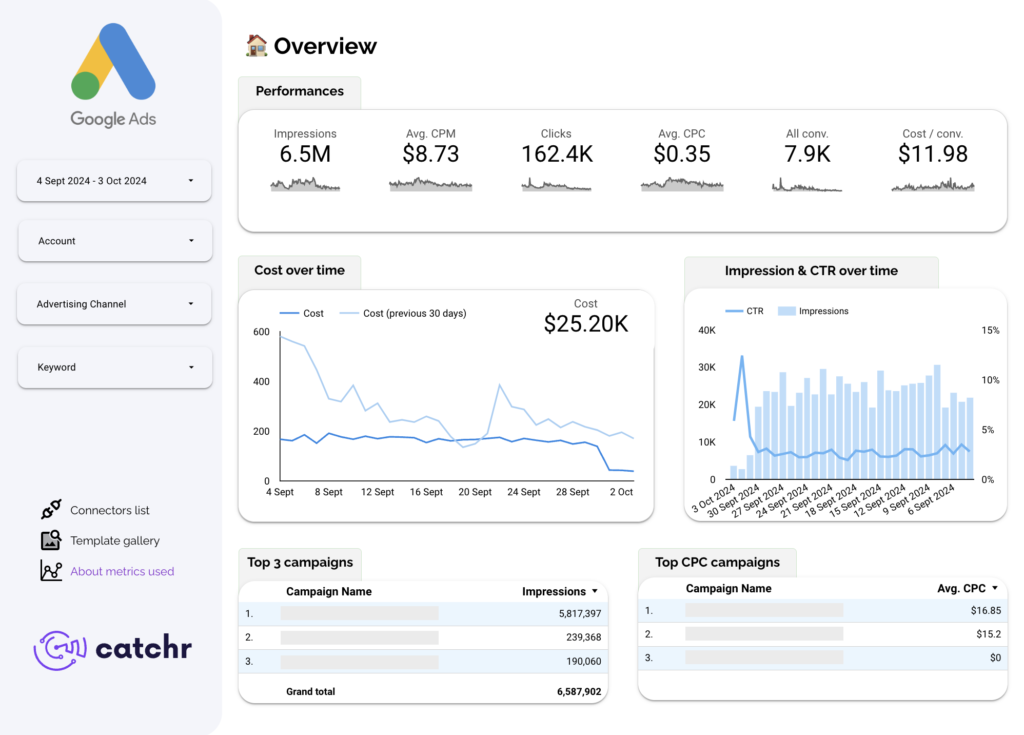
Google Ads KPIs Data Studio dashboard template
By catchr
PPC / Paid Media Free
Best for: For marketers, agencies, freelancers and teams that need faster Google Ads performance reporting.
Overview
Consolidates the core Google Ads KPIs your clients and teams ask for most — performance, campaign analysis, keyword reporting and audience insights — into one Looker Studio dashboard, so you can monitor efficiency and spot budget or ranking constraints without building from scratch.
Who it's for
For marketers, agencies, freelancers and teams that need faster Google Ads performance reporting.
Questions it answers
- What can I track with this Google Ads template?
- Can I compare performance across campaigns?
- Does it include keyword-level reporting?
- Can I identify budget or ranking visibility issues?
- Which filters are available?
What's inside
4 report pages:
1Overview
2Campaign analysis
3Keyword reporting
4Audience insights (age, gender, country)
Key features
- Account and campaign performance by advertising channel
- Keyword analysis (clicks, cost, CTR, conversions, cost per conversion)
- Lost absolute top impression share (rank and budget constraints)
- Audience demographic comparison
- Multi-dimensional filtering
Set it up in minutes
- Get the template.
- Connect your data through Catchr (no manual exports).
- Open the report in Data Studio — it refreshes automatically.
FAQs
Is the template free?
Yes — the template is free to copy and use. Catchr's connector powers the data and may need a subscription after its free trial.
Do I need technical skills?
No. Connect your account through Catchr and open the report — nothing is built from scratch.
Can I customise it?
Yes. Once you copy it, edit the charts, metrics, filters, colours and layout to match your reporting.
How often does the data update?
It refreshes automatically through Catchr, so the report stays current without manual exports.
Can I use it for client reporting?
Yes. Copy the template, connect the client's account, customise and share straight from Looker Studio.
Who is it for?
Marketers, agencies, freelancers and teams who want faster, ready-made reporting.