
Data Studio template
Google Ads vs. Facebook Ads Dashboard Template for Data Studio
By Windsor.ai
PPC / Paid Media Free
Best for: For advertisers comparing Google Ads and Facebook Ads performance side by side in one report.
Overview
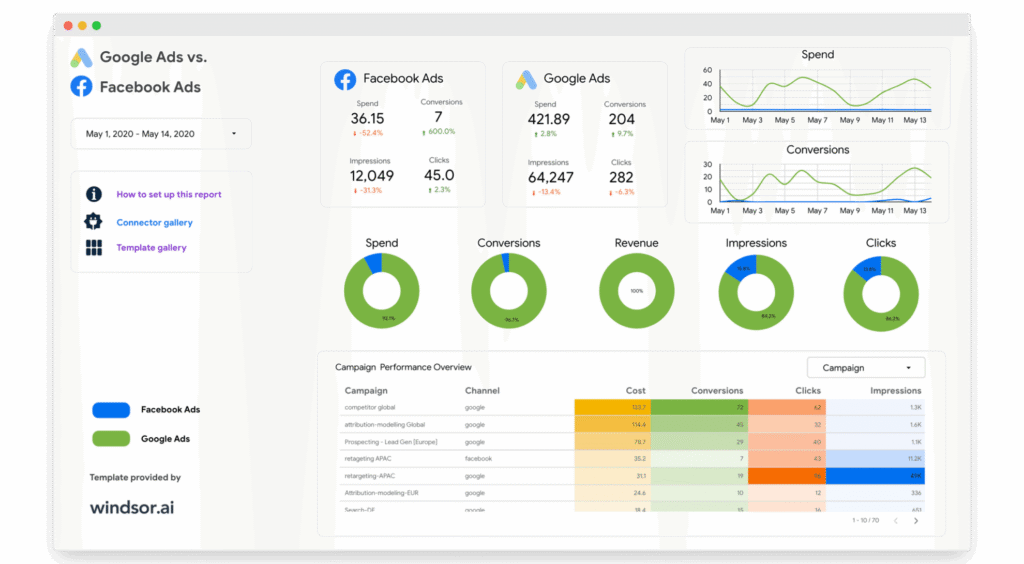
This Data Studio template gives a one-page overview comparing Google Ads and Meta/Facebook Ads performance. Google Analytics conversions are blended with cost, click and impression data from both ad platforms at channel and campaign level. The dashboard requires Google Analytics and properly tagged Facebook Ads to function, and additional dimensions and metrics can be added after copying it.
Who it's for
For advertisers comparing Google Ads and Facebook Ads performance side by side in one report.
Questions it answers
- How do Google Ads and Facebook Ads compare?
- Which platform drives more conversions?
- How do cost and clicks differ between channels?
- Where should I shift budget?
What's inside
4 report pages:
1One-page side-by-side overview
2Channel-level comparison
3Campaign-level comparison
4Conversions vs spend blend
Key features
- Google Ads vs Facebook Ads comparison
- Google Analytics-blended conversions
- Cost, click and impression metrics
- Channel and campaign level
- Single-page layout
- Customizable dimensions
Set it up in minutes
- Make a copy of the template.
- Connect your data through Windsor.ai — 350+ sources, no manual exports or scripts.
- Your report populates and refreshes automatically in Data Studio.
FAQs
Is the template free?
Yes — the template is free to copy and use. Windsor.ai's connector powers the data and may need a paid plan after its free trial.
Do I need technical skills?
No. Connect your account through Windsor.ai and open the report — nothing is built from scratch.
Can I customise it?
Yes. Once you copy it, edit the charts, metrics, filters, colours and layout to match your reporting.
How often does the data update?
It refreshes automatically through Windsor.ai, so the report stays current without manual exports.
Can I use it for client reporting?
Yes. Copy the template, connect the client's account, customise and share straight from Data Studio.
Which data sources are supported?
Windsor.ai connects 350+ marketing and business sources, so you can extend the template well beyond its default connector.