
Data Studio template
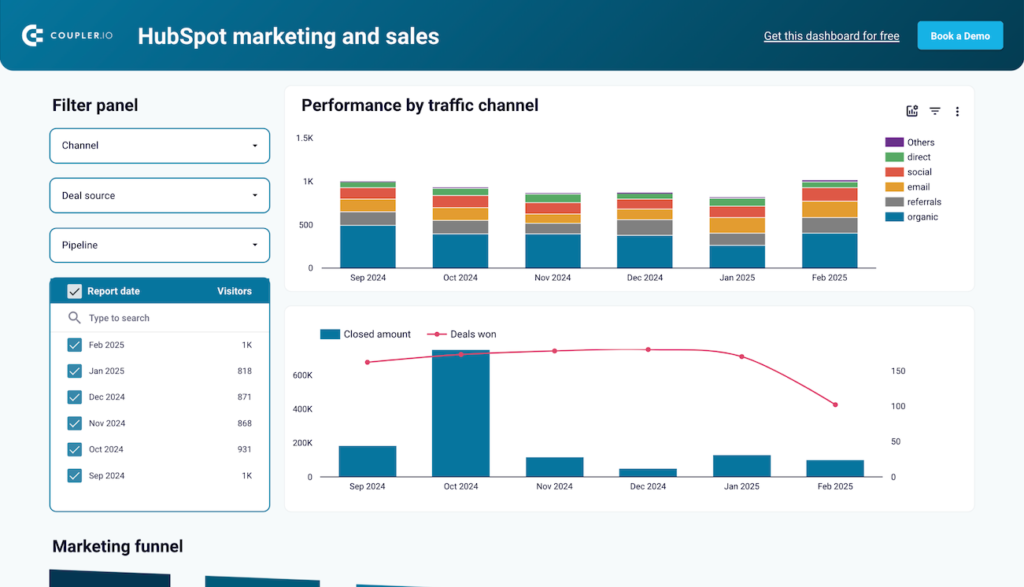
HubSpot Data Studio dashboard template
By Coupler.io
Email & CRM Free
Best for: For marketing and sales teams who want combined CRM and campaign reporting from HubSpot in one place.
Overview
This Data Studio dashboard turns HubSpot CRM and marketing automation data into a unified view of lead generation, deal progression, and customer acquisition. It combines HubSpot modules with external marketing channels so teams do not switch between separate reports. Coupler.io automates the data connection and keeps the metrics current without manual data entry.
Who it's for
For marketing and sales teams who want combined CRM and campaign reporting from HubSpot in one place.
Questions it answers
- How do leads convert through each stage of the funnel?
- Which channels produce the highest-converting prospects?
- How is each sales rep performing on deals and pipeline?
- Which geographic markets drive the most revenue?
What's inside
4 report pages:
1Marketing and sales funnel report
2Customer acquisition performance report
3Sales team productivity report
4Geographic market analysis report
Key features
- Full-funnel conversion tracking (subscriber to customer)
- Multi-channel acquisition and cost per lead
- Cost per acquisition and lead quality scoring
- Sales rep and pipeline productivity metrics
- Geographic performance breakdown
- Looker Studio and Power BI destinations
Set it up in minutes
- Make a copy of the template.
- Connect your sources through Coupler.io — 400+ integrations, no code.
- Your dashboard populates and refreshes automatically in Data Studio (also available for Sheets, Power BI and Tableau).
FAQs
Is the template free?
Yes — the template is free to copy and use. Coupler.io's connectors power the data and may need a paid plan after the free trial.
Do I need technical skills?
No. Connect your accounts through Coupler.io and open the report — nothing is built from scratch.
Can I customise it?
Yes. Once you copy it, edit the charts, metrics, filters, colours and layout to match your reporting.
How often does the data update?
It refreshes automatically on a schedule through Coupler.io, so the dashboard stays current without manual exports.
Which destinations are supported?
The same dashboard is available for Looker Studio (Data Studio), Google Sheets, Power BI and Tableau.
Which data sources can I connect?
Coupler.io connects 400+ marketing and business sources, so you can extend the template well beyond its default connector.