
Data Studio template
Lead generation Data Studio dashboard template
By Coupler.io
Agency / Client Reporting Free
Best for: For marketers and agencies running multi-channel lead generation who need one funnel view across ad platforms and CRM.
Overview
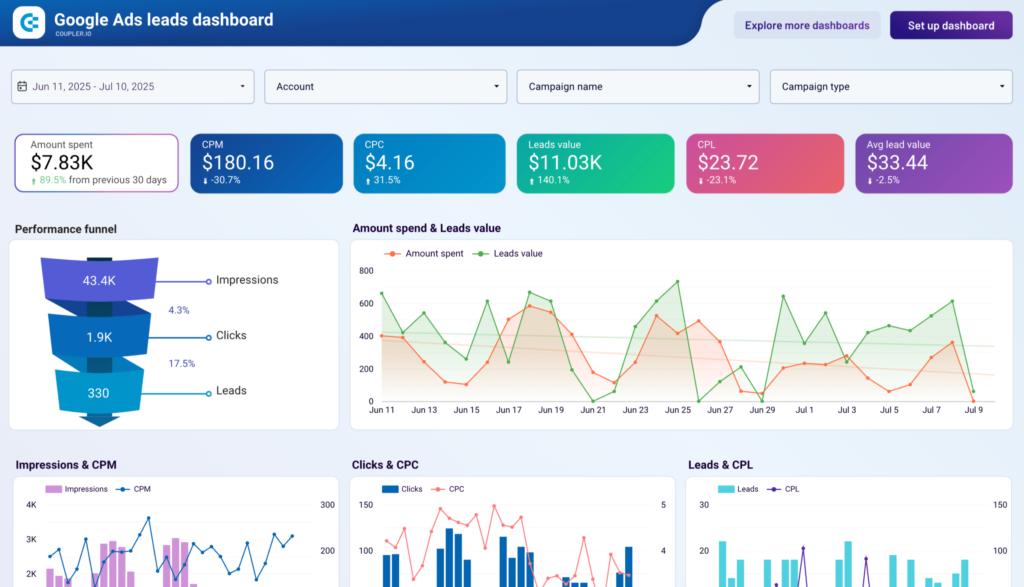
This lead generation dashboard consolidates data from advertising platforms such as Facebook Ads, Google Ads, and LinkedIn Ads alongside CRM systems like HubSpot and Pipedrive in Data Studio via Coupler.io. It maps the full acquisition funnel from ad impressions through to qualified leads, with automated data refresh. Reports cover the acquisition funnel, campaign performance, lead demographics, and landing page conversion.
Who it's for
For marketers and agencies running multi-channel lead generation who need one funnel view across ad platforms and CRM.
Questions it answers
- Where do leads drop off in the funnel?
- Which channels deliver the most cost-efficient leads?
- Which audience segments convert best?
- How well do landing pages convert traffic?
What's inside
4 report pages:
1Acquisition funnel
2Campaign performance
3Lead demographics
4Landing page conversion
Key features
- Multi-channel ad and CRM data
- End-to-end acquisition funnel
- Impressions, clicks, CPC and CPL metrics
- Lead demographic breakdowns
- Cross-channel cost comparison
- Automated data refresh
Set it up in minutes
- Make a copy of the template.
- Connect your sources through Coupler.io — 400+ integrations, no code.
- Your dashboard populates and refreshes automatically in Data Studio (also available for Sheets, Power BI and Tableau).
FAQs
Is the template free?
Yes — the template is free to copy and use. Coupler.io's connectors power the data and may need a paid plan after the free trial.
Do I need technical skills?
No. Connect your accounts through Coupler.io and open the report — nothing is built from scratch.
Can I customise it?
Yes. Once you copy it, edit the charts, metrics, filters, colours and layout to match your reporting.
How often does the data update?
It refreshes automatically on a schedule through Coupler.io, so the dashboard stays current without manual exports.
Which destinations are supported?
The same dashboard is available for Looker Studio (Data Studio), Google Sheets, Power BI and Tableau.
Which data sources can I connect?
Coupler.io connects 400+ marketing and business sources, so you can extend the template well beyond its default connector.