
Data Studio template
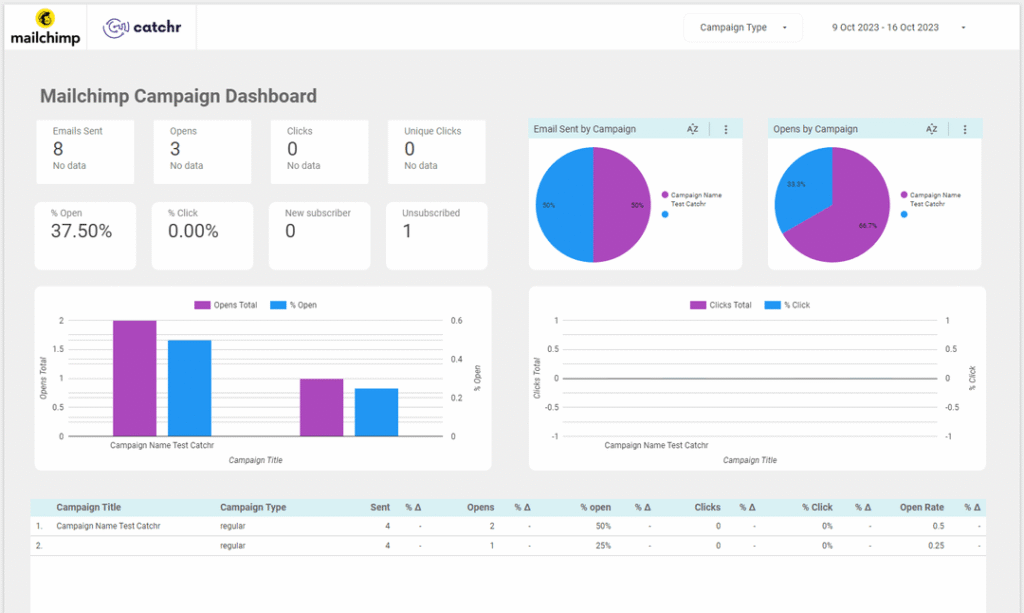
Mailchimp – Campaign Overview Data Studio dashboard template
By catchr
Email & CRM Free
Best for: Freelancers, agencies, and marketing practitioners who need repeatable campaign reporting structures for clients or internal stakeholders.
Overview
This template visualizes campaign-level email performance metrics in Looker Studio. It is designed for monitoring delivery volume, engagement rates, and audience list impact across Mailchimp sends.
Who it's for
Freelancers, agencies, and marketing practitioners who need repeatable campaign reporting structures for clients or internal stakeholders.
Questions it answers
- Monitor delivery volume with emails sent
- Evaluate subject line and audience interest with opens and open rate
- Measure traffic intent with clicks, unique clicks, and click rate
- Track list impact with new subscribers and unsubscribes
- Compare engagement by campaign
What's inside
1 report page:
1Campaign Overview
Key features
- Campaign-level grouping for performance comparison
- Identifies high-engagement campaigns
- Spots sends requiring improved targeting or content
- Tracks list growth and audience reaction
- Recurring email reporting capability
Set it up in minutes
- Get the template.
- Connect your data through Catchr (no manual exports).
- Open the report in Data Studio — it refreshes automatically.
FAQs
Is the template free?
Yes — the template is free to copy and use. Catchr's connector powers the data and may need a subscription after its free trial.
Do I need technical skills?
No. Connect your account through Catchr and open the report — nothing is built from scratch.
Can I customise it?
Yes. Once you copy it, edit the charts, metrics, filters, colours and layout to match your reporting.
How often does the data update?
It refreshes automatically through Catchr, so the report stays current without manual exports.
Can I use it for client reporting?
Yes. Copy the template, connect the client's account, customise and share straight from Looker Studio.
Who is it for?
Marketers, agencies, freelancers and teams who want faster, ready-made reporting.