
Data Studio template
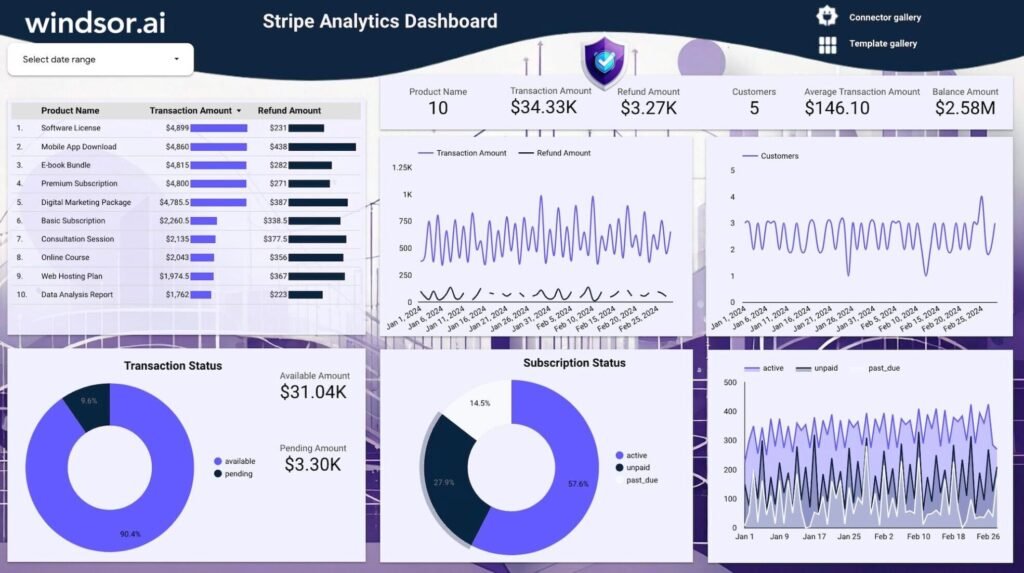
Stripe Analytics Dashboard Template for Data Studio
By Windsor.ai
Ecommerce Free
Best for: For businesses that process payments with Stripe and want clear reporting on revenue, transactions and subscriptions.
Overview
This free Data Studio template visualizes Stripe payment data through the Windsor.ai connector and can be customized to the metrics that matter most. It organizes raw payment data into charts, graphs and tables covering revenue, refunds, payouts, payment methods, subscriptions, churn and transaction status. The report is shareable so teams and stakeholders can view the same real-time data.
Who it's for
For businesses that process payments with Stripe and want clear reporting on revenue, transactions and subscriptions.
Questions it answers
- How are revenue, refunds and payouts trending?
- Which payment methods do customers prefer?
- Are subscription and churn rates improving?
- Why are customers requesting refunds?
What's inside
4 report pages:
1Financial and revenue overview
2Transactions, refunds and payouts
3Subscriptions and churn
4Customer behavior insights
Key features
- Revenue, refunds and payout metrics
- Payment method breakdown
- Subscription and churn tracking
- Transaction status reporting
- Shareable real-time dashboard
- Free to use
Set it up in minutes
- Make a copy of the template.
- Connect your data through Windsor.ai — 350+ sources, no manual exports or scripts.
- Your report populates and refreshes automatically in Data Studio.
FAQs
Is the template free?
Yes — the template is free to copy and use. Windsor.ai's connector powers the data and may need a paid plan after its free trial.
Do I need technical skills?
No. Connect your account through Windsor.ai and open the report — nothing is built from scratch.
Can I customise it?
Yes. Once you copy it, edit the charts, metrics, filters, colours and layout to match your reporting.
How often does the data update?
It refreshes automatically through Windsor.ai, so the report stays current without manual exports.
Can I use it for client reporting?
Yes. Copy the template, connect the client's account, customise and share straight from Data Studio.
Which data sources are supported?
Windsor.ai connects 350+ marketing and business sources, so you can extend the template well beyond its default connector.