
Meta runs an official Ads MCP server at mcp.facebook.com/ads that Claude, ChatGPT, Claude Code and Perplexity can connect to with your Meta login, no developer app required. It reports on Facebook and Instagram campaigns and can also create, edit and switch on ads, so set Meta’s rules in Business Suite before you use it. Then check its first answers against your Data Studio report (formerly Looker Studio), with the same attribution setting on both sides.
Below: routes, tools, setup, Meta’s rules, the alternatives, a parity check and the limits. “Facebook Ads MCP” and “Meta Ads MCP” are the same thing, and Instagram ads run through it too. If MCP is new to you, the GA4 post explains it; for every route side by side, see marketing data MCP servers compared.
I’m writing this from Meta’s developer documentation, Help Centre, newsroom and developer blog, the vendors’ docs and the repositories’ source, read on 14 October 2026. I haven’t connected Meta’s server, a connector’s MCP or a community server to an ad account, or run the parity check.
What Meta provides: one official Meta Ads MCP server, hosted by Meta
Meta announced “Meta ads AI connectors” on 29 April 2026 as an open beta “across regions”: the ads MCP server, plus an Ads CLI for developers. A 16 July 2026 update let your own app connect and added rules for what agents may do.
| Question | Meta’s Ads MCP server |
|---|---|
| Who hosts it | Meta (“remote-hosted”); nothing to install |
| Server URL | https://mcp.facebook.com/ads, the same for every assistant |
| Status | Open beta since 29 April 2026; rules since 16 July 2026, in limited availability |
| Sign-in | Facebook Login for Business (your Facebook account or a Meta Managed Account) |
| Permissions (token route) | ads_mcp_management, ads_read, ads_management, catalog_management, business_management, pages_show_list, instagram_basic |
| Meta app needed? | No, on the Help Centre route. Your own app needs the ads MCP use case |
| App Review? | Only if your own app manages other businesses’ data: Advanced Access on ads_mcp_management |
| Read or write | Both: 36 of its 91 documented tools change something |
| Price, rate limits | Not stated on Meta’s pages |
From Meta’s developer docs, Help Centre and developer blog, read 14 October 2026. Meta’s developer pages are undated. Tool counts are mine, from Meta’s seven tool pages.
Rollout is gradual: Meta warns “You may not have access to all of these tools and features yet”. Google’s Ads server is the opposite: read-only, and run on your own machine (the Google Ads version of this post).
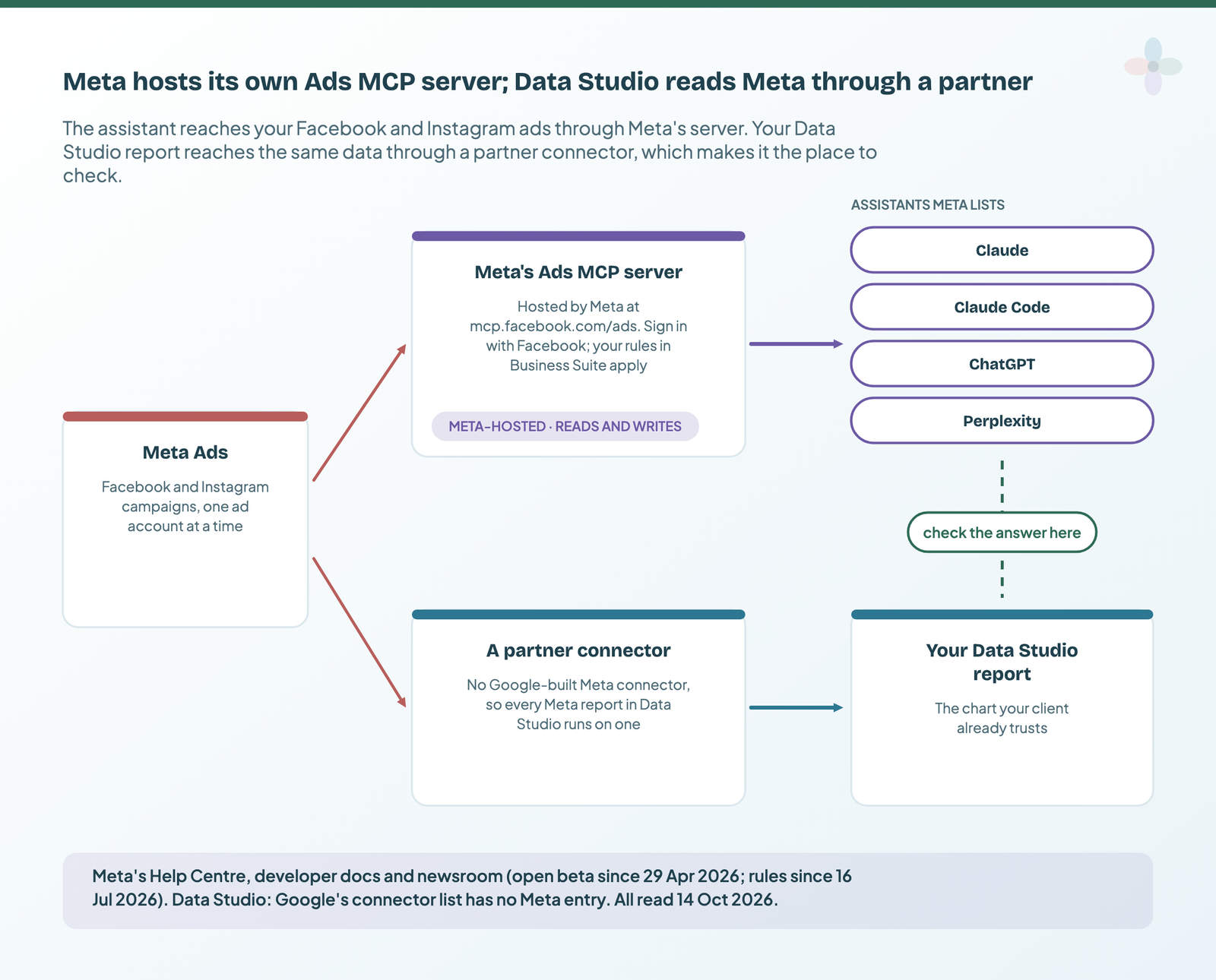
Pick your route by the assistant you use
Meta’s server is remote: a URL, not a program on your computer, so it works wherever your assistant accepts a remote connector, with no terminal.
| Route | Claude (web, Desktop) | Claude Code | ChatGPT | Perplexity | Terminal? | Who holds the Meta authorisation | Can it write? |
|---|---|---|---|---|---|---|---|
| Meta’s server, no app | Yes (Free: one custom connector) | Yes | Developer mode, plan permitting | Yes | No | You, through Meta | Yes, within your rules |
| Meta’s server, your own app | Not in Meta’s doc | Yes (Meta’s command) | Yes (your app ID) | Not in Meta’s doc | For Claude Code | Your app | Yes, within your rules |
| A connector’s hosted MCP | Yes | Yes | Vendor’s app or URL | Vendor-dependent | No | The vendor | Depends on the vendor |
| Community server, local | Desktop only | Yes | Not directly | Not directly | Yes | You (your token) | Depends on the server |
| Community server, hosted | Yes | Yes | As a remote URL | Vendor-dependent | No | The operator | Depends on the server |
From Meta’s, Anthropic’s and OpenAI’s help pages and each vendor’s docs, checked 14 October 2026. Plan details change monthly.
In ChatGPT, full MCP including writes is in beta for Business, Enterprise and Edu; Pro gets read/fetch in developer mode, which for a reporting question is no loss.
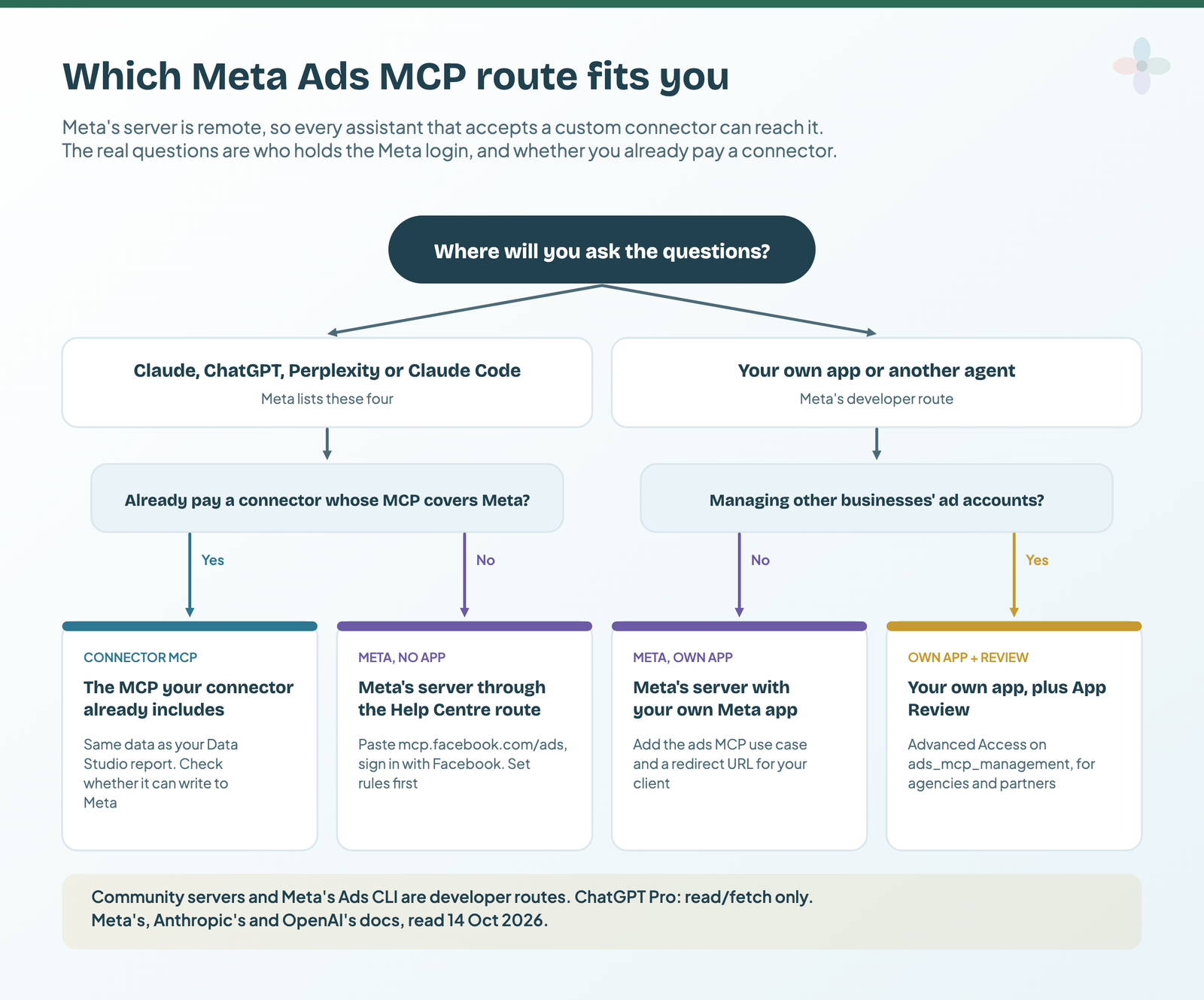
What Meta’s server reads, and what it can change
By my count, Meta documents 91 tools in seven categories, and 36 of them create, change, activate or delete something. Reporting runs through ads_get_ad_entities (spend, impressions, CTR, CPC, CPM and conversions, with breakdowns and date ranges), plus trend, anomaly and benchmark tools. Account discovery returns each ad account’s currency and time zone, which the check needs later.
| Category | Tools | Of which change something | Example |
|---|---|---|---|
| Comprehensive reporting | 7 | 0 | “Which campaigns spent most last month?” |
| Ad creation and management | 28 | 11 | Create a campaign, edit an ad set, activate an ad, boost an Instagram post, upload custom-audience users |
| Catalog creation and management | 34 | 16 | Create or delete products, feeds and product sets |
| Signals and datasets | 13 | 6 | Create, update or delete pixel events and parameters |
| A/B tests and conversion lift | 7 | 3 | Create or update a test |
| Help and troubleshooting | 2 | 0 | Search Meta’s Help Centre |
| Activity logs | 1 | 0 | What changed on the account |
Counted from Meta’s seven tool reference pages on 14 October 2026: names with create, update, delete, activate, connect, disconnect or boost count as changes. Meta says it’s “continuously adding” tools, so ask your agent what it has.
Paused isn’t the same as safe
- Paused: Meta says write tools “create entities in a paused state; your AI client asks for confirmation before activation”.
- Not marked paused:
ads_update_entityedits existing campaigns, ad sets and ads, running or not. Audience uploads, audience and pixel deletes and A/B test changes carry no paused note either. - What turns spending on:
ads_activate_entity, which Meta describes as “starts spending budget”.
Set up the Meta Ads MCP in Claude or ChatGPT
This is Meta’s setup, with the Claude and ChatGPT parts from Anthropic’s and OpenAI’s help pages. It’s the documented setup, untested by me. First set your rules (next section), and use a Meta login that sees only the ad accounts you mean to query.
1. Check you have access
In Meta Business Suite, open Settings and, below Integrations, look for Ads MCP server. If it isn’t there, Meta says you don’t have access yet.
2. Add the connector in Claude
In claude.ai or Claude Desktop, go to Customize → Connectors → + → Add custom connector, name it “Meta Ads” and paste https://mcp.facebook.com/ads as the URL (Anthropic’s custom connector guide).
3. Sign in and read the consent screen
Claude sends you to Facebook Login for Business. Read the permissions before you approve them.
4. Start with read-only prompts
Meta suggests “List my ad accounts.” and “Summarize the top-spending campaigns in <AD_ACCOUNT_ID> over the last 30 days.” I’d add “and tell me the attribution setting and date range you used”: Meta’s reporting tool page doesn’t say which attribution setting it applies by default.
Claude Code, with your own Meta app
Meta’s Help Centre lists Claude Code for the no-app route, pointing to Anthropic’s remote-server docs. Meta’s developer command is for the own-app route: add the Create & manage ads with ads MCP server use case to your app, set the Facebook Login for Business redirect URL, then:
# From Meta's get-started page. The documented setup, untested by me.
claude mcp add --transport http --client-id <META_APP_ID> meta-ads https://mcp.facebook.com/ads
For the curious, Meta’s token-route example of listing the tools (the token carries the manage permissions above: treat it like a password):
# From Meta's get-started page. The documented setup, untested by me.
curl -i -X POST "https://mcp.facebook.com/ads" \
    -H "Authorization: Bearer <ACCESS_TOKEN>" \
    --data-raw '{"jsonrpc":"2.0","method":"tools/list","id":1}'
ChatGPT and Perplexity
In ChatGPT, turn on developer mode and add an app with OAuth and https://mcp.facebook.com/ads as the server URL (OpenAI’s developer mode guide); on the own-app route, your Meta app ID goes in Advanced OAuth Settings as the OAuth Client ID. Perplexity uses the same URL through its custom remote connector guide.
The companion sheet has these steps as a Meta checklist, plus a rules plan and the parity worksheet:
Before you ask anything: limit what the agent can do with Meta’s rules
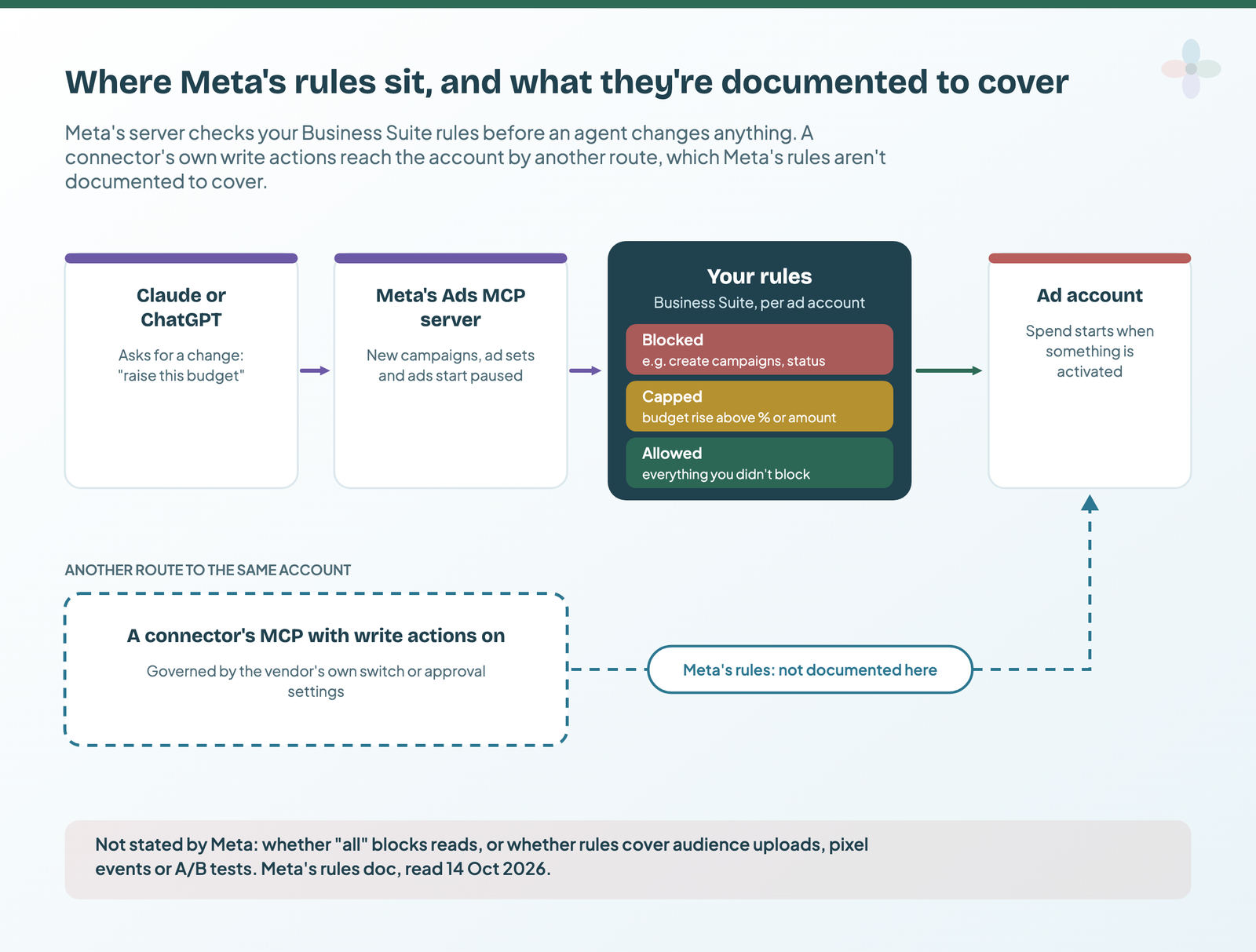
Whoever has full control of the business portfolio sets rules per ad account or catalogue in Business Suite (Settings → Integrations → Ads MCP server). In Meta’s words, “Our ads MCP server will enforce these rules”; a blocked action shows “Limited” next to “Take actions in this ad account”. Partners with shared access can set rules for their own staff. Meta’s rules doc lists what each one denies:
| Rule (Business Suite label where Meta shows one · API action) | What Meta says it denies | My starting state for reporting only |
|---|---|---|
“Create campaigns” · create_campaign |
Creating campaigns | Blocked |
create_ad_set, create_ad |
Creating ad sets, creating ads | Blocked |
| “Edit or set budget” | All budget changes, in the Help Centre’s words | Blocked |
“Budgets set above this amount” · edit_budget |
Budgets above a ceiling (the API also caps increases by a percentage or an amount) | Only if you allow budget edits |
edit_targeting |
Targeting and audience changes | Blocked |
edit_creative |
Creative changes | Blocked |
edit_status |
Delivery status changes, “such as pausing or activating” | Blocked: it stops an agent switching spend on |
all |
“Every agent action on the account” | Test it before relying on it (see below) |
From Meta’s rules doc and Help Centre, read 14 October 2026. Meta says rules “are in limited availability”. Catalogues have their own rules for product and product-set edits.
Blocking status changes has a cost: the agent can’t pause an overspending ad either. Meta suggests starting “in a read-only or approval-required posture” and widening later. Agencies can set rules across many accounts through Meta’s rules API.
What Meta doesn’t say, so don’t assume it:
- whether the
allrule also blocks reads. Meta describes rules that “grant an agent read access to performance data while withholding the ability to make changes to budgets, campaigns, or creative”, but it doesn’t document a single read-only switch; - whether rules cover tools that aren’t in the action list, such as custom-audience uploads, pixel events or A/B tests;
- whether rules apply to apps that change your account outside Meta’s MCP server, such as a connector’s write actions. Meta says its ads MCP server enforces them, nothing more. For a connector, use the vendor’s own write switch.
A reporting-only setup
- ☐ Create campaigns, ad sets and ads: Blocked
- ☐ Budget changes: Blocked
- ☐ Targeting and creative: Blocked
- ☐ Status (pause or activate): Blocked
- ☐ First prompt: list its tools, and stop if a blocked change still works
For the agency side of this (who approves, what the client’s contract says), see client data and AI assistants.
Hosted options: connector MCPs that also feed your Data Studio report
Data Studio has no Google-built Meta connector, so every Meta report in Data Studio runs on a partner connector, and five of them also run MCP servers covering Meta Ads. Two columns matter: can it write to Meta, and does it document the attribution setting its MCP uses?
| Vendor | Meta Ads over MCP | Writes to Meta? (vendor’s words) | Attribution setting documented for the MCP? | Same subscription feeds Data Studio |
|---|---|---|---|---|
| Windsor.ai | Yes | Yes: 20 Meta actions; writes “can be switched off if you want read-only access”; created paused | Not stated | Yes |
| Supermetrics | Yes | Beta (early access), opt-in per ad account, with approval modes; created paused | Yes: the ad account’s or ad set’s setting (“There is no Supermetrics-side default”) | Yes |
| Porter Metrics | Yes | Docs conflict: help says read-only; server docs list Meta campaign actions | Not stated | Yes |
| Catchr | Yes | No write actions documented | Not stated | Yes |
| Coupler.io | Yes | No: reads Meta only (can change Coupler’s own data flows) | Not stated | Yes |
From each vendor’s MCP docs and write-action lists, checked 14 October 2026. Prices and plan limits are in marketing data MCP servers compared.
Coupler.io’s framing is a useful one: the AI “only queries the copy Coupler.io imported”, not the account. For choosing the connector, see Data Studio connectors compared and Porter vs Windsor vs Supermetrics.
Community Meta Ads servers: read the scope before you install
Before Meta shipped its server, GitHub filled the gap, and many of those servers now duplicate it with your personal token. Judge one on who holds the token, what it can change and its licence, not its stars:
| Repository | Stars | Licence | Last push | Runs | Auth | Writes |
|---|---|---|---|---|---|---|
| pipeboard-co/meta-ads-mcp | 1,305 | Business Source License 1.1 | 23 Sep 2026 | Hosted or self-host | Pipeboard login or token | Yes, 42 Meta tools; new campaigns paused |
| gomarble-ai/facebook-ads-mcp-server | 364 | MIT | 5 Aug 2026 | Local | Your Meta user token (ads_read suggested) |
No: list, get and insights tools only |
| mikusnuz/meta-ads-mcp | 85 | MIT | 8 Oct 2026 | Local | Access token in an environment variable | Yes, “134 tools” including deletes |
| EfrainTorres/armavita-meta-ads-mcp | 78 | AGPL-3.0 | 16 Sep 2026 | Local | Token or browser login cache | Yes, 125 tools; deletes need acknowledgement |
| irinabuht12-oss/google-ads-meta-ads-mcp | 4,762 | MIT | 12 Oct 2026 | README points to a hosted commercial service | OAuth via the service | Yes, with an approval step (vendor’s words) |
Read from each repository’s README and GitHub metadata on 14 October 2026. Re-check before you install.
The most-starred one fronts a hosted commercial service and dates from April 2026. For most marketers, Meta’s own server plus rules is simpler.
Before you install a community server
- ☐ Who holds the token: you, locally, or an operator’s servers?
- ☐ Read-only or not, and which tools delete things.
- ☐ Licence: BSL and AGPL carry conditions MIT doesn’t.
- ☐ Last push and maintainer: someone answers issues.
- ☐ Is the README selling a hosted product?
- ☐ A token with the fewest permissions the job needs.
Check the answer against your Data Studio report
The assistant and your Data Studio report both read Meta’s ad insights, so for the same ad account, fields, fixed dates and attribution setting, the numbers should agree. Compare spend, impressions and clicks first, conversions second. This is a method, not a result: I haven’t run it on a client account.
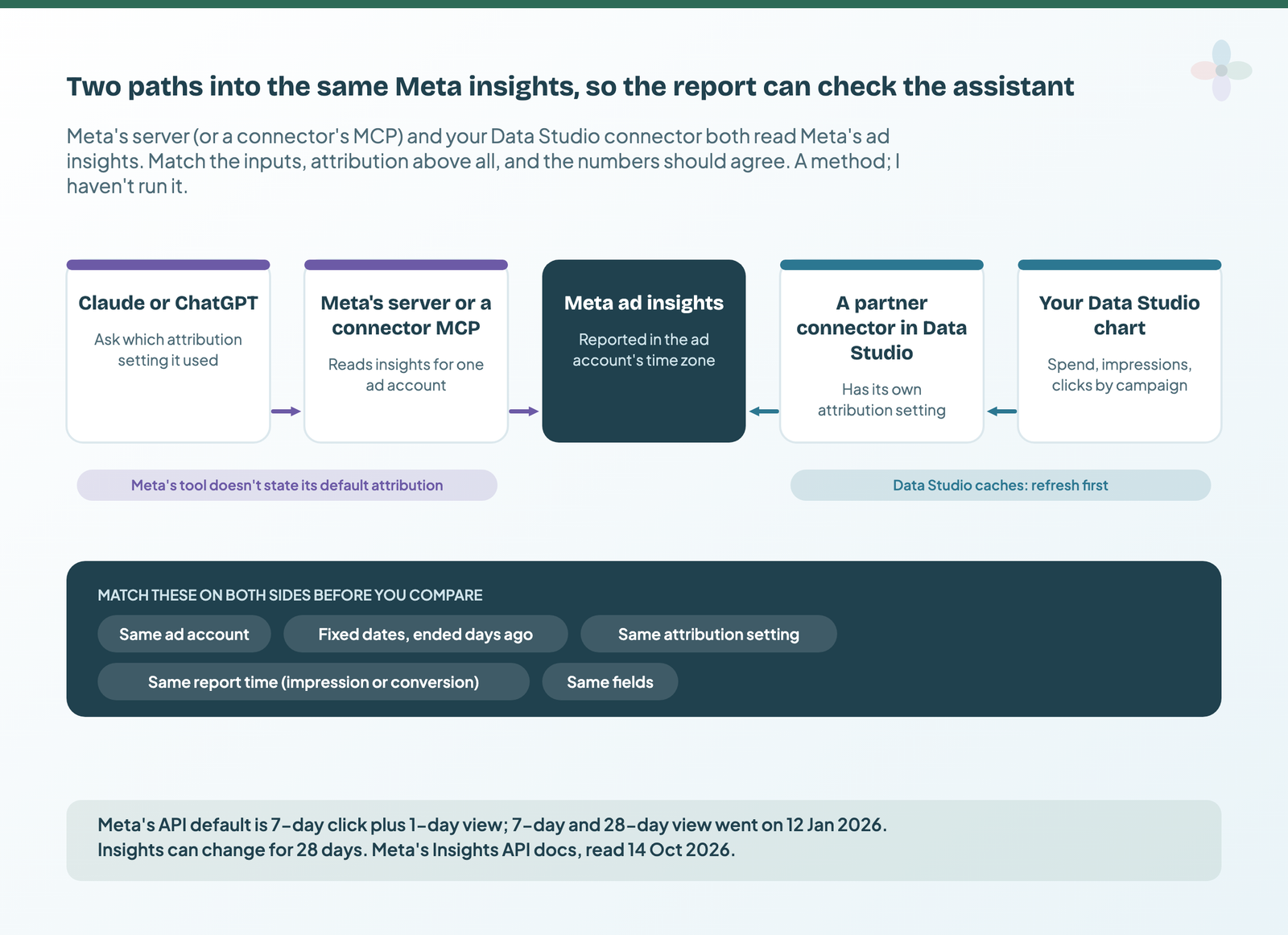
- Pick a fixed range that ended days ago. Meta says metrics can keep updating for a couple of days after an ad has completed, and insights “do not change after 28 days”.
- Note the ad account’s time zone and currency. Meta reports in the account’s time zone; the assistant can list both.
- Find your connector’s attribution setting. Catchr’s default is labelled “7-day click / 1-day view”; Coupler.io offers account, ad set or manual settings; Supermetrics has a “Conversion window”; Windsor.ai and Porter Metrics set it in the connection. Match it to Ads Manager.
- Ask the assistant to use the same setting and say which it used. Meta’s Insights API default is 7-day click plus 1-day view, per Meta’s reference, and
use_unified_attribution_settinggives “the same behavior as in the Ads Manager”. Supermetrics’ MCP uses the ad set’s setting unless you name one. - Match the report time. Counting by impression date or by conversion date moves conversions between days (Meta’s example: seen 1 January, converted 2 January).
- Refresh the Data Studio data source so you’re not comparing against a cache.
- Compare campaign rows in the worksheet, with Ads Manager as the tiebreak.
If your report was built before 12 January 2026 on the 7-day view or 28-day view window, those windows are gone from Meta’s API: expect a step down in conversions, not a broken connector.
| Symptom | Likely cause | How to check |
|---|---|---|
| Spend matches, conversions don’t | Different attribution setting | Ask the assistant which it used; check the connector’s setting |
| Conversions dropped in a long-running report | 7-day and 28-day view removed on 12 January 2026 | Check the window the report was built on |
| Daily conversions shuffle between days | Report time: impression vs conversion date | Ask which report time it used |
| Recent days differ, older ones match | Recent days still attributing | End the range days back |
| Every day off a little | Time zone | Use the ad account’s time zone on both sides |
| Totals off by a day | A relative range (“last 30 days” is the API’s default preset) | Fixed dates on both sides |
| Data Studio is the odd one out | Cache | Refresh the data source |
| Reach is higher on one side | Reach summed across days | Compare the period total, not daily rows |
| Spend off across accounts | Different account currencies | One ad account at a time |
From Meta’s Insights API reference and best practices, Meta’s developer blog, Google’s Data Studio freshness doc and the connector vendors’ discrepancy guides, read 14 October 2026.
More on caching in how data freshness works. The sheet’s Meta worksheet flags mismatched attribution settings before you compare:
The limits: spend, scope, client data and what Meta hasn’t published
Spend. Activation and edits change a live account. Keep the status and budget rules on until you’ve decided who approves changes.
Scope. The token route asks for ads_management, business_management and catalog_management: a key to the account. Meta’s general MCP page (which covers its other MCP servers) warns that agents can be steered by “malicious instructions hidden in tool outputs (prompt injection)” and says “Don’t grant write/manage scopes to AI agents that process untrusted input”.
Client data. Meta’s Platform Terms govern what you do with the data that comes back, and custom-audience uploads are personal data, even hashed. The agency checklist is in client data and AI assistants.
Bans. Meta says “it’s unlikely that an account would be banned simply for using it”; bans follow breaches of its advertising standards. Third-party reports link restrictions to high-volume automated changes: another reason to start read-only.
Unpublished. Meta states no price, MCP rate limits or retention, and its developer pages are undated: re-check them.
- ☐ Rules set before the first prompt.
- ☐ Read-only for the first week.
- ☐ The Meta login sees only the accounts you meant.
- ☐ The client’s contract allows AI processing of their ad data.
- ☐ The number was parity-checked before it was shared.
- ☐ Connected integrations reviewed, and old ones removed.
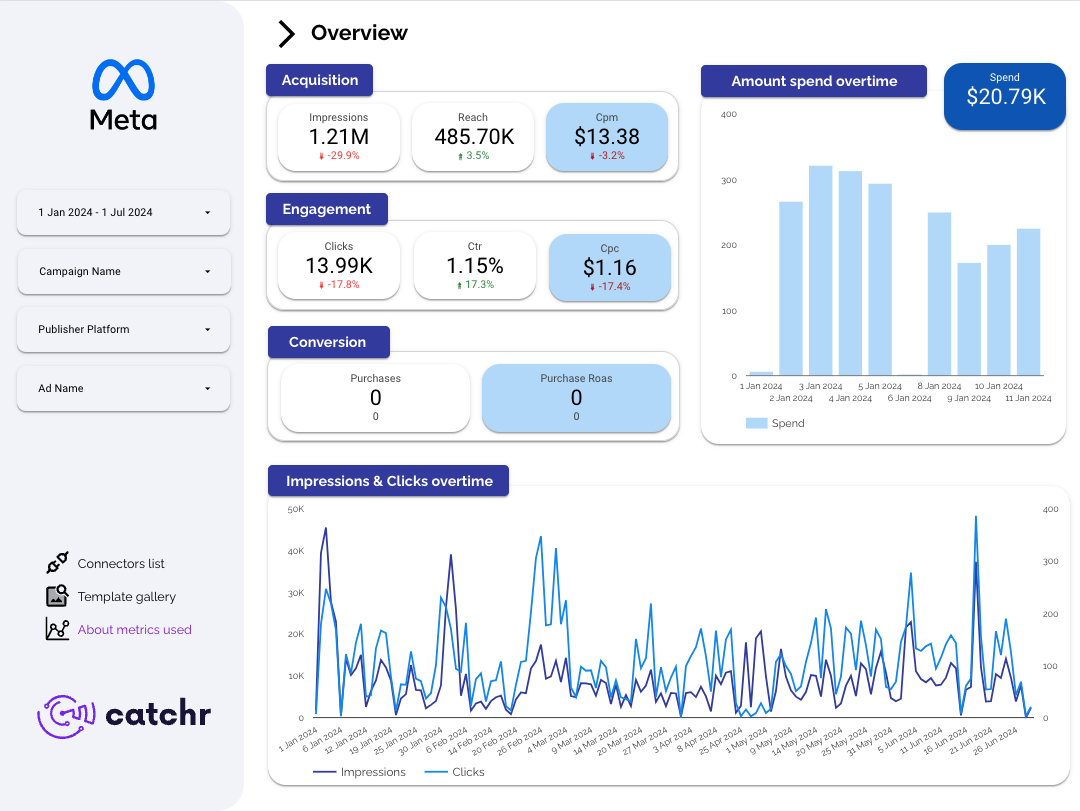
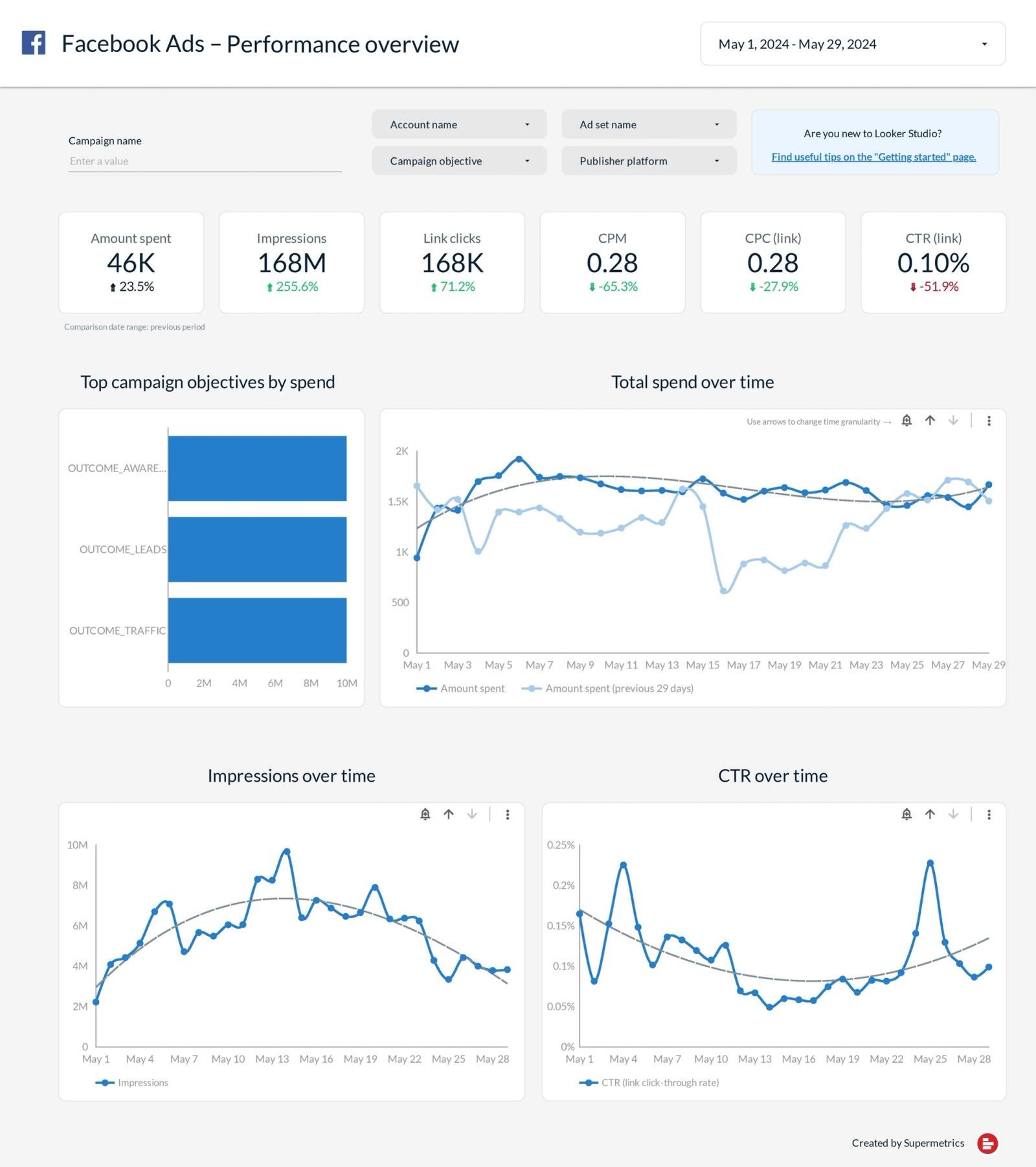
Meta Ads templates to check against
Pick one built on the connector you’d use for the check, so both sides share a data source:
Where to go next
- Marketing data MCP servers compared: every MCP route, priced
- Google Ads and Search Console MCP servers, the Google version of this post
- Connect Google Analytics to Claude or ChatGPT (GA4 MCP), and what MCP is
- Client data and AI assistants: what agencies need to check
- Data Studio connectors compared: the connector behind your Meta report
- AI in Data Studio: what Gemini does, what’s free, and what to use instead
Frequently asked questions
Is there an official Meta Ads MCP server?
Yes. Meta hosts one at https://mcp.facebook.com/ads, in open beta since 29 April 2026.
Do I need a Meta developer app or App Review?
Not on Meta’s Help Centre route. Your own app needs the ads MCP use case, and App Review only if it manages other businesses’ data.
Can it spend money?
Yes, if you let it: it can activate paused ads and edit live ones. Block status and budget changes with Meta’s rules.
Can I make it read-only?
Meta’s rules can block each kind of change, and Meta describes a read-access posture, but it doesn’t document a single read-only switch.
Why don’t the assistant’s conversions match my Data Studio report?
Usually the attribution setting, report time, time zone, recent days or the cache (table above).
Some links in this post are affiliate links: if you sign up through one, I may earn a commission at no extra cost to you. How I work with partners.