
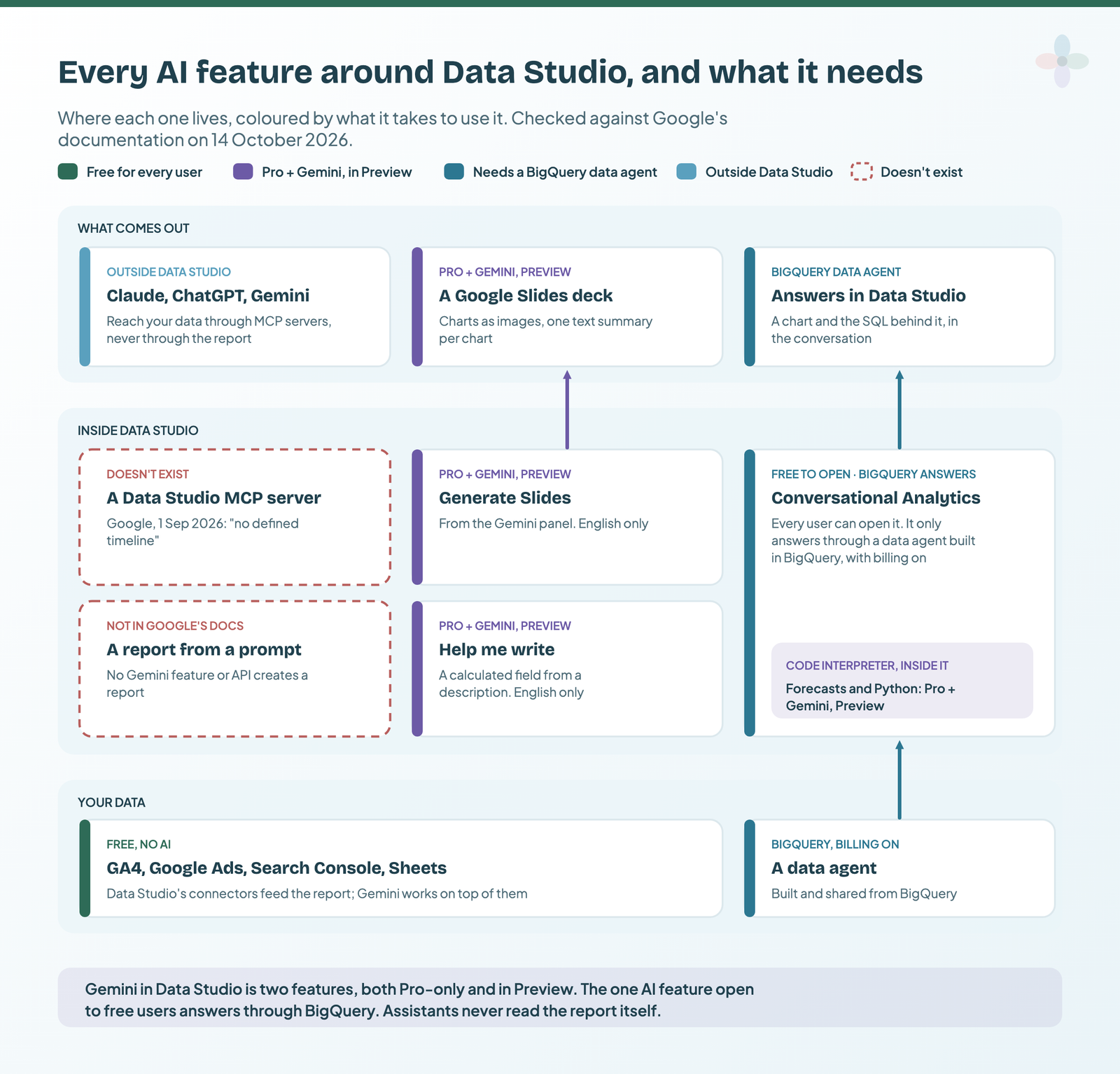
Data Studio has two Gemini features, calculated fields written from a prompt and Google Slides decks with a summary per chart, and both need Data Studio Pro and are still in Preview. The only AI feature open to free users is Conversational Analytics, and it answers only through a data agent built in BigQuery, on a Google Cloud project with billing on. Data Studio has no MCP server, so to get Claude, ChatGPT or Gemini talking about your marketing numbers, connect them to GA4, Google Ads, BigQuery or your connector, and keep the report as the place you check their answers.
That’s AI in Data Studio as of October 2026. This guide covers:
- every AI feature, with its tier, status and what it needs
- what Gemini actually does on Pro, and who switches it on
- Conversational Analytics for free users, including what it costs in BigQuery
- where Google’s AI Overview and older guides are out of date
- what doesn’t exist: an MCP server, or a report generated from a prompt
- what free users can do, and the “instead” routes
- what to check before client data goes into any of it
Everything here comes from Google’s Data Studio, BigQuery and Gemini documentation, release notes and pricing pages as they read on 14 October 2026, Google’s own Data Studio forum, and the vendors’ docs. I haven’t run a Data Studio Pro trial or a BigQuery project for this post, so the Pro and BigQuery screens are described from Google’s documentation. Each table carries the date I checked it. (Data Studio was called Looker Studio until April 2026, and Gemini in Data Studio was “Gemini in Looker”.)
Every AI feature in Data Studio, and what each one needs
Seven things carry the “AI” label around Data Studio, and two of them don’t exist, however often they’re repeated.
| Feature | What it does | Who can use it | Status | What it needs |
|---|---|---|---|---|
| Help me write (calculated fields) | Drafts a calculated field from a plain-English description | Pro users | Preview | Pro, Gemini enabled, English prompts |
| Add report content to Slides | Puts charts into a Google Slides deck as images, with a text summary of each chart | Pro users | Preview | Pro, Gemini enabled, the Gemini for Google Cloud API on |
| Conversational Analytics | Answers questions in plain words, with a chart and the SQL behind it | All Data Studio users | Generally available | A data agent built in BigQuery, a Cloud project with billing on |
| Code Interpreter (inside Conversational Analytics) | Turns questions into Python for forecasts and deeper analysis | Pro users | Preview | Pro with Gemini |
| Conversational Analytics, legacy | The older version that read Sheets, CSV, Looker and BigQuery | Pro users with Gemini | Being replaced | Can’t be migrated to the new experience |
| A Data Studio MCP server | Would let an assistant read or edit your reports | Nobody | Doesn’t exist | Google: “no defined timeline” |
| A report from a prompt | A whole report written by Gemini | Nobody | Not in Google’s docs | – |
Checked against Google’s documentation and release notes on 14 October 2026.
Two details matter more than they look. Google’s Gemini troubleshooting page says Gemini in Data Studio “supports English-language prompts and responses only”. And Conversational Analytics, the one row open to everyone, doesn’t need Gemini switched on at all: it’s a BigQuery product with a Data Studio front door.
Everything else Pro adds, AI or not, is in Data Studio free vs Pro. If Data Studio itself is new to you, start with what Data Studio is.
What Gemini in Data Studio does on Pro (and how it gets switched on)
Gemini does two jobs, both only “when Gemini in Data Studio is enabled for a Data Studio Pro subscription”. Pro is $9 per user per project per month, so a five-editor team pays $45 a month before Gemini is on the table. Gemini itself costs nothing extra “while in preview”, and Google says usage “may require an additional fee” afterwards, without saying what or when.
Help me write: a calculated field from a description
Gemini reads your prompt, any formula you’re refining and the data source’s schema, so it knows your field names. From Google’s steps:
- Make sure Field Editing in Reports is on in the data source.
- Edit the data source and choose Add a field › Add calculated field.
- Click the Help me write icon at the bottom right of the field editor.
- Describe the field, then refine, apply and save.
It won’t suggest parameters or NATIVE_DIMENSION, and free accounts don’t get it at all.
Generate Slides: a deck with a summary per chart
From the Gemini panel, Gemini builds a new Google Slides deck: a title slide (report title, your name, the date, a link), one slide per chart with the chart as an image and a text summary of it, and a closing slide. It “only generates text summaries for visualizations”, so filters, controls and text boxes get none. Two threads on Google’s forum report decks without summaries, so check your first one.
The summaries describe a chart. They don’t explain why a number moved, which is the part a client reads. The method for that is in writing client report commentary with AI. For the wording itself, Chapter 24 of my ebook, Data Storytelling in Data Studio, covers commentary and caveats, including how to draft commentary with AI under guardrails.
Who switches it on
An admin with the Data Studio Pro Manager or Owner role opens User settings › Gemini settings. Four switches sit there: Enabled, Trusted Tester features (which “must be enabled” for anything in Preview, so both features need it), the optional Trusted Tester Data Use consent, and Code Interpreter. Gemini is on by default for Pro subscriptions created on or after 3 June 2025 (Google’s enable page).
Buy Pro for this? Any assistant writes the same formulas once you paste your field list in, and checking them is the same work (writing formulas with Gemini, Claude or ChatGPT side by side). The Pro decision rests on team workspaces and ownership, not on Gemini.
Conversational Analytics: free to open, but it only talks to BigQuery
Since 16 April 2026, Conversational Analytics has been open to every Data Studio user, and on 30 July 2026 Google made it generally available. The catch is that it answers only through a data agent: a set of BigQuery tables plus instructions, a glossary and checked queries, built and shared from BigQuery. Google’s page is blunt: “You cannot create data agents within Data Studio.”
| Current experience | Legacy experience | |
|---|---|---|
| Data it reads | BigQuery data agents only | CSV, Google Sheets, Looker, BigQuery |
| Who can use it | All Data Studio users | Pro subscribers with Gemini enabled |
| Where agents are built | In BigQuery | In Data Studio |
| Gemini needed? | No (only the Code Interpreter needs Pro with Gemini) | Yes |
| Status | Generally available since 30 July 2026 | Being replaced; conversations and agents can’t be migrated |
From Google’s Conversational Analytics overview, setup page and release notes, checked 14 October 2026.
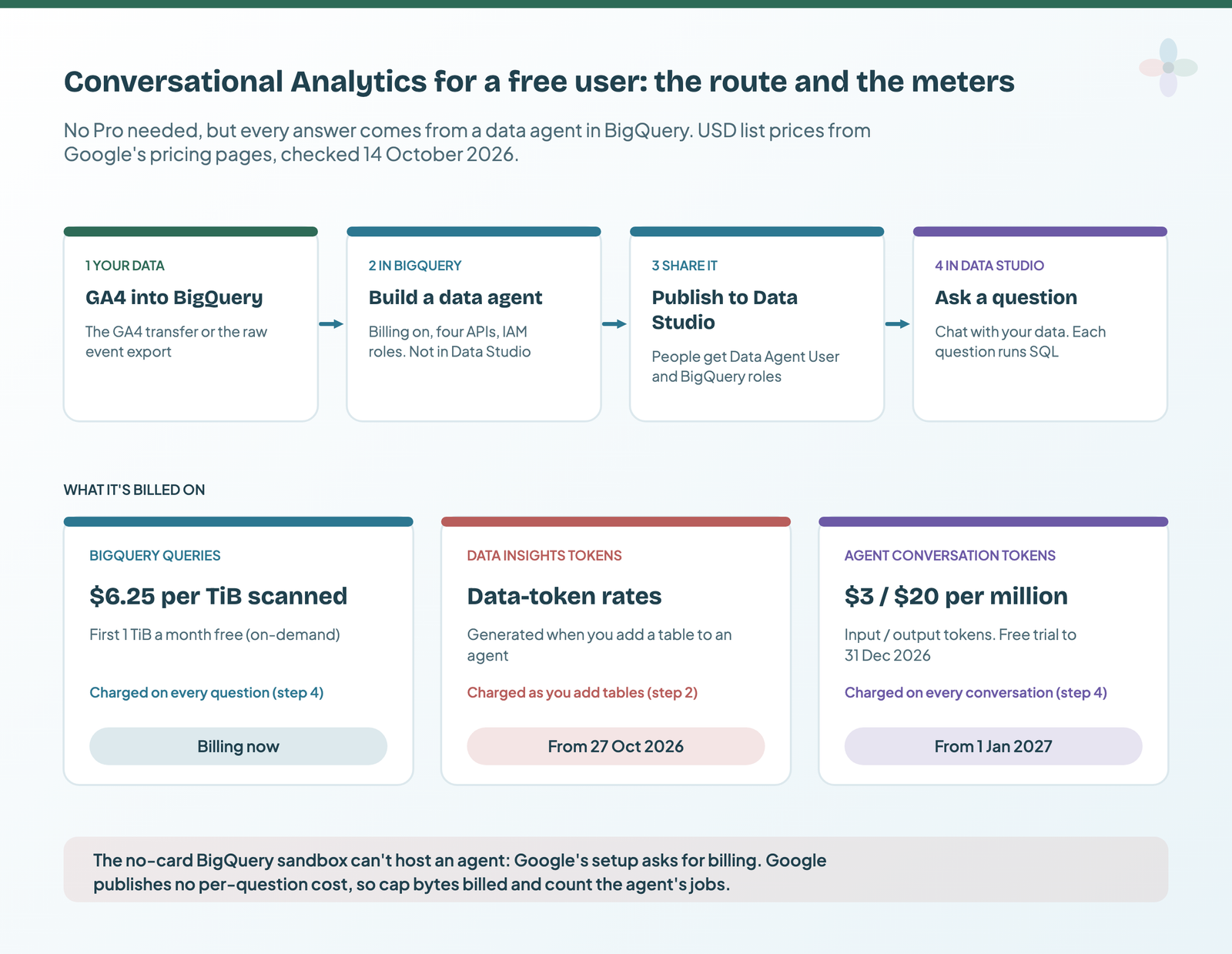
What a free user has to set up first, per Google’s data agent page: a Google Cloud project with billing enabled, four APIs (BigQuery, Gemini Data Analytics, Gemini for Google Cloud, Knowledge Catalog), IAM roles for whoever builds the agent and whoever chats with it, and the project opened once in the Cloud console, because Data Studio only lists recent projects. The no-card BigQuery sandbox won’t do: Google’s agent setup asks for billing to be enabled, and the sandbox has none.
What it costs
Each question runs SQL, and you pay BigQuery compute for it: $6.25 per TiB scanned on demand, after the first 1 TiB a month, which is free. That used to be the whole story. Google’s data agent pricing now adds data tokens at $3 per million input and $20 per million output: data insights (generated when you add a table to an agent) are billed from 27 October 2026, and conversations with agents after the free trial ends on 31 December 2026. Prices are USD list, checked 14 October 2026.
So “free under 1 TiB” holds for query charges only, and only until the tokens start. Google publishes no bytes or tokens per question, so I won’t estimate one. Measure instead: agent jobs carry a ca-bq-job label, and Google gives a query to count them.
-- Count your data agent's queries over the last 30 days.
-- Google's query from its docs, not tested here.
-- Replace my-project and use your region (region-us or region-eu).
SELECT
  COUNT(*) AS agent_jobs,
  ROUND(SUM(total_bytes_billed) / POW(1024, 4), 4) AS tib_billed
FROM `my-project`.`region-us`.INFORMATION_SCHEMA.JOBS
WHERE creation_time >= TIMESTAMP_SUB(CURRENT_TIMESTAMP(), INTERVAL 30 DAY)
  AND EXISTS (SELECT 1 FROM UNNEST(labels) AS label
              WHERE label.key = 'ca-bq-job' AND label.value = 'true');
The full build with GA4 data, from the BigQuery export to cost caps and the “I can’t see the agent” fixes, is in Conversational Analytics in Data Studio with a GA4 data agent.
Where Google’s AI Overview and older guides are now out of date
Most of what ranks for “Looker Studio AI” was written before April 2026, and Google’s own AI Overview blends the legacy and current experiences. Each claim against Google’s documentation now:
| What you’ll read | What Google’s docs say now |
|---|---|
| “Conversational Analytics works with BigQuery or Google Sheets” | The current experience reads BigQuery data agents only. Sheets is the legacy, Pro-only version, which can’t be migrated |
| “Gemini generates reports” | Not in Google’s feature list: Gemini writes calculated fields and Slides decks |
| “Gemini writes executive summaries based on active filters” | It writes a text summary per chart, in the Slides deck |
| “Gemini in Looker Studio is generally available” | Both Gemini features are labelled Preview |
| “Conversational Analytics needs Pro” | The current experience is open to all users; only its Code Interpreter needs Pro |
| “Looker Studio Pro”, “Gemini in Looker” | Renamed Data Studio Pro and Gemini in Data Studio on 16 April 2026 |
AI Overview read 14 October 2026; corrections from Google’s Gemini overview, Conversational Analytics pages and release notes, checked the same day.
Those pages were right when written; the product moved under them. The rename history, and what “Looker” means now, is in Looker vs Looker Studio vs Data Studio.
What doesn’t exist: an MCP server, or an API that reads your reports
An MCP server (Model Context Protocol) is the small program that lets an assistant such as Claude call tools in another product. There isn’t one for Data Studio, and none is coming soon. In a forum thread asking for one, Google staff wrote on 1 September 2026:
“due to shifts in strategic priorities, there is currently no defined timeline for the development of an MCP server for Data Studio.”
Google staff, Data Studio forum, 1 September 2026
| What you might reach for | What it actually does |
|---|---|
| The Data Studio API | Searches and manages reports and their permissions. It can’t read report data or create charts |
| “Looker MCP” | Google’s managed MCP server for enterprise Looker instances, in Preview. Not Data Studio |
So no assistant can open your report. The longer version, with the same quote, is in what the Data Studio API can and can’t do.
What free Data Studio users can do with AI today
Quite a lot, if you match the job to the tool. None of these needs Pro.
| Your job | Free route | What it needs | Read next |
|---|---|---|---|
| Explain a spike or drop in GA4 | Ask Advisor in Google Analytics, then check the same dates in your report | Free, in Beta, on English-language properties | Or ask GA4 through MCP, below |
| Write or fix a calculated field | Any assistant, with your field list and Data Studio’s function list pasted in | An assistant | Help me write, above |
| Draft the monthly commentary | An assistant given only your exported numbers and a dated list of what happened | An assistant, and a check against the report | The commentary method, above |
| Tag or summarise rows in a Sheet that feeds a report | The Sheets =AI() function |
An eligible Google Workspace or Google AI plan | Sheets in Data Studio |
| Ask questions inside Data Studio | Conversational Analytics | A BigQuery data agent, billing on | Above |
| See AI-assistant traffic in your report | GA4’s AI Assistant channel, through the GA4 connector | Nothing extra | The templates at the end |
From Google Analytics and Google Workspace help pages, checked 14 October 2026.
On that last row: GA4’s AI Assistant channel counts sources like ChatGPT, Gemini, Copilot and Grok, and it excludes Google’s AI Overviews and AI Mode, which count as Organic Search.
Scheduling the report the commentary goes into is covered in automated client reporting in Data Studio.
The “instead” route: connect the assistant to your data, check it in the report
If the assistant can’t read the report, connect it to what the report reads.
| Data | Official MCP server? | How it runs | Read or write | Setup guide |
|---|---|---|---|---|
| GA4 | Yes, labelled Experimental | On your computer (Claude Desktop, Claude Code); 9 tools in the current release | Read-only | GA4 to Claude or ChatGPT |
| Google Ads | Yes | On your computer or your own Cloud Run | Read-only tools, but the sign-in carries full Google Ads access | Google Ads and Search Console MCP |
| Search Console | No, Google hasn’t published one | Community code or a connector | Depends on the server’s scope | Same post |
| BigQuery (GA4 export, Ads transfer) | Yes | Google-hosted, on when the BigQuery API is | Reads; execute_sql can change data unless blocked |
Google’s guide |
| Meta Ads | Yes, Meta’s own | Meta-hosted | Can create, edit and switch on ads | Meta Ads MCP |
| Your connector’s sources | The vendor’s | Vendor-hosted | Varies: some write to ad platforms | Below the table |
| Data Studio | No | – | – | – |
From Google’s, Meta’s and each vendor’s developer documentation, checked 14 October 2026.
On the connector side: Windsor.ai and Porter Metrics include their MCP on every plan, free ones included, and Catchr, Coupler.io and Funnel.io on every plan. Supermetrics’ standalone server needs Data API access, which its pricing page shows on Enterprise; Starter and Growth reach the same server through its AI chats destination. Windsor.ai (since May 2026) and Supermetrics (in beta) can also write to ad platforms. Which one fits your client count and budget is worked through in the MCP comparison; the connector side of the same choice is in Data Studio connectors compared.
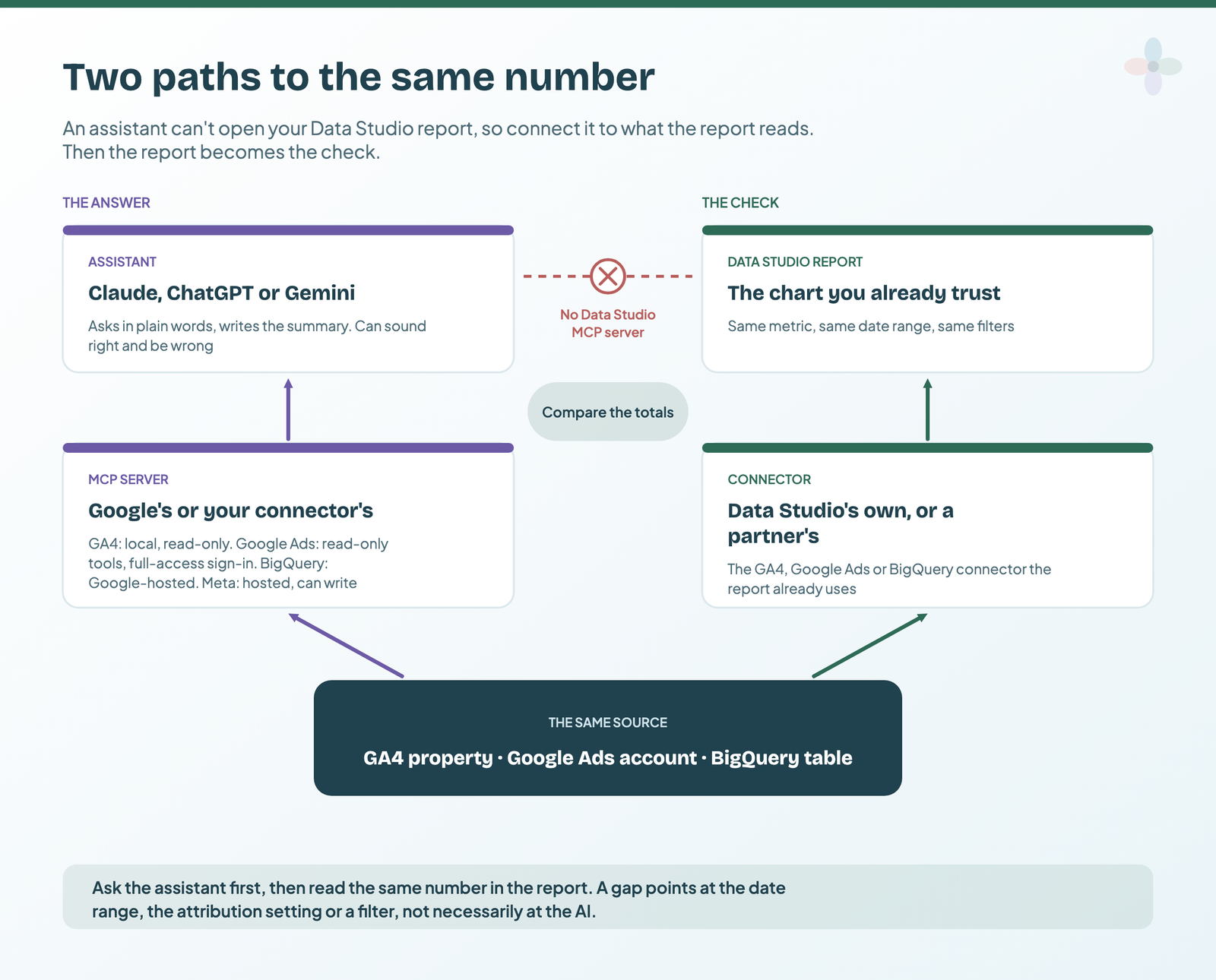
Then check it in the report. Google’s own warning on its AI output is that it “can generate output that seems plausible but is factually incorrect”. Pull the number from the assistant, read the same metric for the same dates in your Data Studio chart (connecting GA4 to Data Studio, if it isn’t there yet), and if they differ, check the date range, the attribution setting and any filter before blaming the model.
Before client data goes into any of this
Not legal advice: these are the settings an agency usually owns, with the defaults Google and the vendors document:
- ☐ Gemini in Data Studio belongs to Gemini for Google Cloud, which doesn’t use your prompts or its responses to train its models.
- ☐ Trusted Tester Data Use is a separate, optional consent, and it switches on automatically with Trusted Tester features. Decide on purpose.
- ☐ Conversational Analytics prompt analytics is on by default (anonymised, not for training). Opt out by form before 23 November 2026, or with an org-policy constraint after.
- ☐ Sign-in scope: the GA4 server asks for read-only access; Google’s Ads server uses the full Google Ads scope even though its tools only read.
- ☐ Write access: Meta’s server, Windsor.ai and Supermetrics can change campaigns. Set the rules or switch writes off before connecting a client account.
The rest, from which assistant plans train on your chats to what goes in the client contract, is in client data and AI assistants, for agencies.
So, will AI replace the dashboard?
Google now calls Data Studio “the discovery page for Data Cloud resources in the AI era”, has parked the MCP server, and puts its AI work around the report rather than in it. Meanwhile only 13 of 444 Data Studio forum questions since October 2025 were about AI, about 3%.
My read: ad-hoc questions are moving to assistants, and the report becomes the agreed, checked view that keeps their answers honest. The more of my own answers come from an assistant, the more I need a report to check them against. I run MLforSEO, where I teach marketers to use machine learning and AI in their work, and the habit I push hardest there is the same one: let the model draft, then check it against a source you trust. The longer argument is in will AI replace marketing dashboards?
Templates for reporting on AI traffic and BigQuery
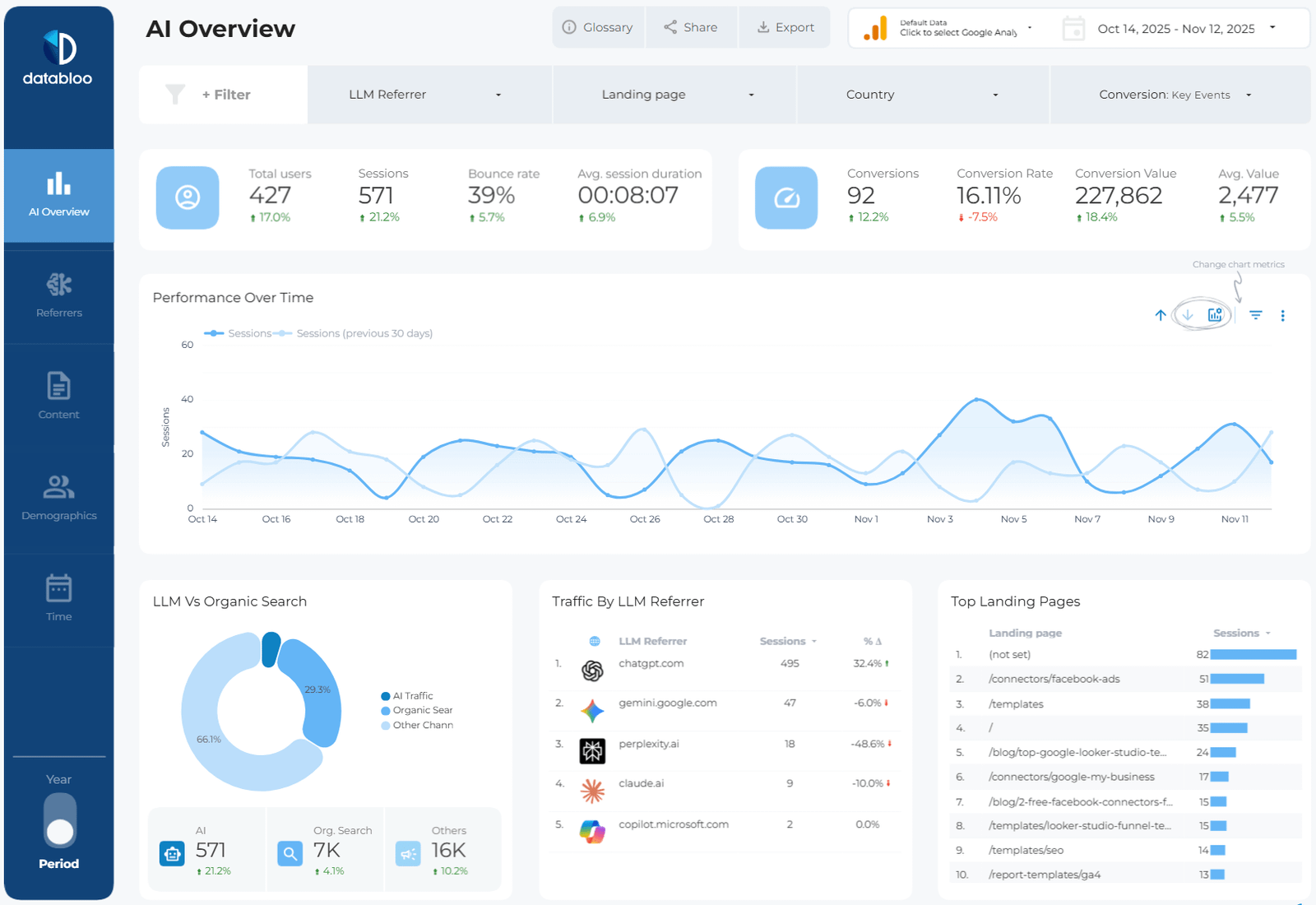
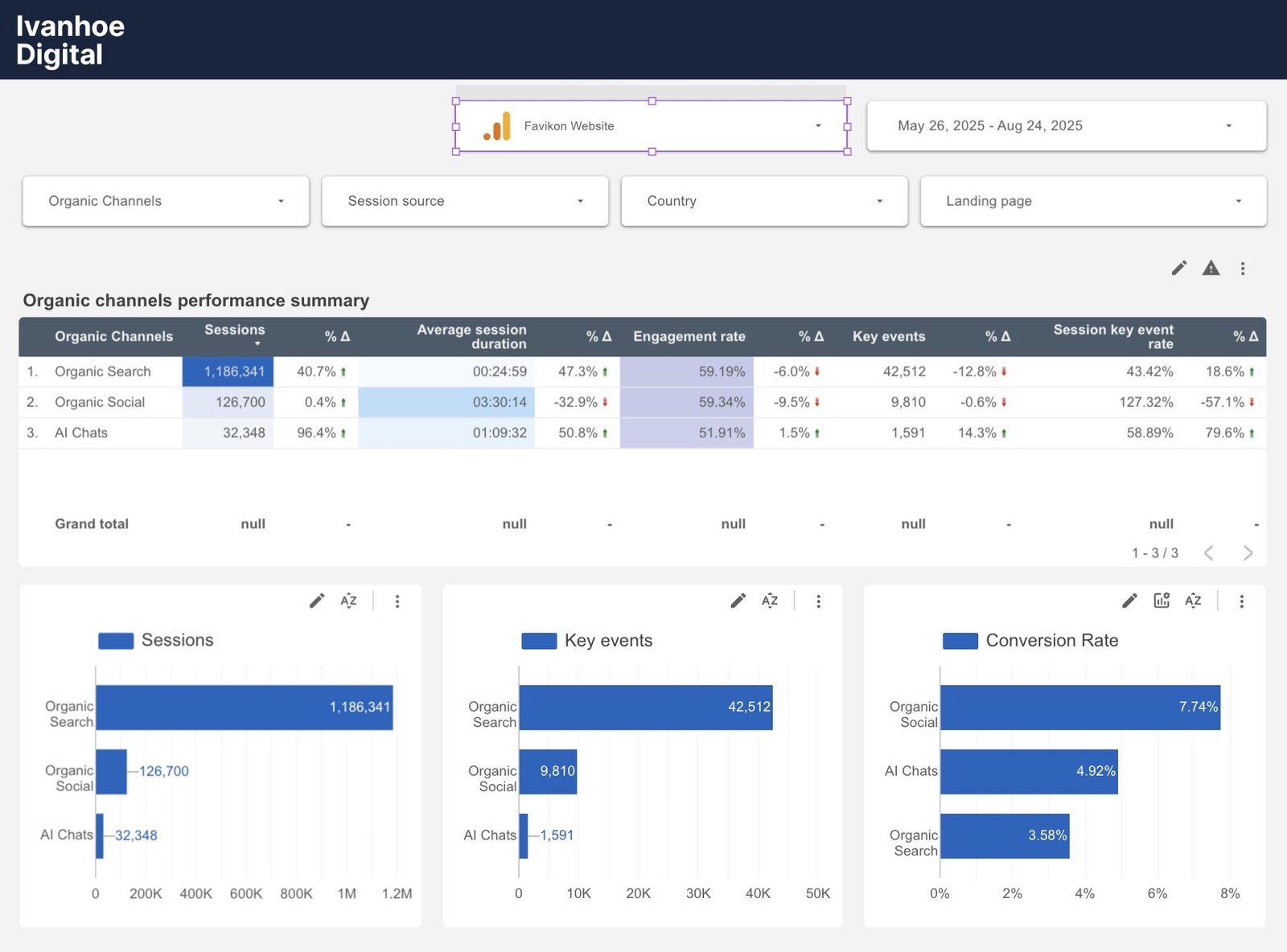
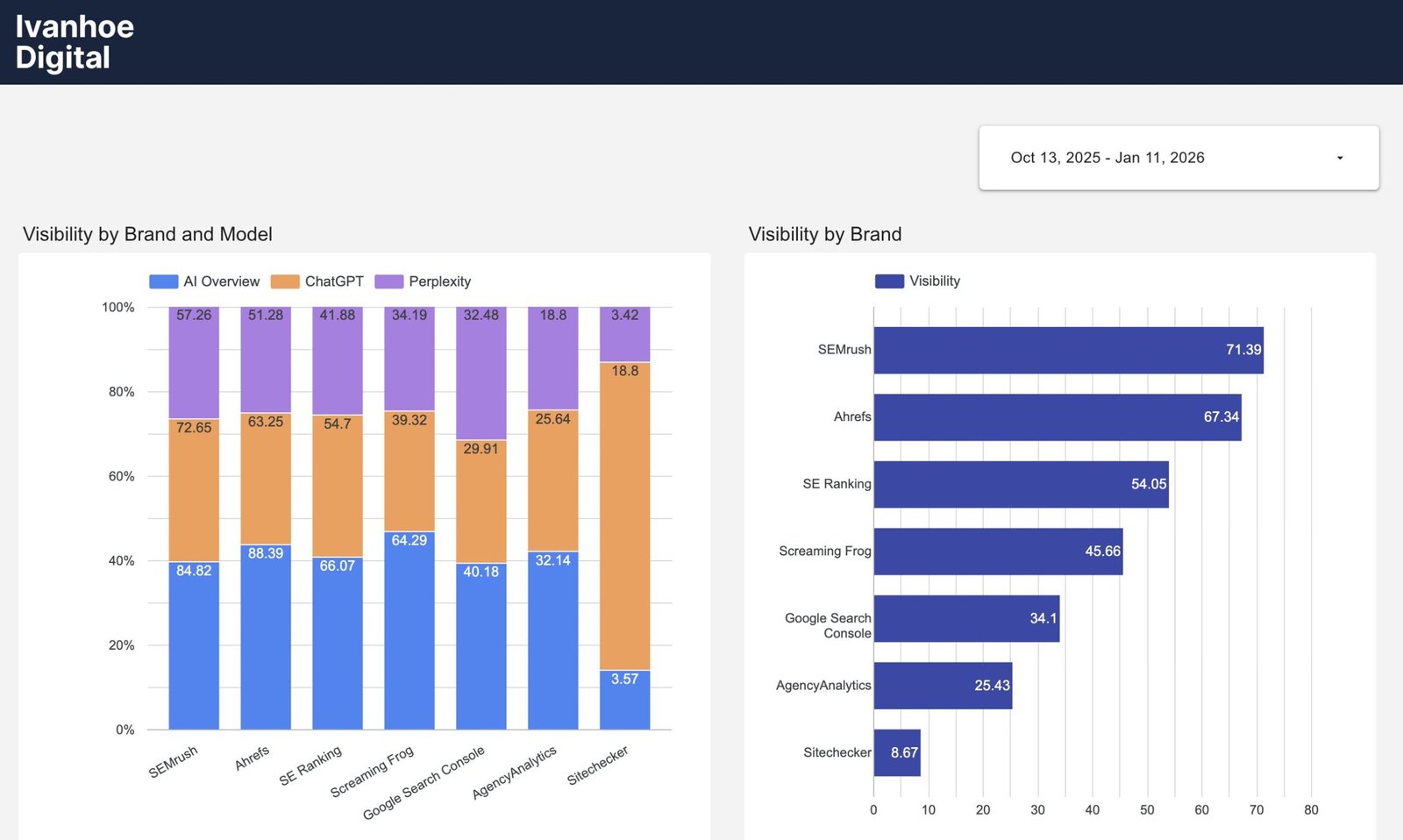
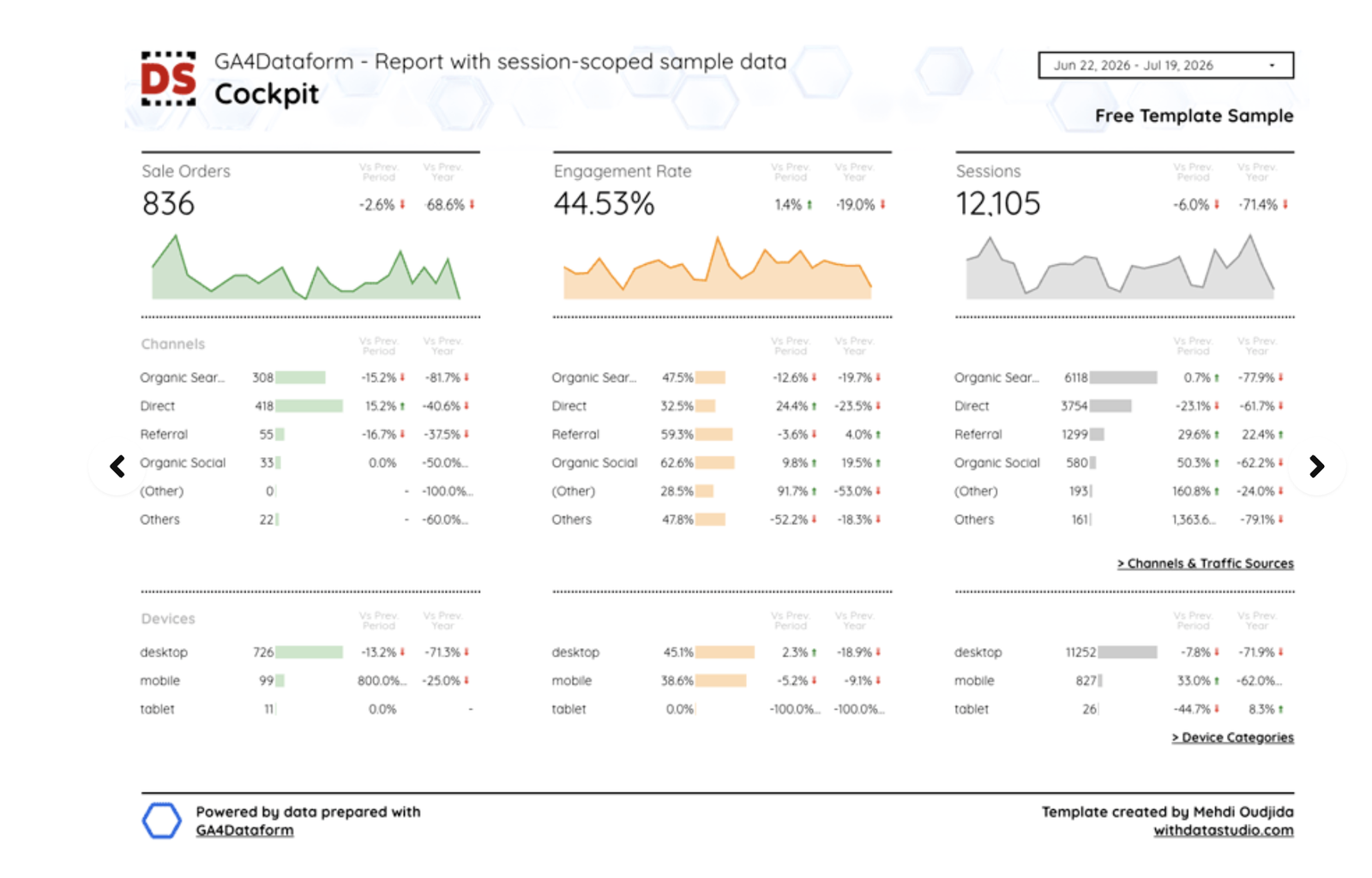
To measure what AI is sending you, or to get GA4 into BigQuery as the first step towards a data agent, start from these library reports:
Where to go next
- Connect GA4 to Claude or ChatGPT with Google’s MCP server
- Conversational Analytics with a GA4 data agent
- Marketing data MCP servers compared
- Google Ads and Search Console MCP servers
- Meta Ads MCP
- Building a Data Studio report with ChatGPT, Claude or Gemini
- Writing client report commentary with AI
- Client data and AI assistants, for agencies
- Will AI replace marketing dashboards?
Frequently asked questions
Is Gemini in Data Studio free?
No. It needs Data Studio Pro ($9 per user per project per month). Google charges nothing extra for Gemini while it’s in Preview and says that may change.
Does Conversational Analytics work with Google Sheets?
Only in the legacy experience, which is Pro-only and being replaced. The current experience answers through BigQuery data agents.
Can I use Conversational Analytics without paying for anything?
Without Pro, yes. Without any bill, no: the agent’s Cloud project needs billing on, queries beyond the free 1 TiB a month are charged, data insights tokens bill from 27 October 2026, and conversations bill in tokens after the free trial ends on 31 December 2026.
Is there a Looker Studio or Data Studio MCP server?
No. Google said on 1 September 2026 there’s “no defined timeline” for one. Looker’s MCP server is for enterprise Looker.
Can AI build a Data Studio report for me?
Not inside Data Studio: Google documents no report-from-a-prompt feature, and the Data Studio API can’t create charts. Assistants can plan the pages and draft the formulas; you build and check.
How do I turn on Gemini in Data Studio?
A Pro admin enables it under User settings › Gemini settings, with Trusted Tester features on for Preview features. It’s on by default for Pro subscriptions created on or after 3 June 2025.
Does Gemini in Data Studio work in other languages?
Not yet. Google’s troubleshooting page says it supports English-language prompts and responses only.
Some links in this post are affiliate links: if you sign up through one, I may earn a commission at no extra cost to you. How I work with partners.