
The main Supermetrics alternatives for people who report in Data Studio are Windsor.ai, Dataslayer, Porter Metrics, Coupler.io, Catchr, Power My Analytics and Funnel.io, and the right one depends on which Supermetrics limit you’ve hit. For many clients on a few platforms, Windsor.ai’s $19 plan (billed annually) includes 75 accounts. For the same structure as Supermetrics at a lower price, Dataslayer. For paying only for what you connect, Porter Metrics. And if you only report on Google data, the answer is free: Google’s own connectors.
This guide covers why people leave Supermetrics (counted from reviews and forum threads), what Supermetrics’ October 2026 plan change means for that decision, a shortlist table, one mini-review per tool with its current pricing page, worked bills for three real setups, routing by the problem you’re solving, and when staying put is the better call.
Price your own setup. The reporting cost calculator runs these numbers for your clients, platforms and billing, with every route side by side.
Why people look for alternatives to Supermetrics
Supermetrics is a widely used connector with a long source list and real fans: in the 45 reviews I coded, 10 praise how easy it is to set up and 5 say it works especially well with Data Studio. Two Reddit threads still call it the default choice. People leave over three things, and the counts make the order clear.
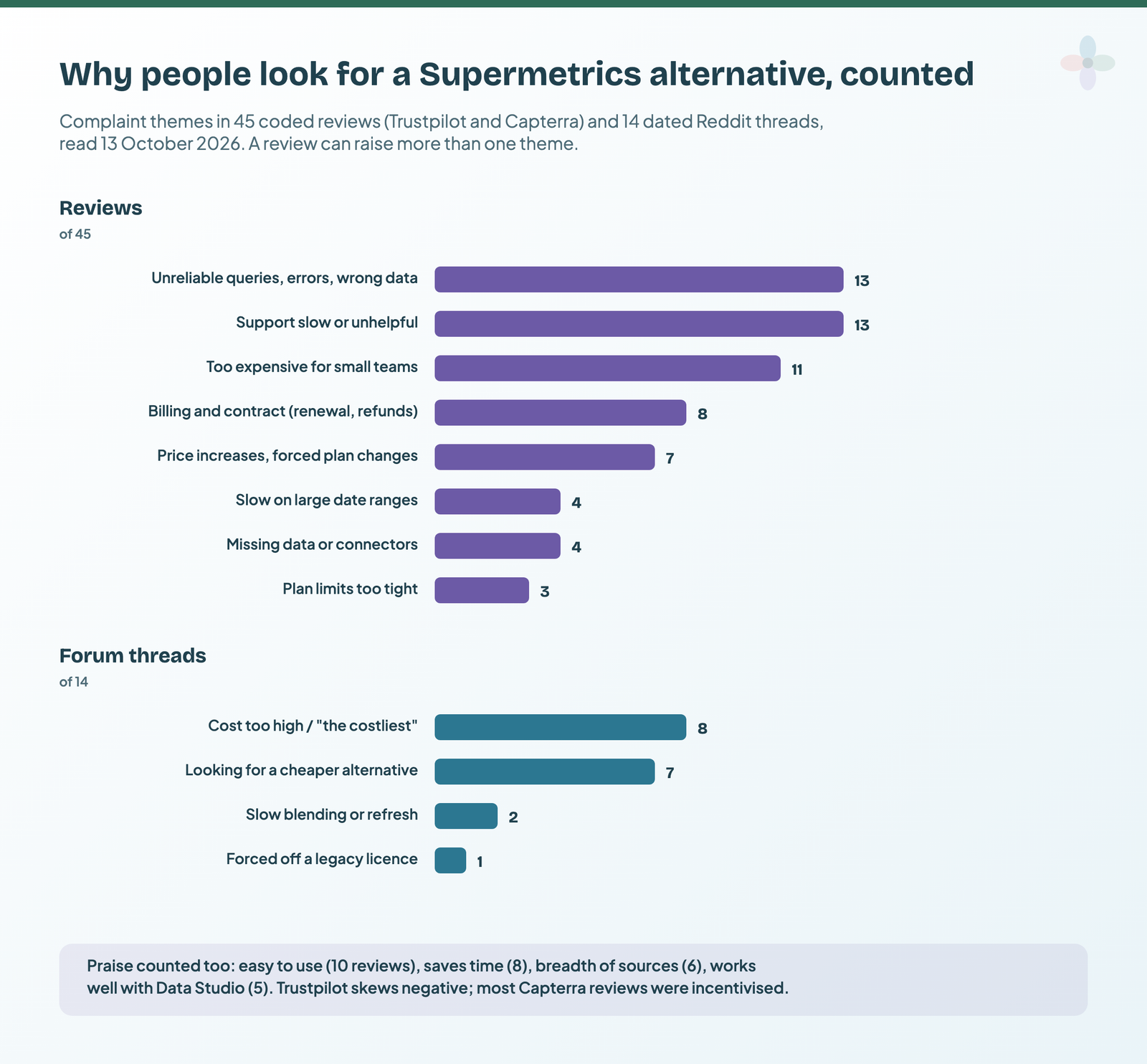
- Cost and price changes. 11 of 45 reviews call it too expensive for small teams, 7 describe price increases or forced plan changes, and 8 of 14 forum threads open with the price.
- Reliability. 13 reviews describe failing or silently failing queries or wrong data.
- Support and billing. 13 reviews describe slow or unhelpful support, and 8 describe billing disputes (auto-renewal, charges after cancelling, refused refunds).
The samples lean in opposite directions: all 20 Trustpilot reviews I read are one or two stars, and 16 of the 22 labelled Capterra reviews were incentivised. Read the counts as what each camp says. The full ratings and the review breakdown are in my Supermetrics pricing guide.
The October 2026 change shifts the maths
Between 9 September and 13 October 2026, Supermetrics removed its Pro plan, cut the EUR Starter plan to 2 data sources × 2 accounts per source (from 3 × 3) at the same €39 a month billed yearly (€49 monthly), and its extras now cap Starter at 3 sources and 3 accounts. Growth stays at €159 (€199) for 7 sources × 7 accounts and 2 users. Third-party articles, and archived copies of Supermetrics’ US page, report a different US list (which I haven’t read live), with Starter at $44 billed annually for 3 × 3.
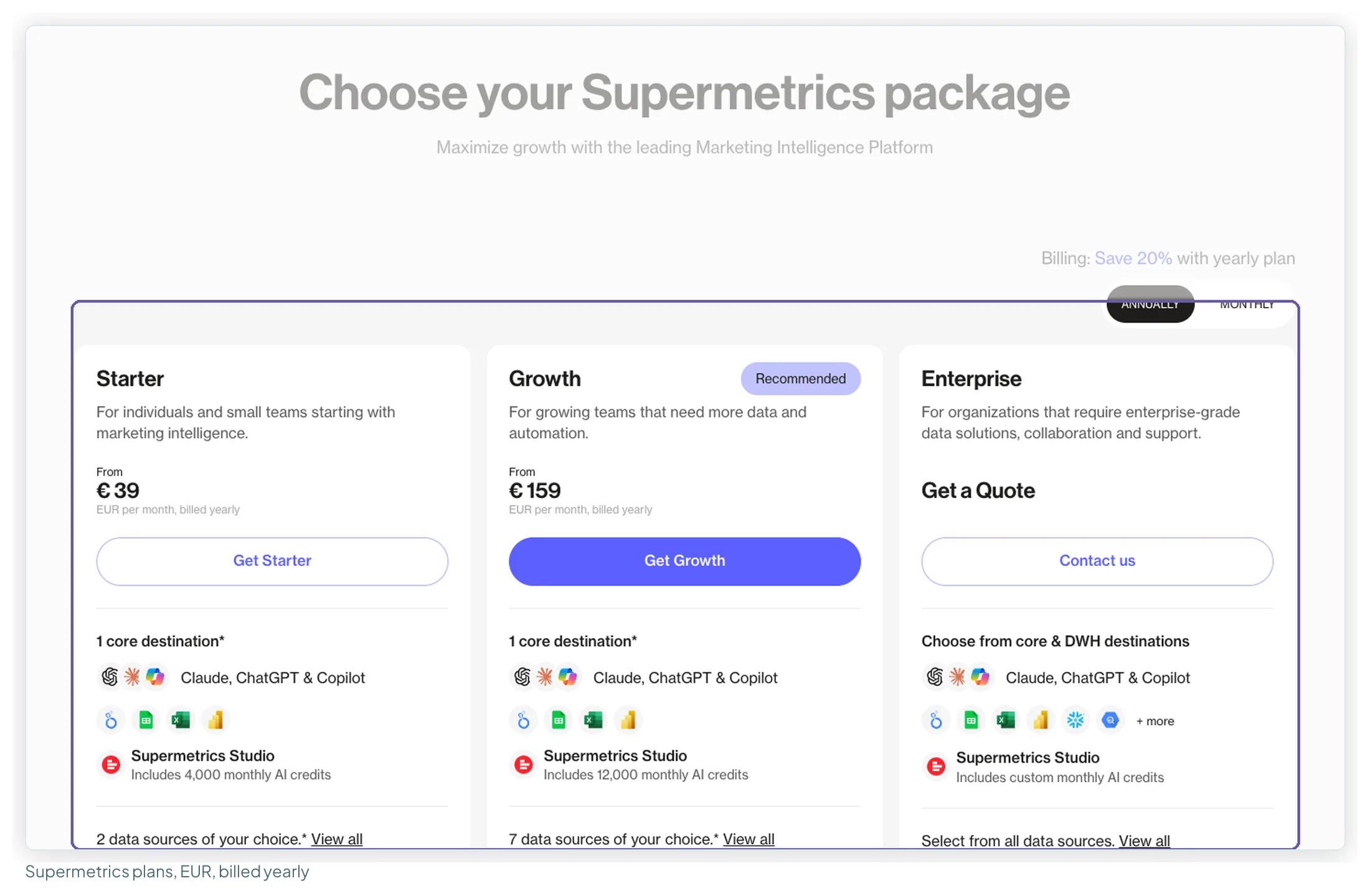
Two consequences matter for this guide. Small setups get a little more expensive on Starter, because the third account or source is now an extra. Mid-sized agencies may get cheaper: a ten-client agency that my September notes put on Pro at €399 can now sit on Growth plus extras. So before you switch, re-run your own bill on today’s Supermetrics prices; the reason you started looking may have changed.
Check first that you’re not paying to connect Google’s own data
The biggest saving available doesn’t need an alternative at all. Google builds and maintains free Data Studio connectors for its own products, and each one you move off a paid connector frees a source slot.
| Source | Google’s own connector |
|---|---|
| Google Analytics 4, Search Console, Google Ads, Sheets, YouTube Analytics | Free, built and maintained by Google |
| BigQuery | Connector free; BigQuery itself is billed |
| Meta, Instagram, LinkedIn, TikTok, Microsoft Ads, Pinterest, HubSpot, Shopify, Mailchimp | None: partner connectors only |
| Google Business Profile | None: partner connectors only |
If everything you connect is in the first row, you don’t need an alternative. Move those sources onto Google’s connectors (the GA4 guide and Search Console guide cover the switch) and cancel. That’s also the answer to “is there a free Supermetrics alternative”: for Google data, yes; for everything else, the free plans below are for testing, not for client reporting.
The shortlist: seven Supermetrics alternatives compared
Prices from each vendor’s own pricing page, checked between 9 September and 13 October 2026 (Supermetrics, Dataslayer and Power My Analytics read in a browser on 13 October). Billed-annually rate first, monthly second. Ratings read 13 October 2026.
| Tool | Best for | Entry price | What the entry plan buys | Rating (reviews) | Free plan / trial |
|---|---|---|---|---|---|
| Windsor.ai | Many clients on a few platforms | $19/mo · $23 | 3 sources, 75 accounts, unlimited users | G2 4.4 (90) · Trustpilot 3.5 (78) | Forever Free · 30-day trial |
| Dataslayer | Supermetrics’ structure, lower price | €29/mo · €35 | 3 connectors × 3 accounts, 1 user | G2 4.8 (312) · Capterra 4.7 (89) | Free plan · 15-day trial |
| Porter Metrics | Paying only for what you connect | $12.50 per account · $15 | 1 account; users, history and reports unlimited | G2 4.6 (288) · Capterra 4.5 (6) | Read-only free plan · 14-day trial |
| Coupler.io | The widest source list, light transformation | $24/mo · $32 | 3 accounts, 1 user, daily refresh | G2 4.8 (104) · Capterra 4.9 (111) | Free plan · 7-day trial |
| Catchr | Data Studio and AI assistants off one connection | $239/yr · $24/mo | 3 platforms, 10 accounts, unlimited users | G2 4.5 (2) · Capterra 5.0 (1) | No free plan · 14-day trial |
| Power My Analytics | Unlimited sources at agency scale | $41.63/mo · $49.95 | 5 sources, 5 accounts, 2 admins | Capterra 4.7 (182) · G2 4.5 (83) | Sample-data plan · 14-day trial |
| Funnel.io | Larger teams that need a data hub | from €280/mo (annual only) | 117 connectors, 5 users, Data Studio included | G2 4.5 (276) · Capterra 4.7 (19) | None · demo |
| Supermetrics (for reference) | Maintained connectors at agency scale | €39/mo · €49 | 2 sources × 2 accounts, 1 user | G2 4.4 (824) · Trustpilot 1.5 (31) | No free plan · 14-day trial |
Windsor.ai, Coupler.io, Catchr and Supermetrics are affiliate partners of this site; Porter Metrics, Dataslayer, Power My Analytics and Funnel.io are not. Every tool gets the same structure below, and the routing table says plainly when a non-partner is the better choice.
How I compared them: what each tool counts
Before comparing prices, compare what each tool meters. The same agency gets very different invoices because the unit is different, not the rate. I compared every tool on the unit it bills, what’s capped, the Data Studio connection, refresh, free and trial options, ratings, and the bill for three standard setups.
| Tool | What it counts | Accounts shared across sources? | Users | Destinations |
|---|---|---|---|---|
| Supermetrics | Data sources, accounts per source, users, destinations | One quota applied to every source (docs) | 1 · 2, +€99 each on Growth | 1 per plan, extras paid |
| Windsor.ai | Data sources and accounts | Yes, pooled | Unlimited | Not counted |
| Dataslayer | Connectors, accounts per connector, users, destinations | Per connector | 1 · 10 · unlimited | 1 per plan; bundles 10–15% off |
| Porter Metrics | Accounts only, volume-priced | Every account counts | Unlimited | All included |
| Coupler.io | Accounts, destinations, rows per run | Pooled | 1 on Starter | 1 · 1 · 3 · unlimited |
| Catchr | Platforms and accounts | Pooled | Unlimited | Visualisation and spreadsheet on entry plans |
| Power My Analytics | Sources and accounts per source, admins | Per source from Grow | 2 · 3 · unlimited admins | Sheets and Excel from Grow |
| Funnel.io | Flexpoints: connectors, accounts, destinations | Every account costs 5 FP | 5 · unlimited | Data Studio 150 FP |
The alternatives, one by one
Each mini-review has the tool’s pricing page as it looked when I checked it, the plans that matter for Data Studio, what reviewers praise and complain about (with counts from samples I coded or the dossiers behind this cluster), and a “choose it if” line.
Windsor.ai: the direct answer to the account cap
Best for: agencies and freelancers reporting many clients across a handful of platforms.
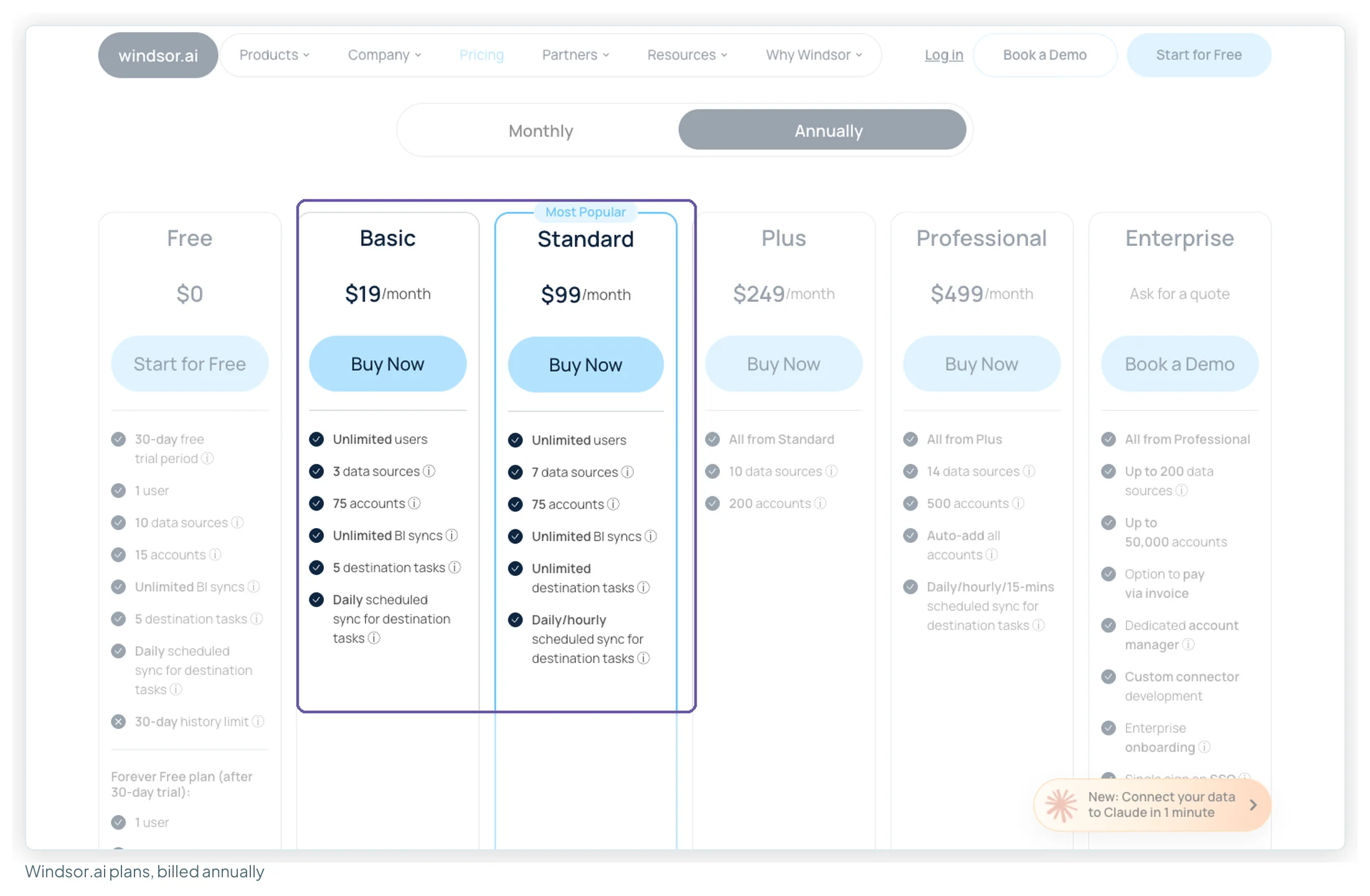
| Plan | Billed annually | Monthly | Sources | Accounts (pooled) |
|---|---|---|---|---|
| Forever Free | $0 | 1 | 1 | |
| Basic | $19 | $23 | 3 | 75 |
| Standard | $99 | $118 | 7 | 75 |
| Plus | $249 | $299 | 10 | 200 |
| Professional | $499 | $598 | 14 | 500 |
Strengths. Seventy-five accounts on the entry plan is the outlier in this whole category, and they’re pooled across sources, so twelve Meta clients and four LinkedIn clients is sixteen accounts, not two separate caps. Users are unlimited on every paid plan, there are no premium connectors, destinations aren’t counted, and ten Google Business Profile locations count as one account. In a sample of 40 Trustpilot reviews, the most common praise (10) is fast, human support, followed by time saved (5) and use with Claude or ChatGPT through its MCP (4); many of the five-star reviews name an agent after a just-closed ticket.
Weaknesses. The most common complaint, in 10 of those 40 reviews, is billing: Windsor’s documentation says “all sales are final” with no refunds, including for monthly fees, and reviewers who missed that weren’t refunded. Five reviews describe slow support, four describe bugs or connector failures. Data Studio queries are cached for six hours, with a manual Clear Cache allowed once every two hours. Windsor says 350+ sources; its own site has 157 public connector pages, so check yours by name.
Choose it if you’ve hit Supermetrics’ account quota and your clients sit on three or fewer non-Google platforms. Use the 30-day trial fully before paying, because there are no refunds.
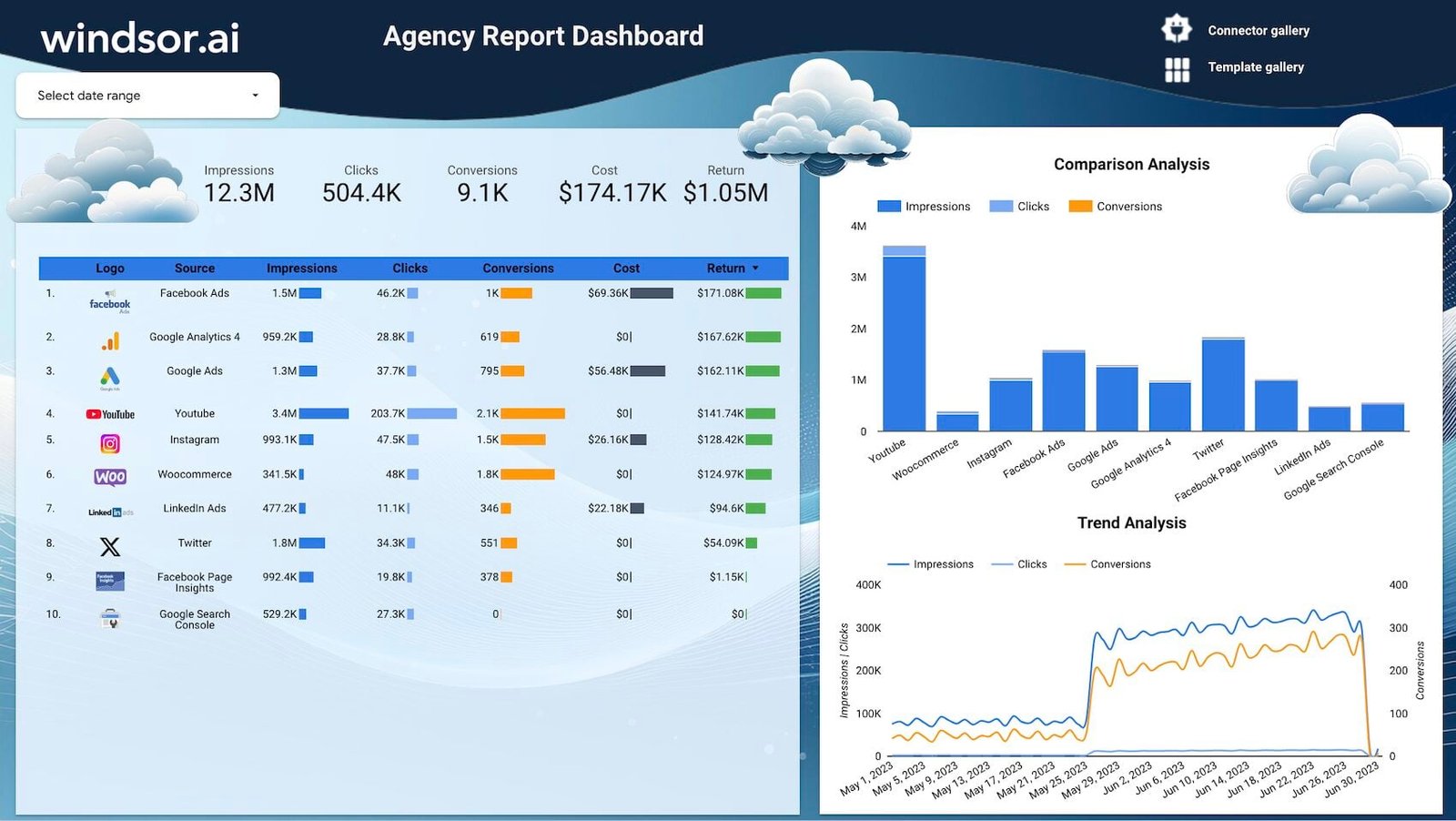
All 51 Windsor.ai templates in the library · Start Windsor’s 30-day trial
Dataslayer: Supermetrics’ structure at a lower price
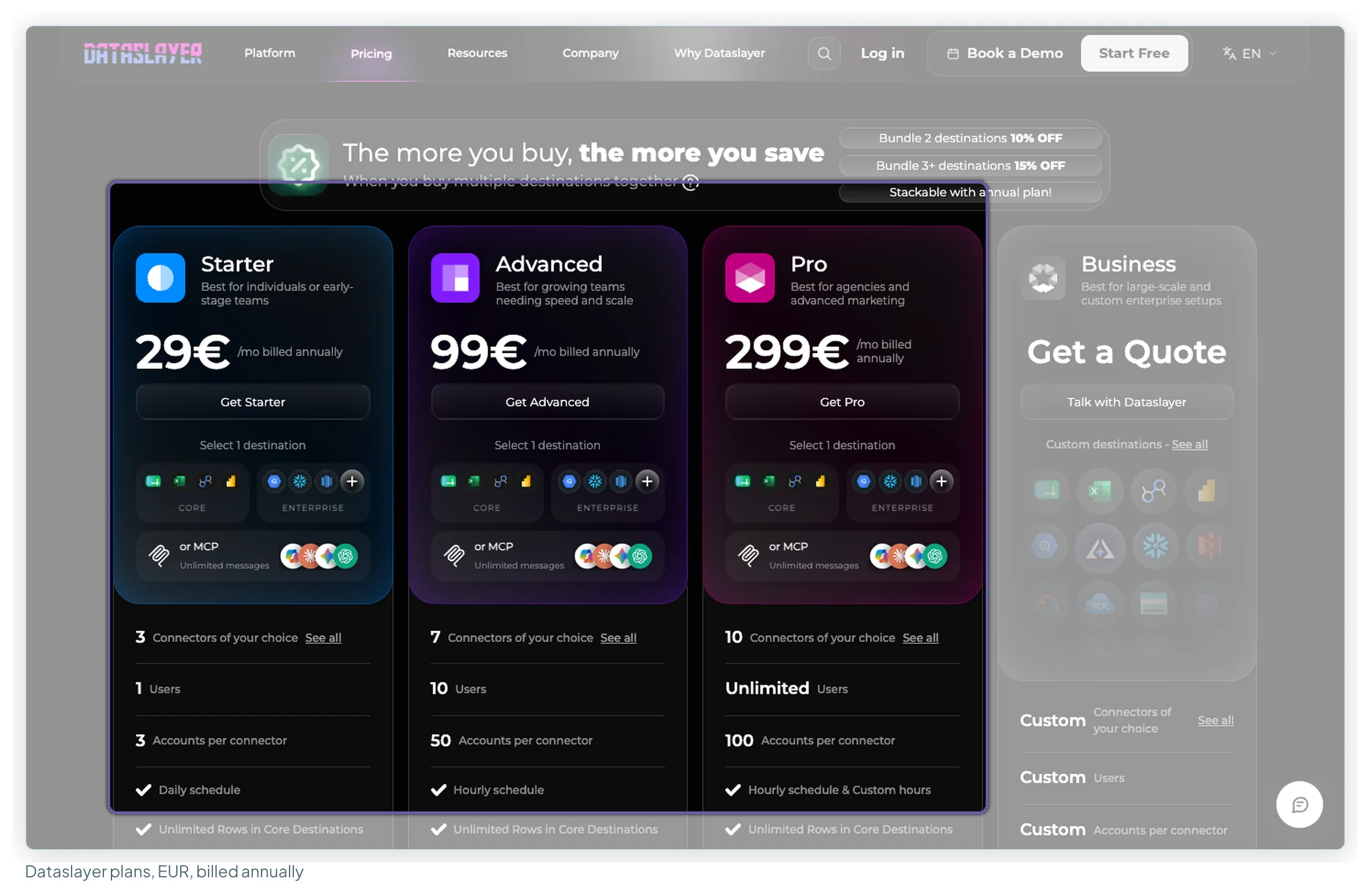
Best for: anyone who likes how Supermetrics works but not what it costs. Dataslayer is the name forum threads give for the “cheaper swap” (2 of the 14 Supermetrics threads I tracked), and 9 of the 25 Capterra reviews I read say they switched from Supermetrics, every one over price.
| Plan | Billed annually (EUR) | Monthly (EUR) | Connectors | Accounts per connector | Users |
|---|---|---|---|---|---|
| Free (after a 15-day trial) | €0 | 1 | 1 | 1 | |
| Starter | €29 | €35 | 3 | 3 | 1 |
| Advanced | €99 | €119 | 7 | 50 | 10 |
| Pro | €299 | €359 | 10 | 100 | Unlimited |
Its page also carries a USD list that my EU session didn’t render (Starter $35 billed annually, $39 monthly; Advanced $115 / $139). Like for like, Dataslayer Starter is €29 for 3 connectors × 3 accounts against Supermetrics Starter at €39 for 2 × 2. Advanced is €99 for 7 connectors × 50 accounts and 10 users against Supermetrics Growth at €159 for 7 × 7 and 2 users. The extras are near-identical in shape (+€10 an account on both).
Strengths. In my sample of 38 reviews (13 on G2, 25 on Capterra), 20 praise ease of use, 12 the support, 12 the value against Supermetrics, and 11 the time saved. Rows are unlimited in core destinations (Sheets, Excel, Data Studio, Power BI) on paid plans; row limits apply only to warehouse destinations. Every paid plan includes an “Import data from Supermetrics” option, and the pricing FAQ says there are no long-term contracts.
Weaknesses. Seven reviews say setup or the interface needs technical knowledge, six name a missing connector or metric, and four mention query limits. The source list is shorter: “50+ data sources”. One destination per plan, like Supermetrics. Read the 4.8 with the sample in mind: G2 shows no review below four stars in 312, 6 of the 13 G2 reviews I read were seller-invited, and 13 of the 25 Capterra reviews share one date. Refunds aren’t stated, and whether an extra account applies to one connector or all of them isn’t either.
Choose it if you want to keep Supermetrics’ way of working and your platforms are on its list. For a 30-client agency on four platforms, Advanced at €99 is the lowest bill in this guide; at ten clients, Catchr ($85.82) and Windsor.ai ($99) are in the same range.
Porter Metrics: pay only for the accounts you connect
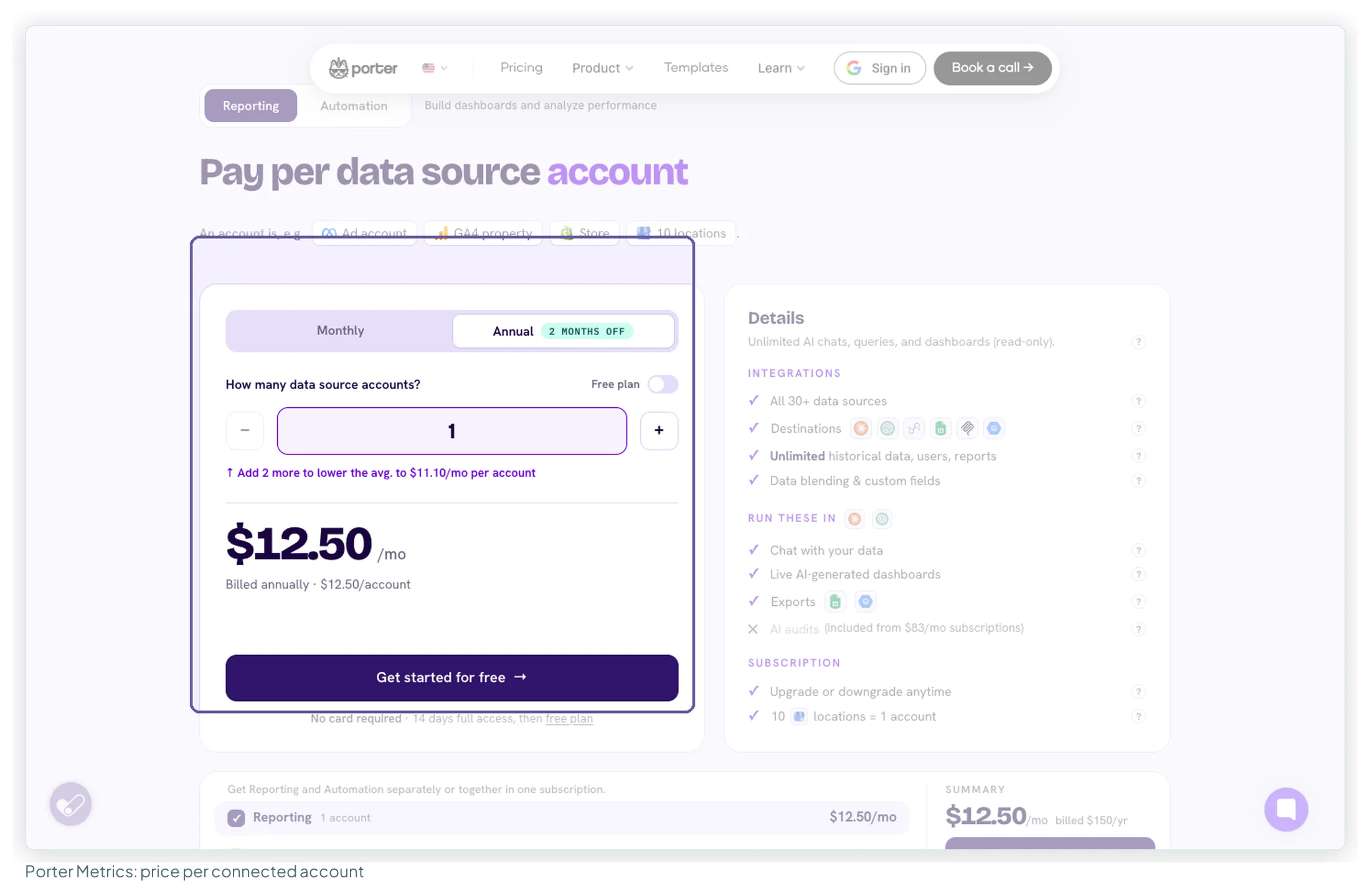
Best for: one brand or a small client list that resents paying for capacity it doesn’t use.
| Accounts connected | Monthly price | Billed annually (per month) |
|---|---|---|
| 1 | $15 | $12.50 |
| 3 | $39.99 | $33.33 |
| 6 (5–12 at $8 each) | $48 | $40.00 |
| 13–20 (flat) | $100 | $83.33 |
| 40 ($4.50 each) | $180 | $150.00 |
| 120 ($2.30 each) | $276 | $230.00 |
Strengths. The model is the fairest one for a small setup: users, reports and history are unlimited, blending is included, and the price per account falls as you add more. Ten Google Business Profile locations count as one account. Its MCP for Claude and ChatGPT is on every plan, the free one included, and Porter refunds within 14 days of purchase. In a sample of 40 reviews, support is the standout (25), followed by easy setup (18). One founder on Capterra (2022) put it as finding Supermetrics “expensive and intimidating”.
Weaknesses. Nine of those 40 reviews say connections break or need resetting, six name missing connectors or fields, and most of the readable reviews date from 2021–2024. The source list is short: 29 connectors on its connectors page, with no Amazon Ads or YouTube organic connector. And per-account pricing adds up past a few dozen accounts, although the volume ladder softens it.
Choose it if you connect a handful of accounts on mainstream platforms and want unlimited users without a tier to outgrow.
Coupler.io: the widest source list
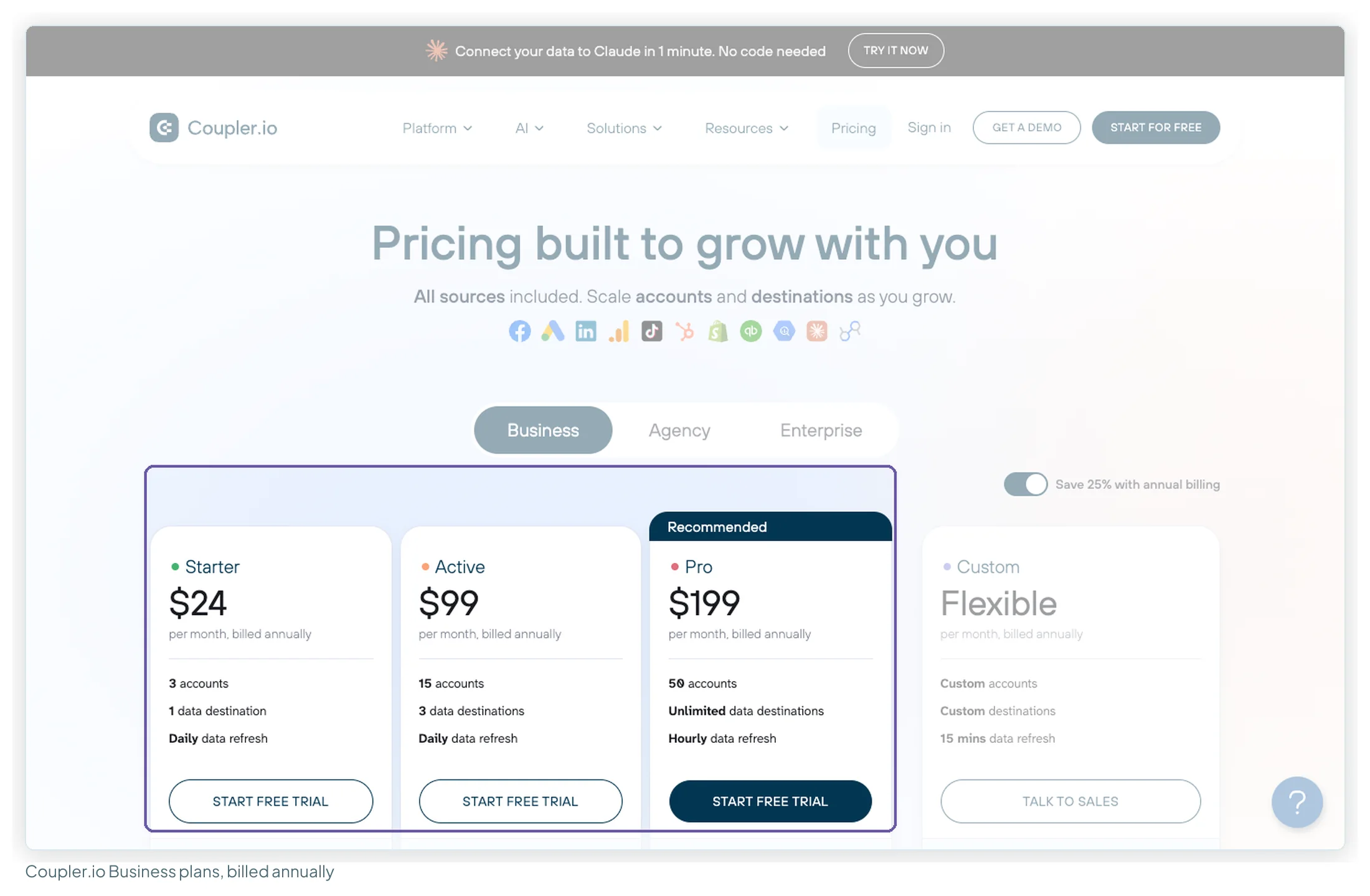
Best for: a source Supermetrics doesn’t list, or data that needs joining before it reaches Data Studio.
| Plan | Billed annually | Monthly | Accounts | Destinations | Refresh |
|---|---|---|---|---|---|
| Free | $0 | 1 | 1 | Manual, 100 rows per run | |
| Starter | $24 | $32 | 3 | 1 | Daily, 5,000 rows per run |
| Active | $99 | $132 | 15 | 3 | Daily |
| Pro | $199 | $259 | 50 | Unlimited | Hourly |
Extra accounts are $4.49 a month billed annually ($5.99 monthly).
Strengths. The pricing page lists 440 sources, all available on every plan, and 14 destinations. Coupler joins, appends and aggregates data before it reaches Data Studio, which helps when Data Studio’s five-table blend limit is the wall you keep hitting. In a sample of 36 reviews, 18 praise the no-code setup, 13 the time saved, and 8 each the value and the support. Ratings are among the highest here: 4.8 on G2 (104) and 4.9 on Capterra (111). Read them with the sample in mind too: 10 of the 25 Capterra page-one reviewers are non-profits, a group Coupler offers special terms.
Weaknesses. Accounts are the metering unit, and Starter’s three fill up fast. The 5,000 rows per run on Starter is tight for Search Console query data; unlimited volume starts at Active. Starter has one user. In the review sample, 8 name a missing connector or feature and 5 say the cost climbs as connections grow (“It can really get pricey when adding multiple data connections”, Capterra, August 2025). The free plan is manual-refresh only, so it’s for testing, not a live client dashboard.
Choose it if your problem with Supermetrics is a missing source or messy data that needs shaping, and you fit within its account tiers.
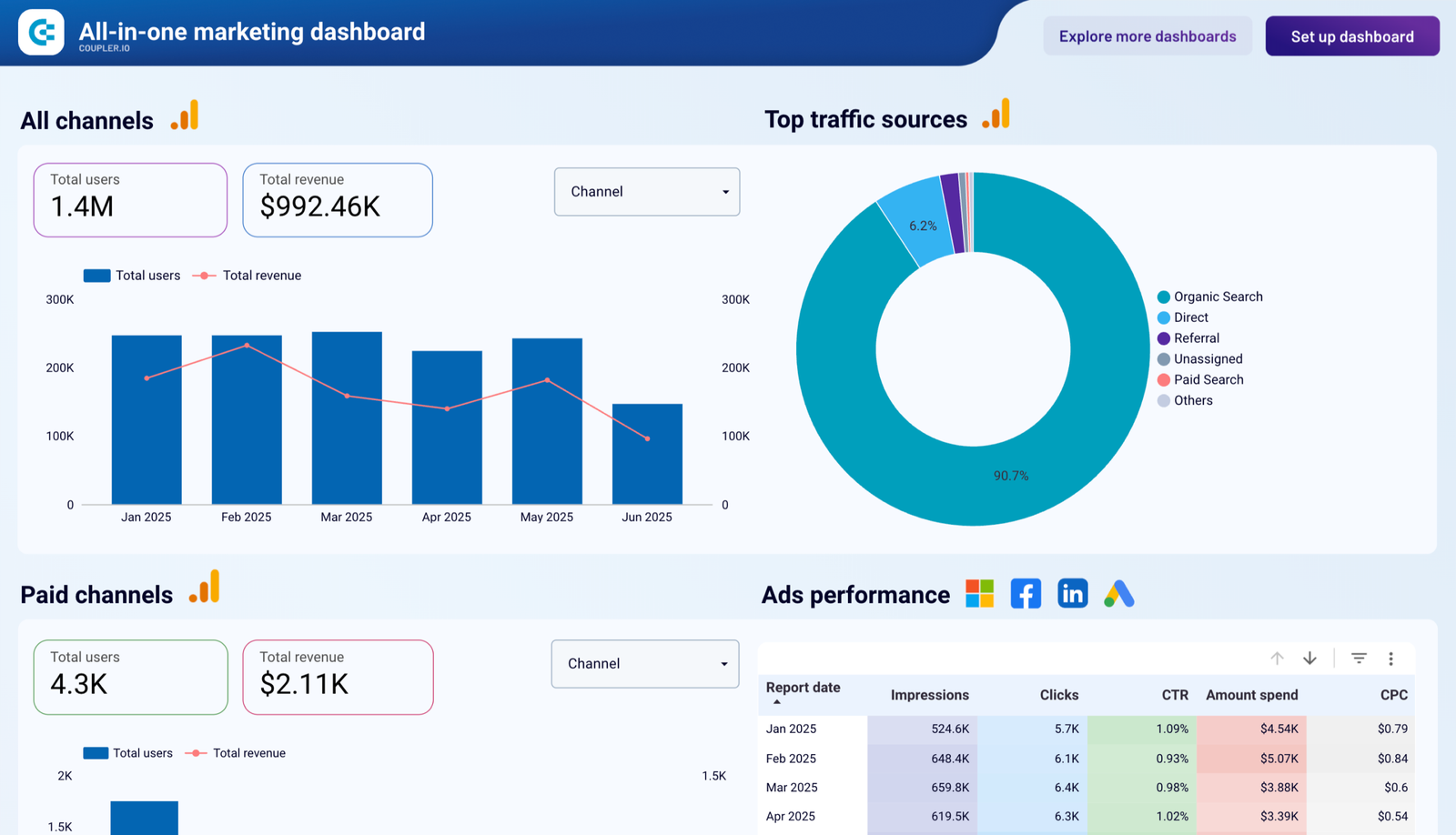
All 71 Coupler.io templates in the library · Try Coupler.io free for 7 days
Catchr: Data Studio and AI assistants off one connection
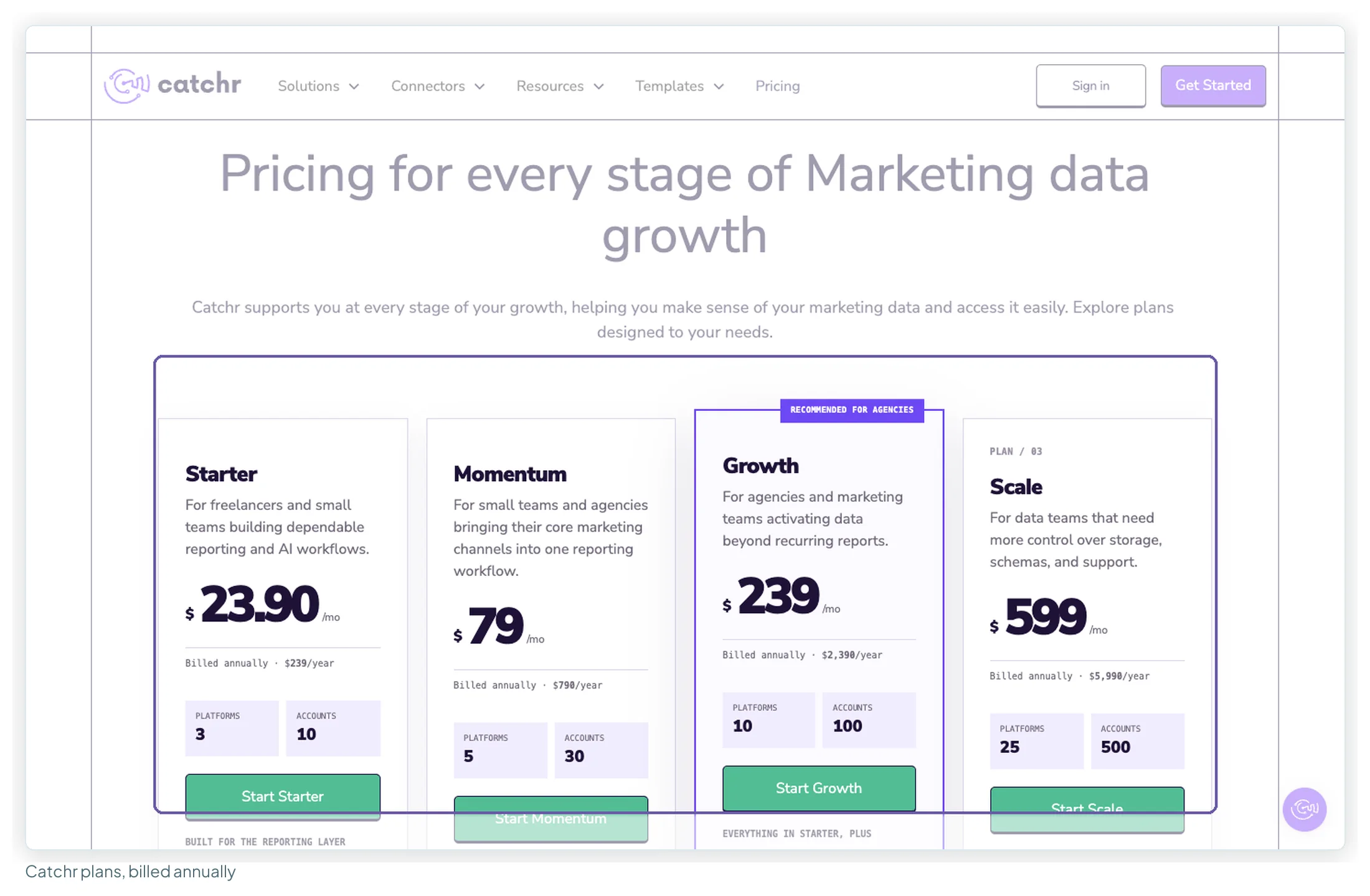
Best for: freelancers and small agencies who want the same data in Data Studio and in Claude or ChatGPT.
| Plan | Billed annually | Monthly | Platforms | Accounts |
|---|---|---|---|---|
| Starter | $239/yr | $24 | 3 | 10 |
| Momentum | $790/yr | $79 | 5 | 30 |
| Growth | $2,390/yr | $239 | 10 | 100 |
| Scale | $5,990/yr | $599 | 25 | 500 |
Overages are $19.99 per extra platform and $19.99 per 10 accounts; Starter and Momentum cap at 5 platforms and 50 accounts. With yearly billing on, the cards show a tenth of the yearly price as “/mo” ($23.90 for Starter), so I work from the yearly totals: $239 a year is $19.92 a month.
Strengths. One connection feeds Data Studio, Sheets and an AI assistant through Catchr’s MCP, on every plan, with unlimited users. Accounts are pooled across platforms, and every plan gets the full 100+ source list. The new Momentum tier closes what used to be a ten-fold jump from Starter to Growth.
Weaknesses. Independent evidence is thin: G2 shows 2 reviews and Capterra 1, I found no forum threads at all, and the Sheets add-on rates 3.55 from 11. The pricing page contradicts itself on warehouse destinations below Growth, so confirm BigQuery access before buying. It doesn’t say whether overage packs are billed monthly or yearly, or whether they apply on Growth. Refresh frequency and history depth aren’t stated.
Choose it if AI-assistant access to client data is part of the job, and you can confirm your platforms and refresh needs in the 14-day trial.
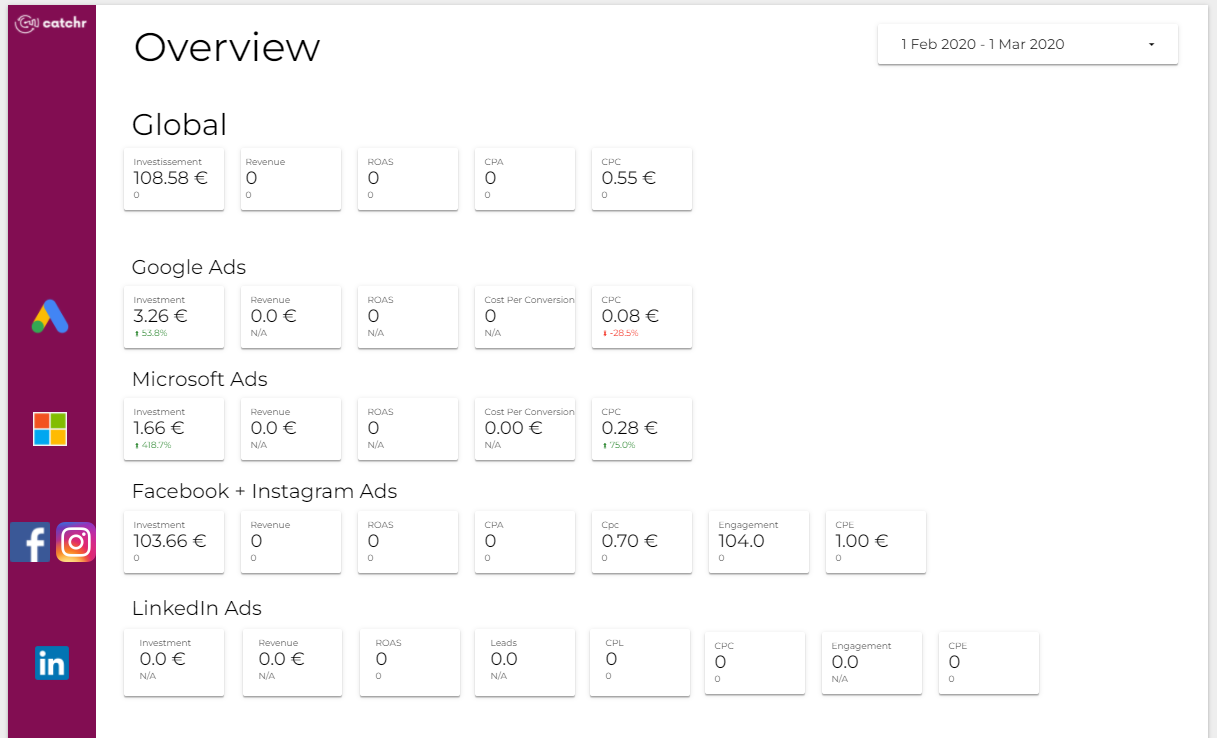
All 40 Catchr templates in the library · Start Catchr’s 14-day trial
Power My Analytics: unlimited sources, accounts per source
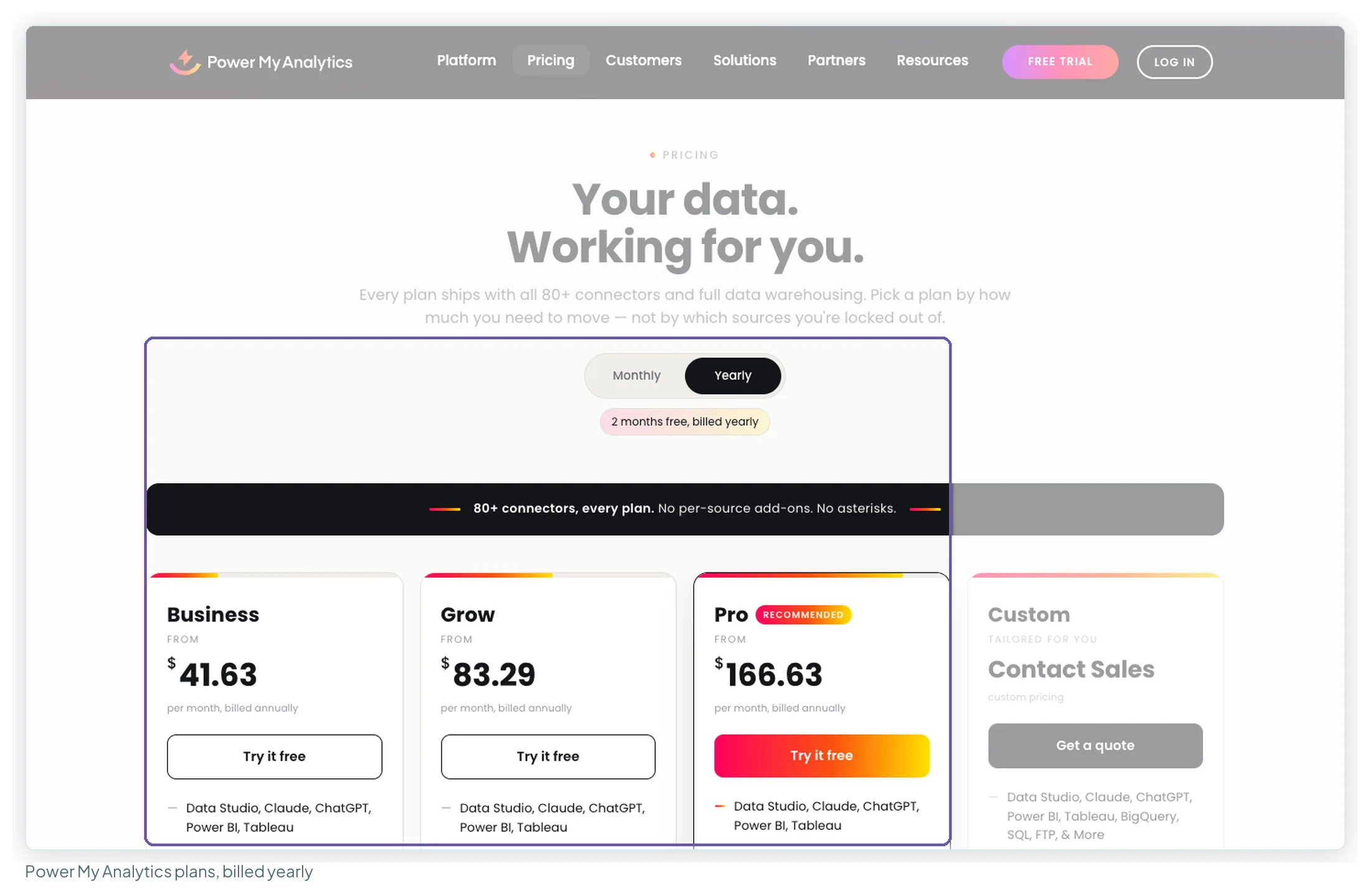
Best for: agencies whose clients use many different platforms, where Supermetrics’ source count is the limit.
| Plan | Billed yearly (per month) | Monthly | Sources | Accounts | Admins |
|---|---|---|---|---|---|
| Business | $41.63 | $49.95 | 5 | 5 in total | 2 |
| Grow | $83.29 | $99.95 | Unlimited | 7 per source | 3 |
| Pro | $166.63 | $199.95 | Unlimited | 20 per source | Unlimited |
Strengths. “80+ connectors, every plan” with no per-source add-ons, and unlimited sources from Grow. Business includes Data Studio, Power BI, Tableau, Claude and ChatGPT as destinations; MCP and API access are on every plan. Capterra rates it 4.7 from 182 reviews, the largest Capterra pool in this guide. Extra accounts are priced as a lift for every source: the Grow slider shows 3 extra accounts per source at +$32.38 a month billed yearly.
Weaknesses. Sheets and Excel start at Grow, so Business is Data Studio-first. Hourly refresh and exports (BigQuery, SQL, FTP) are paid add-ons with no published price, and the default refresh frequency isn’t stated. I didn’t code a review sample for it this round, and its G2 figure (4.5 from 83) comes from Google’s snippet because G2 blocked the page.
Choose it if you report across five or more non-Google platforms per client and want the source count to stop mattering.
Funnel.io: when you’re outgrowing connectors altogether
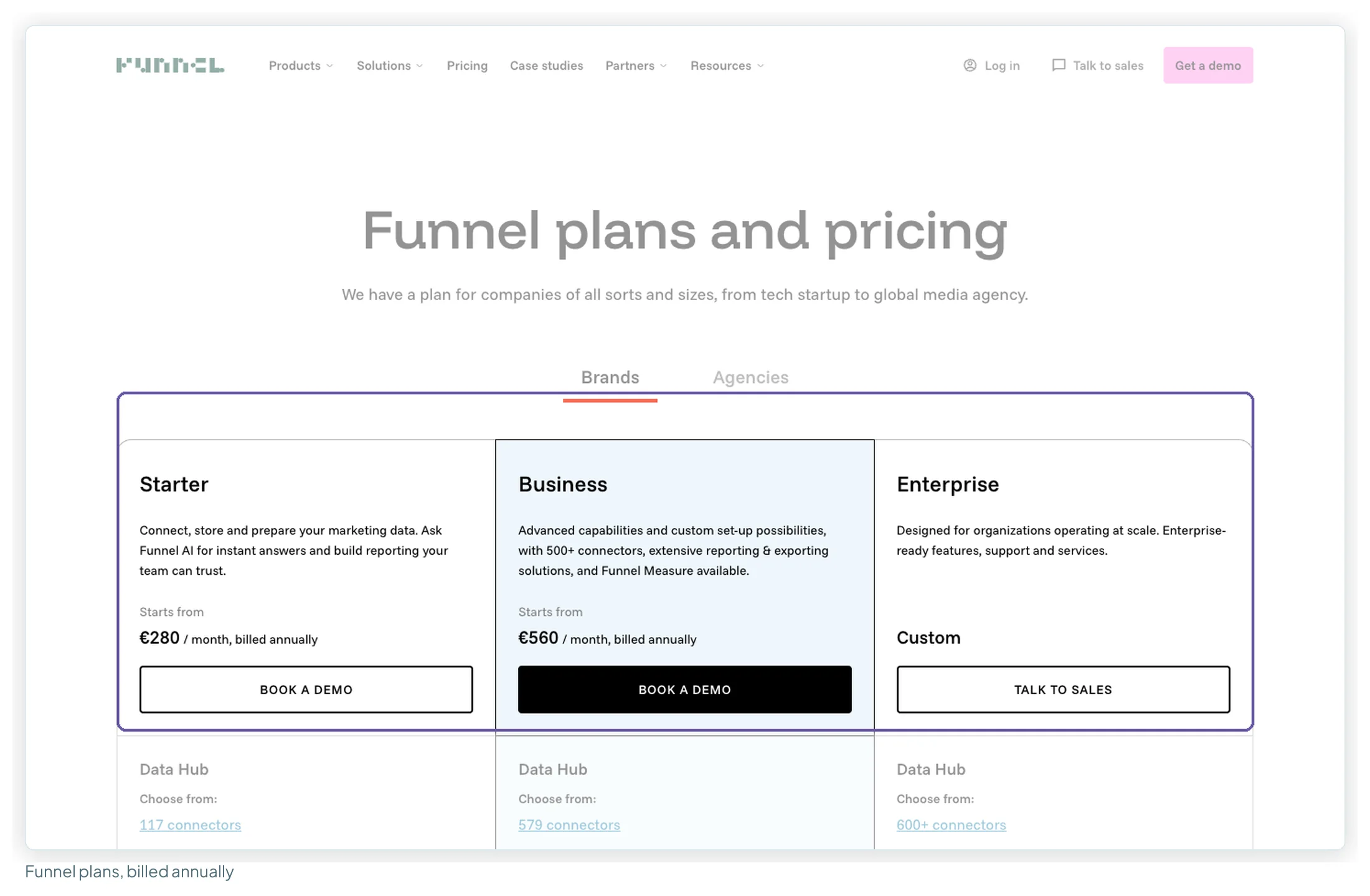
Best for: teams where the pipe itself has become the hard problem: dozens of accounts, currencies, naming conventions across markets.
| Plan | Billed annually | Connectors | Users | Notes |
|---|---|---|---|---|
| Starter | from €280/mo | 117 | 5 | Data Studio included; daily exports |
| Business | from €560/mo | 579 | Unlimited | Adds Power BI, Tableau, BigQuery; 2-hour exports |
| Enterprise | Custom | 600+ | Unlimited | Adds Snowflake, SAML and OIDC sign-in, audit log |
Strengths. Funnel stores and harmonises data before Data Studio reads it, through its own OAuth “Funnel” connector in the gallery. Capacity is priced in Flexpoints with a published rate card (50 per connector, 5 per account, 150 for a visualisation destination such as Data Studio), and the FAQ says it doesn’t charge by data volume. In a sample of 30 reviews, connector breadth (12), support (10) and easy setup (9) lead the praise, though nearly all of it comes from Capterra reviews written in 2018–2023.
Weaknesses. No free plan, no trial and no monthly billing: you book a demo. How many Flexpoints each plan includes isn’t on the page, so the real bill is a quote. Six reviews call it expensive and six say transformation or dashboards are limited, and all four contract complaints (renewal notice, emailing to downgrade) are from the last two years. It’s priced for teams spending hundreds a month, not for a freelancer’s first connector.
Choose it if you need a governed marketing data hub that feeds Data Studio, and €280 a month or more is in the budget.
What three real setups pay on each tool
Here’s the arithmetic for three setups, with Google’s own data on Google’s free connectors in every case and only published prices and extras used. Billed annually, each vendor’s currency at face value.
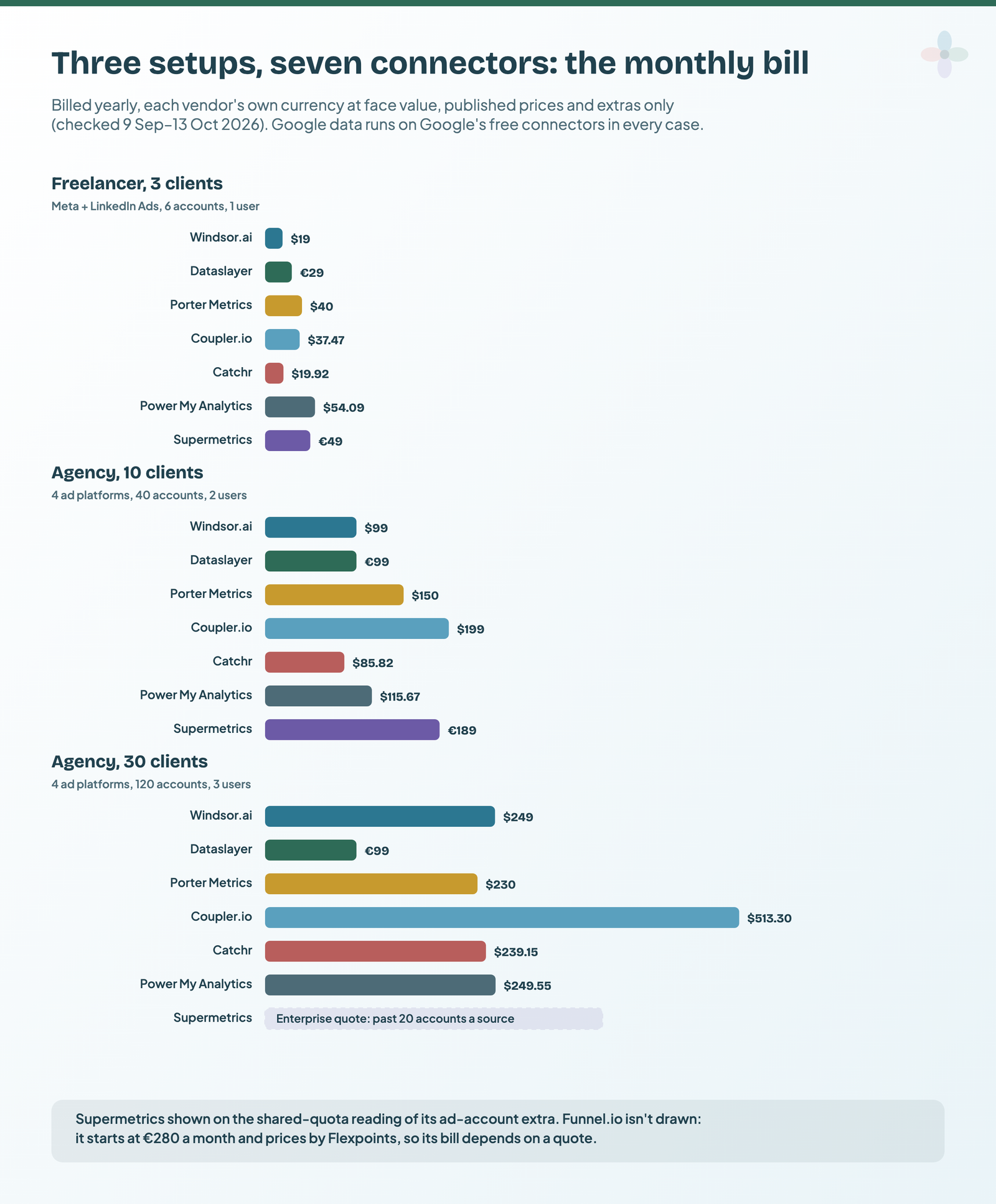
| Tool | Freelancer: 3 clients, Meta + LinkedIn (6 accounts, 1 user) | Agency: 10 clients, 4 platforms (40 accounts, 2 users) | Agency: 30 clients, 4 platforms (120 accounts, 3 users) |
|---|---|---|---|
| Windsor.ai | $19 (Basic) | $99 (Standard: 4 sources) | $249 (Plus: 200 accounts) |
| Dataslayer | €29 (Starter) | €99 (Advanced) | €99 (Advanced: 50 per connector) |
| Porter Metrics | $40.00 | $150.00 | $230.00 |
| Coupler.io | $37.47 (Starter + 3 accounts) | $199 (Pro) | $513.30 (Pro + 70 accounts) |
| Catchr | $19.92 (Starter, $239/yr) | $85.82 (Momentum + 10 accounts) | $239.15 (Growth + 20 accounts, if packs apply on Growth) |
| Power My Analytics | $54.09 (Business + 1 account) | $115.67 (Grow + 3 accounts per source) | $249.55 (Pro + 10 accounts per source) |
| Supermetrics | €49 (Starter + 1 account) · €59 per-source reading | €189 (Growth + 3) · €279 per-source reading | Enterprise quote (past 20 accounts) |
| Funnel.io | From €280; setup B uses 550 Flexpoints on the published rates, and the included allowance per plan isn’t stated | ||
Prices checked 9 September–13 October 2026. Every bill is base plan plus published extras; the arithmetic is in the notes for each tool above.
Three things stand out. Windsor is the cheapest for the freelancer, with Catchr close behind. At ten clients, Catchr’s Momentum plus one account pack is the lowest bill, with Windsor and Dataslayer next; at thirty, Dataslayer’s Advanced plan is, because 50 accounts per connector covers 30 clients. And Supermetrics at ten clients (€189 on the docs’ reading) is now closer to the field than its reputation suggests; at thirty, it’s a quote.
Name the limit you’ve hit, and the alternative follows
People rarely leave because the connectors are bad. They leave over a specific limit or cost. Find yours in the left column:
| If your problem with Supermetrics is… | Look at | Why |
|---|---|---|
| You only report Google data | Google’s own connectors | Free and maintained by Google |
| The account quota (many clients) | Windsor.ai; Dataslayer Advanced | 75 pooled accounts at $19; 50 per connector at €99 |
| The price, but you like how it works | Dataslayer | Same structure, €29 for 3 × 3 |
| Paying for capacity you don’t use | Porter Metrics | Per account, from $12.50 billed annually |
| Seats (Starter has one, Growth two) | Windsor.ai, Porter Metrics, Catchr | Unlimited users on every paid plan |
| A second destination (+€49 or +€149) | Windsor.ai, Porter Metrics | Destinations not counted / all included |
| A missing connector | Coupler.io; Power My Analytics | 440 sources on every plan; 80+ with unlimited sources |
| You want AI assistants on the same data | Catchr; Windsor.ai; Porter Metrics; Power My Analytics; Dataslayer | MCP on every plan (on Dataslayer’s paid plans, as the one destination) |
| The pipeline itself (scale, governance) | Funnel.io | A data hub with storage and harmonisation |
When to stay with Supermetrics
Switching connectors means rebuilding every data source in every report and re-checking every calculated field. On an agency account with a dozen reports, that’s a project in itself. Stay if:
- You’re a 7–20-client agency on mainstream platforms. Growth plus extras covers up to 20 accounts a platform at a published price, and none of the mainstream ad platforms is a Premium connector.
- You need a source only Supermetrics has in its 177-entry grid, or one of its templates is the backbone of your reporting.
- Your team is already trained on it. Consistency across an organisation is worth more than a modest price difference.
Before migrating, check whether you can just downgrade
- Move Google sources onto Google’s free connectors. Each one frees a source slot.
- Drop the second destination if the Sheets export is habit: €49 a month on Starter, €149 on Growth, billed yearly.
- Prune accounts you no longer report on; they count against the quota.
- Re-price on today’s list. Pro is gone; Growth plus extras may cost less than your current plan.
If that brings you back inside a plan you’re happy with, you’ve saved the money without the migration and kept the connector maintenance that’s the reason to be on Supermetrics in the first place.
What gets sold as an alternative but isn’t one
Agency reporting platforms (AgencyAnalytics, Databox, DashThis, Whatagraph) replace Supermetrics and Data Studio, because each brings its own dashboard builder. If you’re happy with your Data Studio reports, that’s a migration, not a substitution. That trade-off has its own comparison, including when the platform is the better buy.
Warehouse pipelines (Fivetran, Airbyte and similar) are a different job at a different price, and you’d still want Data Studio on top to read the warehouse.
Manual exports to Sheets. Free, and quietly wrong the first month somebody forgets. The chart keeps rendering, so nobody notices.
Before you cancel anything
- List every source you connect; mark the ones Google covers natively and move those first
- Count individual accounts per platform, not platforms: that’s what most of these tools meter
- Check the replacement connects to each remaining source by name, in its own directory
- Run the trial with your real accounts connected: Windsor 30 days, Dataslayer 15, Porter 14, Catchr 14, Power My Analytics 14, Coupler 7
- Rebuild one report on the new connector before touching the rest
- Check refund terms before paying: Windsor says all sales are final; Supermetrics doesn’t refund the remaining days when you cancel
- Set the migration time honestly against twelve months of the price difference
How this comparison was researched
I didn’t run hands-on tests for this update; test accounts weren’t available, and I’ve said so wherever it matters. Instead:
- Pricing: Supermetrics’, Dataslayer’s and Power My Analytics’ pricing pages read in a browser on 13 October 2026 with both billing toggles; the other vendors from the pricing ledgers behind this cluster, checked between 9 September and 13 October 2026; every pricing page screenshotted as shown.
- Reviews: coded samples per tool (Supermetrics 45, Windsor.ai 40, Porter Metrics 40, Dataslayer 38, Coupler.io 36, Funnel.io 30, Catchr 3), with ratings from G2, Capterra, Trustpilot and the Workspace Marketplace.
- Forums: 14 dated Reddit threads on Supermetrics and more per tool, through Google’s snippets.
- Ranking articles: the top results for “supermetrics alternatives”, including which tools they name and how often, each checked against the vendors’ current pages.
Frequently asked questions
What is the cheapest Supermetrics alternative for Data Studio?
For Google-only reporting, Google’s own connectors, which are free. For a freelancer with a few clients on Meta and LinkedIn, Windsor.ai at $19 a month billed annually (75 accounts) or Catchr at $239 a year. For a ten-client agency on four platforms, Catchr’s Momentum plus one account pack ($85.82 a month billed yearly), with Windsor.ai and Dataslayer at $99 and €99. At thirty clients, Dataslayer Advanced at €99 a month billed annually, with 50 accounts per connector.
Is there a free alternative to Supermetrics?
For GA4, Search Console, Google Ads, Sheets and YouTube, yes: Google’s own Data Studio connectors are free. Windsor.ai, Dataslayer, Porter Metrics and Coupler.io have free plans, but they’re limited to one source or account, read-only use or manual refresh, so they’re for testing rather than client reporting.
Is Dataslayer cheaper than Supermetrics?
On the EUR price lists I read on 13 October 2026, yes. Dataslayer Starter is €29 a month billed annually for 3 connectors × 3 accounts, against Supermetrics Starter at €39 for 2 × 2. Dataslayer Advanced is €99 for 7 connectors × 50 accounts and 10 users, against Supermetrics Growth at €159 for 7 × 7 and 2 users.
Why does Supermetrics get so expensive for agencies?
Because it meters accounts per data source, users and destinations separately. On Growth, the eighth account on each platform is an extra, a third user is +€99 a month billed yearly, and a second destination is +€149. Past 20 accounts on a platform, it’s an Enterprise quote.
Did Supermetrics drop its Pro plan?
Yes, on its pricing page. As of 13 October 2026 it shows Starter, Growth and Enterprise. Pro (€399 billed yearly, €499 monthly) was listed until at least 9 September 2026.
Can I switch from Supermetrics without rebuilding my reports?
No. Changing connector means recreating every data source and re-pointing every chart and calculated field that uses it. Dataslayer offers an “Import data from Supermetrics” option on paid plans, but check what it covers in the trial. Before migrating, try moving Google sources to Google’s free connectors and dropping any second destination.
What’s the difference between Funnel.io and Supermetrics?
Supermetrics connects sources to tools like Data Studio, with warehouses on Enterprise. Funnel.io stores and harmonises the data first, then feeds Data Studio and other destinations. Funnel starts at €280 a month billed annually, through a demo; Supermetrics starts at €39.
Where to go next
- Supermetrics pricing: what it costs at your size
- Porter Metrics vs Windsor.ai vs Supermetrics
- Data Studio connectors compared
- AgencyAnalytics alternatives
- Marketing reporting tools compared
- The best free Data Studio templates
Some links in this post are affiliate links: if you sign up through one, I may earn a commission at no extra cost to you. How I work with partners.