
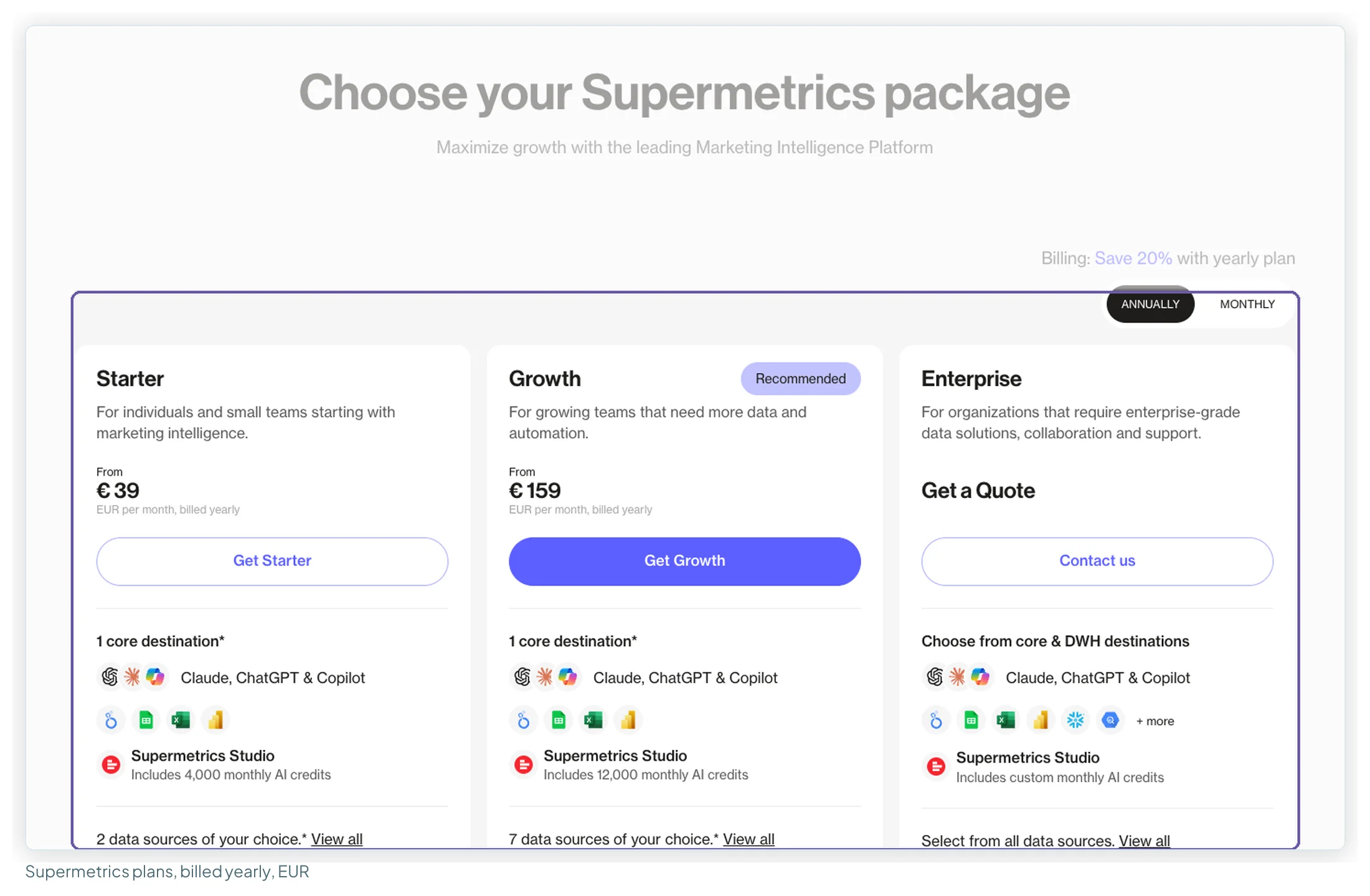
Supermetrics pricing starts at €39 a month billed yearly (€49 billed monthly) for Starter and €159 (€199) for Growth; Enterprise is quote-only. Those are the EUR prices on Supermetrics’ own pricing page, which I read with both billing toggles on 13 October 2026. What you actually pay depends on four limits (data sources, accounts per source, users and destinations) and the extras that lift them, so on the same price list a freelancer might pay €49 a month and an in-house team €407 (both billed yearly).
This guide covers the plans as they stand after Supermetrics’ autumn 2026 changes, every extra and what each limit counts, five worked bills from a freelancer to a 30-client agency, what reviewers and forum threads say, the gotchas, support and cancellation terms, and when another tool is the better buy.
Price your own setup. The reporting cost calculator runs these numbers for your clients, platforms and billing, with every route side by side.
Is Supermetrics worth it? The short verdict
For an agency or in-house team that reports in Data Studio across several non-Google ad platforms and wants the connectors maintained for them, yes: the bill is fixed, the connector list is long, and Growth covers a ten-client agency for €189 a month billed yearly if extra accounts apply across all sources, as Supermetrics’ docs suggest (€279 if they’re bought per source; Supermetrics doesn’t say). For a solo marketer who mostly needs Google data, no: Google’s own connectors are free, and Starter’s two sources and one user fill up quickly.
| Verdict box | Supermetrics, EUR price list, 13 October 2026 |
|---|---|
| Best for | Agencies and in-house teams reporting across 3–7 paid platforms, with up to 20 accounts on each |
| Not for | Google-only reporting (free natively), one person on a tight budget, or agencies past 20 accounts on a platform |
| Price from | €39/mo billed yearly, €49 billed monthly (Starter) |
| Free plan / trial | No free plan. 14-day trial of any connector or destination, no card |
| Ratings | G2 4.4 (824 reviews) · Capterra 4.4 (109) · Trustpilot 1.5 (31) |
| Our test rating | None yet: no hands-on test this round (see how this guide was researched) |
What changed in Supermetrics’ pricing in autumn 2026
If you’ve read a Supermetrics pricing article before, check its date. Between 9 September and 13 October 2026 the pricing page changed shape, and most articles ranking for “supermetrics pricing” still describe the old one.
| Until September 2026 | 13 October 2026 (EUR view) | |
|---|---|---|
| Plans | Starter, Growth, Pro, Enterprise | Starter, Growth, Enterprise. Pro is gone |
| Pro | €399 yearly, €499 monthly; 10 sources, 10 accounts each, 3 users | Not offered |
| Starter limits | 3 data sources × 3 accounts each | 2 data sources × 2 accounts each, same price |
| Extras | Our 9 September read recorded destination and user extras (incl. +€37 a seat on Starter); a May 2026 article shows source and account extras with higher Starter ceilings | Destination, user (Growth only), data source and ad account extras, each with an “up to” ceiling; Starter capped at 3 sources and 3 accounts; no extra users on Starter |
| Refresh row | Weekly / daily / hourly, marked “(Google Sheets only)” | Removed from the plan table |
| Row caps | 50,000 API rows/mo on Starter; fair-usage caps listed | No longer on the page; whether the limits changed isn’t stated |
| AI | MCP listed for AI assistants | Claude, ChatGPT and Copilot listed as core destinations; MCP not listed against any plan |
Supermetrics’ MCP server, which lets an AI assistant query your marketing data, is now a standalone product “included in all Supermetrics plans that include Data API access”, which the pricing page ticks for Enterprise only. Starter and Growth reach it through the AI chats destination, and it can also create, update, pause and remove campaigns, ad groups and ads on seven ad platforms, in early access (marketing data MCP servers compared).
Supermetrics’ docs also mention an earlier package change in November 2024, with an “Upgrade to new subscription” route for customers still on old packages. So if your invoice doesn’t match anything below, you may be on a legacy plan.
The Supermetrics plans and prices, billed yearly and monthly
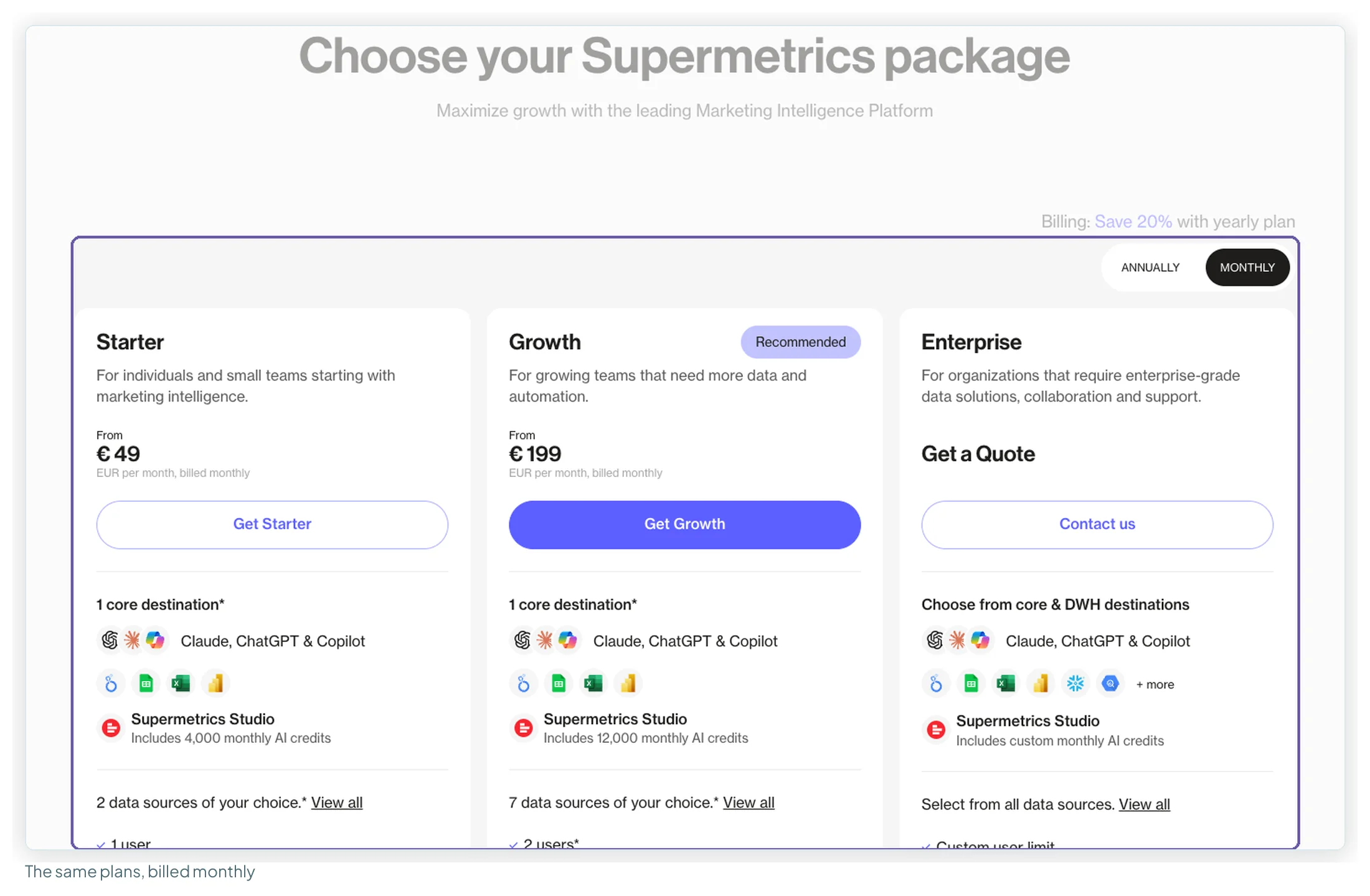
All figures are from Supermetrics’ own pricing page, read on 13 October 2026 with each billing toggle in turn. Prices are in euros; the page served to me has no currency switch.
| Plan | Billed yearly | Billed monthly | Data sources | Accounts per source | Users | Destinations | AI credits / month |
|---|---|---|---|---|---|---|---|
| Starter | €39/mo | €49/mo | 2 | 2 | 1 | 1 core | 4,000 |
| Growth | €159/mo | €199/mo | 7 | 7 | 2 | 1 core | 12,000 |
| Enterprise | Quote only | All | Custom | Custom | Core + data warehouses | Custom | |
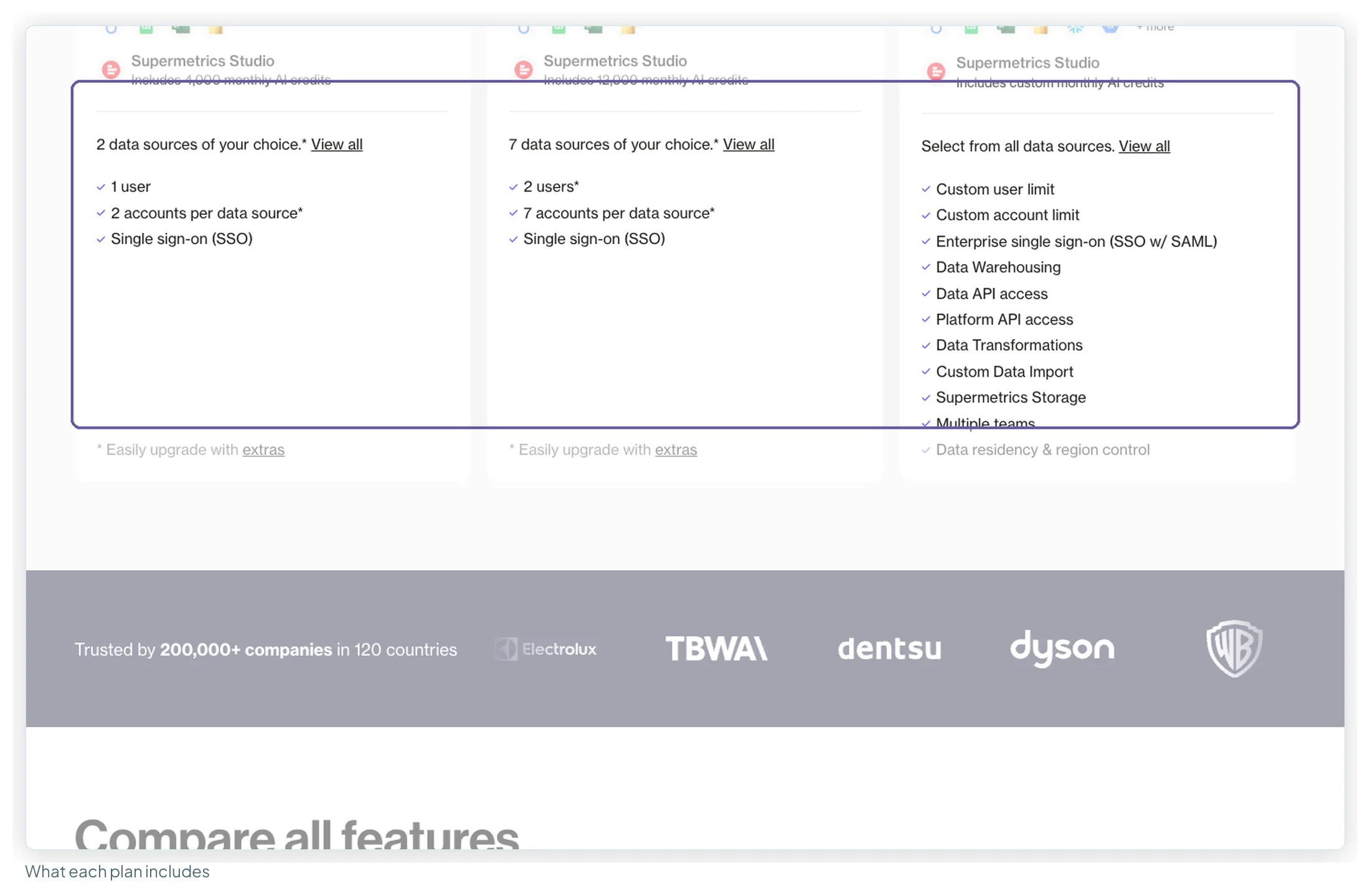
A few things the cards say that matter more than they look:
- “1 core destination”. A destination is where the data lands: Data Studio, Google Sheets, Excel, Power BI, Supermetrics Studio, or an AI assistant (Claude, ChatGPT, Copilot). Every self-serve plan includes one. Data Studio and Sheets is two.
- “2 data sources of your choice”. A data source is a platform: Facebook Ads, LinkedIn Ads, Shopify. Not an account.
- AI credits are for Supermetrics Studio, its own AI analysis destination. The FAQ calls them “the one metered element”; everything else is fixed price, and Supermetrics says it doesn’t bill for the volume of data you move.
- Warehouses (BigQuery, Snowflake, Amazon Redshift), Data API and Platform API access, data transformations and Supermetrics Storage are Enterprise features in the published packages. Growth gets “Limited access” to Custom Data Import.
Is Supermetrics free? No, but there’s a 14-day trial of any connector or destination with no card details asked, and the cancellation docs confirm it ends on its own without a charge.
What each plan costs over a year
Twelve months at each rate, before any extra:
| Plan | Paid yearly | Paid monthly | Yearly billing saves |
|---|---|---|---|
| Starter | €468/yr | €588/yr | €120 |
| Growth | €1,908/yr | €2,388/yr | €480 |
The step from Starter to Growth is €120 a month at yearly rates, €1,440 a year. As the next section shows, the extras let you stretch Starter a little before you take that step.
Every Supermetrics extra, what it costs and how far it goes
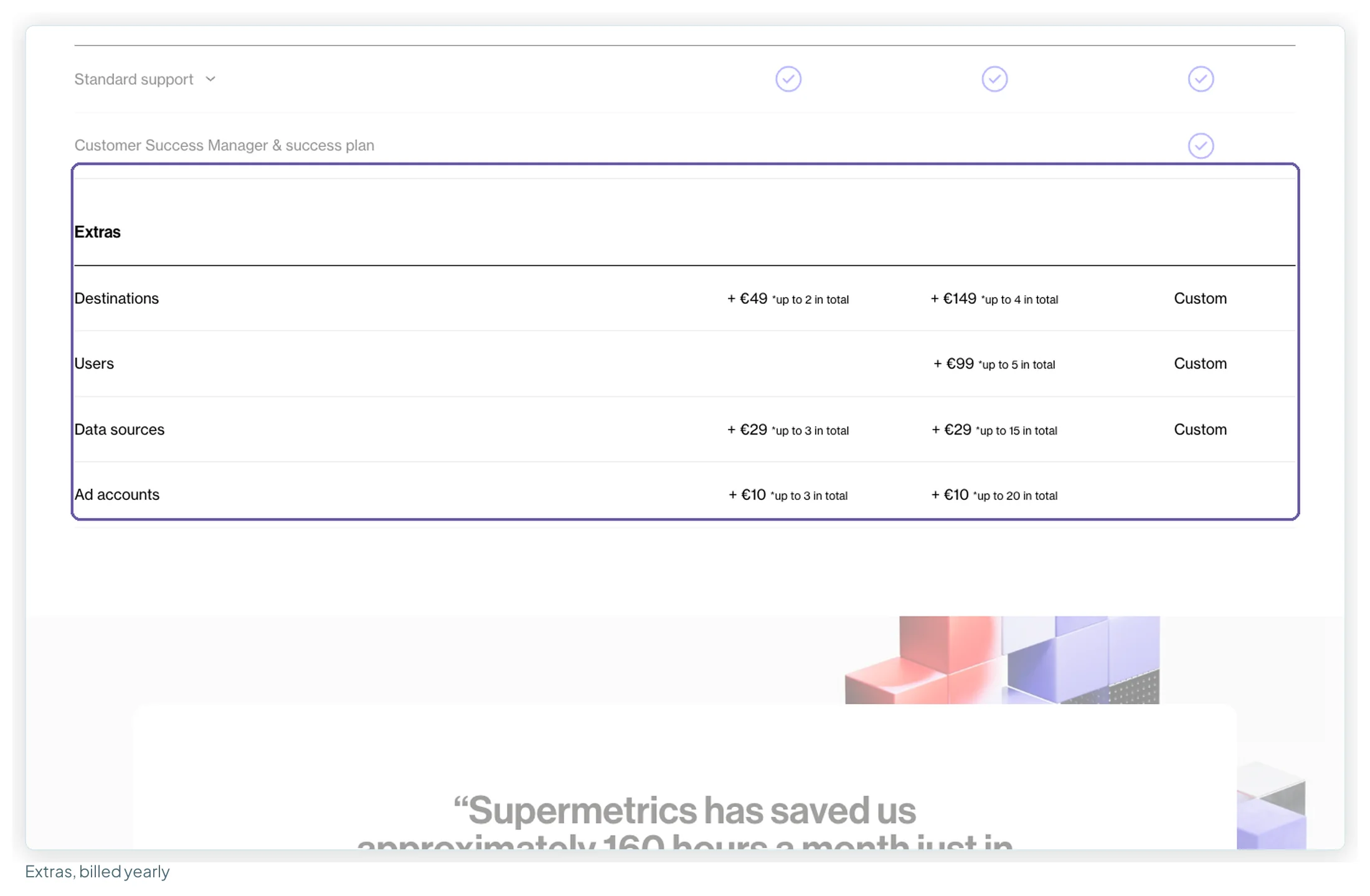
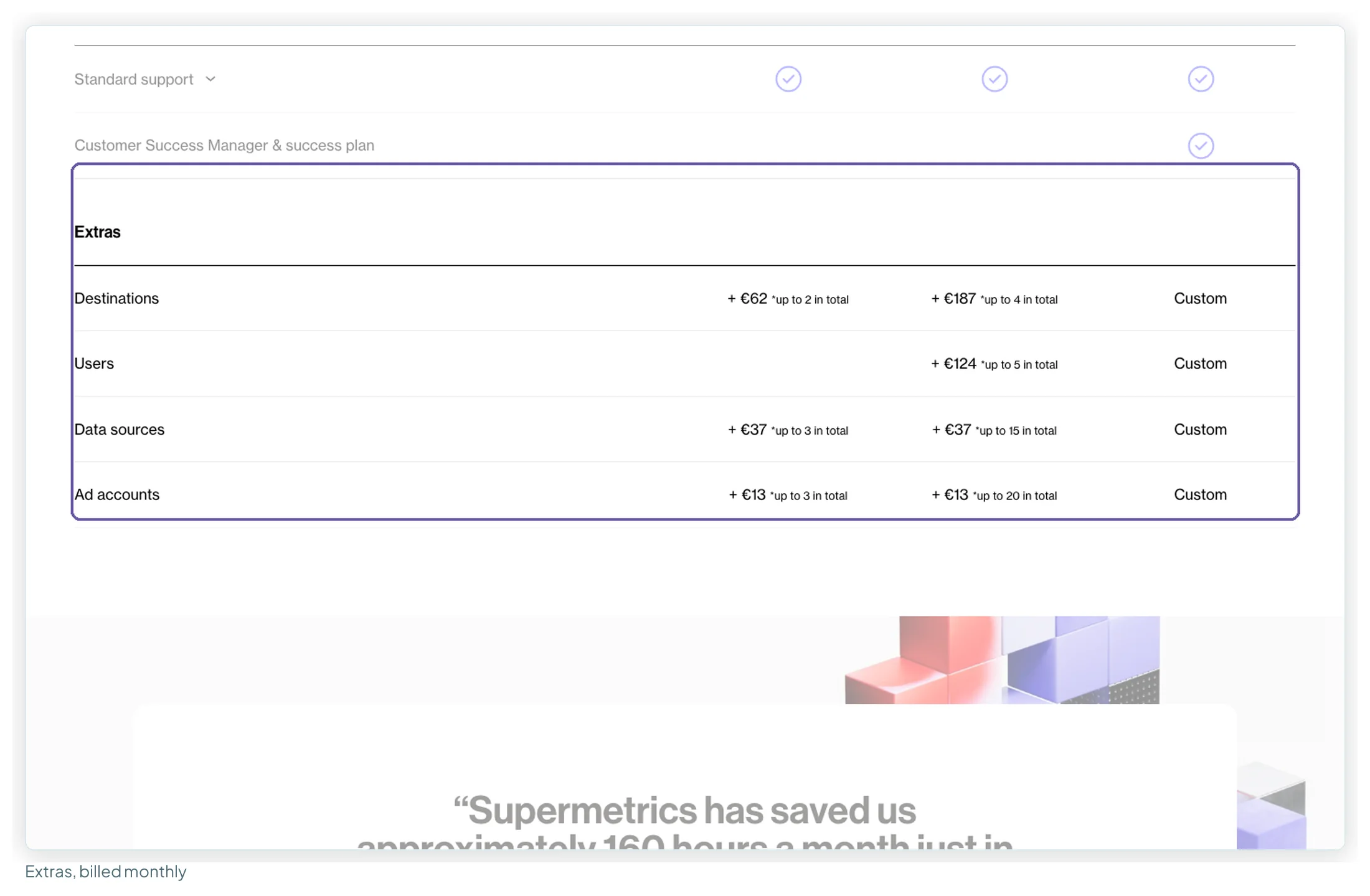
The extras are where the real bill is made. Each one is priced per unit per month and capped at an “up to N in total” ceiling. I read them in the “Compare all features” table with each billing toggle:
| Extra | Starter, billed yearly | Starter, billed monthly | Starter ceiling | Growth, billed yearly | Growth, billed monthly | Growth ceiling |
|---|---|---|---|---|---|---|
| Destination | +€49 | +€62 | up to 2 | +€149 | +€187 | up to 4 |
| User | Not available on Starter | +€99 | +€124 | up to 5 | ||
| Data source | +€29 | +€37 | up to 3 | +€29 | +€37 | up to 15 |
| Ad account | +€10 | +€13 | up to 3 | +€10 | +€13 | up to 20 |
Two consequences:
- Starter has a hard ceiling. Fully extended, it’s 3 sources, 3 accounts, 2 destinations and still one user: €127 a month billed yearly (€161 monthly). Anything with a second person goes to Growth.
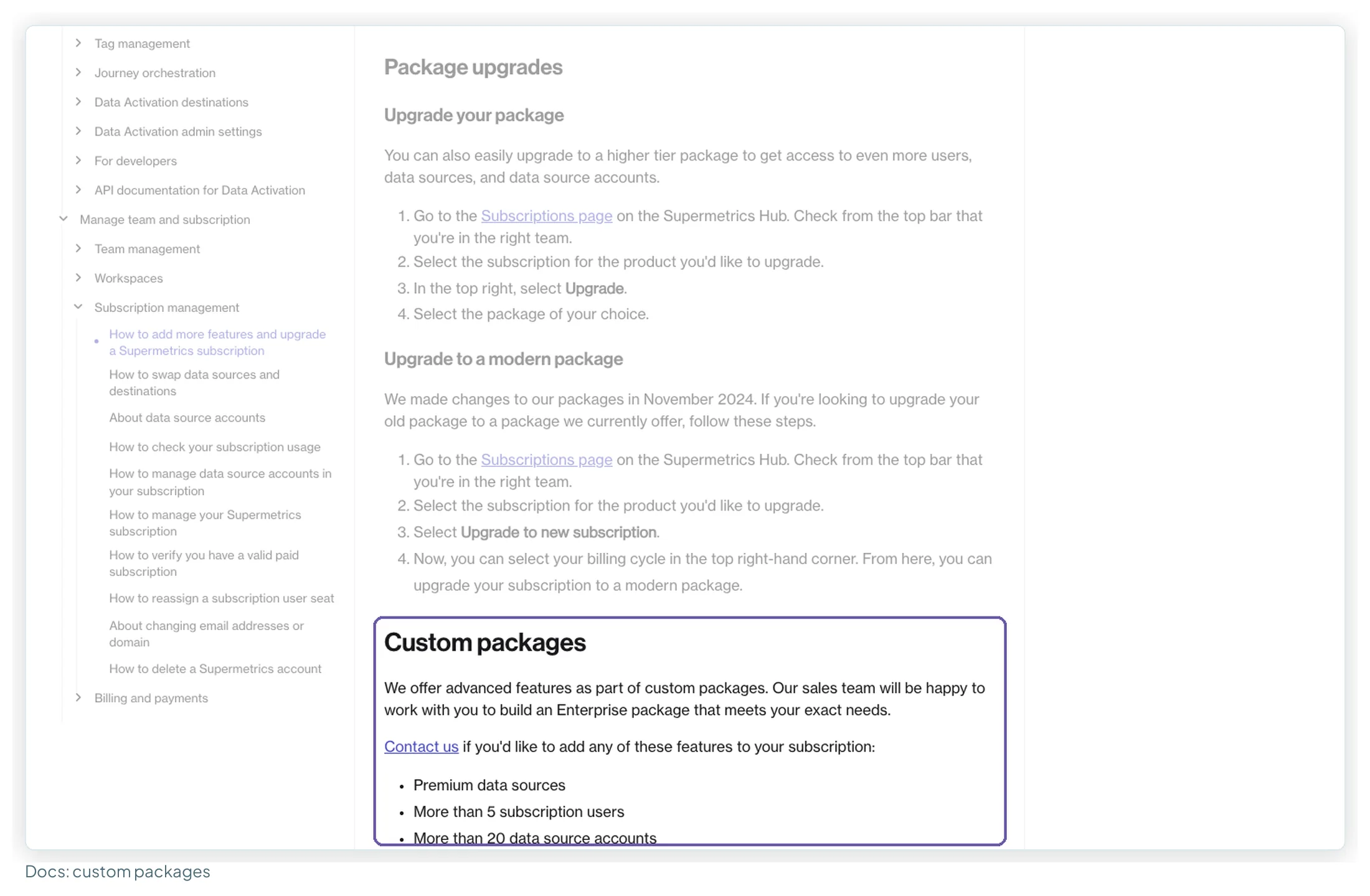
- Growth has one too. At its ceilings (4 destinations, 5 users, 15 sources, 20 accounts) it would come to €1,265 a month billed yearly, €1,597 monthly, on the shared-quota reading explained below. Past that, the docs send you to sales: custom packages cover premium data sources, more than 5 users and more than 20 data source accounts.
What each Supermetrics limit counts
This decides most bills. Supermetrics meters four separate things:
| Limit | What one unit is | Example |
|---|---|---|
| Data source | A platform you connect | Facebook Ads, LinkedIn Ads and Shopify are three |
| Data source account | The unit inside a platform: an ad account, a GA4 property, an Instagram profile | Three clients’ Facebook ad accounts are three accounts on one source |
| User | A person with a Supermetrics login on the subscription | Two analysts building reports are two users |
| Destination | Where the data goes | Data Studio plus Google Sheets is two |
The pricing FAQ still defines a Google Analytics account as “a view”, which is Universal Analytics wording; the accounts article in the docs, updated on 13 October 2026, uses the GA4 property instead. A connection on its own doesn’t count, only the accounts it pulls.
Are accounts counted per source or across all of them?
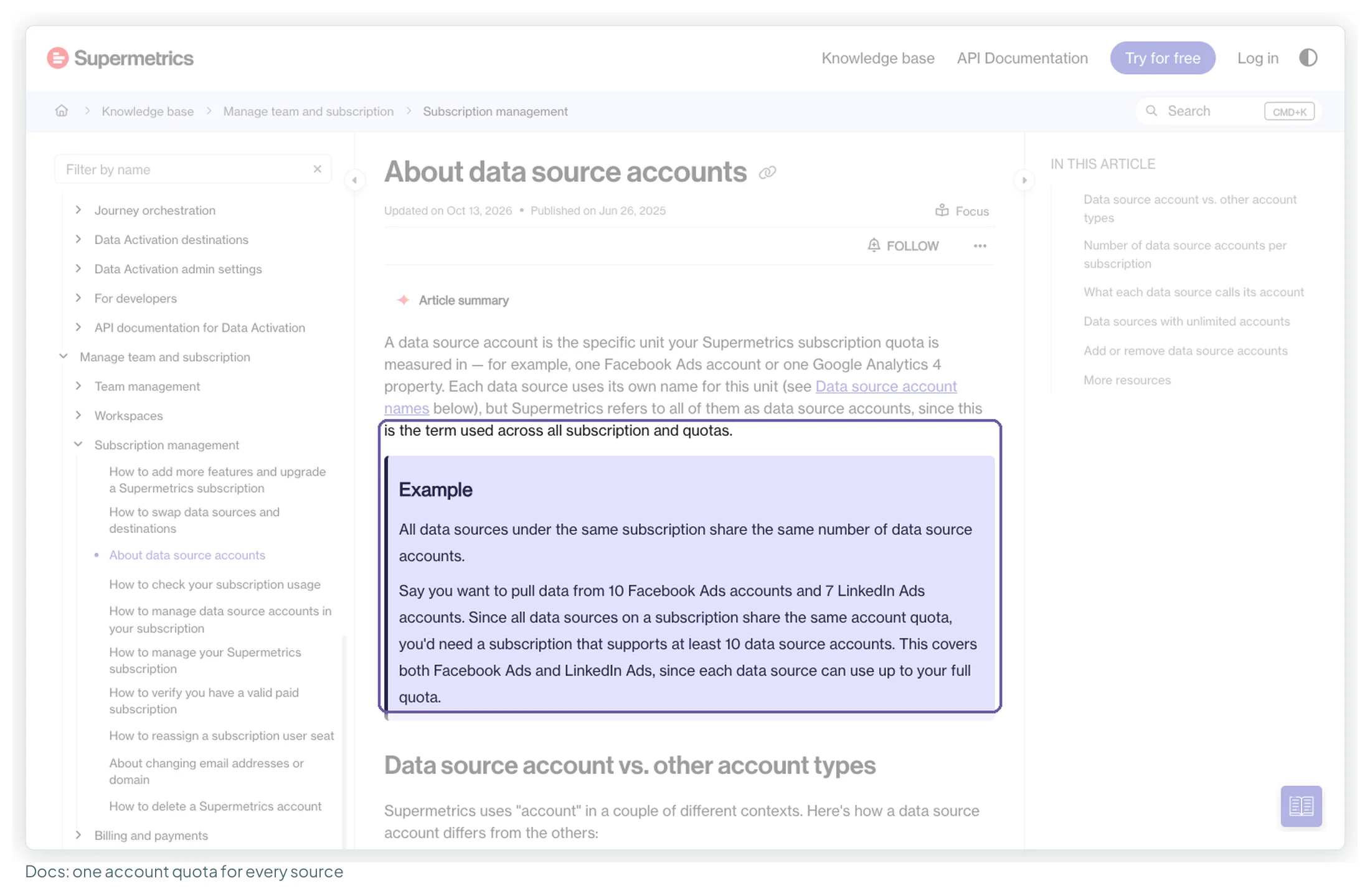
The plan cards say “accounts per data source”. The docs explain what that means: all data sources on a subscription share the same number of accounts, and each source can use up to that number. Their own example is 10 Facebook Ads accounts and 7 LinkedIn Ads accounts, which needs a subscription that supports at least 10.
What the pricing page does not say is what one extra “ad account” buys. There are two readings, and they price an agency very differently:
- Shared quota. One extra lifts the per-source number for every source on the subscription. This matches the docs: one quota for all sources, and the upgrade steps say only “select the number of accounts and proceed to payment”, with no source to pick.
- Bought per data source. One extra adds one account to one source, so lifting four sources by three accounts each takes twelve extras.
Supermetrics doesn’t state which applies, so every worked bill below shows both where they differ. The docs point to the first. If you’re near the ceiling, ask before you buy. The “up to 20 in total” ceiling on Growth has a similar gap: one docs article says to contact sales for “more than 20 additional data source accounts”, another for “more than 20 data source accounts”, so it isn’t settled whether 20 is the quota or the number of extras.
One more detail that saves money: some sources have unlimited accounts on any subscription. The docs list them, and they include YouTube, TikTok Organic, Mailchimp, Ahrefs, Semrush Analytics, Moz and Google PageSpeed Insights. Ten YouTube channels don’t touch your account quota.
Why your Supermetrics price list may look different
The EUR page I read may not be the only version. Third-party sources report a different US price list, with different limits as well as a different currency; I haven’t been able to load it live. Coupler’s pricing article (7 October 2026) quotes a US list with Starter at $44 a month billed annually for 3 data sources × 3 accounts, and Growth at $177 with 6 sources; Google’s AI Overview quotes the same $44 Starter. Internet Archive copies of Supermetrics’ pricing page, as served to the archive’s crawler on 11 September and 5 October 2026, show that list too. A pricing tracker dates a US Starter rise from $37 to $44 (yearly) to 5 May 2026.
| EUR list (read by me, 13 Oct 2026) | US list (reported by third parties, not read live) | |
|---|---|---|
| Starter price | €39 billed yearly, €49 monthly | $44 billed annually, $55 monthly |
| Starter limits | 2 data sources × 2 accounts; no extra users | 3 data sources × 3 accounts; extra user +$37 a month billed yearly |
| Growth | €159 yearly, €199 monthly; 7 sources × 7 accounts | $177 billed annually ($222 monthly); 6 sources × 7 accounts; extras up to 9 sources and 15 accounts |
| Source | supermetrics.com/pricing, both toggles | Coupler (7 Oct 2026), Google’s AI Overview, pricingsaas.com, Internet Archive copies (11 Sep, 5 Oct 2026) |
I couldn’t load the US page from a US session, so I quote EUR throughout and treat the dollar figures as reported, not verified. Two practical points follow:
- Check which version you’re looking at before you compare with an article. At least two ranking pages appear to print the EUR prices with a dollar sign ($39, $159, $399).
- The arithmetic in this guide works the same way on either list: base plan, plus extras, plus the per-source quota. Swap in the numbers your page shows.
How Supermetrics works with Data Studio, and what you’re paying for
Supermetrics is a connector: the piece that pulls data from a platform into a tool that can chart it. In Data Studio, it appears as a set of partner connectors in the connector gallery, one per source. You authorise each platform once in the Supermetrics Hub, then pick the Supermetrics connector in Data Studio and choose accounts and fields. Data Studio still builds the dashboard; Supermetrics fetches the numbers.
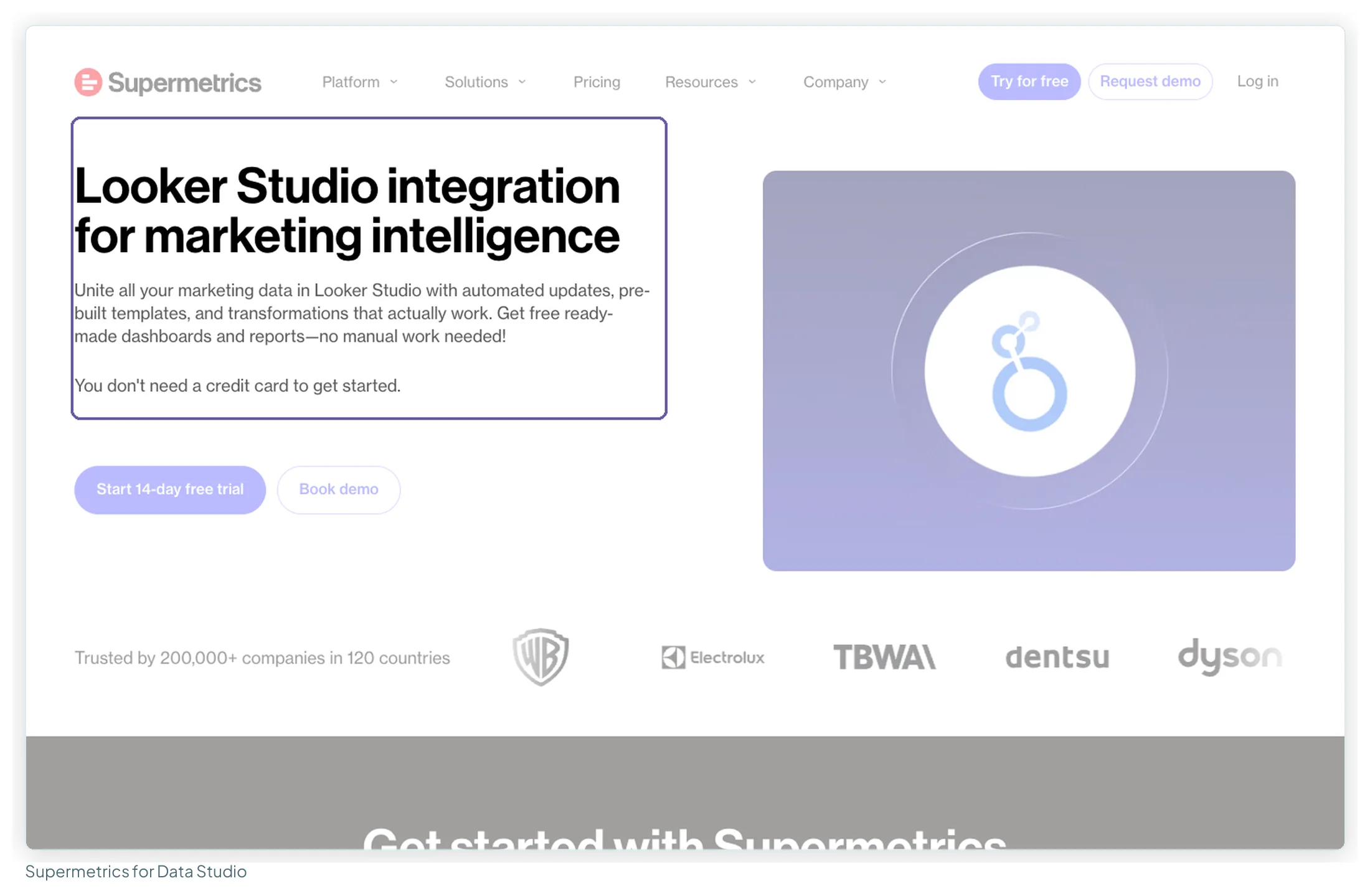
One thing trips agencies up: the docs say you must log in to Data Studio with the same email as your Supermetrics subscription. Use another Google account and a new trial is created instead of using your licence.
What the subscription buys, in practice:
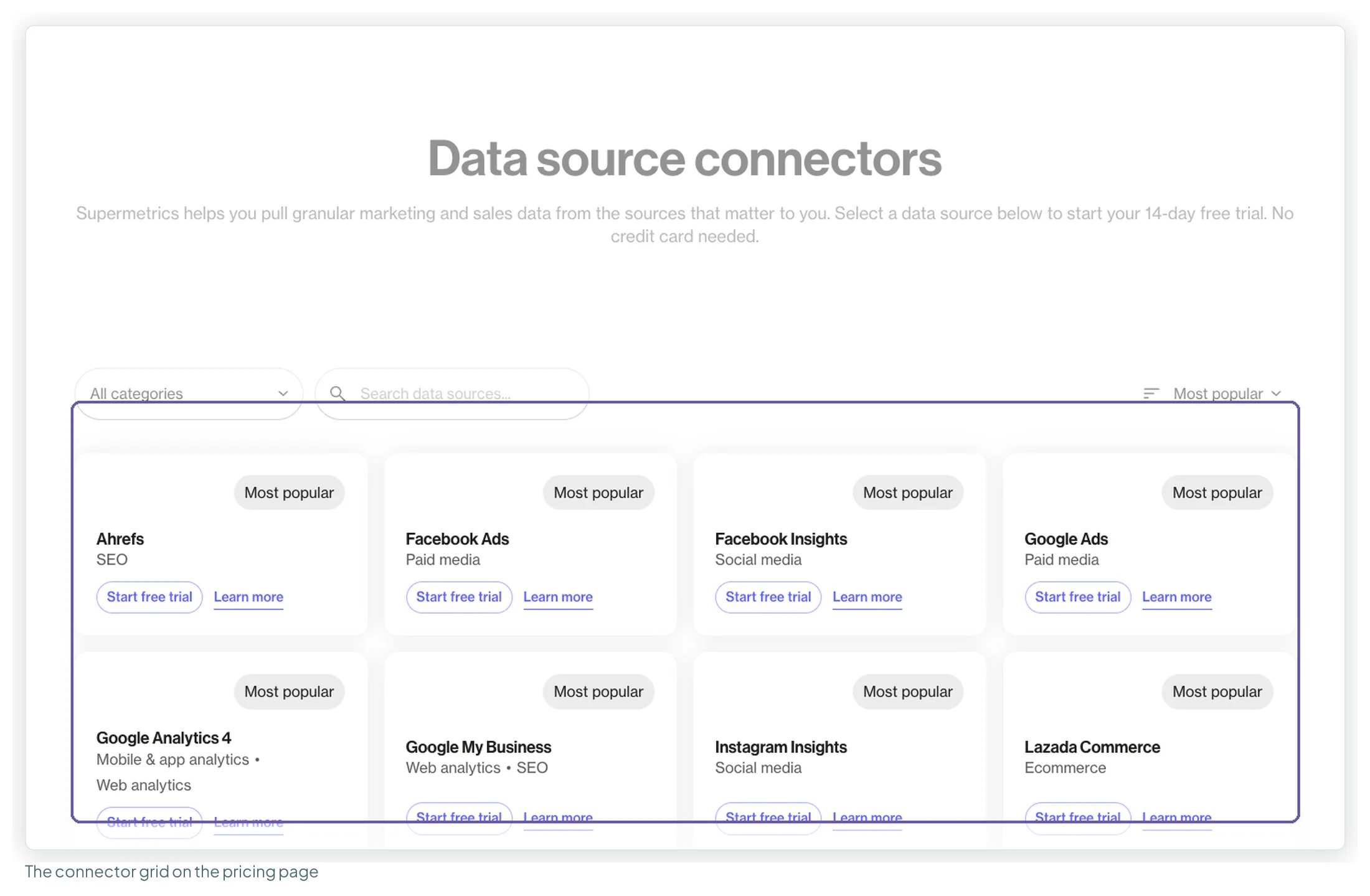
- Coverage. The connector grid on the pricing page lists 177 entries when expanded, 38 tagged Premium and 21 Early access (parsed on 13 October 2026). Supermetrics doesn’t publish a single connector count on these pages any more. None of the marketer staples is Premium: GA4, Search Console, Google Ads, Facebook Ads, LinkedIn Ads, TikTok Ads, Microsoft Advertising, Pinterest Ads, Amazon Ads, Shopify, HubSpot and Google Business Profile (listed as “Google My Business”) are all standard.
- Maintenance. Ad platform APIs change; someone else fixes the connector.
- A predictable bill. Fixed price, no data-volume charge, AI credits the only metered part. The page says Supermetrics is “trusted by 200,000+ companies in 120 countries”.
What Supermetrics costs at your size: five worked bills
Here’s the arithmetic for five setups, built only from the published prices above. In every case Google’s own data (GA4, Search Console, Google Ads) runs on Google’s free connectors, because paying a connector for GA4 spends a source slot on something Data Studio already does for free.
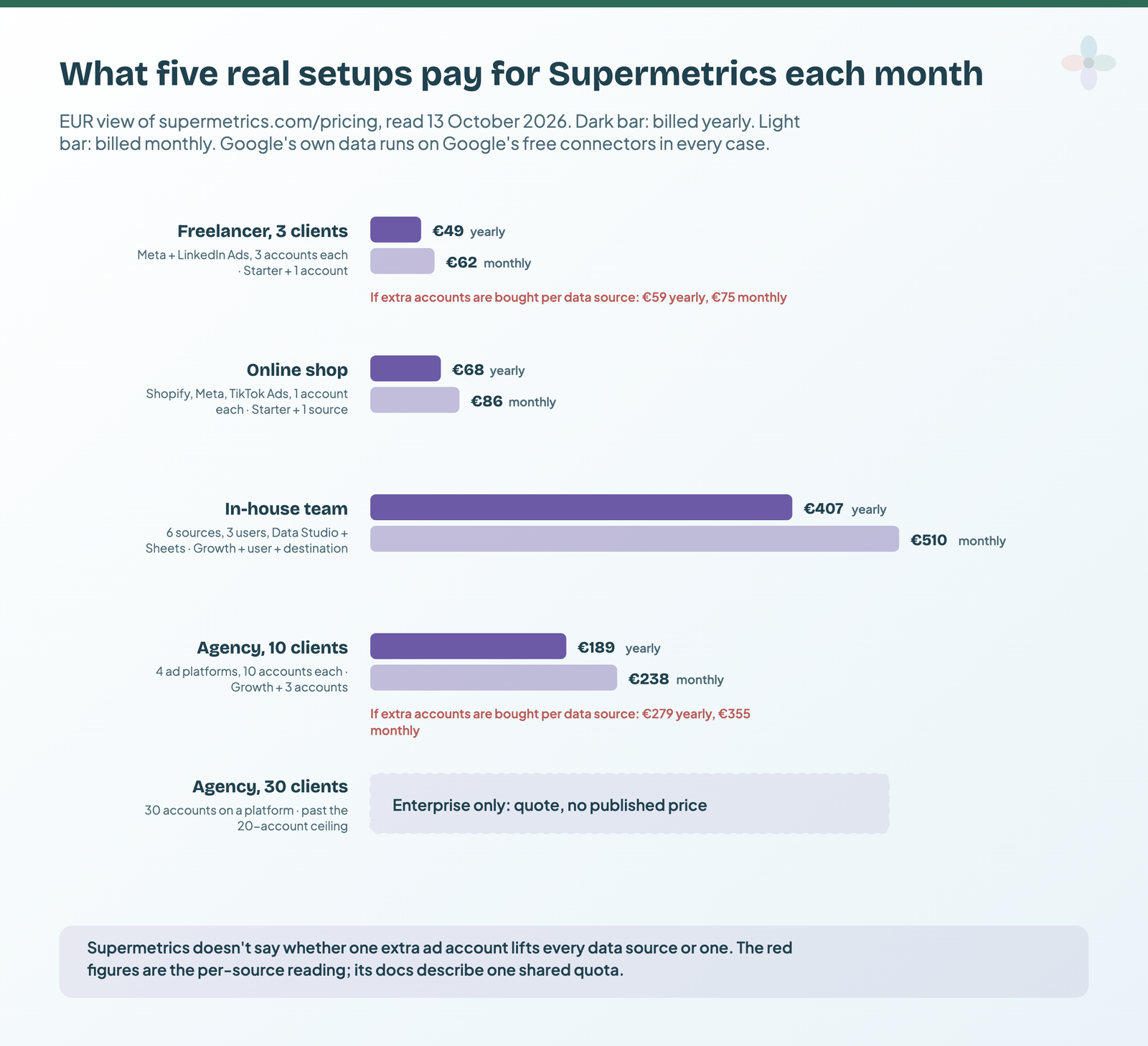
| Setup | What it needs | Plan and extras | Billed yearly | Billed monthly |
|---|---|---|---|---|
| Freelancer, 3 clients | Meta and LinkedIn Ads, 3 accounts on each; 1 user; Data Studio | Starter (2 × 2) + 1 ad account | €49 (shared quota) · €59 (per source) | €62 · €75 |
| Online shop | Shopify, Meta Ads, TikTok Ads, 1 account each; 1 user | Starter + 1 data source | €68 | €86 |
| In-house team | 6 non-Google sources, 1 account each; 3 users; Data Studio and Sheets | Growth + 1 user + 1 destination | €407 | €510 |
| Agency, 10 clients | Meta, LinkedIn, TikTok, Microsoft Ads, 10 accounts on each; 2 users; Data Studio | Growth + 3 ad accounts (shared) or + 12 (per source) | €189 · €279 | €238 · €355 |
| Agency, 30 clients | 30 accounts on at least one platform | Past Growth’s 20-account ceiling | Enterprise quote, no published price | |
Prices from Supermetrics’ pricing page (EUR view), checked 13 October 2026. Each row is the base plan plus the listed extras.
The freelancer: Starter, stretched by one account
Three clients on Meta and LinkedIn is two sources with three accounts on each. Starter covers two sources and two accounts, so you buy one ad account: €39 + €10 = €49 a month billed yearly, or €49 + €13 = €62 monthly. If an extra account only applies to one source, you’d need two, at €59 or €75. A fourth client breaks Starter’s ceiling of 3 accounts; so does a second person. Both mean Growth at €159.
The online shop: one source over
Shopify, Meta and TikTok Ads, one account each, is three sources. Starter plus one data source is €68 yearly or €86 monthly. Add Klaviyo or Pinterest and you’re past Starter’s three-source ceiling, which means Growth.
The in-house team: where users and destinations add up
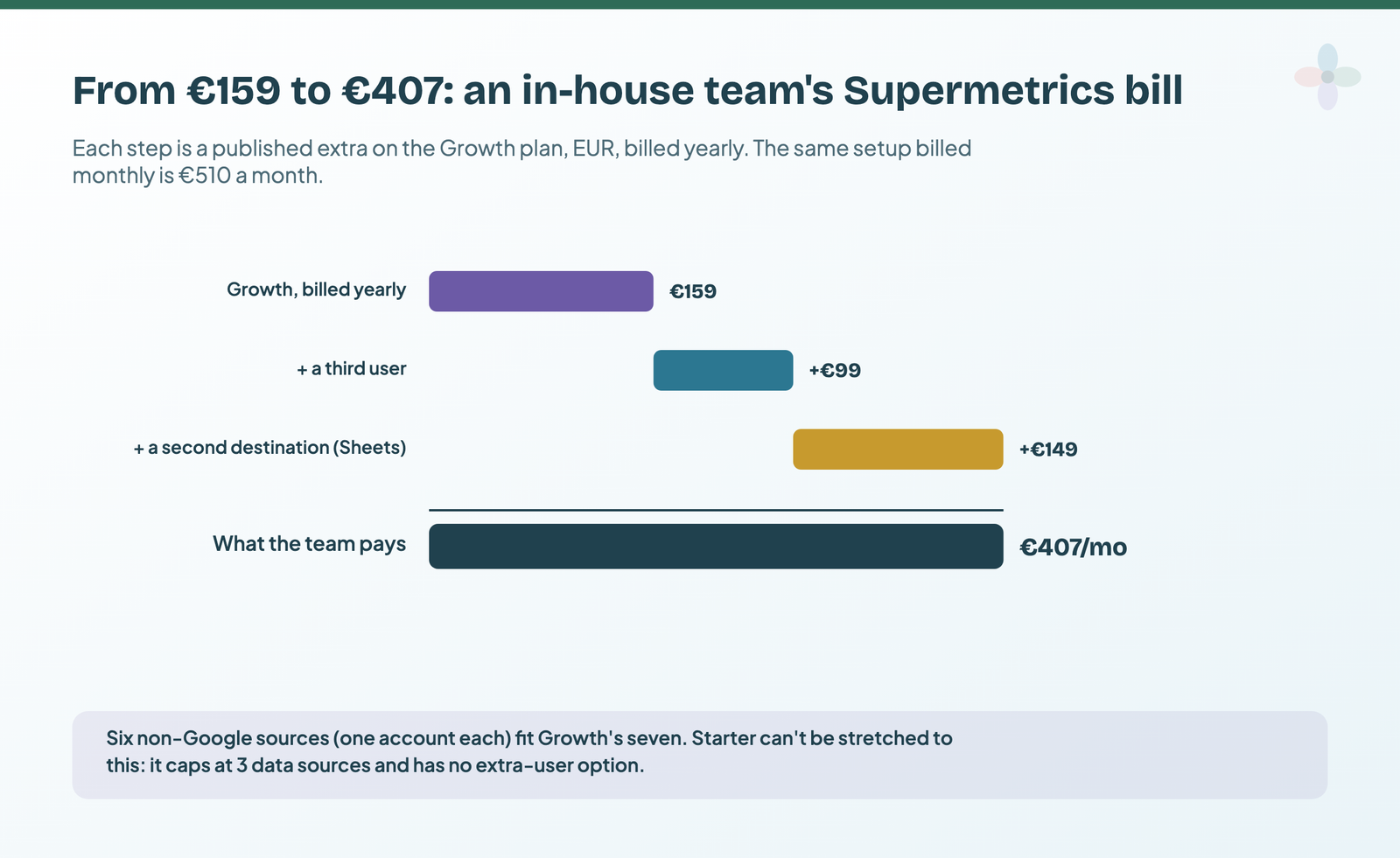
One brand rarely strains the account quota. Six non-Google sources fit Growth’s seven. The bill comes from people and destinations: Growth includes two users, and the third costs €99 a month billed yearly (€124 monthly). Reporting in Data Studio and also pulling into Google Sheets is a second destination, at €149 (€187). Drop the Sheets habit and the same team pays €258 yearly, €323 monthly.
The agency at 10 and 30 clients
Ten clients on four ad platforms needs ten accounts on each, against Growth’s seven. On the shared-quota reading that’s three extras: €159 + €30 = €189 a month billed yearly (€238 monthly). If accounts are bought per source, it’s twelve extras: €279 (€355). A third account manager adds €99 (€124) either way, which puts the shared-quota bill at €288 (€362).
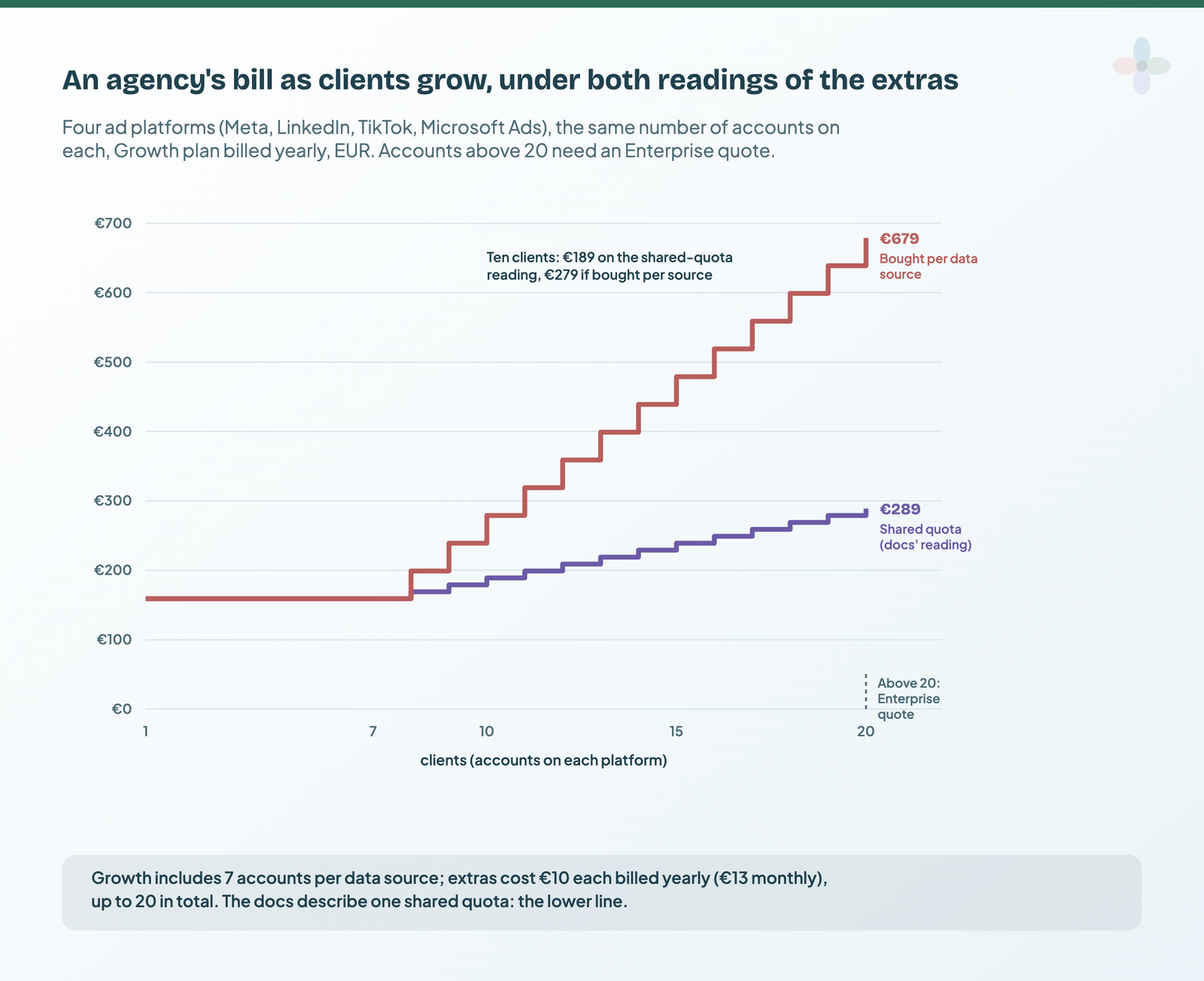
At thirty clients there’s no published price. Thirty accounts on a platform is past Growth’s “up to 20” ceiling, and the docs route anything over 20 data source accounts to a custom package. That’s the size at which agencies on forums start quoting figures like “$400-600+/month” (r/PPC, around March 2026), which I can’t verify.
The earlier version of this guide put a ten-client agency on Pro, at €399 a month billed yearly. Pro is gone, and Growth plus extras now covers that agency for €189 or €279. Whether the old list already offered account extras on Growth, I can’t confirm: my September notes don’t record them, but archived copies of the US page from the same weeks do.
The upgrade that doesn’t make a Data Studio report fresher
Older Supermetrics plans advertised weekly, daily and hourly refreshes by tier, and most pricing articles still present faster refresh as a reason to upgrade. In September the pricing page itself marked that ladder “(Google Sheets only)” and said Data Studio dashboards “are always updated on-demand”. The row has since gone, but the docs say the same thing in plainer terms:
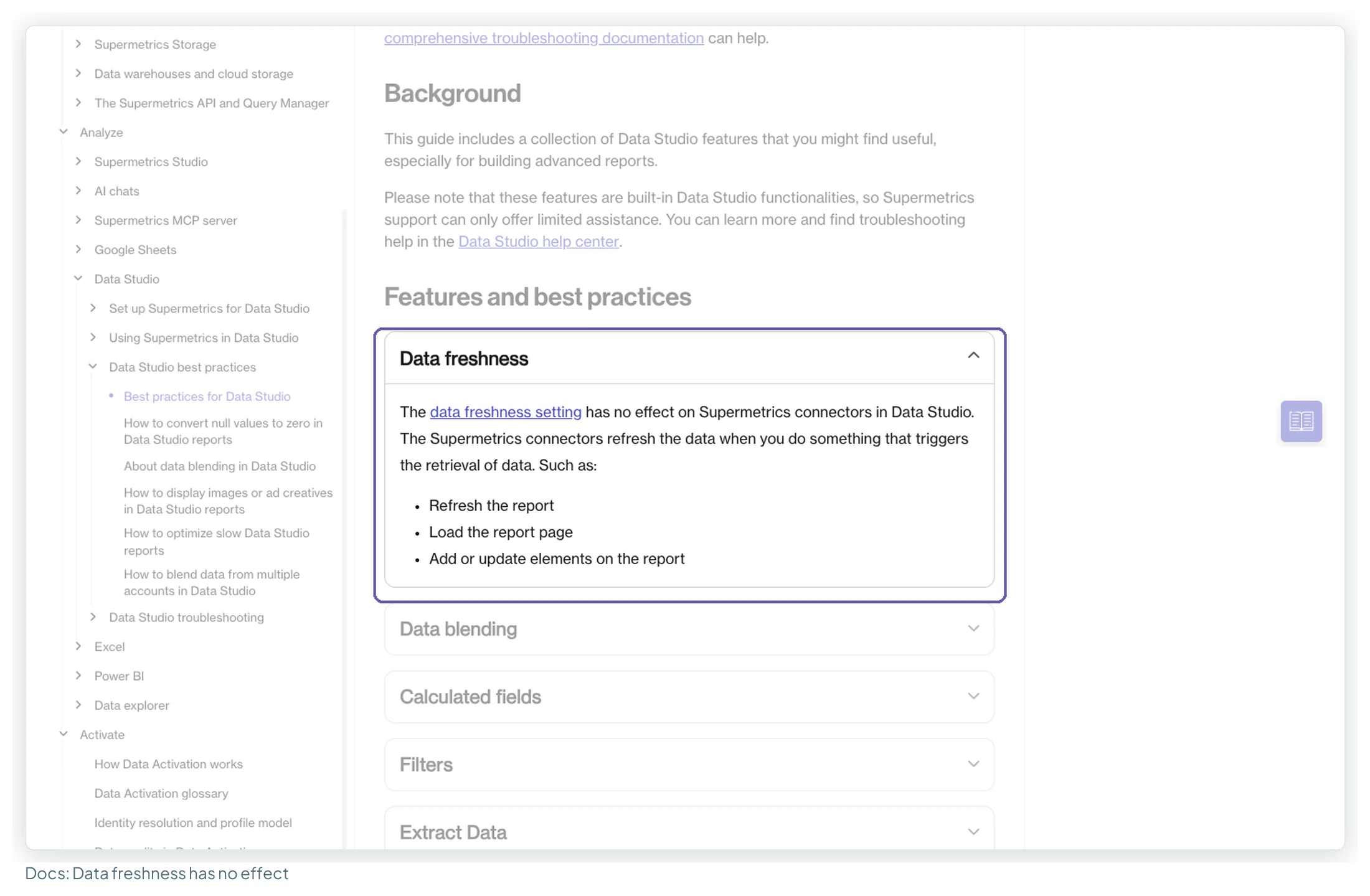
So a bigger plan buys a Data Studio user more sources, accounts, users and destinations, not fresher data. If a report feels slow, look at how the data source is set up and how many charts query at once before you look at the plan.
What Supermetrics users say: ratings, reviews and forums
The review sites tell two different stories.
| Site | Rating | Reviews | Read |
|---|---|---|---|
| G2 (seller page, all Supermetrics products) | 4.4 / 5 | 824 | 13 Oct 2026, from Google’s snippet (page blocked) |
| Capterra (same pool on GetApp and Software Advice) | 4.4 / 5 | 109 | 13 Oct 2026 |
| Trustpilot | 1.5 / 5 | 31 (84% one-star) | 13 Oct 2026 |
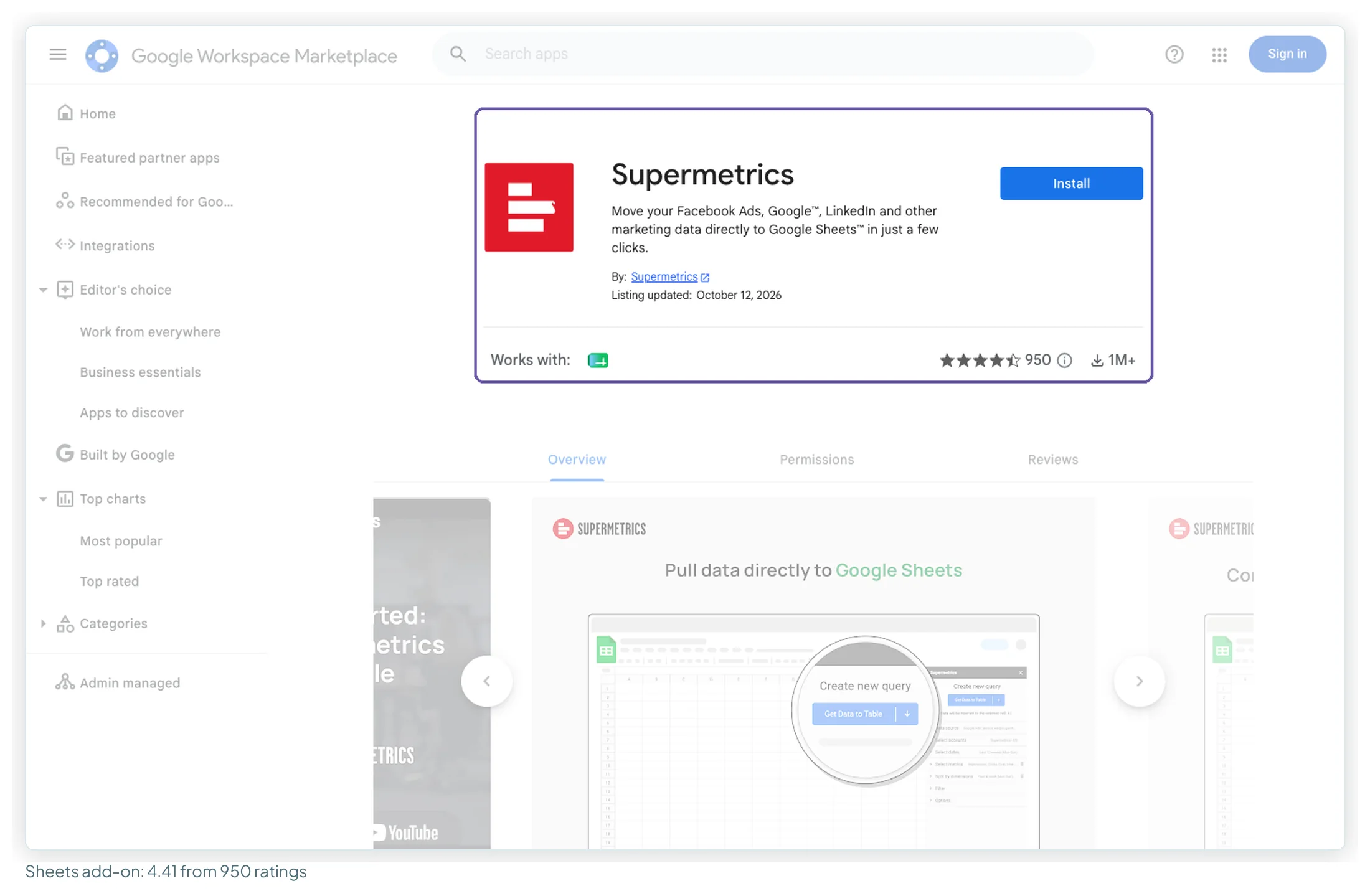
| Google Workspace Marketplace (Sheets add-on) | 4.41 / 5 | 950 ratings, 1M+ installs | 13 Oct 2026 |
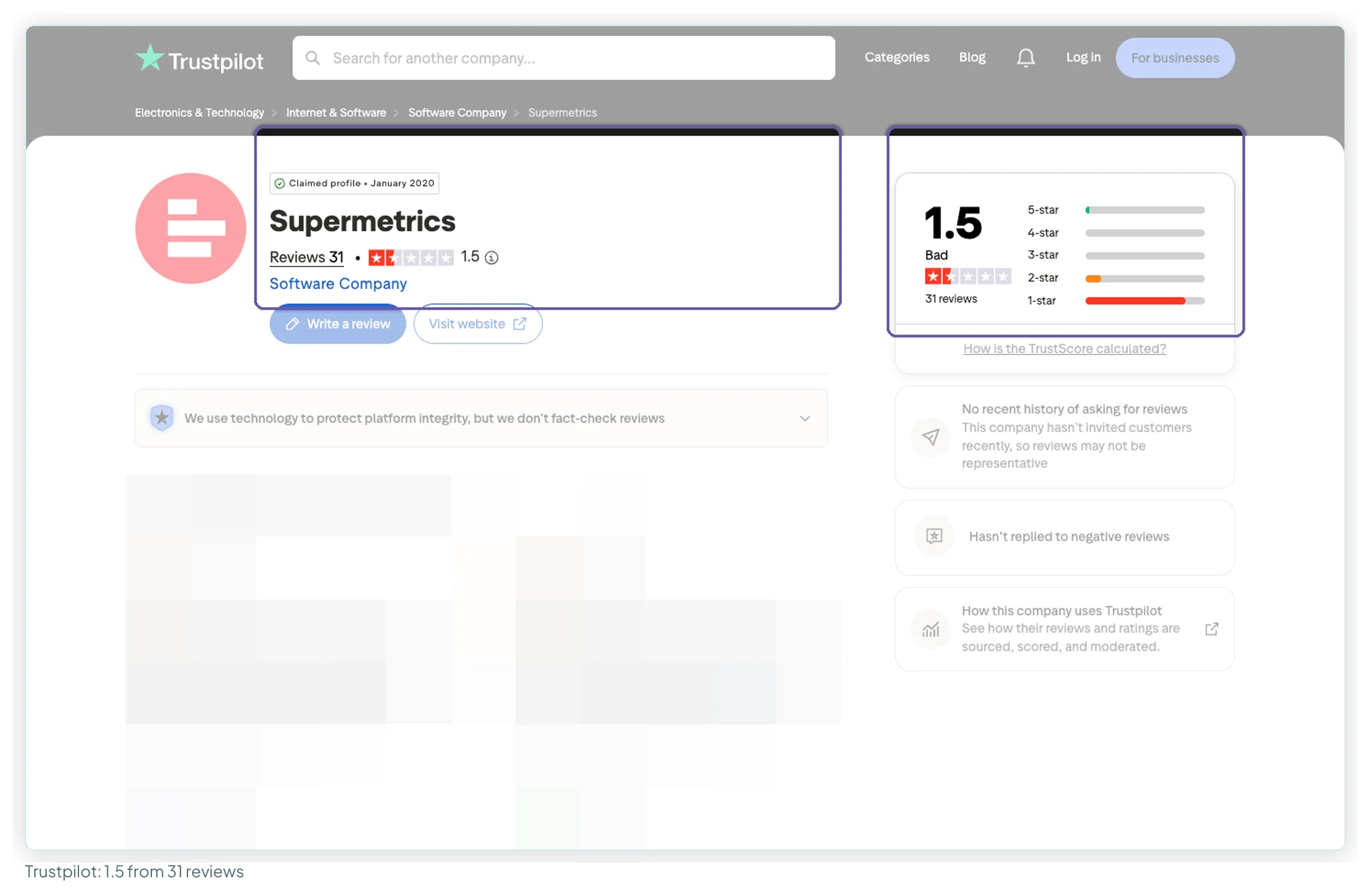
I read and coded 45 reviews: the first 20 on Trustpilot and all 25 on Capterra’s default page. The two samples lean in opposite directions. All 20 Trustpilot reviews are one or two stars and unprompted. On Capterra, 16 of the 22 labelled reviews were vendor-referred or incentivised. Read the counts as “what each camp says”, not as a satisfaction rate.
| Theme | Type | Reviews (of 45) |
|---|---|---|
| Unreliable: failing or silently failing queries, errors, wrong data | Complaint | 13 |
| Support slow, unreachable or unhelpful | Complaint | 13 |
| Too expensive, poor value for small teams | Complaint | 11 |
| Easy to set up and use (query builder, scheduling) | Praise | 10 |
| Saves time, automates manual reporting | Praise | 8 |
| Billing and contract: auto-renewal, charged after cancelling, refund refused | Complaint | 8 |
| Price increases or forced plan changes | Complaint | 7 |
| Breadth: many platforms in one tool | Praise | 6 |
| Works well with Data Studio specifically | Praise | 5 |
| Helpful support or account manager | Praise | 2 |
| Slow on large date ranges (4) · missing data or connectors (4) | Complaint | 4 each |
| Re-authentication needed repeatedly (3) · plan limits too tight (3) | Complaint | 3 each |
The praise is specific to the job this site is about. One Capterra reviewer (October 2025, vendor-referred) found the Google connectors “more robust than the native Google ones”. The complaints cluster on reliability and money: another vendor-referred Capterra reviewer wrote that “authentication often has to be done multiple times”, and a Trustpilot reviewer from a UK agency (July 2026) said “the speed, accuracy and support of the service are all in decline”.
Forums say the same thing more bluntly. Across 14 dated Reddit threads (read through Google’s snippets, as Reddit blocks direct reading), 8 call it too expensive or “the costliest”, 7 are hunting for a cheaper alternative, and 2 still call it the default or best-in-class choice for Data Studio. One r/PPC thread from around March 2026 is a long-time customer told their legacy licence was being sunset, which fits the package changes above.
Supermetrics limits and gotchas to check before you buy
- Count accounts per platform, not platforms. The quota is per data source. Ten clients on Meta is ten accounts, whatever else you connect.
- One destination per plan. Data Studio plus Sheets is a second destination: +€49 yearly on Starter, +€149 on Growth.
- Starter is one person. There’s no extra-user option on Starter, so any second login means Growth.
- Use the subscription email in Data Studio. A different Google account starts a new trial instead of using your licence.
- Premium connectors aren’t self-serve. X Ads, Search Ads 360, Display & Video 360, Salesforce, Marketo and Adobe Analytics carry the Premium tag, and premium sources sit in custom packages.
- Warehouses are Enterprise. If BigQuery or Snowflake is in next year’s plan, price Enterprise now.
- Pick the price list you’re comparing. Third parties report that USD limits differ from the EUR ones, not just the currency.
- Plan for re-authentication. Three reviewers in my sample mention reconnecting sources repeatedly. Build it into your monthly checks.
Support, renewal and cancellation
The plan table lists “Standard support” on every plan as “24/7 coverage with tickets, chat & email”, plus a “Customer Success Manager & success plan” row. A menu blurb on the same page says “24/5 support”, and so did a Supermetrics blog post in 2025, so I’d treat the hours as unconfirmed. The docs are extensive: a Data Studio section with guided onboarding, video tutorials, a template gallery and troubleshooting articles.
Renewal and cancellation are worth reading before the first invoice, because billing is a recurring theme in the reviews (8 of 45). From the docs:
- Subscriptions renew automatically until cancelled. Invoiced subscriptions renew too, and not paying the invoice doesn’t cancel them.
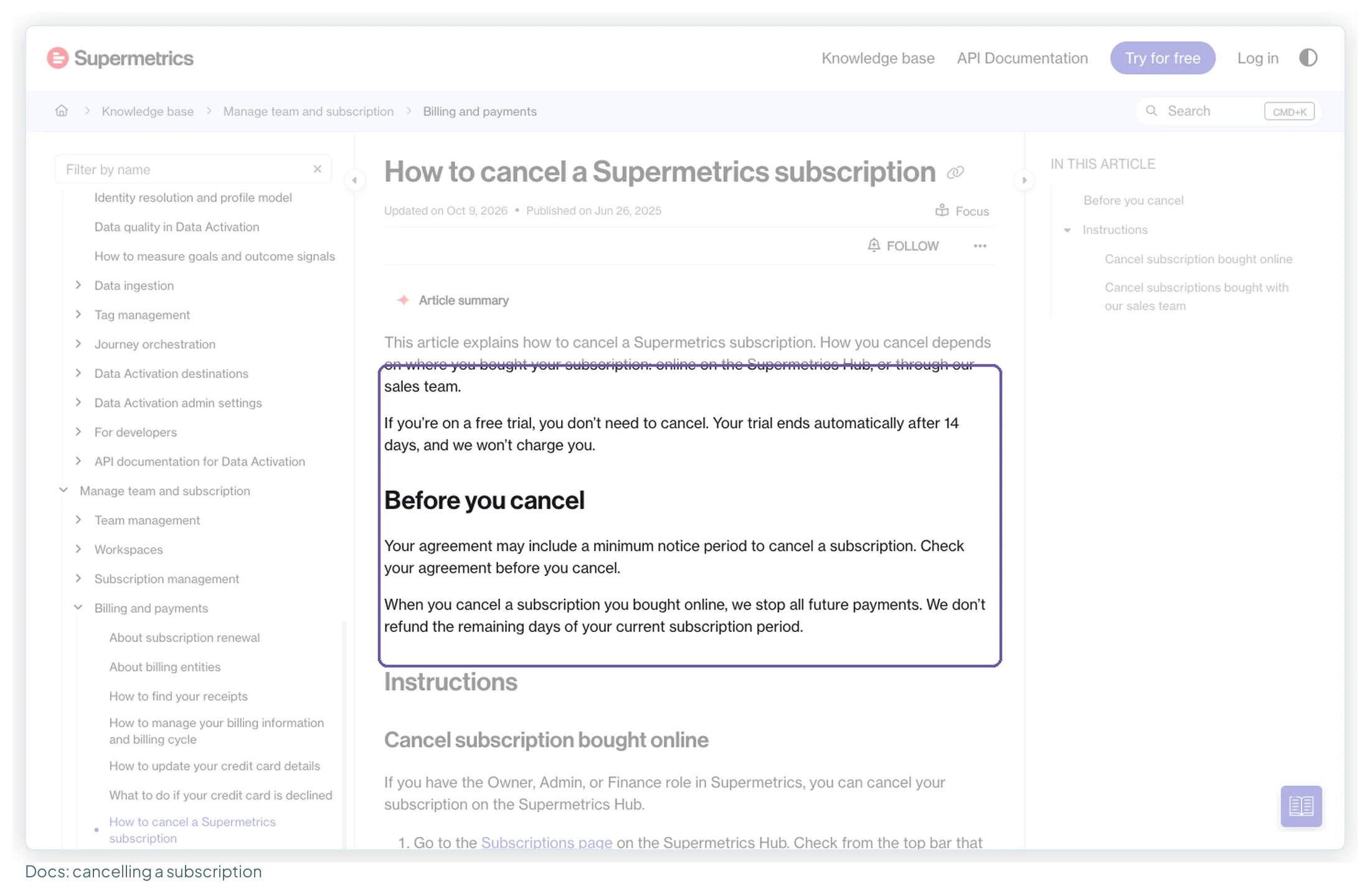
- If you bought online, an Owner, Admin or Finance user can cancel in the Hub: Subscriptions → your subscription → Cancel subscription at the bottom of the page.
- Cancelling stops future payments, but Supermetrics doesn’t refund the remaining days of the current period. Agreements may also include a minimum notice period.
Practically: pay monthly until you’re sure, and set a reminder before a yearly renewal date.
When Supermetrics is worth the money
You report across several paid platforms and the maintenance matters. What you’re really buying is someone else keeping the Meta, LinkedIn, TikTok and Microsoft connectors working before your client report goes out.
You’re a mid-sized agency on Growth. Ten clients on four platforms is €189 a month billed yearly on the docs’ reading, with room to grow to 20 accounts a platform.
You want a predictable bill. Fixed price, no data-volume charges, and every extra priced on the page.
You’re joining a team already on it. Consistency across an organisation is worth more than a price difference, and switching connectors means rebuilding every data source.
When it isn’t, and what to look at instead
| Your situation | Why Supermetrics fits less well | Look at | Entry price |
|---|---|---|---|
| You only connect Google data | GA4, Search Console, Google Ads, Sheets and YouTube connectors are free | Google’s own connectors | Free |
| Many clients on a few platforms, small budget | The per-source account quota and the one-user Starter | Windsor.ai: 3 sources, 75 accounts, unlimited users | $19/mo yearly, $23 monthly |
| You like how it works, not the price | Same metering, lower price | Dataslayer: 3 connectors × 3 accounts | €29/mo yearly, €35 monthly |
| One brand, one or two accounts | A plan sized for more than you use | Porter Metrics: pay per account | $12.50 per account yearly, $15 monthly |
| A niche source, light transformation | Premium connectors aren’t self-serve | Coupler.io | $24/mo yearly, $32 monthly |
| AI assistants on the same data, small team | One destination per plan | Catchr: 3 platforms, 10 accounts | $239/yr, $24 monthly |
Prices from each vendor’s pricing page as recorded in our pricing ledgers, checked between 9 September and 13 October 2026. The full comparison, with screenshots and worked bills for each tool, is in Supermetrics alternatives for Data Studio users, and the three pricing models side by side are in Porter Metrics vs Windsor.ai vs Supermetrics.
Five ways to pay Supermetrics less without switching
- Move Google sources onto Google’s free connectors. Each one you move frees a source slot. The Search Console guide covers the switch.
- Drop the second destination if the Sheets export is habit rather than need: €49 a month on Starter, €149 on Growth, billed yearly.
- Prune accounts. Paused clients and test ad accounts still count. The docs explain how to remove accounts from a Data Studio connection.
- Use the unlimited-account sources where they cover the need (YouTube, TikTok Organic, Mailchimp and others on the docs’ list).
- Pay yearly once you’re sure. It’s 20% off the plan and 20–23% off each extra, but the remaining days aren’t refunded if you cancel.
Supermetrics templates for Data Studio
Supermetrics publishes its own Data Studio templates, and 31 of them are in the library here, free to copy. Three that fit the setups above: the paid channel mix for an agency’s cross-platform view, the Shopify report for the online shop, and a two-platform comparison for the freelancer.
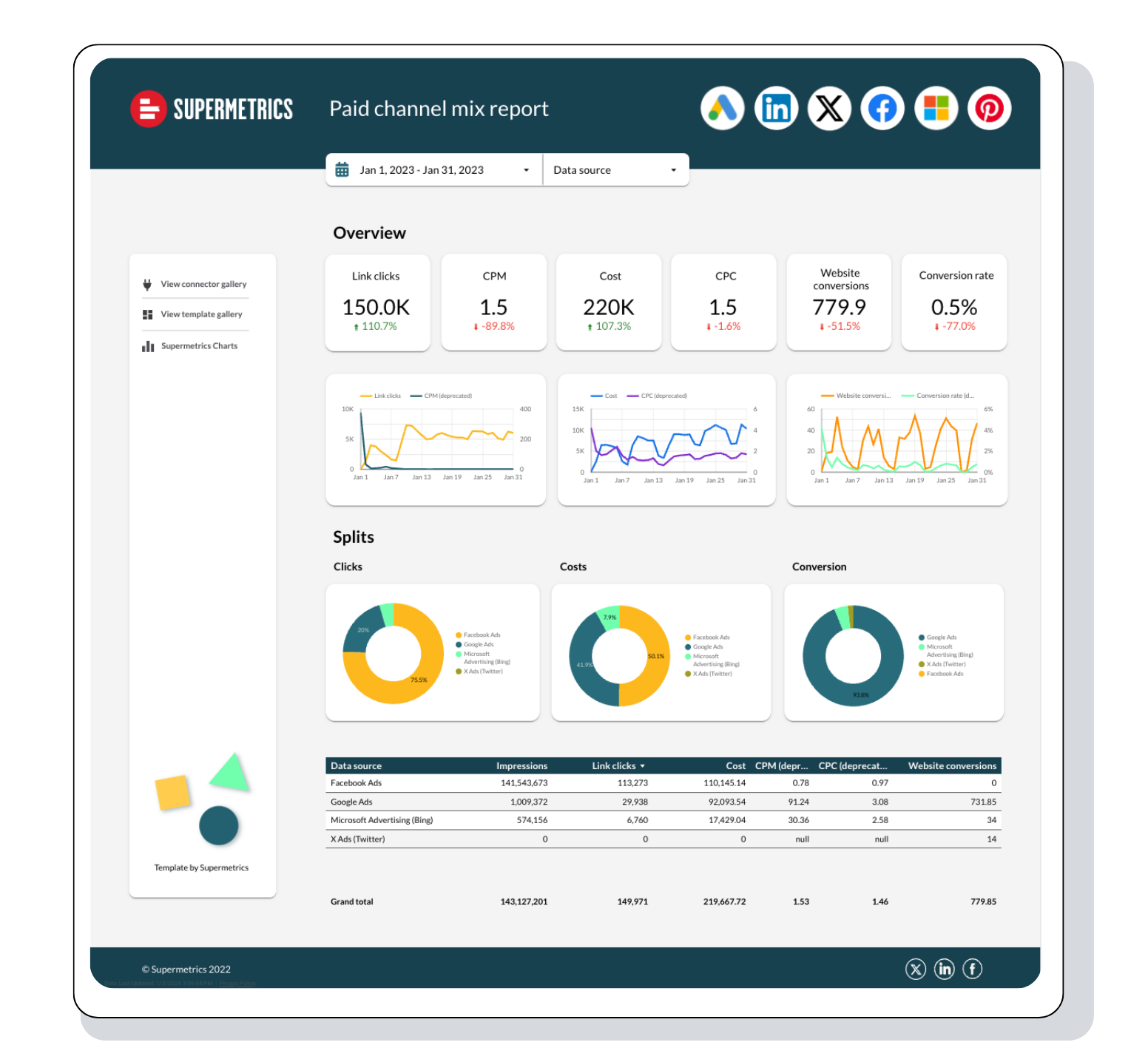
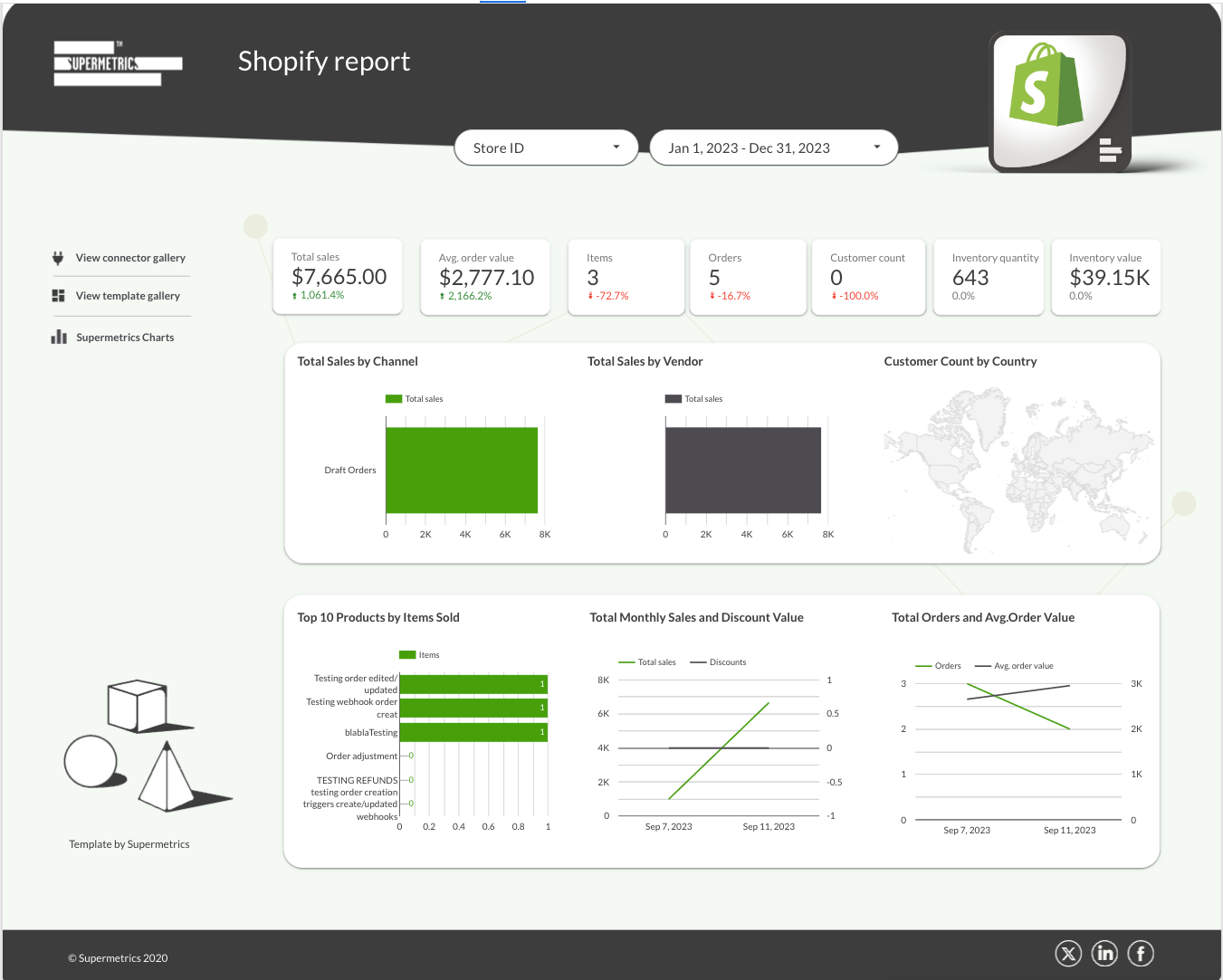
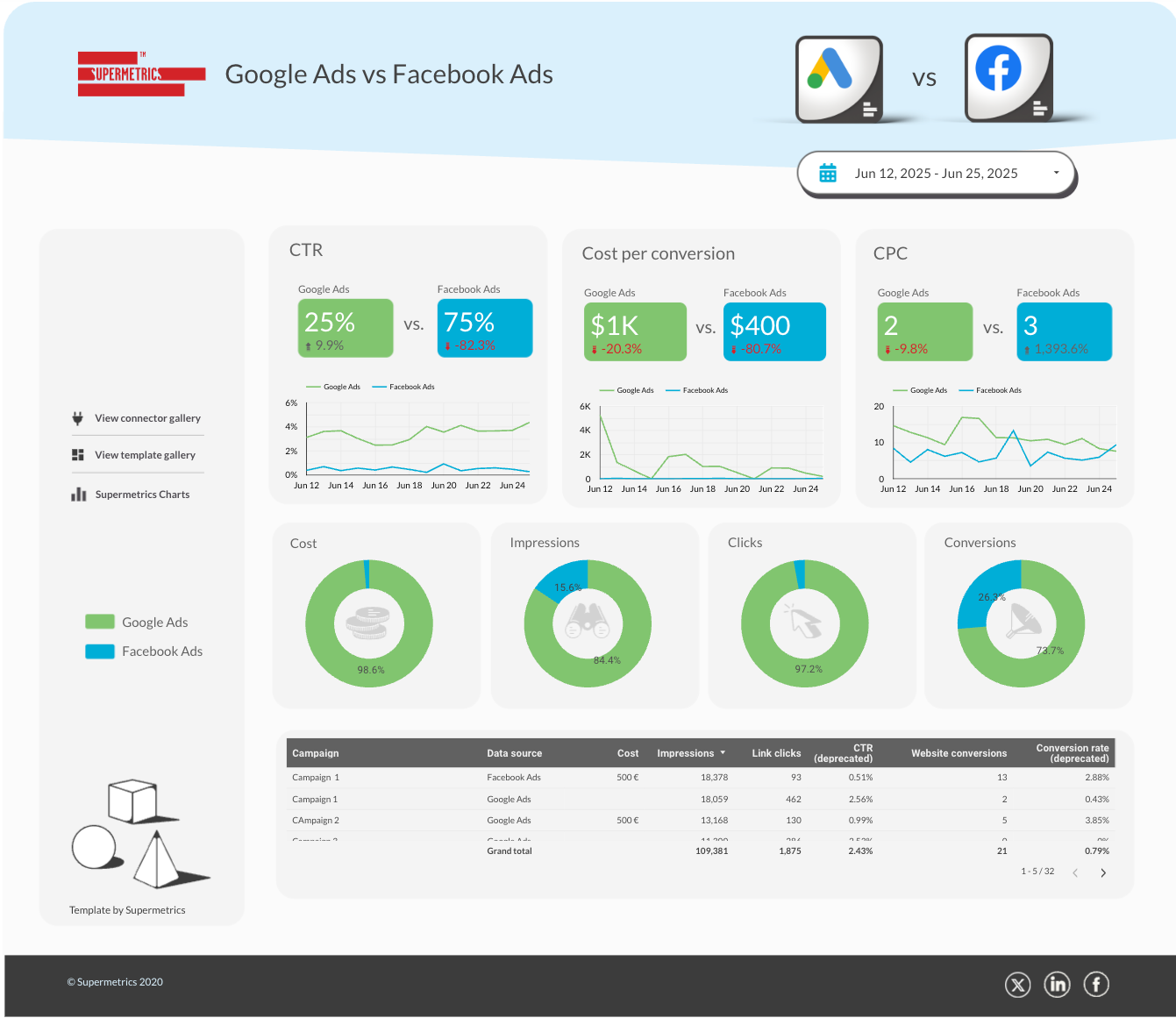
All 31 Supermetrics templates in the library · Try Supermetrics free for 14 days
How this guide was researched
I didn’t have a Supermetrics account for this update, so nothing here comes from hands-on testing. Instead:
- Pricing: Supermetrics’ pricing page, EUR view, read in a browser on 13 October 2026 with the Annually and Monthly toggles and every Extras row, and screenshotted as shown.
- Docs: the accounts, upgrade, renewal, cancellation and Data Studio best-practice articles, read the same day.
- Reviews: 45 reviews coded from Trustpilot and Capterra; ratings from G2, Capterra, Trustpilot and the Workspace Marketplace.
- Forums: 14 dated Reddit threads, through Google’s snippets.
- Ranking articles: the twelve pricing articles in Google’s top results for “supermetrics pricing” (eleven could be read), each checked against the live page.
The next update will add my own test: setup timings, a GA4 parity check against Google’s connector, and what happens at the account limit.
Frequently asked questions
How much does Supermetrics cost per month?
On the EUR price list (checked 13 October 2026), Starter is €39 a month billed yearly or €49 billed monthly, and Growth is €159 or €199. Enterprise is quote-only. Extras for destinations, users, data sources and ad accounts add to that; the extras table above has every price.
Is Supermetrics free?
No. There’s no free plan. You can trial any connector or destination free for 14 days without a card, and the trial ends on its own without a charge. Google’s own Data Studio connectors for GA4, Search Console, Google Ads, Sheets and YouTube are free.
Does Supermetrics still have a Pro plan?
Not on the pricing page as of 13 October 2026. It shows Starter, Growth and Enterprise. Pro (€399 yearly, €499 monthly) was listed until at least 9 September 2026.
Why does my Supermetrics price look different from this article?
Supermetrics’ price list reportedly differs by region. The EUR page has Starter at 2 data sources × 2 accounts; third-party articles report a US list with Starter at $44 billed annually and 3 × 3. You may also be on a legacy package from before the November 2024 or autumn 2026 changes.
Is there a Supermetrics discount code?
The only discount on the pricing page is billing yearly, which saves 20% on the plans and a similar share on each extra. No codes are published there.
Does upgrading Supermetrics make Data Studio refresh faster?
No. Supermetrics’ docs say its Data Studio connectors fetch data when the report is loaded, refreshed or edited, and that Data Studio’s data freshness setting has no effect on them. A bigger plan buys more sources, accounts, users and destinations.
Can I cancel Supermetrics any time?
If you bought online, an Owner, Admin or Finance user can cancel in the Hub. Cancelling stops future payments, but the remaining days of the current period aren’t refunded, and subscriptions renew automatically until cancelled.
Is Supermetrics an ETL tool?
Partly. On Starter and Growth it moves marketing data into tools like Data Studio, Sheets and Excel. Warehouse loading, transformations and the data APIs are Enterprise features.
How much does Data Studio itself cost?
Data Studio is free to build and share reports. Data Studio Pro, which adds organisation-owned content and team features, is $9 per user, per project, per month.
Where to go next
- Supermetrics alternatives for Data Studio users
- Porter Metrics vs Windsor.ai vs Supermetrics
- Data Studio connectors compared
- Marketing reporting tools compared
- Data Studio free vs Pro
- How to connect GA4 to Data Studio, free
Some links in this post are affiliate links: if you sign up through one, I may earn a commission at no extra cost to you. How I work with partners.