
Google publishes a free Google Ads MCP server that is read-only, runs on your own computer or your own Cloud Run, and no longer needs a developer token. It publishes no Search Console MCP server, so for Search Console you choose between community code and a connector’s hosted MCP. Whichever you use, check the assistant’s first answers against the same chart in your Data Studio report (formerly Looker Studio) before they go anywhere near a client.
Below: the routes, what “read-only” means for Google’s Ads server, the Claude setup, choosing a Search Console server, hosted options, a parity check and the limits. It’s the Google Ads and Search Console version of connecting GA4 to Claude or ChatGPT; for the wider picture, start with my overview of AI in Data Studio.
I’m writing this from Google’s documentation, the servers’ source code and GitHub issues, and each vendor’s pages, read on 14 October 2026. I haven’t applied for Google Ads API access, installed either server or run the parity check on a client account.
What Google provides, and what it doesn’t
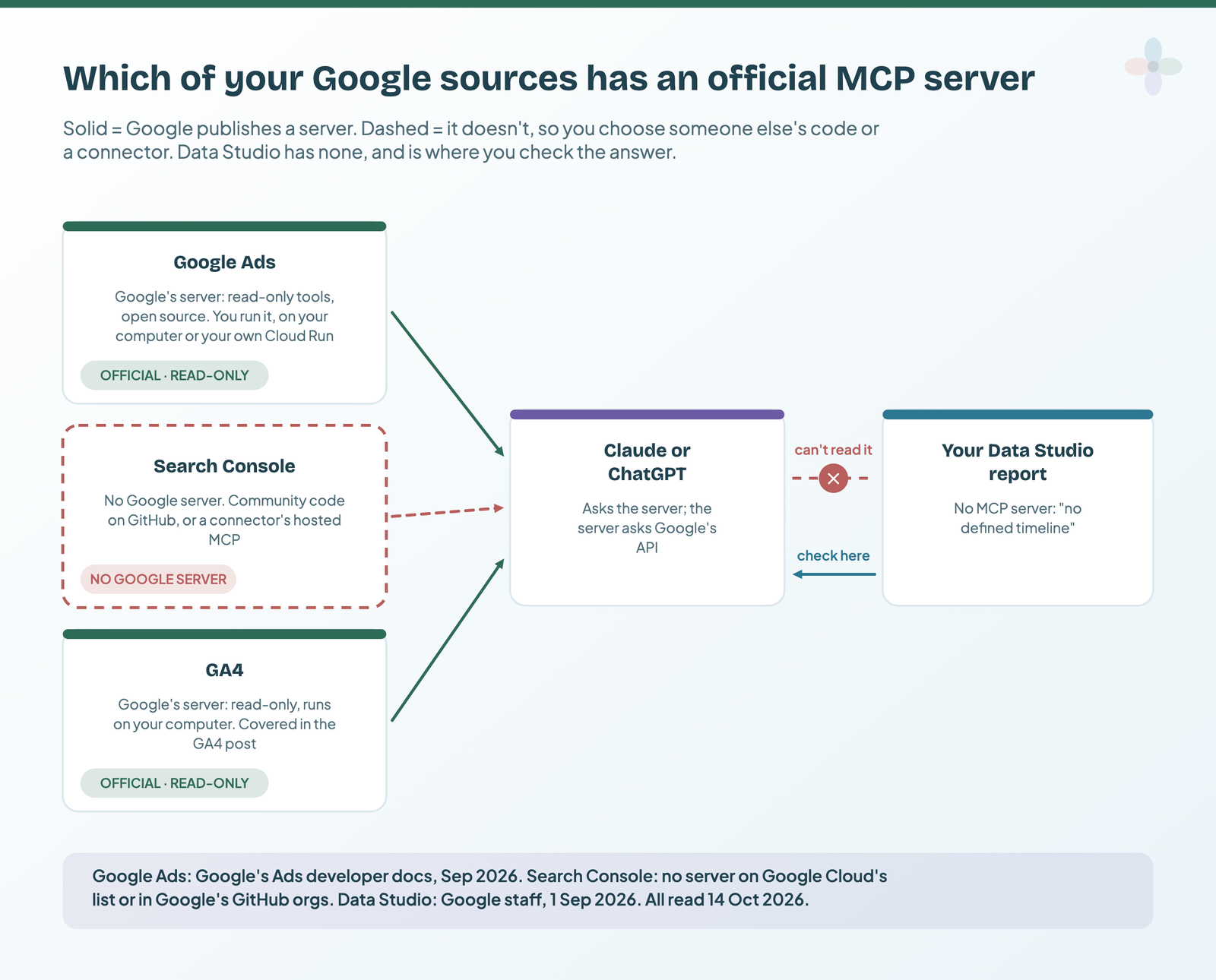
An MCP server is the small program that lets Claude or ChatGPT call a tool, like “run a Google Ads report”, and read the result (the GA4 post explains MCP). The official picture on 14 October 2026:
| Source | Official MCP server? | Who runs it | Read or write | Google sign-in it asks for |
|---|---|---|---|---|
| Google Ads | Yes, open source since October 2025 | You: on your computer or your own Cloud Run | Read-only tools | The full Google Ads scope (adwords) |
| Search Console | No. Google hasn’t published one | Community code or a connector | Depends on the server | Depends: webmasters.readonly or full webmasters |
| GA4 | Yes | You, on your computer | Read-only | Read-only Analytics |
| Data Studio | No, and “no defined timeline” | – | – | – |
From Google’s developer docs, Google Cloud’s MCP list and Google’s GitHub organisations, checked 14 October 2026.
Neither Google Ads nor Search Console is on Google Cloud’s list of Google-hosted MCP servers, so there’s no Google URL to paste into an assistant. Data Studio has none either, so the report is the check, not the source (what the Data Studio API can and can’t do).
Meta is a different animal: it has its own official, Meta-hosted Ads MCP server that can write. I cover it in the Meta Ads MCP post.
Pick your route by the assistant you use
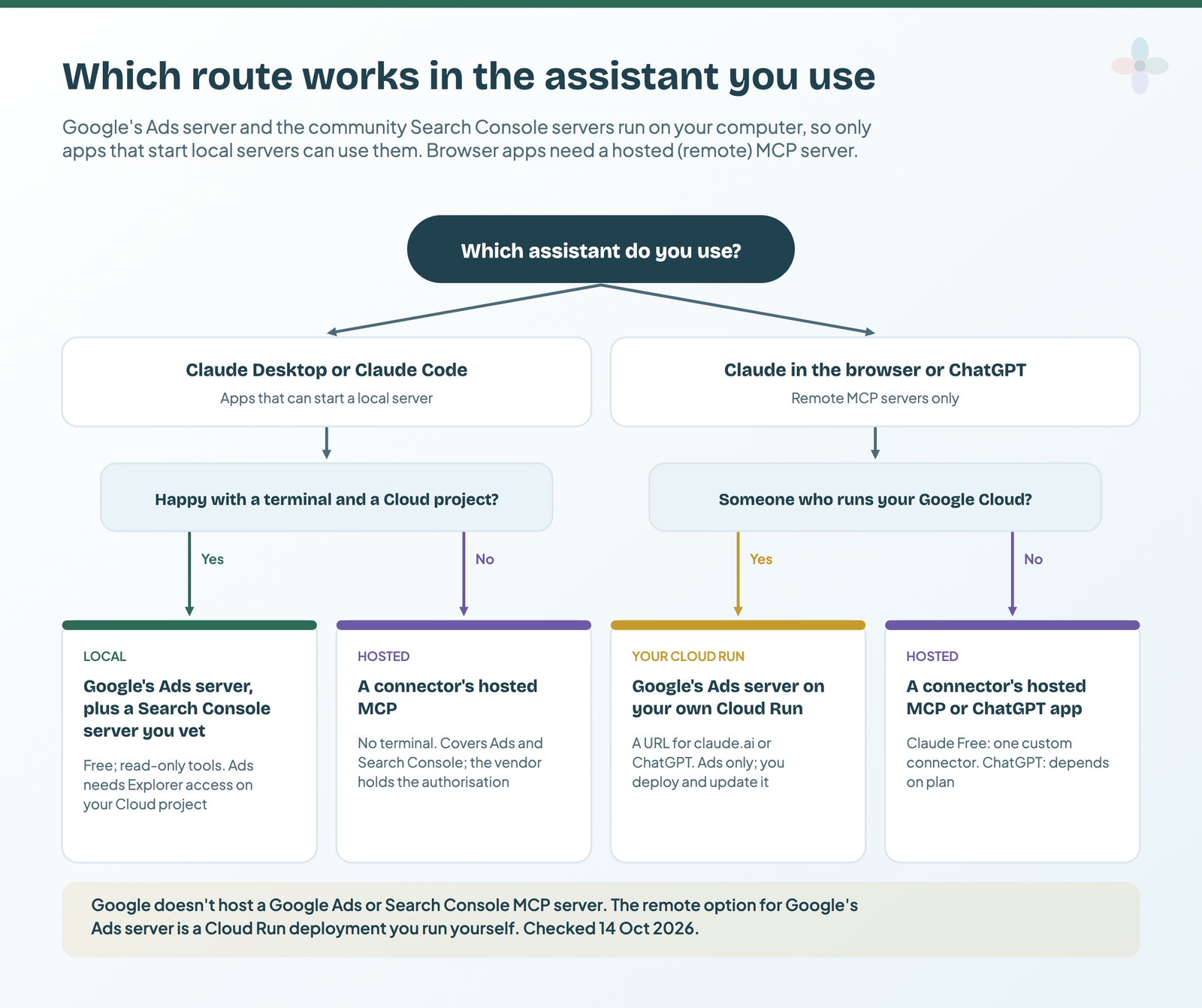
The deciding question is where your assistant can run a server. Google’s Ads server and the community Search Console servers are local: programs on your computer, which only desktop apps such as Claude Desktop and Claude Code can start. Claude in the browser and ChatGPT need a remote server reached by a URL.
| Route | Claude Desktop | Claude Code | Claude in the browser | ChatGPT | Terminal? | Who holds the Google authorisation | Read or write |
|---|---|---|---|---|---|---|---|
| Google’s Ads server, local | Yes | Yes | No | Not directly | Yes, plus a Cloud project | You | Read-only tools |
| Google’s Ads server on your Cloud Run | Yes | Yes | Yes, as a custom connector | As a remote MCP URL, plan permitting | Yes, and a deployment | Your Cloud project | Read-only tools |
| Community Search Console server, local | Yes | Yes | No | Not directly | Yes | You | Depends on the server |
| A connector’s hosted MCP (Ads and Search Console) | Yes | Yes | Yes (Free plan: one custom connector) | Vendor’s app or URL, plan permitting | No | The vendor | Read; some can write to Google Ads |
From Google’s README, Anthropic’s and OpenAI’s help pages and each vendor’s docs, checked 14 October 2026. Plan details change monthly.
ChatGPT
OpenAI’s help page says ChatGPT “connects to remote MCP servers”; a local server needs OpenAI’s Secure MCP Tunnel. What you can connect depends on your plan (table in the GA4 post). I found no Google Ads or Search Console app for ChatGPT from Google, so the practical route is a connector’s app or URL, or your own Cloud Run deployment.
Google’s Google Ads MCP server: what it reads, and what “read-only” means
Google released the Google Ads MCP server as open source in October 2025. Google’s developer page, updated 30 September 2026, lists its mode as “Read-only (current release)” and says: “This implementation is strictly read-only. It cannot modify bids, pause campaigns, or create new assets.” It has three tools and four reference resources:
| Tool or resource | What it returns | A question it answers |
|---|---|---|
list_accessible_customers |
Customer IDs and account names you can access | “Which accounts can I see?” |
search |
Results of a Google Ads Query Language (GAQL) query: metrics, budgets, status | “Spend and conversions by campaign, 1–30 September” |
get_resource_metadata |
The fields a resource such as “campaign” has | “Which fields does campaign have?” |
metrics, segments resources (plus discovery document, release notes) |
Reference lists of metrics and segments | “What can I break this down by?” |
GAQL is Google Ads’ query language. The assistant writes it for you, and the server logs every query it runs.
Now the part the setup guides I read skip. “Read-only” lives in the tool list, not in the sign-in. Google doesn’t publish a read-only Google Ads scope, so the credentials you create carry the full adwords scope; a comment in the source says access “is restricted to read methods by the tools this server exposes”. And a Google maintainer wrote on GitHub in June 2026: “We already have plans to add write access soon”.
The token you no longer need
- Google sunset Google Ads developer tokens on 9 September 2026. Sending one is “optional and ignored by the API servers”.
- Access levels now sit on the Google Cloud project behind your OAuth credentials. Explorer covers production accounts at 2,880 operations a day.
- Check your level on the Google Ads API Overview page in the Cloud console (Google’s access levels page).
Older guides and an optional README section still mention a developer token: leave it out. The PyPI package google-ads-mcp is Google’s (0.0.5, released 9 October 2026, Python 3.10 or newer).
Set up the Google Ads server for Claude Desktop or Claude Code
This is Google’s documented setup, with the Claude parts from Anthropic’s docs. It’s the documented setup, untested by me. You’ll need a terminal and a Google Cloud project.
1. Install pipx and the Google Cloud CLI
Install pipx (it runs Python apps without you managing them) and the Google Cloud CLI, which gives you the gcloud command.
2. Enable the Google Ads API and apply for Explorer access
In a Cloud project, enable the Google Ads API from the API Library. That gives you Test access, which only reaches test accounts. Then open the Google Ads API Overview page in the Cloud console, expand Upgrade access level, and click Apply for access for Explorer. Google may upgrade you automatically.
Before you apply: Google’s known issue
Google’s developer-token page (7 October 2026) says Explorer applications from Cloud projects on the Free Trial, or with suspended or disabled billing, are being rejected; a fix is in progress. On the server’s GitHub, five users reported auto-rejected Explorer applications in the week to 13 October 2026. If calls later fail with CLOUD_PROJECT_NOT_APPROVED_FOR_PRODUCTION, the project is still on Test access.
3. Create credentials
Create an OAuth client of type Desktop app (Google’s Manage OAuth Clients page shows where), download its JSON, then sign in with a Google account that can see the Ads accounts:
# From Google's README. The documented setup, untested by me.
gcloud auth application-default login \
  --scopes https://www.googleapis.com/auth/adwords,https://www.googleapis.com/auth/cloud-platform \
  --client-id-file=YOUR_CLIENT_JSON_FILE
Copy the path it prints after Credentials saved to file:. The README also documents a service-account version and an OAuth-proxy option, which it says gives better credential isolation; I show this method because it mirrors the GA4 setup.
4. Add the server to Claude
Claude Code. The README has no Claude Code command, so this combines its configuration with Anthropic’s claude mcp add syntax:
# Assembled from Google's README and Anthropic's docs. The documented setup, untested by me.
claude mcp add google-ads-mcp --scope user \
  -e GOOGLE_PROJECT_ID=YOUR_PROJECT_ID \
  -e GOOGLE_APPLICATION_CREDENTIALS=PATH_TO_CREDENTIALS_JSON \
  -- pipx run --spec git+https://github.com/googleads/google-ads-mcp.git google-ads-mcp
Then run /mcp to check it’s connected. (The README names ~/.claude/settings.json; Anthropic’s docs keep MCP servers in ~/.claude.json or .mcp.json, so use the command.)
Claude Desktop. Open Settings → Developer → Edit Config and add the README’s JSON under mcpServers, with full paths. I’ve dropped its optional developer-token line; keep GOOGLE_ADS_LOGIN_CUSTOMER_ID only if you reach clients through a manager (MCC) account:
{
  "mcpServers": {
    "google-ads-mcp": {
      "command": "pipx",
      "args": [
        "run",
        "--spec",
        "git+https://github.com/googleads/google-ads-mcp.git",
        "google-ads-mcp"
      ],
      "env": {
        "GOOGLE_APPLICATION_CREDENTIALS": "PATH_TO_CREDENTIALS_JSON",
        "GOOGLE_PROJECT_ID": "YOUR_PROJECT_ID",
        "GOOGLE_ADS_LOGIN_CUSTOMER_ID": "YOUR_MANAGER_CUSTOMER_ID"
      }
    }
  }
}
Quit Claude Desktop completely and restart it. To stop updates changing the tools, pin a version as the README shows: pipx run --spec "google-ads-mcp==X.Y.Z" google-ads-mcp.
5. Ask your first question
Start with the README’s prompts, what can the ads-mcp server do? and what customers do I have access to?, and include a customer ID: the agent “will need and ask for a customer id for most prompts”. If the server doesn’t appear, Anthropic’s advice is to use absolute paths and read the MCP logs in ~/Library/Logs/Claude (or %APPDATA%\Claude\logs on Windows).
Putting it on Cloud Run so claude.ai or ChatGPT can reach it
Google’s README has a Cloud Run section: build an image, deploy it with gcloud run deploy, and give it an OAuth client ID, secret and base URL. The OAuth flow, not Cloud Run’s sign-in, gates access (the command uses --allow-unauthenticated), and an open GitHub issue reports 401 errors after OAuth. It’s a job for whoever runs your Cloud account, not a marketer’s afternoon.
The companion sheet has these steps as a checklist, plus the snippets:
Search Console: no Google server, so choose the code carefully
Google hasn’t published a Search Console MCP server, but the Search Console API is public, so the community has filled the gap: a GitHub search for “search console mcp” returned 396 repositories on 14 October. The question that matters is the sign-in scope. Google’s Search Analytics query works with the read-only webmasters.readonly scope, so a reporting question never needs more. Here’s what the four most-starred servers I read ask for:
| Repository | Stars | Licence | Last push | Scope requested | Write tools (default) |
|---|---|---|---|---|---|
| AminForou/mcp-gsc | 1,927 | MIT | 15 Sep 2026 | Full webmasters |
Add site, delete site, delete sitemap: off unless you set GSC_ALLOW_DESTRUCTIVE. Sitemap submit: not gated |
| saurabhsharma2u/search-console-mcp | 302 | MIT | 2 Sep 2026 | webmasters.readonly; a separate indexing sign-in for submissions |
An indexing_submit action (that separate sign-in); also bundles Bing, GA4 and AdSense |
| ahonn/mcp-server-gsc | 278 | No licence file | 4 Sep 2026 | webmasters.readonly |
Not checked |
| Suganthan’s GSC MCP | 147 | Apache-2.0 | 27 Sep 2026 | Full webmasters and indexing, unless GSC_SCOPES=readonly (its setup wizard’s default) |
Sitemap and URL submission, full tier only |
Read from each repository’s README and source on 14 October 2026. “Not checked” means I didn’t read it from the code. This changes often: re-check before you install.
A server that manages sitemaps needs the full scope. For “which queries lost clicks last month”, a read-only server is the smaller risk.
Before you install a Search Console MCP
- ☐ Scope:
webmasters.readonlyfor reporting; know why if it asks for more. - ☐ Write tools off by default, and you know which ones aren’t gated.
- ☐ Licence, last commit, maintainer: you may use it, and someone answers issues.
- ☐ A pinned version.
- ☐ Lowest permission: for a service account, the lowest level Google’s permissions table allows for reading Performance data.
You’ll also enable the Google Search Console API in your Cloud project, the same way as the Ads API in step 2. (Connecting Search Console to Data Studio covers the report side, including Site vs URL Impression.)
Hosted options: connector MCPs that also feed your Data Studio report
Five Data Studio connectors also serve Google Ads and Search Console over MCP. The column that matters: can it change your campaigns?
| Vendor | Google Ads over MCP | Search Console over MCP | Writes to Google Ads? (vendor’s words) | Also a Data Studio connector |
|---|---|---|---|---|
| Windsor.ai | Yes | Yes | Yes (34 Google Ads actions); write “can be switched off if you want read-only access” | Yes |
| Supermetrics | Yes | Yes | Beta, opt-in per ad account; campaigns “always created paused” | Yes |
| Porter Metrics | Yes | Yes | Its docs conflict: help article says read-only, MCP docs list campaign actions | Yes |
| Catchr | Yes | Yes | No: “Claude cannot create, pause, or edit a campaign” | Yes |
| Coupler.io | Yes | Yes | No ad-platform writes | Yes |
From each vendor’s MCP source list, docs and Claude pages, checked 14 October 2026. Prices and plan limits are in marketing data MCP servers compared.
Write-first tools also rank for “google ads mcp” (AdKit, Markifact, Adspirer, Composio). They’re built to change campaigns, mostly behind drafts or approvals.
In Claude, a hosted MCP goes in as a custom connector: Customize → Connectors → + Add → Add custom connector (Free: one). No terminal, but the vendor holds your client’s Google authorisation. For the connector choice, Data Studio connectors compared and Porter vs Windsor vs Supermetrics go further.
Check the answer against your Data Studio report
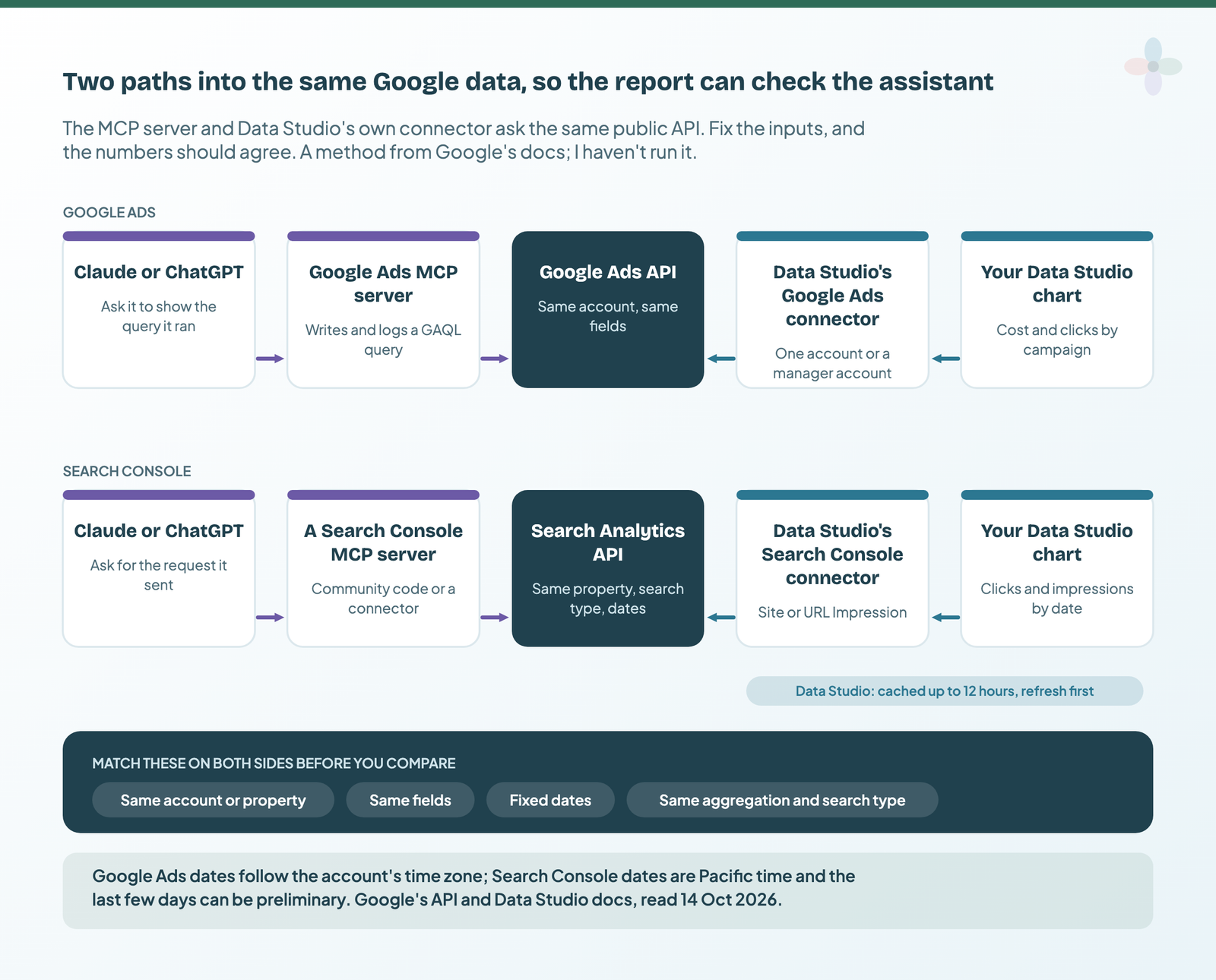
The MCP servers and Data Studio’s own connectors read the same public APIs (Google Ads API, Search Analytics API). So for the same account or property, fields, fixed dates and settings, the assistant’s numbers and your chart should agree, and when they don’t, the cause is findable. This is a method, not a result: I haven’t run it on a client account.
Google Ads, in five steps:
- Fix the dates. Use 1–30 September 2026, not “last 30 days”, which excludes today and follows the account’s time zone.
- One account, two metrics, one dimension. Cost and clicks by campaign, on one account, not a manager-account roll-up.
- Build the chart on Data Studio’s Google Ads connector (connecting Google Ads to Data Studio), then refresh the data source: Google Ads data refreshes every 12 hours.
- Ask the assistant for the same table and the exact GAQL query it ran; look for a
WHEREorLIMITyou didn’t ask for. Cost comes back ascost_micros: ask how it converted it. - Compare row by row in the worksheet, with the Google Ads UI as the tiebreak.
Search Console, in five steps:
- Match the aggregation. Data Studio’s Site Impression and URL Impression tables correspond to the API’s
byPropertyandbyPage. Ask for the one your table uses, with the same search type. - Avoid the last three days. Data takes 2–3 days and the newest can be preliminary.
- Remember the time zone. Search Console dates are Pacific time.
- Compare totals, not summed query rows. Anonymised queries count in totals but have no row in the API.
- Check the row limit the assistant used: the API returns 1,000 rows unless asked for more.
When the numbers differ, start here:
| Source | Symptom | Likely cause | How to check |
|---|---|---|---|
| Google Ads | Totals off by about a day | A relative range, in the account’s time zone | Fixed dates on both sides |
| Google Ads | Extra rows from the assistant | Zero-impression rows: Data Studio’s connector hides them | Filter impressions > 0 |
| Google Ads | Cost differs, clicks match | Manager-account currency conversion, or cost_micros converted wrongly |
One account; ask how it converted |
| Google Ads | Conversions differ | A different conversion column or attribution setting | Ask which field it used |
| Search Console | CTR or position higher on one side | By property vs by page aggregation | Match Site/URL Impression to the API |
| Search Console | Recent days don’t match | Fresh vs final data | End the range three days back |
| Search Console | Every day off a little | Pacific-time dates vs your own time zone | Compare against Search Console’s own report |
| Search Console | Summed queries fall short of the total | Anonymised queries (Data Studio may show one blank row) | Compare chart totals |
| Search Console | Assistant’s total is lower | Row limit (1,000 by default; 50,000 rows a day export cap) | Ask for the rowLimit it sent |
| Both | Data Studio is the odd one out | The 12-hour cache | Refresh the data source |
From Google’s API, Help and Data Studio docs, read 14 October 2026.
More on the cache in how data freshness works. The sheet has a parity worksheet for each source, with these causes as a drop-down:
The limits: write access, scopes, quotas and client data
Write access. Google’s Ads server is read-only today, with writes planned, and several hosted MCPs already write. One forum thread from July 2026 describes an account whose performance “tanked” after automating changes Claude suggested. Stay read-only unless you have an approval step, and pin the version.
Scopes. An adwords credential or a full webmasters token is a key to the account. Store it like a password and revoke it when the project ends.
Quotas. Explorer allows 2,880 operations a day on production accounts, over a sliding 24 hours. Search Console’s API adds a load quota to its per-site and per-user limits (1,200 queries a minute each); requests by both page and query cost the most.
Client data. Google’s README: “The MCP Server will expose your data to the Agent or LLM that you connect to it”; it also adds a header to your API calls, used “to improve the product”. Anthropic says to “only connect to trusted servers” and “be aware of prompt injections”. With a connector, the vendor is in the data path too. Governance is in client data and AI assistants for agencies. This isn’t legal advice, but I’d tick these first:
- ☐ A read-only route, or write approvals switched on.
- ☐ The scope checked for every server you installed.
- ☐ The credential stored safely and revocable; login customer ID set to the right manager.
- ☐ The client’s contract allows AI processing of their account data.
- ☐ The number was parity-checked before it was shared.
Google Ads and Search Console templates to check against
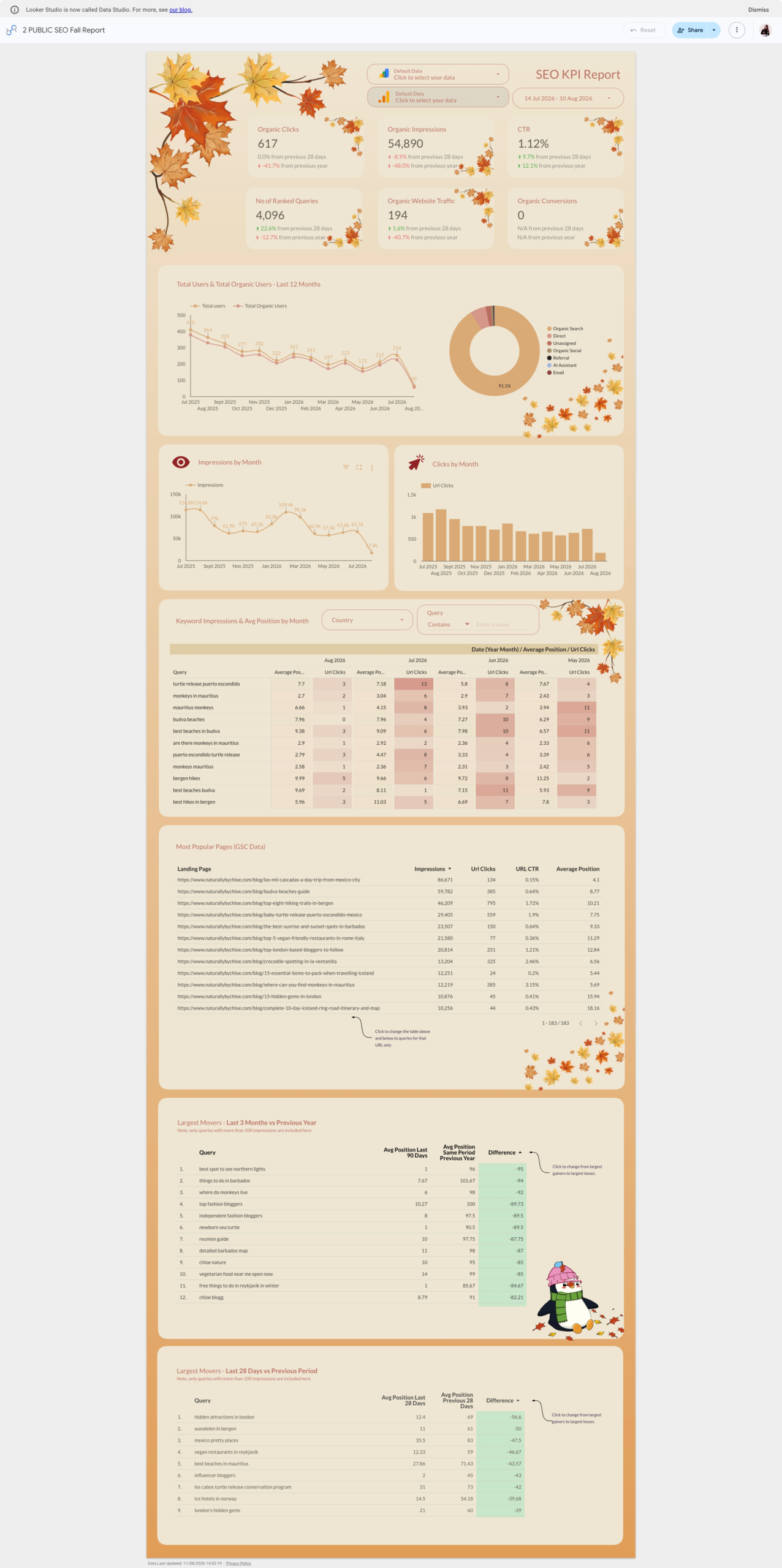
The parity check compares against Google’s own connectors, so start from templates built on them:

Where to go next
- Connect Google Analytics to Claude or ChatGPT (GA4 MCP), the GA4 version of this post
- Connect Google Ads to Data Studio, the report side of the Ads check
- Connect Search Console to Data Studio: Site vs URL Impression, and why query rows don’t add up
- Marketing data MCP servers compared
- Client data and AI assistants: what agencies need to check
- AI in Data Studio: what Gemini does, what’s free, and what to use instead
Frequently asked questions
Is there an official Search Console MCP server?
No. Google hasn’t published one. Every option is community code on GitHub or a connector’s hosted MCP.
Do I still need a Google Ads developer token?
No. Google sunset developer tokens on 9 September 2026; your access level now sits on your Google Cloud project. Sending a token is optional and ignored.
Can Google’s Google Ads MCP server change my campaigns?
Not today: its tools only read. But the credential it uses has the full Google Ads scope, and Google says write tools are planned.
Does it work in ChatGPT?
Not directly. ChatGPT needs a remote server, so use your own Cloud Run deployment or a connector’s app, plan permitting.
Is the Google Ads MCP server free?
The server is free and open source. You need a Cloud project with at least Explorer access (2,880 production operations a day) and an assistant that can run it, or your own Cloud Run deployment.
Why doesn’t Claude’s number match my Data Studio report?
Usually dates (time zone, relative ranges), aggregation (Site vs URL Impression), fresh data or the 12-hour cache. The table above lists the common causes.
Some links in this post are affiliate links: if you sign up through one, I may earn a commission at no extra cost to you. How I work with partners.