
To build a data story, check three things before the report goes out: that the data is accurate and reliable enough to carry a decision, that the narrative is action-oriented and tied to the projects you’re working on, and that every visual helps the reader see a pattern they couldn’t see in the rows. Then check the skills behind them, because a data story is only as good as the weakest of the four.
This is the practical half of my data storytelling guide for marketers, built from my WTSFest 2023 talk on data storytelling for digital marketing and data consultants. It covers the four skills a data story asks of you, the questions I use to validate the data, the narrative and the visuals, worked examples of each, and the checklist I made for the talk, which you can copy.
Why dashboards and spreadsheets aren’t enough
Throughout history, stories have been the vehicle that bridges gaps between people and unites them. We’re very used to hearing stories, creating them and using storytelling as a device, and marketing is full of examples of how important it is for growth. Stories help us understand meaningful information, and so they shape our values, our prejudices and our desires. Some of the most successful brands in history have used storytelling to carry their whole marketing strategy without ever having to persuade anyone to buy.
Yet many digital marketing consultants, SEO consultants and analysts don’t use this skill when they present data or discuss performance. They rely on dashboards or spreadsheets, which only speak of the what, not the why. Or they discuss what happened in the project or the niche, not the actions needed to resolve the issue or move the project forward.
Storytelling gets overlooked because it needs a more advanced understanding of your stakeholders, and of the soft limitations and risks of a project. It’s also the last step of the reporting process (collection, analysis, visualisation, then storytelling): roughly the last 10% of the effort, and arguably the most important part. Where storytelling sits in the reporting process goes into why it’s the step that meets the deadline.
The four skills a data story asks of you
Data storytelling is the ability to tell the story behind the raw data, presenting selected information to a specific audience with a compelling narrative. Those three elements (the selected information, the audience and the narrative) are its fundamental components, and building them takes four skills: data science, data visualisation, narrative design and relationship management.

Data science
To build data stories into your reporting, you first need to extract knowledge and insight from data, and to have the technical skill to combine data sources and manipulate them. In Data Studio that means knowing how to blend data, how to apply filters to get the exact view you need, and how to create custom dimensions. It might also mean scraping data, running entity or sentiment analysis, or otherwise having a few more technical hard skills in data science.
Data visualisation
You need to understand how best to visualise data based on its type, and help stakeholders take in the large quantities of data you’ve collected. That matters for your storytelling more than almost anything else. Part of the skill is knowing how to promote change rather than cause more confusion when you build reports. It’s also worth experimenting with different visualisation tools, and with different ways to present the same data depending on the stakeholder.
What you’ll often find is that there’s no need for complex visualisation when the story is simple. The people at the top (the c-suite, say) often grasp top-level performance best from a simple colour-coded table.
Narrative
How do you convey insights? How will you communicate wins? Do you know the best way to instil urgency in your stakeholders when it’s needed? Are you aware of how the different parts of the project, and the relationships between its stakeholders, affect it? Do you know how best to show your stakeholders a cause and its effect?
The narrative is a critical component of data storytelling, and it takes skill in communication as well as creativity. I cover what goes into it in the narrative section below.
Stakeholder relationships
As well as conveying insight and data, you need to be good at building relationships with stakeholders: knowing them as people, not just as positions in the organisation. Find out what kind of person they are, and how you can relate to and communicate with them without friction day to day. Consider what motivates and worries them in their role and in the context of your projects together; in other words, what success and failure look like to them. If you report to the c-suite, you need to know what they report on to their executives, and what matters most to them. With that knowledge you can present project bottlenecks or wins in terms of their own goals and KPIs.
I think a crucial part of data storytelling is your ability to build relationships, take the most important things you learn from them, and put those in the context of the data you have.
| Skill | What it looks like in a reporting week |
|---|---|
| Data science | Blending GA4 with Search Console on date, filtering to the pages the team works on, a custom dimension that groups them |
| Data visualisation | Choosing the chart from the data type and the stakeholder; a colour-coded table for the c-suite |
| Narrative | Knowing which result is the win, which needs urgency, and which cause you can actually show |
| Relationships | Knowing what your contact reports upward, and what success and failure look like to them |
Validate the data
A data story has three components: the data, the narrative and the visuals. Each helps you engage, explain to and enlighten your audience, and only with all three do you get a thought-provoking, engaging, action-oriented report. The data comes first.
When you choose the data you report on, select data that is accurate, reliable and appropriate for the insights you want the story to reach. Accurate means the data isn’t sampled, or filtered in a way that distorts it. Reliable means the source can be reached, and that other people trying to replicate the report would get the same views.
Think about it this way. If your data is sampled, inaccurate, or not timely enough for its use, how can you rely on the report as the source of truth for your client? Would you feel confident presenting it to them? Would you feel comfortable using it to build your monthly report, or in c-suite, executive-level reporting? Perhaps not. And if you don’t feel comfortable with the report, your stakeholders won’t either. That’s why accurate data is the first component of a good story.
The questions I ask when validating the data:
- Is sampling applied to the data?
- Is the data accurate?
- Is it timely, that is, timed for its use? Is it real-time, historical or forecasted?
- Do I feel comfortable enough with this data to use it to inform strategy?
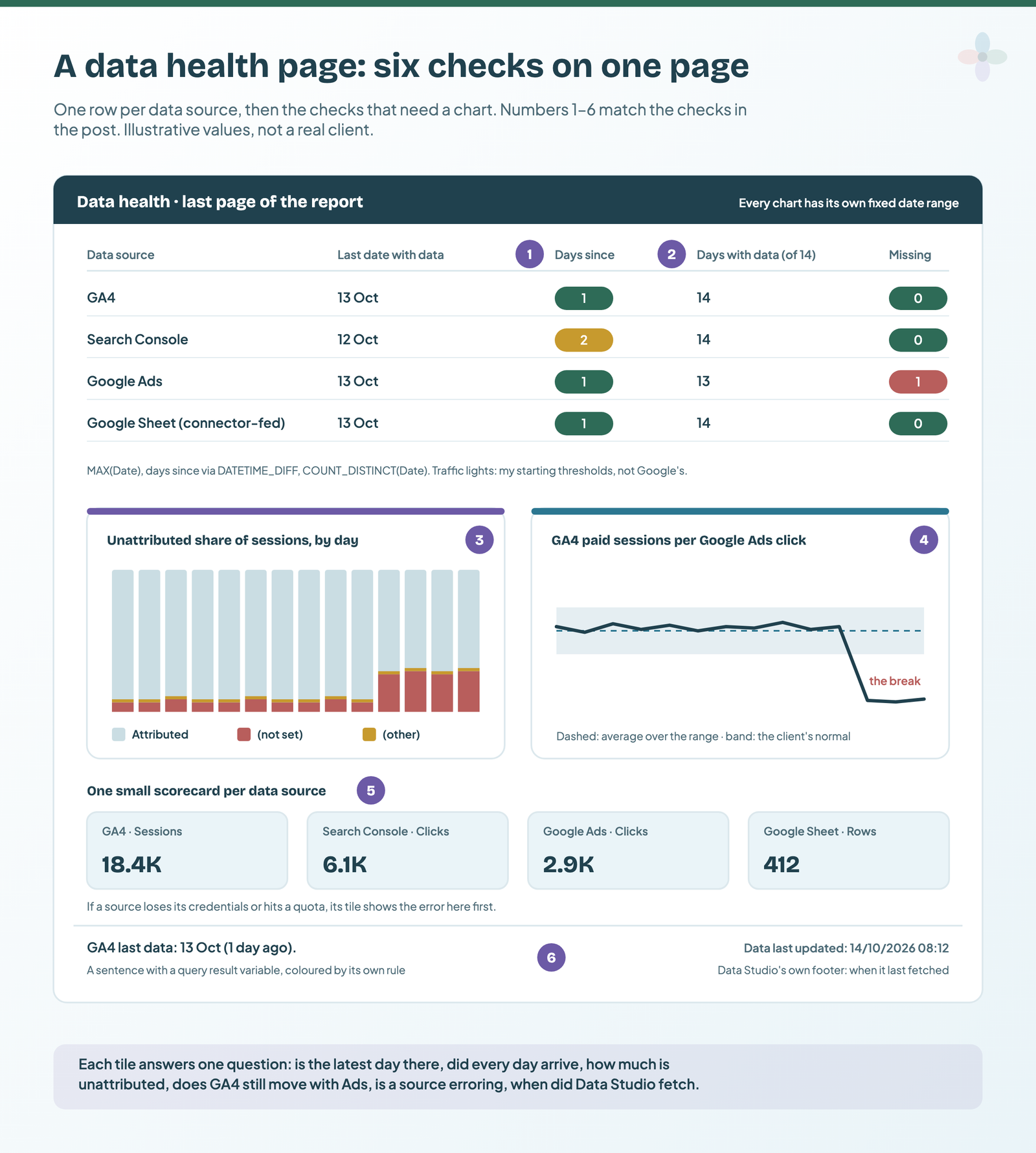
In Data Studio, two checks answer most of these: whether the connector or the platform is sampling or thresholding the numbers (GA4 withholds rows below its data thresholds, for example in demographics, and can sample reports, explorations and requests that go over its event quota), and how fresh each source is. A data health page turns those checks into something the reader can see.
Build a narrative that leads to action
The narrative is the second component. It should be compelling, action-oriented, and aligned with the needs of the project and its stakeholders.
The action-oriented part matters most. Think about the data in the context of the projects you’re working on, including projects that have been delayed for reasons that, if you work in SEO, are often outside your control. Someone in the web development team has quit, or taken on another project that keeps them from their duties. All of it delays your projects. If you report without that context, you aren’t pulling your weight as a consultant, because you aren’t doing what these projects need to move forward.
Consider what actions would resolve the conflicts in the data, and what context explains what you’re observing. Speak your stakeholders’ language, and help them understand the complexities of the project. Think about how they see it.
An example: when the fix is in the stakeholder’s hands
Say your stakeholder has told you that one KPI matters most to them, the one they report on: a 20% increase in organic sessions. You have three projects blocked for reasons within this stakeholder’s control, and you report directly to them. Then the narrative to build is that the underperformance is within their power to fix. Part of the reason is that projects haven’t been actioned, and as the stakeholder they can change that story. Built that way, the narrative ties in the actions needed to fix performance and makes the next steps obvious.
The questions I use to guide the narrative:
- What does the data show? Is the performance aligned or misaligned with expectations?
- Can you derive the next actions from analysing the data and the performance?
- How does the data relate to the projects you’re working on?
- Is it influenced by external projects, or by stakeholders within the team?
- Could people on the team, or faster delivery of projects in the pipeline, improve the performance you’re seeing?
Setup, conflict, resolution in a performance report
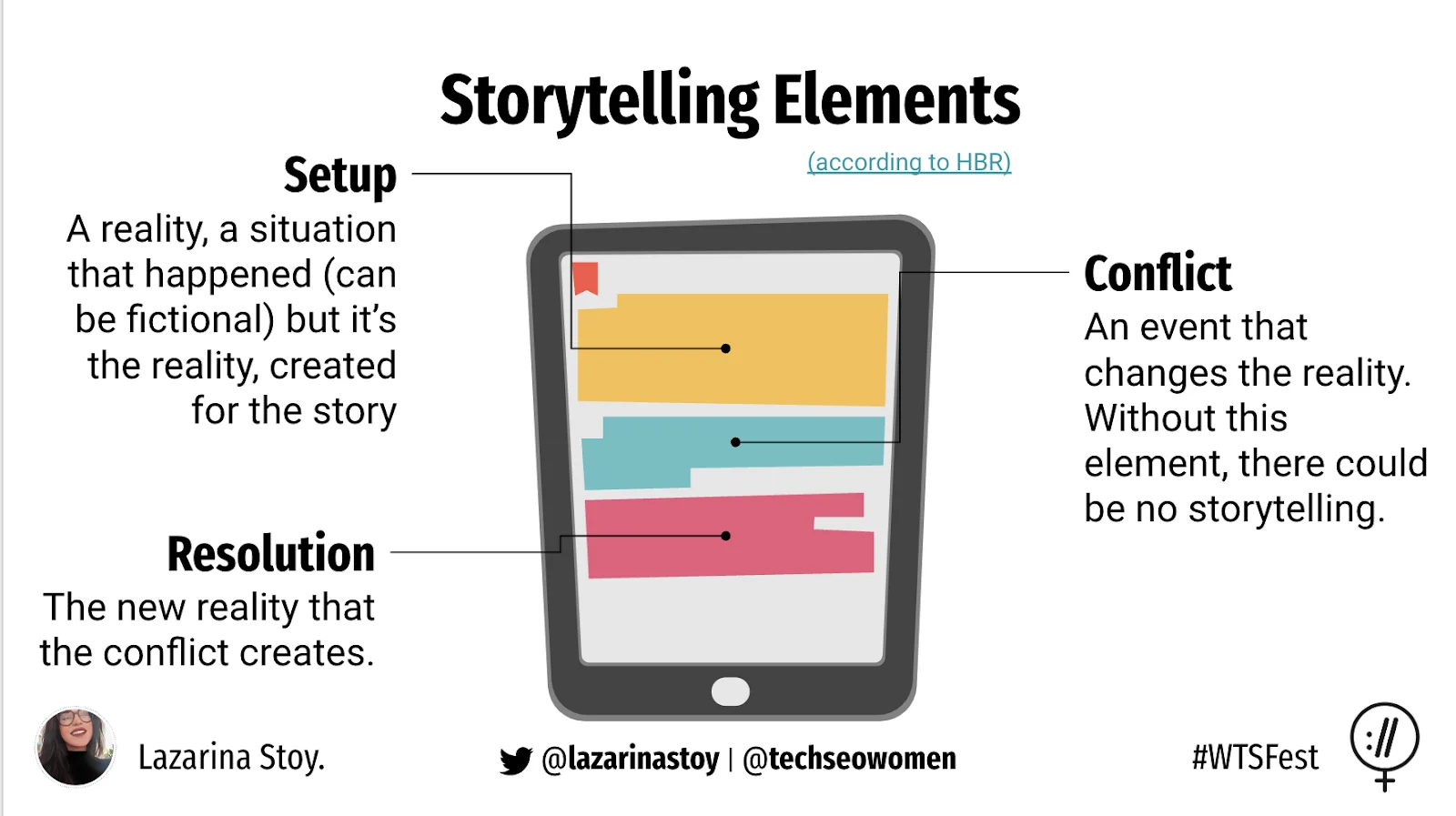
When it comes to the narrative itself, there are three elements to think about: the setup, the conflict and the resolution. The narrative structure a monthly report needs covers where the model comes from.
| Element | What it is | In an organic marketing report |
|---|---|---|
| Setup | The reality: the situation the story starts from | The period, the baseline, what you were trying to do |
| Conflict | An event that changes that reality. Without it, there’s no story. | An algorithm update, or a resignation that changes the pace of the project |
| Resolution | The new reality the conflict creates | The action needed, with an owner and a date |
As you build the conflict, tension rises. Without change, there is no story.
Here’s how the three elements turn a chart into a decision. One of the clearest before-and-after examples I know (from a tips-and-tricks guide to data storytelling) shows tickets received and tickets processed by month. In the before chart you can see both series, but not what happened, why it matters, or why you should pay attention. The next steps are hard to grasp, and nothing shows what the desired state should be.
The after version uses the narrative elements:
- Setup: from January to May, tickets received were processed.
- Conflict: an annotation on the chart marks a key event in May that changed the reality: tickets are no longer processed as they arrive.
- Resolution: the text around the chart, the title and description, states the action needed to resolve the gap.
The example shows the practical side of building a narrative into a report, and also how much depends on choosing visualisations that convey meaning and highlight patterns, and on using annotations, text and titles strategically to add commentary and recommend next steps that resolve the bottleneck.
Choose visuals that show what the rows can’t
The visuals help the reader spot trends and patterns, and reach insights that aren’t easy to see in the rows and columns of a spreadsheet or raw data. Two things matter most when you choose them for a story:
- Experiment with different reporting tools and formats for different audiences. Not everyone is the right audience for a dashboard, or for a deck. Adapt the method to the audience. Your choice has to convince them that this style of reporting gives you both a better understanding of the data, and more insight through it. The visuals are the vessel for that.
- Don’t choose a visualisation because it looks nice, and don’t choose colours at random. Every choice should reflect the story you’re telling with that data point, metric or dimension. Use what you know about the metric to highlight what’s important about the change.
Simple stories, presented simply, can have a huge impact
The medium you choose can make or break a data story. We’re led to believe that fancy reports, interactive and complex dashboards, or advanced analyses are the hottest thing in the game. You’d be surprised how effective a colour-coded list can be: the projects not yet implemented, their projected impact on traffic and revenue you’re currently not getting, and what they’re costing the organisation in consulting fees in the meantime.
The point is that if you know your stakeholders well, and use the data points you have strategically to move them to action, you don’t need a complex vessel to put the story in front of them and get the outcome you want.
Questions to validate your choice of visuals:
- Are the visuals you’ve chosen the vessel for your data story?
- Do the charts, graphs, scorecards and tables give you a better understanding of the data?
- Do they help you identify patterns and trends that would otherwise stay hidden?
Andrew Abela’s chart chooser is the one I put on the slide in my talk; for Data Studio’s own charts, choosing a chart from the shape of your data maps each one.
Why you need all three
If you only have the narrative and the data, you can explain something. If you only have the visuals and the data, you enlighten your understanding of the data. If you only have the visuals and the narrative, you’ll have a very engaged audience, but with no data tied in it isn’t a compelling story and may not lead to any action; you’ll only capture their short-term attention. Combine all three and your stakeholders can envision the change that needs to happen.

Copy the data storytelling checklist
I made a checklist for the talk, so you can validate the data, narrative and visual elements of any data story: the complete list of questions in all three dimensions, each with a note on why it matters.
The mistakes the checklist is built to catch are in 10 common data storytelling mistakes and how to avoid them.
What data storytelling does for you
Data storytelling is a critical skill for every consultant. It helps you:
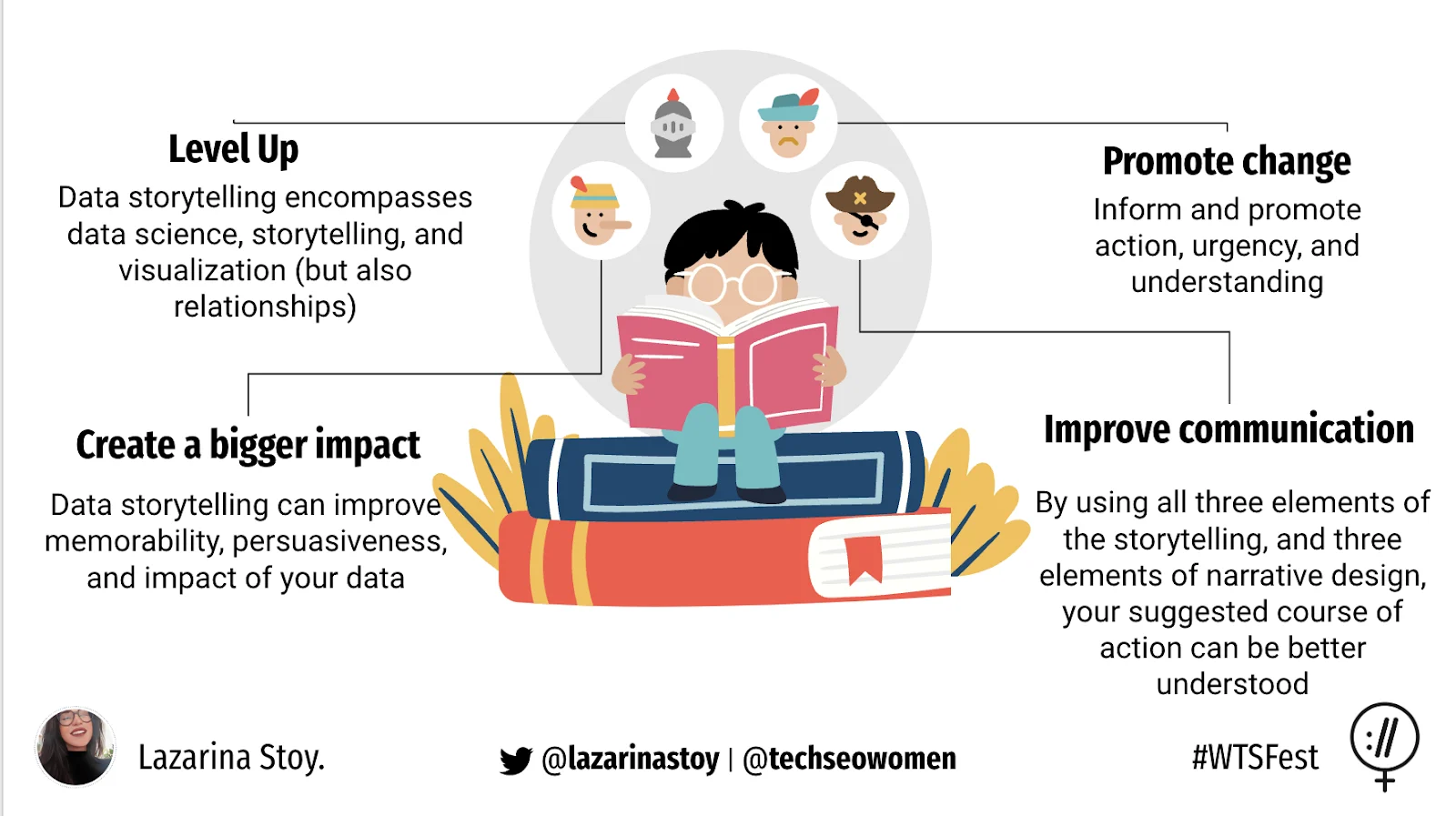
- Promote change: inform, and promote action, urgency and understanding.
- Level up: it combines data science, storytelling and visualisation, but also relationship building and stakeholder management.
- Create a bigger impact: it can make your data more memorable and more persuasive. What the evidence for data storytelling actually says is careful about which of those claims hold up.
- Improve communication: using the three components of a data story and the three elements of narrative design, your suggested course of action is better understood.
Watch the talk
This guide is a write-up of my WTSFest 2023 talk. If you prefer to watch, the full recording is below; the practical half starts at around the 14th minute.
The slides are on SlideShare.
Frequently asked questions
What are the components of a data story?
Three: the data, the narrative and the visuals. The data has to be accurate and reliable, the narrative action-oriented and tied to the project, and the visuals have to show patterns the rows can’t. With only two of the three you explain, enlighten or engage; it takes all three to drive action.
What skills do you need for data storytelling?
Data science (extracting insight and combining sources), data visualisation, narrative, and stakeholder relationships. The fourth is the one most often left out, and it’s why identical charts land differently with different clients.
How do I check my data before I build a story on it?
Ask whether it’s sampled, whether it’s accurate, whether it’s timely for its use (real-time, historical or forecasted), and whether you’d be comfortable using it to inform strategy. If you wouldn’t, your stakeholders won’t be either.