
Before client data goes into ChatGPT, Claude or Gemini, check four things: the plan (consumer plans can train on your chats; business plans and paid APIs don’t by default), the contract (a DPA with the AI vendor, and a client agreement that lets you add it as a sub-processor), whether the export is personal data, and what any connection can read or write. Most monthly reporting needs none of the client’s personal data at all.
The question arrives the week a team starts pasting exports into an assistant, or someone connects one to GA4 over MCP. The answers that rank are written for law firms and IT departments, not for someone holding a client’s GA4 property and a Data Studio report. (Data Studio was called Looker Studio until April 2026.) This covers:
- the three routes client data takes into an assistant
- a plan-by-plan register: training, the switch, retention, DPA (human review is in the Sheet)
- the contracts, and whether an export is personal data
- what an MCP connection can read and write
- Google’s own switches, logs, and telling the client
- a twelve-point checklist and a register Sheet to copy
On the evidence: this is built from each vendor’s terms and help pages as they read on 14 October 2026 (OpenAI’s in a browser, because they block automated reads), the GDPR text on EUR-Lex and Google’s documentation. I haven’t audited any vendor. Terms change often: OpenAI’s training page was updated two days before I read it, which is why the register has a “checked on” column.
Not legal advice
I’m an EU-based practitioner who teaches marketers to use AI, not your lawyer. Where I quote GDPR, I’m telling you what the text says. Whether it applies to your agency, and what your client contracts need, is a question for your DPO or counsel.
The three ways client data reaches an assistant
Each route falls under different terms, so the first job is knowing which one each person on the team uses.
- Paste or upload. An exported chart, a screenshot, a client email. Governed by the assistant plan’s terms.
- A connection. An MCP server (Model Context Protocol, the standard that lets an assistant call tools) or app that queries the source with the OAuth permissions you grant. Governed by the plan, the connector vendor’s terms and the scopes.
- AI built into Google’s tools. Gemini in Data Studio, Ask Advisor in GA4, Conversational Analytics. Governed by Google Cloud and Analytics terms, not the consumer Gemini app’s.
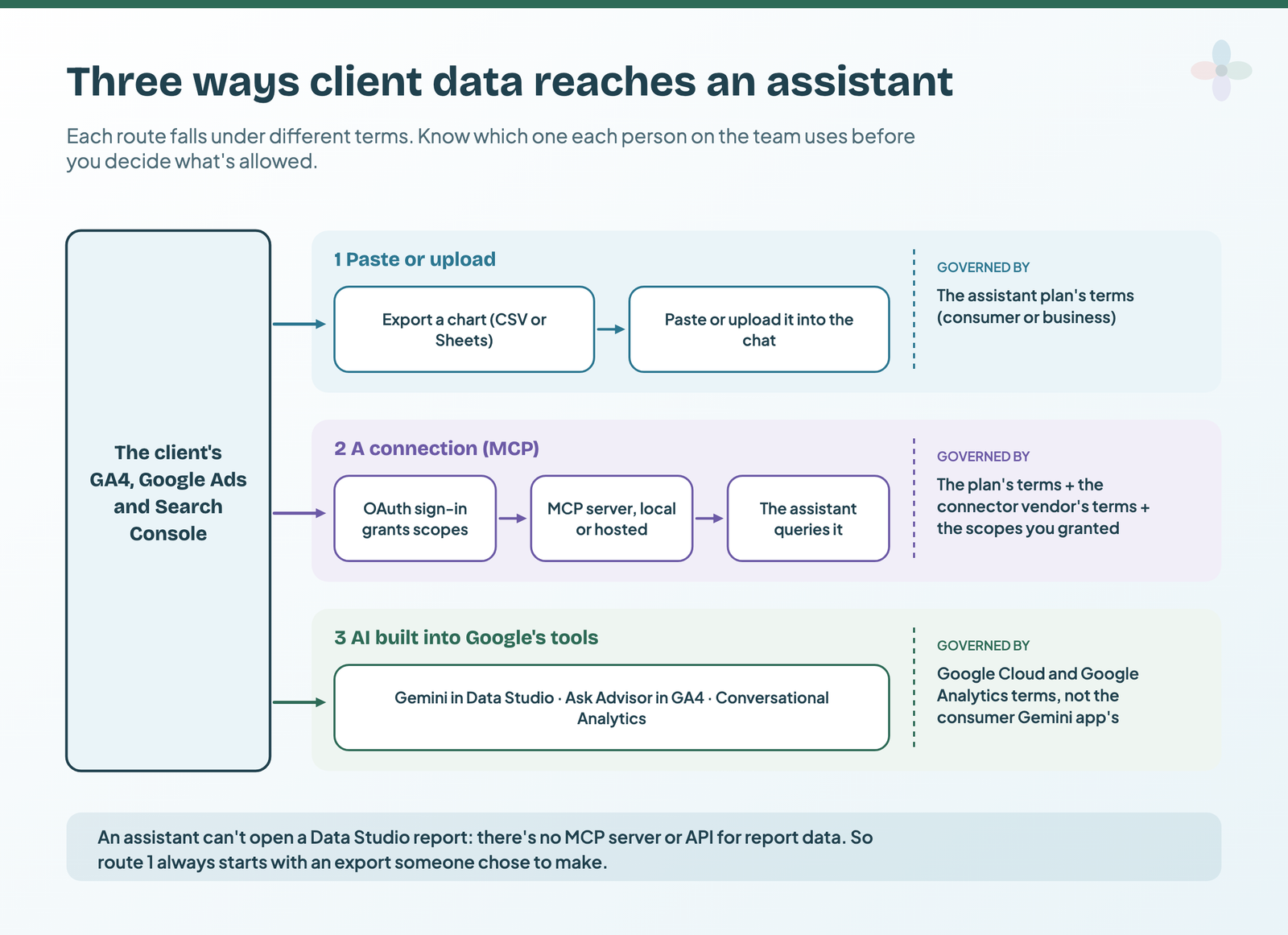
An assistant can’t open a Data Studio report: there’s no MCP server for Data Studio, and its API doesn’t read report data. So route 1 starts with an export from a chart (CSV or Sheets, with the chart’s filters applied; a report owner can stop viewers exporting). Route 2 is set up in my guide to connecting GA4 to Claude or ChatGPT, and Gemini’s place in Data Studio is in my AI in Data Studio guide.
In practice the riskiest route is the first one on a team member’s personal account. OpenAI, Anthropic and Google all draw their line between personal and work accounts, and Google says a personal-account user who shares Workspace data with the Gemini app falls under the Gemini app’s terms.
Check 1: which plans train on your data, and how long they keep it
The pattern is the same at all three vendors: consumer plans may train on your chats, business plans and paid APIs don’t by default. What differs is retention, feedback exceptions, human review and who can read the chats later. And “Gemini” is several products, each with its own terms.
| Product / plan | Trains on your chats? | How to switch it off | Retention | DPA? |
|---|---|---|---|---|
| ChatGPT Free, Plus, Pro | Yes, by default | Settings › Data controls › Improve the model for everyone | Saved until you delete; deleted chats within 30 days; temporary chats up to 30 days | No |
| ChatGPT Business | No, by default | Nothing to switch: feedback doesn’t permit training | Admin-controlled; deleted within 30 days | Yes, via a form |
| ChatGPT Enterprise | No, by default | — | Admin-controlled; deleted within 30 days | Yes, via a form |
| OpenAI API | No, by default | — | Up to 30 days; zero data retention on request for eligible endpoints | Yes, via a form |
| Claude Free, Pro, Max | Only if you allow it | Settings › Privacy › Help improve our AI models | Deleted chats off the back-end within 30 days; up to 5 years de-identified if you allowed training | No |
| Claude Team, Enterprise | No, by default | Owners can turn off Rate chats | Deleted chats within 30 days | In the Commercial Terms |
| Anthropic API | No, by default | — | Deleted within 30 days | In the Commercial Terms |
| Gemini app, personal account | Yes, with Keep Activity on; some chats human-reviewed | Gemini Apps Activity › Keep Activity, or temporary chats | 18 months by default; 72 hours with Keep Activity off | No |
| Gemini in Workspace apps | No | — | Prompts and output not stored without your permission | Not on the page read |
| Gemini API, unpaid (incl. Google AI Studio) | Yes, outside the EEA, Switzerland and the UK; human reviewers may read it | Use the paid tier | Not stated | No (in the EEA, Switzerland and the UK, the paid tier’s data terms apply) |
| Gemini API, paid | No | — | Logged for a limited period for abuse detection | Yes, Google’s processor DPA |
| Gemini in Data Studio | No | Keep Trusted Tester data use off | Not stated | Not on the page read |
| Ask Advisor in GA4 (Beta) | No | — | Chat logs 55 days | Not on the page read |
Read from each vendor’s own page on 14 October 2026: OpenAI training, OpenAI retention, OpenAI business, Anthropic consumer, Anthropic commercial, Gemini app, Gemini API, Gemini for Google Cloud, Ask Advisor. Every link is also in the Sheet.
Three exceptions worth a bold line in your policy:
- Feedback buttons. On ChatGPT’s individual plans, a thumbs-up or thumbs-down can put the whole conversation into training even after you’ve opted out. Claude’s commercial plans make feedback an exception too.
- Human review outlives deletion. Gemini chats picked for human review are disconnected from your account and kept three years, even if you delete your activity. Google’s own advice: don’t enter confidential information you wouldn’t want a reviewer to see.
- Connectors. Anthropic says training data doesn’t include raw content from connectors, including MCP servers, unless you copy it into the chat.
The short version of this table also sits in my commentary guide’s governance section.
Check 2: the contracts, a DPA with the AI vendor and your client’s permission
Under GDPR, an agency usually processes a client’s personal data on the client’s behalf: the client is the controller, you’re the processor. Article 28 of the GDPR then sets two rules that matter here. Processing has to be governed by a contract (Art. 28(3)), and “the processor shall not engage another processor without prior specific or general written authorisation of the controller” (Art. 28(2)). With general authorisation, you tell the client about changes so they can object.
So when client personal data goes into an AI tool on a business plan or API, where the vendor signs a DPA as your processor, the vendor becomes your sub-processor. That needs paper in two places. A consumer plan isn’t a sub-processor arrangement at all: there’s no DPA, and its terms can let the vendor use your chats for its own purposes (training, where it’s on), while the contract Art. 28(3)(a) requires has a processor act only on the controller’s documented instructions. That’s the reason client personal data stays off personal accounts.
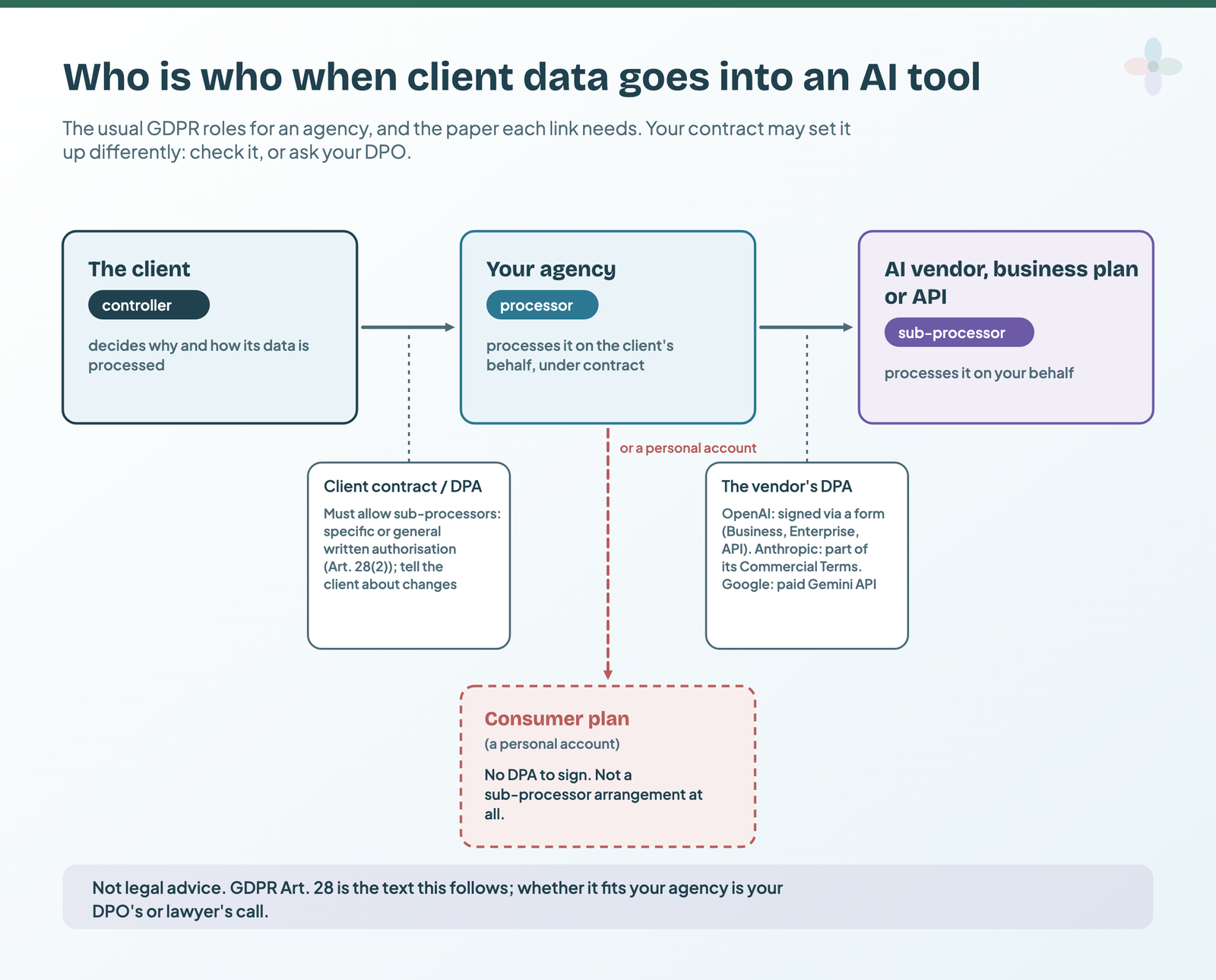
- The vendor’s DPA. OpenAI executes its DPA for ChatGPT Business, Enterprise and the API through a form; for EEA customers the counterparty is OpenAI Ireland. Anthropic’s Commercial Terms incorporate its DPA, which gives 15 days to object to a new subprocessor. Google’s paid Gemini API runs under its processor DPA; the unpaid tier, AI Studio included, is used to improve Google’s products, except that Google’s terms apply the paid tier’s data terms to users in the EEA, Switzerland and the UK. OpenAI’s DPA gives 30 days to object to a new subprocessor. Consumer plans have no DPA at all.
- Your client contract. Does it allow sub-processors, generally or by name? Is there an AI clause?
The check, in order:
- Find the data-processing clause in each client agreement.
- Check whether it allows sub-processors, and whether general or specific.
- Sign or accept the AI vendor’s DPA for the business plan you’ll use.
- Add the vendor to your sub-processor list and notify the client the way the contract says.
- Record all of it in the register Sheet.
If your agency already keeps client paperwork on who owns the report at handover, this belongs next to it, and in your reporting operations.
Check 3: is the export personal data? GA4, Google Ads and Search Console, one by one
GDPR’s definition is broad: personal data is “any information relating to an identified or identifiable natural person”, including identification by “an online identifier” (Art. 4(1)). Recital 30 names IP addresses and cookie identifiers. A chart of last month’s sessions by channel identifies nobody. Some exports do.
Google’s own rules help at the source, though Google’s “PII” is a narrower idea than GDPR’s personal data. GA4’s policies say no data Google could recognise as personally identifiable, such as email addresses, may be sent to Analytics, and its data redaction removes emails and chosen query parameters from web streams. GA4 doesn’t log or store IP addresses from EU, Swiss or UK users. Search Console leaves rare, anonymised queries out of its query tables.
| Export | Typical contents | Identifies a person? | What to do |
|---|---|---|---|
| GA4 channel or landing-page report, a month | Sessions, key events by channel | Usually not | Send |
| GA4 report on a tiny segment or one day | A handful of users per row | Can be, combined with other data | Widen the range or segment first |
| GA4 user-level export | User ID, client ID, user explorer, BigQuery event export | Very likely: online identifiers (Recital 30) | Don’t send |
| Page URLs with query strings | Sometimes emails or IDs in parameters | Can be | Strip parameters first |
| Google Ads campaign report | Spend, clicks, conversions | Usually not | Send |
| Google Ads Customer Match list | Customer emails and phone numbers | Yes | Don’t send |
| Search Console queries and pages | Clicks, impressions; rare queries already left out | Usually not | Send |
| CRM or lead export joined to GA4 | Names, emails, deal values | Yes | Don’t send |
My reading of Art. 4(1) and Recital 30, with Google’s PII policy, EU data and Search Console pages, read 14 October 2026. Not a legal ruling.
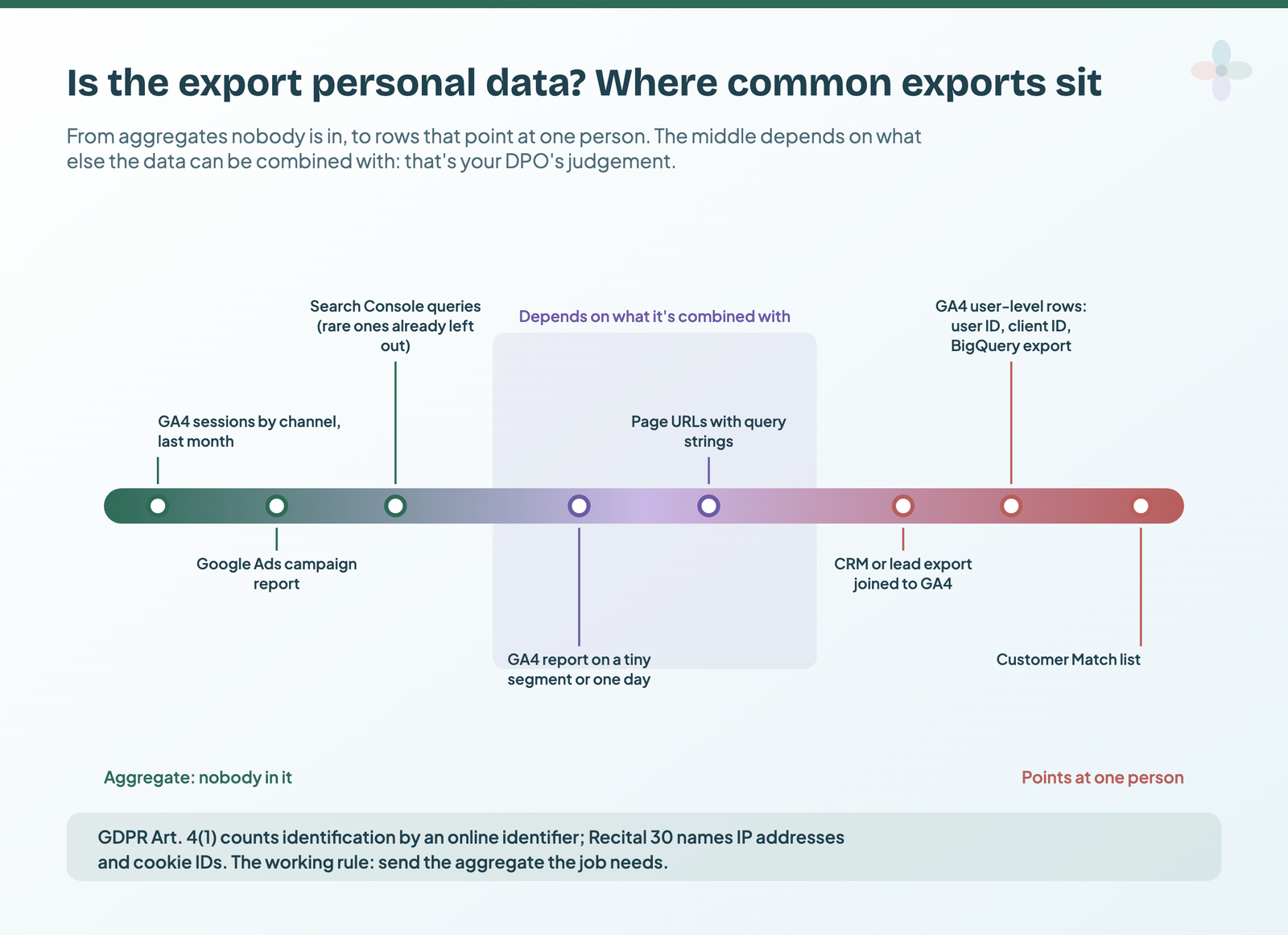
I’m not saying aggregated reports can never be personal data. Recital 26 asks whether someone can be identified by “all the means reasonably likely to be used”, including singling out, so it depends on what else the data can be combined with, and that’s the judgement your DPO makes. I am saying the working rule is GDPR’s own data minimisation principle, data “limited to what is necessary” (Art. 5(1)(c)): send the aggregate the job needs. If the BigQuery event export is on your mind, it’s user-level, which matters for Conversational Analytics; and who sees which rows inside the report is a row-level security question.
Check 4: what the connection can read and write (MCP permissions)
A connection queries the source with the permissions you grant, so least privilege is a scope decision. Analytics and Search Console have read-only scopes (analytics.readonly, webmasters.readonly). Google Ads doesn’t: its API scope is “See, edit, create, and delete your Google Ads accounts and data”. Google’s Ads MCP server is read-only by design, which is the server’s promise, not the scope’s (more on that here).
| Route | Where it runs | Can it write? | How to keep it read-only |
|---|---|---|---|
| Google Analytics MCP server | Your machine | No; asks only for analytics.readonly |
Nothing to do |
| Google Ads MCP server | Your machine or your Cloud Run | No, by design | Guard the credentials: the scope is full access |
| BigQuery remote MCP | Google-hosted | execute_sql can |
Block it with an IAM deny |
| Catchr, Funnel.io, Coupler.io | Vendor-hosted | No ad-platform writes (Coupler.io can edit its own flows) | Nothing to switch |
| Windsor.ai | Vendor-hosted | Yes | Settings switch for read-only |
| Supermetrics | Vendor-hosted | Yes, beta | Opt-in per ad account; approval modes |
| Porter Metrics | Vendor-hosted | Its docs disagree | Confirm in the AI client |
| Meta’s ads server | Meta-hosted | Yes; new campaigns start paused | Business-portfolio rules; client asks before activation |
From each vendor’s MCP docs and Google’s OAuth scopes page, read 14 October 2026. The full write-access comparison is in my MCP server comparison.
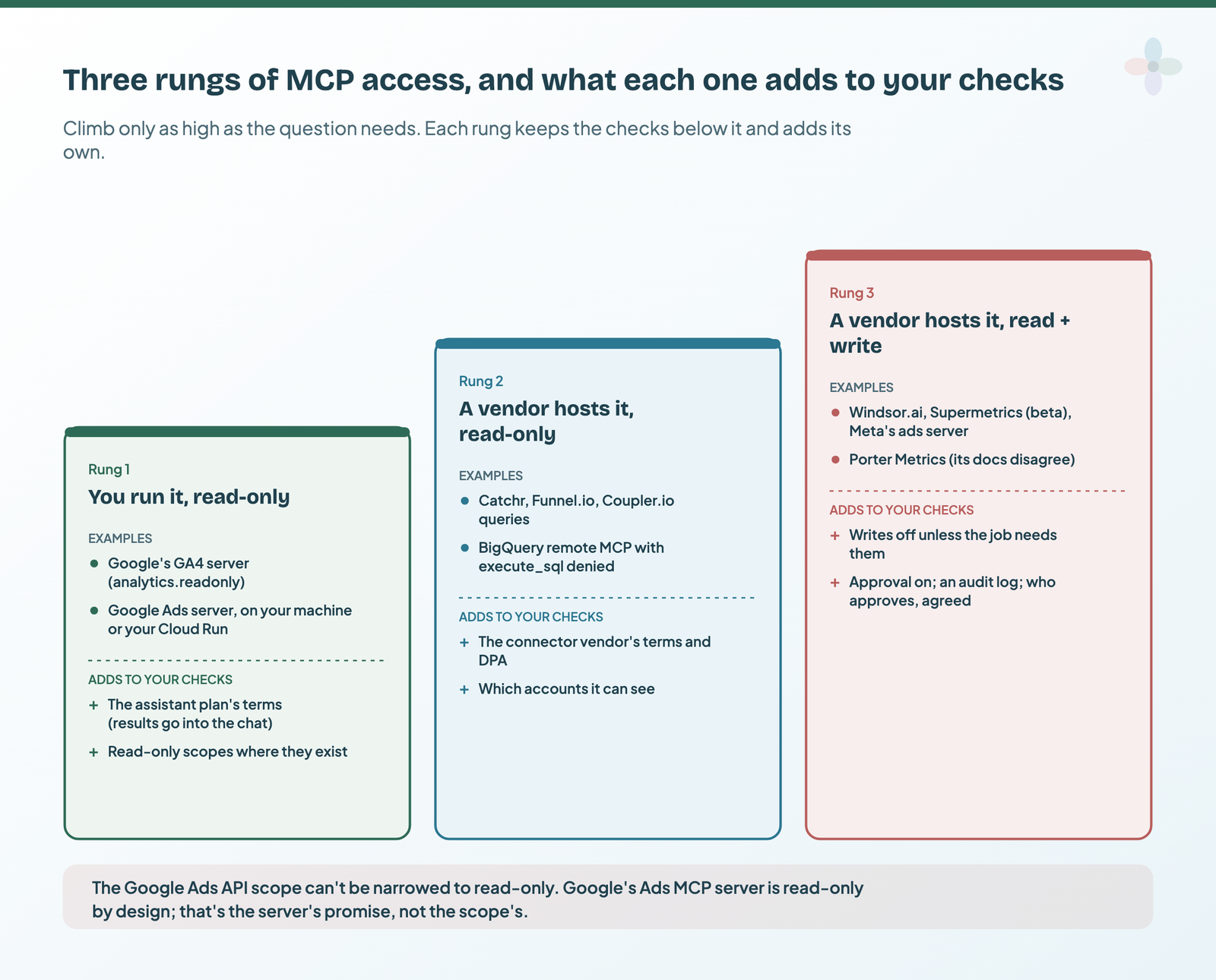
On the client side, the assistant decides how freely it calls those tools. Anthropic tells you to review requested permissions and “Limit these scopes when possible”, to choose “Allow always” only for tools you trust to run unsupervised, and warns that in Research mode Claude can call connector tools without asking; its advice is to disable tools that take write actions. OpenAI’s full MCP support with write access is rolling out in beta to Business, Enterprise and Edu. The MCP specification’s own security guidance calls broad scopes granted up front a risk.
The same “who sees the data” question comes up inside Data Studio with community visualisations.
Check 5: Google’s own switches (GA4, Data Studio, Conversational Analytics)
Four settings sit on the Google side, and a Data Studio agency usually owns them.
| Where | What it controls | Default | Who can change it |
|---|---|---|---|
| GA4 › Admin › Account details › data sharing settings | “Google products & services” on: Google can use the data to improve its products, as an independent controller | Not stated; check each account | Editor or above, at account level |
| Data Studio › User settings › Gemini settings (Pro) | Trusted Tester data use: consent to Google using your data under the programme terms | Optional, but switched on automatically with Trusted Tester features | Data Studio Pro Manager or Owner on the Pro project |
| Report sharing (Pro) | “Disable viewers from generating Google Slides with Gemini” | Viewers can generate | Report owner |
| Conversational Analytics prompt analytics | Google analyses anonymised prompts, not for training | On | Opt-out form before 23 November 2026; org-policy constraint from then |
From Google’s data sharing settings, Gemini in Data Studio, Slides with Gemini and Conversational Analytics pages, read 14 October 2026.
With all GA4 data sharing settings off, Google uses the data only to provide and maintain Analytics; with “Google products & services” on, it’s an independent controller for that data under GDPR, which is worth a line in your client conversation. Gemini for Google Cloud, the family Gemini in Data Studio belongs to, doesn’t use prompts or responses to train its models. Conversational Analytics conversations are deleted after 180 days without activity, and my Conversational Analytics walkthrough has the opt-out route. Ask Advisor isn’t used for training and keeps chat logs 55 days. Which of these need Pro is in Data Studio free vs Pro.
Check 6: logs, so you can answer “what did you send?”
When a client asks what went into an AI tool, the answer depends on the plan.
| Tool / plan | Who can see what was sent | Audit log |
|---|---|---|
| Any consumer plan | Only the person who sent it | No |
| ChatGPT Business | Admins can view, export and delete members’ conversations | Not stated |
| ChatGPT Enterprise | Admins | Through the Enterprise Compliance API |
| Data Studio Pro | Cloud project admins | Cloud Audit Logs (datastudio.googleapis.com) |
| Windsor.ai · Supermetrics MCP | Account users | Audit log of writes · campaign history with revert |
From OpenAI’s business privacy page, Google’s Data Studio audit logging page and the vendors’ write-action docs, read 14 October 2026.
Where nothing logs, keep your own: the Sheet’s “Data sent log” tab takes date, client, tool and plan, what was sent, why and who, and flags a row that doesn’t match what the register allows. (Data Studio’s report usage tracking is about viewers, not AI.)
Check 7: telling the client
If the AI vendor is a sub-processor, Check 2 already forces the conversation: the contract has to allow it. Beyond that, disclosure is professional practice. Say which tools touch the client’s data, on which plan, with what access, and that a person checks AI-drafted work before it goes out. Put it in writing once, in the agreement or onboarding pack, and keep the register as the evidence. For AI-drafted report commentary, my stance and wording are in the disclosure section of my commentary guide.
An example paragraph (my wording, not a legal template)
“We use AI assistants for some reporting work, such as drafting commentary and analysing aggregated performance data. We use [tool and plan], under a data processing agreement, on a plan that doesn’t use your data to train its models. We send aggregated figures, not personal data about your customers, unless we’ve agreed otherwise in writing. A named person on our team checks everything before it reaches you. We’ll tell you before we add a new AI provider.”
It also makes the next report meeting easier when the client asks “did AI do this?”
The checklist, and the register to copy
Run it once per client, then every quarter:
- Work accounts only: no personal ChatGPT, Claude or Gemini accounts for client data.
- Client data goes only to a plan that doesn’t train by default and offers a DPA.
- Training is off on any other plan still in use.
- The vendor’s DPA is signed or accepted.
- The client contract allows the sub-processor, and the client was told.
- Each export is classified before it’s sent.
- Only aggregates go in; identifiers and query strings are stripped.
- Connections use read-only scopes where they exist.
- Write actions are off unless needed, with approval on.
- Google’s switches are set.
- What was sent is logged where the tool doesn’t log it.
- Terms are re-checked every quarter.
The Sheet has the plan register with source links and a re-check flag, the export classifier, a connections tab with review dates, the data-sent log, this checklist per client and the example disclosure paragraph.
Where to go next
- AI in Data Studio: every AI feature, what it needs and what’s free
- Connect GA4 to Claude or ChatGPT: Google’s official read-only route
- Marketing data MCP servers compared: which connectors read and which write
- AI client report commentary: using the data once it’s in
- Row-level security in Data Studio: who sees what inside the report
- Data Studio report ownership: the other agency handover checklist
Frequently asked questions
Is ChatGPT Business GDPR-compliant?
No tool makes you compliant, and I don’t label any plan that way. ChatGPT Business doesn’t train on your data by default and offers a DPA you can sign; the client’s lawful basis, its permission for the sub-processor and data minimisation still have to be in place.
I already pasted client data into a personal account. Now what?
Delete the chat (OpenAI and Anthropic both say deleted chats are removed from their systems within 30 days, with exceptions such as legal holds; on ChatGPT, delete any file saved to Library too, because deleting the chat doesn’t), turn training off, log what happened, and tell whoever handles data protection for that client promptly: whether it’s a reportable breach is their call, not yours.
Does Gemini in Data Studio train on my clients’ data?
Google says Gemini for Google Cloud doesn’t use prompts or responses to train its models. Check that Trusted Tester data use is off in your Gemini settings.
Is a Data Studio report with no names in it personal data?
An aggregate report usually identifies nobody. Small segments, user-level fields and joins with CRM data change that.
Does deleting a chat delete it everywhere?
Not always. Google keeps human-reviewed Gemini chats for three years, and Anthropic keeps de-identified data in training pipelines up to five years if you allowed training.
Some links in this post are affiliate links: if you sign up through one, I may earn a commission at no extra cost to you. How I work with partners.