

Data Studio is free. Data Studio Pro costs $9 per user, per project, per month. For most marketers the honest answer is that you need the free version and always will — but the pricing is worded confusingly enough that people either overpay or avoid Pro when they genuinely need it. Agencies have a sharper version of the question: most of client delivery (more than one schedule per report, hourly sends, Slack and Google Chat, alerts) sits behind Pro, and not every agency can buy it.
This page explains what you get free, who can buy Pro, what it adds for client delivery, how the “per user, per project” line works, how agencies work inside a client’s subscription, what happens if you stop paying, and when paying is clearly the right call.
How I checked this: this comes from Google’s Data Studio documentation and pricing page (read 13 October 2026, price re-checked 14 October) and Google’s developer forum. I haven’t run a Pro trial for this post, so Pro screens are described from Google’s docs, not my account. Looker Studio Pro is the same product under its old name.
What you get for free — which is nearly everything
Google’s own documentation describes Data Studio as “a no-cost tool”, and it is free for both the people building reports and the people reading them. There’s no seat cost, no viewer cost and no trial clock.
Everything a normal marketing workflow needs is in the free tier:
- Reports, pages and charts with no seat or viewer cost
- All of Google’s 23 native connectors — GA4, Search Console, Google Ads, Sheets, YouTube, BigQuery
- Sharing by link, scheduled email delivery (one schedule per report, up to daily) and embedding
- Calculated fields, blending, filters and date controls
- Viewers don’t need a licence, or even a Google account, depending on how you share
If you’re a freelancer, a solo in-house marketer, or a small team, you can build a career’s worth of client reporting on the free tier and never hit a wall that Pro would solve.
Who can buy Pro, and why you might not see the button
Pro isn’t sold to individual Google accounts. Per Google’s Pro subscription overview, to subscribe you need:
- An organisation: a Google Workspace or Cloud Identity organisation, not a personal Gmail account.
- A Google Cloud project: each subscription is tied to exactly one, and it owns the Pro content.
- A Cloud Billing account linked to that project, to pay for the licences.
- A place to buy: inside Data Studio, the Google Cloud console or the Workspace Admin console.
So a freelancer on a personal Gmail account can’t subscribe. That explains the Reddit threads asking whether Data Studio Pro actually exists: for many people asking, it doesn’t exist for their account. Google doesn’t say which Cloud Identity editions qualify, so check before setting one up just for Pro.
The older “monthly active user” subscription is now only for large organisations, through Google Cloud sales, which is why some forum threads quote per-active-user pricing you can’t buy.
What Pro actually adds
Pro is aimed at organisations, not individuals. The features are about ownership and governance rather than better charts — there is no chart, connector or calculation in Pro that free doesn’t have. Part VII of my ebook, Data Storytelling in Data Studio, rebuilds seven marketing reports before and after, and none of the makeovers needs Pro.
| What Pro adds | Why it matters |
|---|---|
| Organisation-owned content | Reports belong to a Google Cloud project, not to the person who made them. Assets survive someone leaving, and access is controlled through IAM. |
| Team workspaces | Shared spaces for a team’s reports rather than a tangle of individually-owned files. |
| Enhanced scheduling | Up to 200 delivery schedules per report, delivery into Google Chat and Slack, and chart-level alerts when a metric moves. The full list is in the delivery table below. |
| Personal report links | A private, editable copy of the report for whoever opens the link. Changes to the copy don’t touch your original, and vice versa. Only Pro users can open one, and the copy includes pages you’ve hidden in view mode. |
| Gemini in Data Studio | Calculated fields written from plain English, and adding report content to Google Slides. Both are in Preview and free “for a limited time”; Google says it may charge for them later. |
| Compliance controls | CMEK, customer-managed storage, data residency — relevant if your legal team has opinions. |
| Looker mobile app | Google’s Looker app gives access to Data Studio reports and data on a phone. |
| Google Cloud Customer Care | Technical support, but only if you also have a Google Cloud support plan: Pro on its own doesn’t include it. Free Data Studio has community forums. |
The personal report link is the one people get wrong. It doesn’t show each viewer their own data: it hands each person their own copy (Google’s page). If you want “each client sees only their own rows”, that’s filtering by email address, which works in free Data Studio: see my guide to row-level security.
On AI: the new Conversational Analytics experience is available to all Data Studio users, through BigQuery data agents; its Code Interpreter still needs Pro with Gemini (Google’s overview).
Client delivery: what free does and what Pro adds
This is where agencies feel the difference. On 21 March 2025 Google announced on its forum that Send now, the custom subject and message, and the inline preview were going for non-Pro users and for Pro reports still in “Owned by me”. Scheduling itself stayed. Where things stand now, from Google’s scheduling documentation:
| Delivery job | Free Data Studio | Pro (report in a Sandbox or team workspace) |
|---|---|---|
| Schedules per report | 1 | Up to 200, where the report owner has Pro |
| Most frequent send | Once a day | Once an hour |
| Send now | No | Yes |
| Custom subject and message | No | Yes |
| Inline preview in the email | No | Yes |
| Email recipients per sender | Individual account: 200 a day, 800 a month. Google Workspace: 500 a day, 3,000 a month | No quota |
| Recipients per email schedule | Up to 50 | Up to 50 |
| Google Chat | No | People in your organisation; up to 10 users and 10 spaces per schedule |
| Slack | No | A Pro admin connects Slack first; up to 5 channels or 10 users per schedule, not a mix |
| Filter delivered data by recipient’s email | No | Email schedules only, not Chat or Slack |
| Chart alerts | No | Recipients in your organisation; AND conditions only; checked against default filter values; no blended data, calculated fields or running totals |
| Auto refresh while the report is open | No | Every 5 minutes up to daily; it doesn’t override data freshness |
Three caveats. Google’s email filtering page says the recipient filter works in Google Chat too; I’ve followed the scheduling page, which says it doesn’t. Alerts can’t go to people outside your organisation, so a client on their own domain won’t get one directly (free ways to get alerted are in my guide to Data Studio alerts). And Slack needs an admin to connect it first.
The steps are in my guide to sharing and scheduling reports; if a schedule stops arriving, here’s how to find out why; and how it all fits a client workflow is in my guide to automated client reporting.
Pro only applies outside “Owned by me”
This one catches people after they’ve paid: buying Pro doesn’t upgrade the reports you already have. “Owned by me” holds everything you create or own, and Google treats reports there as personal: they stay on the email quotas, and Send now, the custom subject and the inline preview don’t work, licence or not. Pro features need the report and its data sources in one of two places (Google’s page on team workspaces):
- Sandbox: your personal Pro space. Others can’t see it unless you share, though organisation admins and project owners can.
- Team workspace: shared, with four roles: Viewer, Contributor, Content manager and Manager.
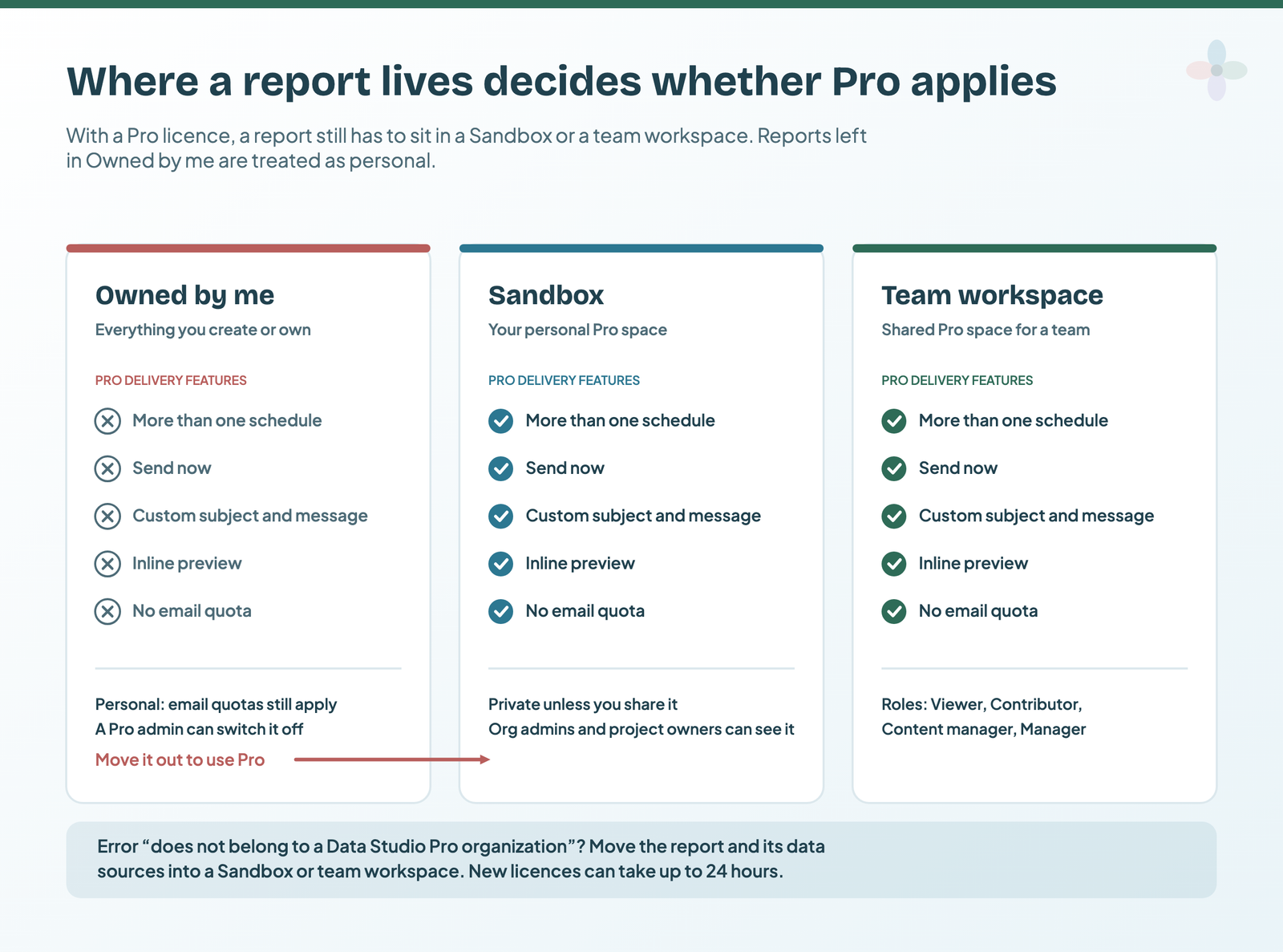
If a report is in the wrong place, Google’s troubleshooting section lists the two errors you’ll see: “Creating schedules on the report is disabled as the report does not belong to a Data Studio Pro organization” and “Scheduling functionalities are limited because the owner of this report doesn’t have an active Data Studio Pro subscription”. The fix is to move the report and its data sources into a Sandbox or team workspace. A new licence can take up to 24 hours to arrive. A Pro admin can also switch “Owned by me” off.
Who should own what, and how to move reports when people leave, is in my guide to report ownership.
The pricing line that confuses everyone
Pro is $9 per user, per project, per month. Three variables in one price is unusual, and it’s why “Looker Studio Pro price confusion” is a real thread people write. Taken one at a time:
- Per user — anyone who creates, edits or manages content in Pro workspaces. Viewers of a report don’t need a licence, though they don’t get Pro features either.
- Per project — a Google Cloud project. Each Pro subscription is tied to exactly one, and that project is what owns the content. An organisation can run several subscriptions, one project each.
- Per month — billed through Google Cloud to the billing account linked to that project, for every licence in the subscription, used or not.
That $9 (USD) is the list price on Google’s pricing page, checked 14 October 2026. Google says the price “varies depending on the length of the customer’s subscription”, without publishing other prices.
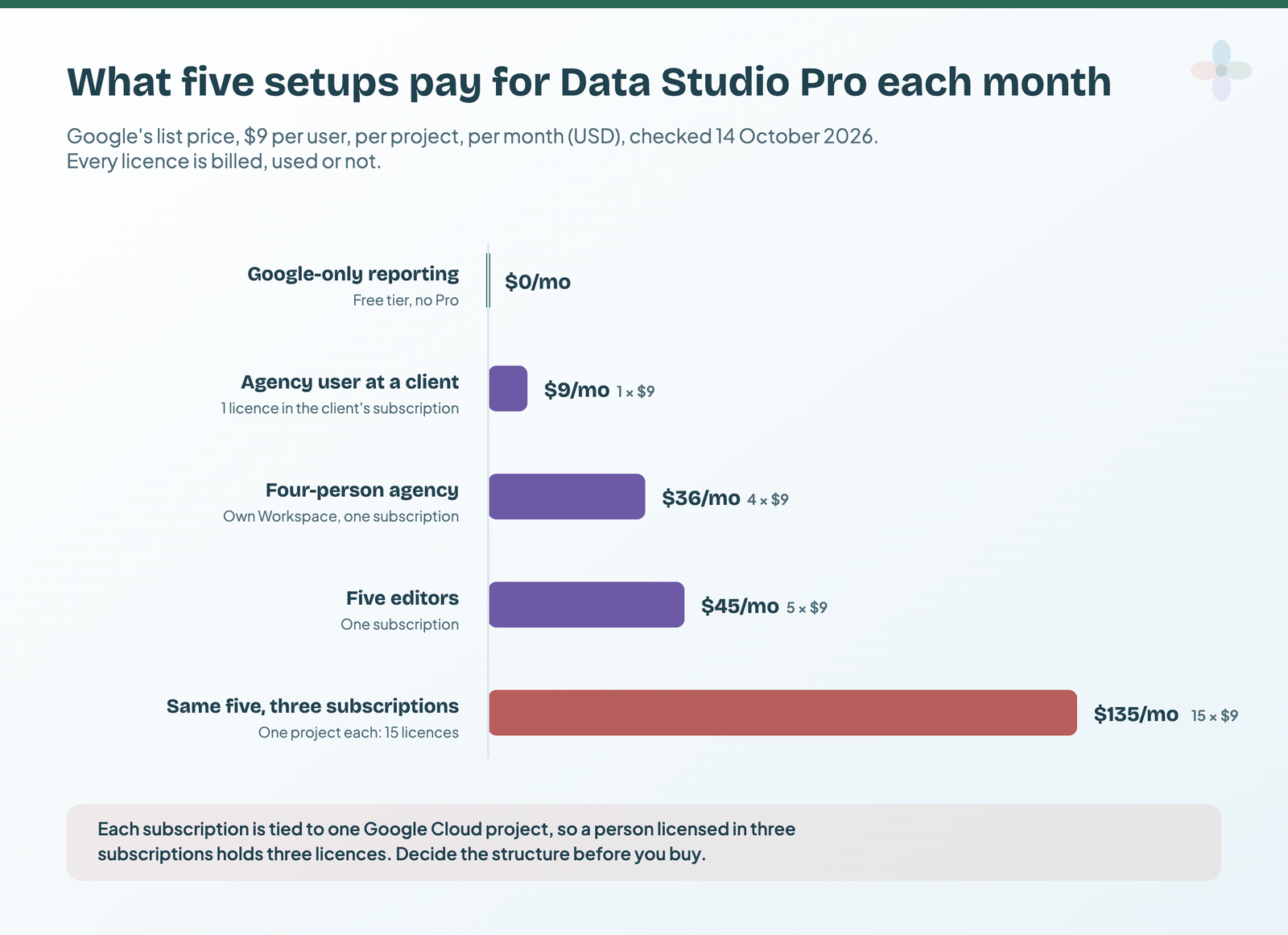
So a five-person team on one project is 5 × $9 = $45/month, or $540 a year. Because each subscription has its own project, the same five people licensed in three separate subscriptions hold fifteen licences: $135 a month. If you’re evaluating Pro, decide your project structure before you buy, not after.
| Setup | Licences | Per month | Per year |
|---|---|---|---|
| Five editors, one subscription | 5 | $45 | $540 |
| Four-person agency, its own Workspace, one subscription | 4 | $36 | $432 |
| The same five people across three subscriptions | 15 | $135 | $1,620 |
| One agency user licensed inside a client’s subscription | 1 | $9, on the client’s bill | $108, on the client’s bill |
| Google-only reporting on the free tier | 0 | $0 | $0 |
At Google’s list price of $9 per user, per project, per month (USD), checked 14 October 2026.
In a sheet, the whole calculation is one formula, with named cells for each input:
=editors * subscriptions * 9Pro changes the work, not just the bill, when one report goes to many clients. Ten clients, a monthly PDF each, showing only their data: on free, that’s ten report copies with one schedule each. On Pro, it’s one report with ten schedules, each filtered by recipient email. Free also means quotas, counted per sender: five recipients per client, weekly, is about 217 emails a month, under an individual account’s 800. Daily, it’s 50 a day, about 1,500 a month: over 800, under Workspace’s 3,000.
There’s a 30-day Pro trial with no user limit — genuinely generous. But billing starts automatically when it ends unless you cancel, so put a reminder in your calendar the day you start it.
Agencies inside a client’s Pro subscription: Trusted Organizations
You can’t buy Pro for a client: Google’s partner notes say a partner can’t start a subscription for a project in a client’s organisation. What works is the client licensing your people:
- A user in the client’s organisation starts the subscription, on a Google Cloud project in that organisation.
- The project is linked to a Cloud Billing account, which can be partner-managed (a reseller sub-account, say).
- The client’s admin enables Trusted Organizations and adds your agency’s organisation ID.
- The client assigns Pro licences to your team members by email (Google’s steps).
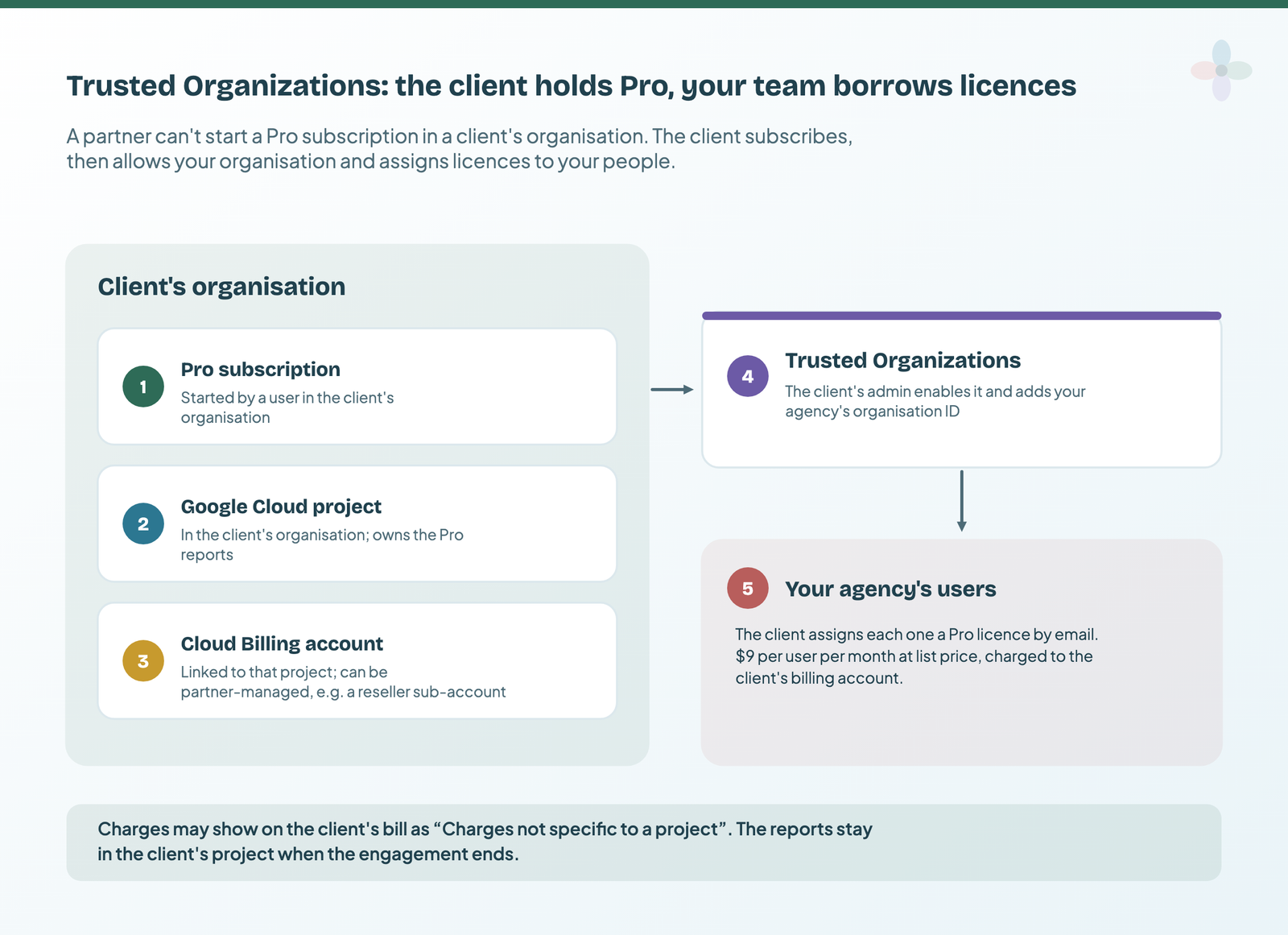
Charges go to the client’s billing account, where Google says they may show as “Charges not specific to a project”: worth telling the client’s finance team before the first invoice. The reports live in the client’s project, so when the engagement ends, they stay with the client.
What happens if you stop paying
Cancelling doesn’t delete schedules, but switches most off:
| What | After Pro ends |
|---|---|
| Email schedules | The oldest-created schedule on each report stays active. The rest become Inactive. |
| Alerts | All deactivated. You can reactivate them if you renew. |
| The 30-day trial | Turns into billing automatically. Cancel during the trial and you aren’t charged. |
The cost that actually catches marketers out
Here’s the thing most “free vs Pro” articles miss: for marketers, the free-versus-paid decision usually isn’t about Pro at all. It’s about connectors.
Data Studio has no native connector for Meta Ads, LinkedIn, TikTok, Microsoft Ads, Shopify, HubSpot or even Google Business Profile. Getting any of those into a report means a third-party connector, and those cost more than Pro does:
| What you’re buying | Billed monthly | Billed annually |
|---|---|---|
| Data Studio (free tier) | $0 | $0 |
| Data Studio Pro | $9 per user, per project | Google publishes only the monthly list price |
| Windsor.ai, entry plan | $23/mo | $19/mo |
| Catchr, entry plan | $24/mo | $239/year |
| Coupler.io Starter | $32/mo | $24/mo |
| Supermetrics Starter (EUR) | €49/mo | €39/mo |
Prices from each vendor’s pricing page, checked 13 October 2026 (Supermetrics in its EUR view; it varies by region).
Which is worth saying plainly: a marketer’s Data Studio bill is usually a connector bill. If your reporting is Google-only, you pay nothing at all — and I’d rather you knew that than bought something you don’t need. I’ve written before about not over-relying on third-party connectors, and it applies here too: buy the connector when the platform gives you no free route, not before.
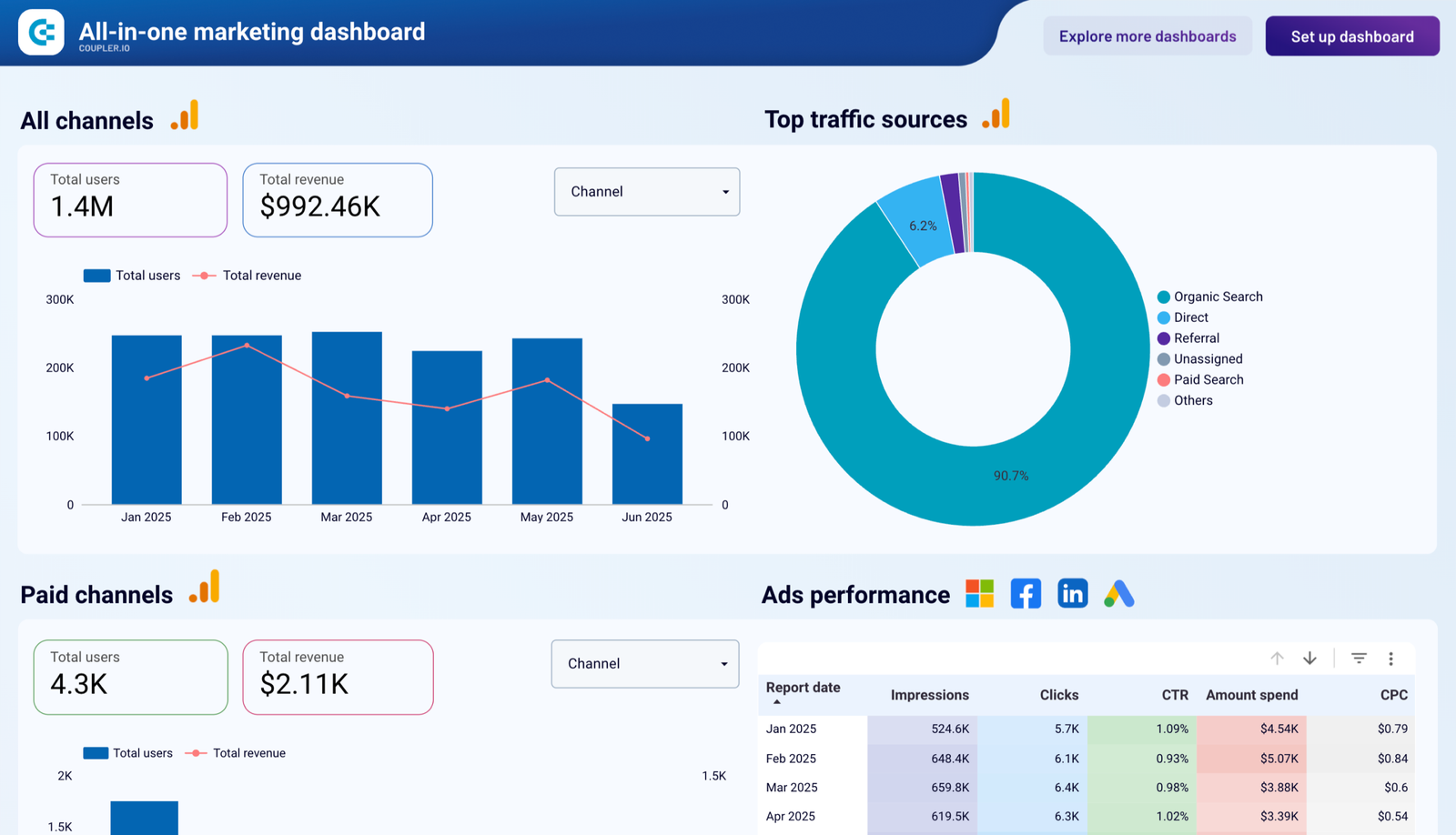
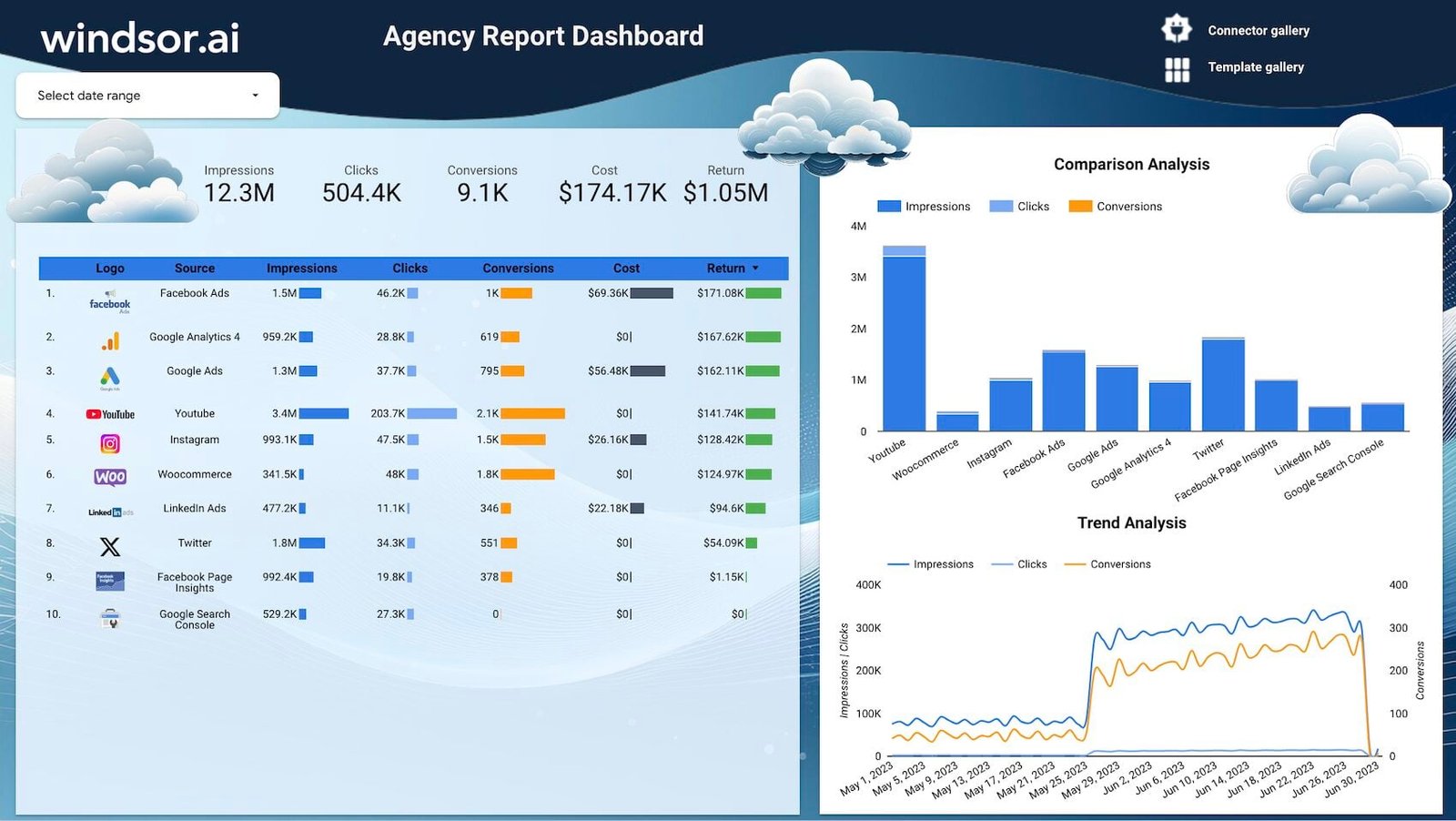
Two agency dashboards from the library that pull several channels into one view:
So which do you need?
Stay free if…
- You’re a freelancer, consultant, or a team of one to three
- Reports being owned by a personal Google account is not a business risk
- You don’t have a compliance requirement about data residency or encryption keys
- You can live without formal support
- Each report goes out on one schedule, once a day or less often
That covers the large majority of marketers reading this. On a personal Gmail account, it’s the only option anyway.
Buy Pro if…
- Losing a report because someone left has stopped being hypothetical. This is the single best reason, and for an agency it usually pays for itself the first time it happens. (What happens to reports when someone leaves.)
- You need more than one schedule per report, or hourly sends
- You’d rather send one report to many clients, each filtered to their own data, than keep a copy per client
- You want reports delivered to Slack or Google Chat
- Legal or procurement have asked about data residency, CMEK or an uptime SLA
- You want alerting when a metric moves, rather than someone noticing on Thursday
Don’t buy Pro if…
- You’re hoping for better charts, more connectors, or higher data limits — Pro adds none of those
- Your actual problem is that Meta or LinkedIn data isn’t in your report. That’s a connector, not Pro.
- Your reports are slow. Pro won’t fix that; see where Data Studio gets hard.
Where to go next
- Automated client reporting in Data Studio
- How to share and schedule reports
- Scheduled report not sending? How to fix it
- How to copy and reuse a template
- What is Data Studio? — the full beginner’s guide
- Running reporting operations at an agency
Frequently asked questions
How much does Data Studio Pro cost?
$9 per user, per project, per month, billed through Google Cloud. A five-person team on a single Cloud project is $45/month.
Is Data Studio completely free?
Yes. The free tier has no seat cost, no viewer cost and no expiry, and includes all of Google’s native connectors, blending, calculated fields, sharing and scheduled delivery (one schedule per report).
Does Pro give me more connectors?
No. Pro changes ownership, governance, scheduling and support — not the connector list. Non-Google platforms still need a third-party connector on either tier.
What happens when the 30-day Pro trial ends?
Billing starts automatically unless you cancel. The trial has no user limit, so set a reminder before it converts.
Do people viewing my report need a licence?
No. Viewers never need a Pro licence, and depending on how you share, they may not need a Google account either. But they don’t get Pro features, and only Pro users can open a personal report link.
Is Data Studio Pro the same as Looker?
No. Looker is a separate enterprise BI platform with its own pricing. See the naming section for how the products relate.
Can I buy Data Studio Pro on a personal Gmail account?
No. Self-service Pro is for Google Workspace or Cloud Identity organisations, with a Google Cloud project and billing account.
Can my agency buy Pro for a client?
Not directly. The client subscribes on a project in its own organisation, then its admin enables Trusted Organizations and assigns licences to your team, billed to the client.
Do Looker customers get Pro free?
Eligible Looker customers get at least 1,000 complimentary Pro licences, but not for Looker (original) contracts signed or Looker (Google Cloud core) instances created after 1 August 2026, nor customer-hosted Looker.
Some links in this post are affiliate links: if you sign up through one, I may earn a commission at no extra cost to you. How I work with partners.