

The metrics on most client reports are the ones the client asked for, and they’re nearly all lagging. Revenue, sessions, conversions: each measures a result that has already happened. Leading KPIs measure the work that produces it, and a report without them becomes an explanation of the past rather than a case for what to do next.
This covers what to stop reporting, what to report instead, and how to build the swap in a Data Studio report: the comparison, the rate from two totals, the change in points, and the running total, step by step.
Lagging KPIs measure results you can’t act on
A lagging KPI measures a result. Organic revenue, transactions, sessions, conversions, average order value. They’re the numbers the client cares about, and they belong on the report — that isn’t in question.
The problem is what happens when they’re the only thing on it, and it’s structural rather than aesthetic:
You can’t flip a switch to skyrocket performance in any of these metrics. There is no single action that you can do to improve organic traffic or to reduce bounce rates. It’s a combination of things.
So a report made entirely of lagging KPIs asks a question nobody can answer in the meeting. Worse, it puts you in what’s fairly called explaining mode — the first two or three months of any engagement spent saying “we haven’t seen changes yet, but we did this and this and this”.
Leading KPIs measure the work you control
A leading KPI measures the work that produces the result. Pages published, issues fixed, links earned, pages submitted for indexing, load speed. They’re current rather than historical, and — this is the point — they’re yours.
Six reasons they belong on a client report, and only the first is obvious:
- You can show progress before results exist. Month one has no revenue story. It does have a work story.
- They’re directly controllable, so they’re honestly measurable. Nobody argues about whether a page was published.
- They aren’t sitting in GA4 waiting for you. You have to decide how to measure them, and a metric you had to construct is one both sides have agreed matters.
- They demonstrate expertise. Reporting the inputs shows you know what produces the outcome, rather than trying things and hoping traffic rises.
- They let you signpost what’s outside your control — clearly, in advance, rather than defensively afterwards.
- They let you pivot with evidence. Halfway through an initiative that isn’t moving the outcome, they let you say so and change course, instead of finishing it because it was in the plan.
You’ll also see these called input and output metrics, which is arguably the clearer pair — inputs are what you do, outputs are what happens. Same distinction either way.
Mapping input metrics to the output metrics they drive
The practical artefact is a sheet, per client, mapping each output metric to the inputs that actually drive it — with an owning team on both sides, yours and theirs.
| Input metrics (what we do) | Output metric (what happens) |
|---|---|
| Pages crawled · new pages created · pages submitted for indexing | Number of indexed pages |
| Load speed · number of HTTPS pages | Bounce rate |
| Mobile usability issues resolved | Engagement time for mobile users |
| Content published · digital PR placements · social amplification | Organic sessions |

Put the expected lag on the map as well as the pairing. An input that takes twelve weeks to show up in an output isn’t a failing input in week four, and writing that down at kick-off is what stops it being relitigated every month.
Build it once per client, at kick-off. It becomes the spine of the reporting and, when something doesn’t move, the map you use to work out why.
You don’t have to start from a blank sheet. My marketing metrics workbook marks 311 metrics as input or output and leading or lagging, with an input-to-output map per area. Copy it, delete the areas you don’t work in, and you have the first draft.
A vanity metric isn’t a category of metric, it is a missing comparison
The usual framing is a list: impressions, followers, page views. That framing is why the advice never changes anyone’s report.
A vanity metric is any metric reported without context. That’s harsher than the conventional one — Nielsen Norman Group define a vanity metric as one that appears impressive without giving insight into true performance, closer to the list-based framing. Mine puts the fault in the reporting, not the metric. Impressions with a comparison, a denominator and a related metric beside them are useful; revenue as a bare number is a vanity metric, however serious it sounds.

Nielsen Norman Group’s three fixes for a context-free metric are each a Data Studio setting.
Context 1: a timeframe on every number
Every number gets a comparison: previous period, or previous year for anything seasonal. A new scorecard already compares with the previous period, a default nobody chose that only editors can change. A number with no comparison is a fact, not information. Chapter 6 of my ebook, Data Storytelling in Data Studio, covers the four comparisons that turn a number into a verdict, and how to pick one.
In Data Studio: set the comparison on a scorecard
- In edit mode, select the scorecard and open the Setup tab.
- Leave Comparison type on Period (it reads “Full stop” in a UK English interface). The comparison date range only appears with Period.
- In the Default date range section, open Comparison date range and choose Previous year for a seasonal metric, Previous period for a short operational one.
- Click Apply, and name the comparison in the title (“Revenue, September, vs last year”).
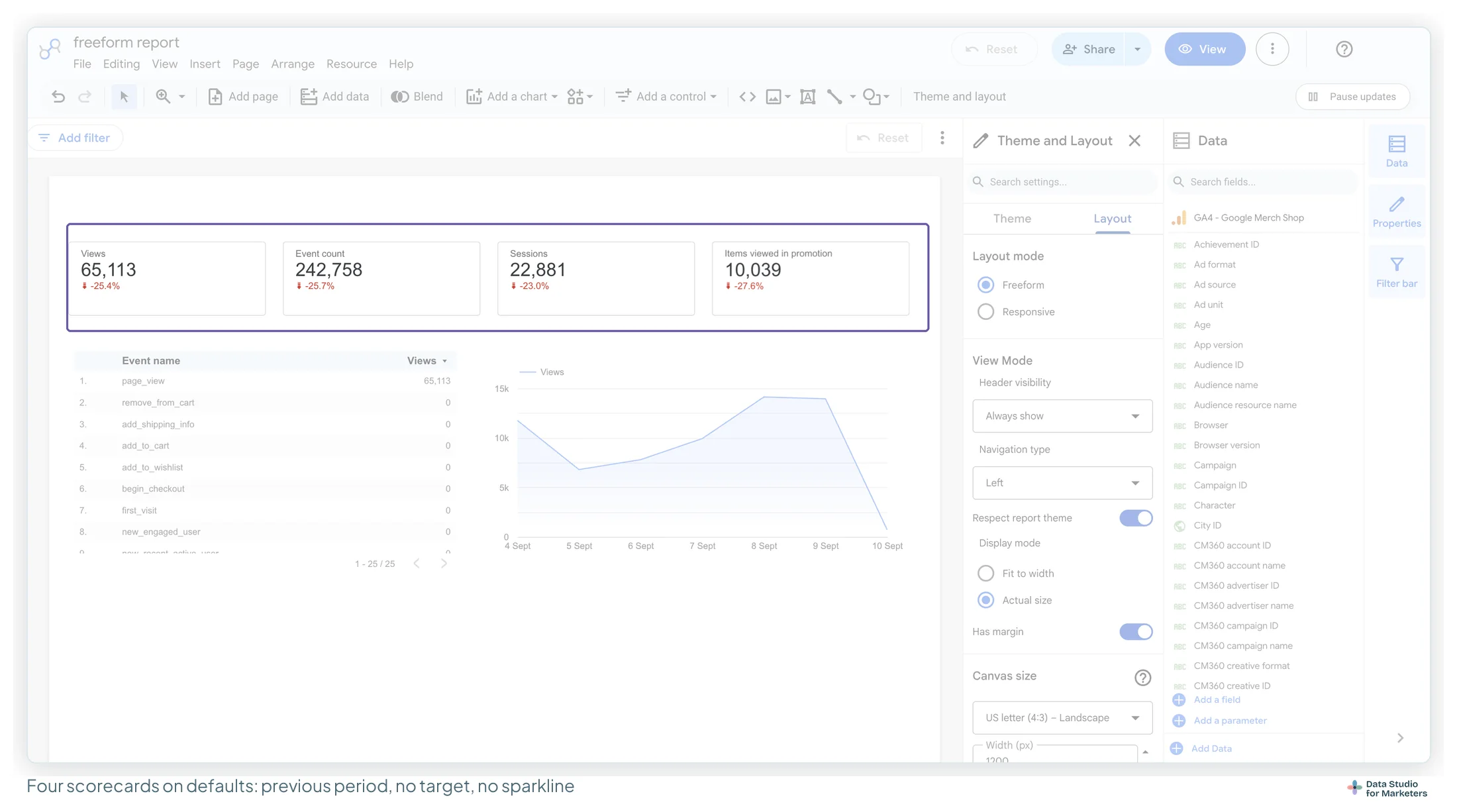
Time series and tables take the same setting in Setup: a time series draws the comparison as a second line, a table as a change with an up or down arrow. Every option is in comparison date ranges, and previous year on a scorecard in my scorecards guide.
Context 2: a per-user or per-visit denominator
Totals grow because the audience grew. Rates tell you whether anything improved.
Build the rate as a calculated field rather than reporting the total: revenue per user rather than revenue, pages per session rather than pageviews, conversions per thousand sessions rather than conversions.
Worked example. At Harbour & Fern, the sample shop my ebook follows, September revenue is up 9.6% on last year and sessions up 18%, so revenue per session fell from £1.63 to £1.51. The total says the month went well; the rate says the new traffic spends less.
How you write the formula depends on the source:
| Source | Formula | Why |
|---|---|---|
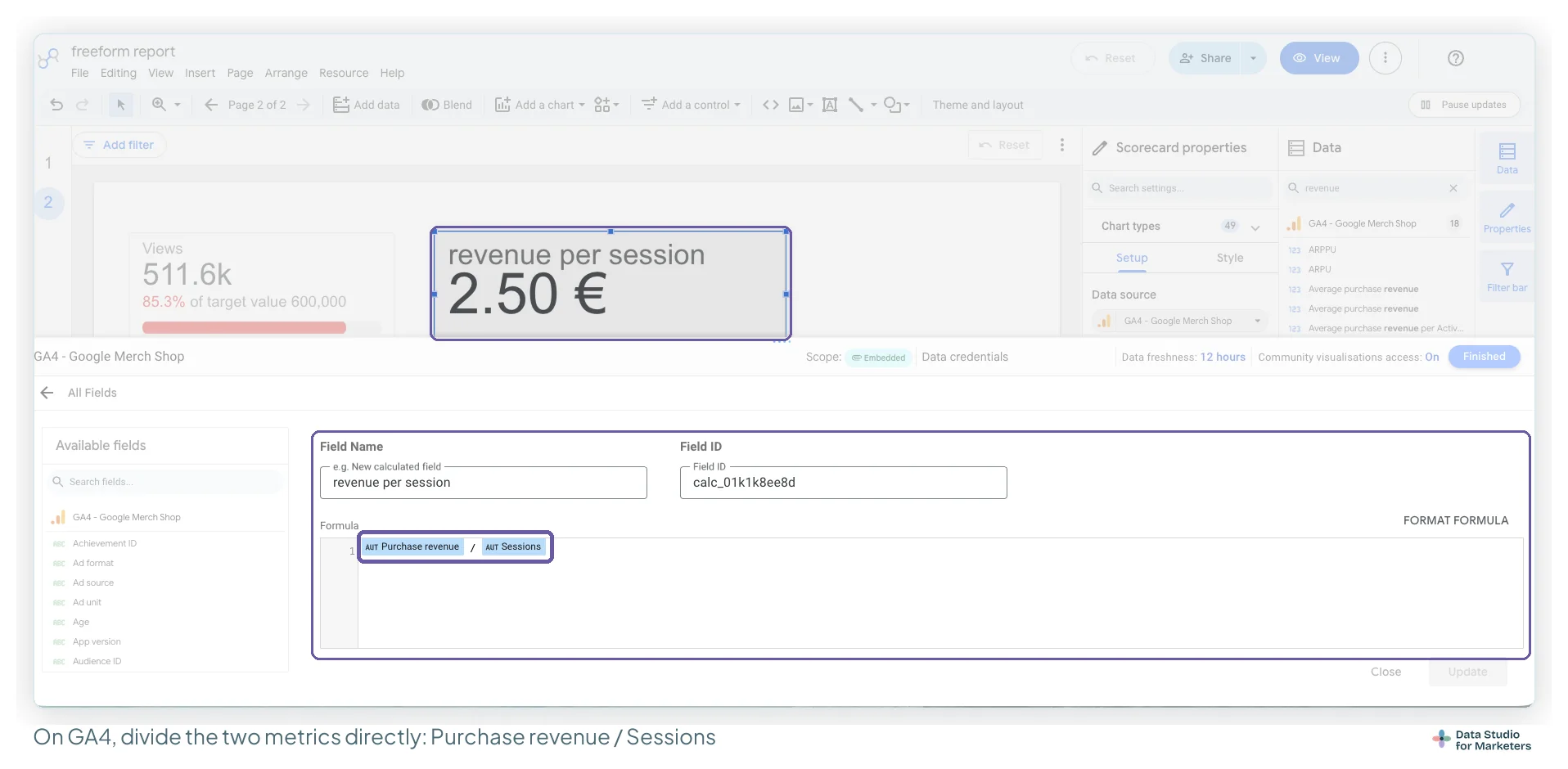
| GA4, Search Console, Google Ads and other platform connectors | Purchase revenue / Sessions, Clicks / Impressions |
The metrics arrive already totalled. SUM() around any of them, such as SUM(Clicks), returns “Re-aggregating metrics is not supported” (I’ve tested Search Console too). Aggregating a dimension still works: COUNT_DISTINCT(Query) counts queries |
| Google Sheets, BigQuery and other sources that send raw rows | SUM(Revenue) / SUM(Sessions) |
The rows aren’t totalled yet, so the formula says how |
In Data Studio: build revenue per session on GA4
- In edit mode, choose Add a field at the bottom of the Data panel. It goes into the data source, so every chart shares one definition.
- Name it for what it means: “Revenue per session”.
- In Formula, write
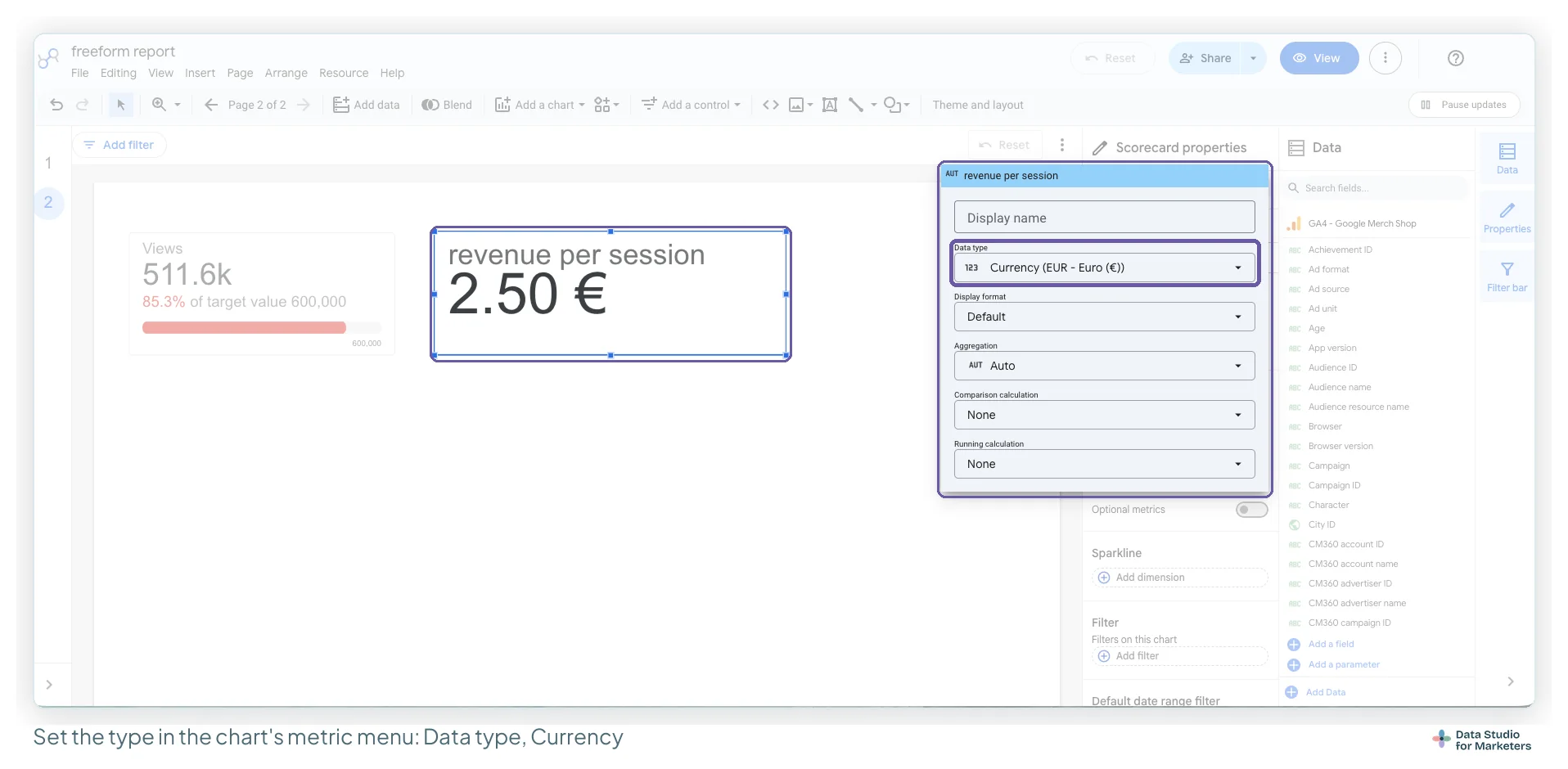
Purchase revenue / Sessions, with noSUM(), and save. - Add it to the chart, click the metric in Setup and set Data type to Currency (Percent for a conversion rate). The formula screen has no type setting.
Ratios come from sums, never from an average of a rate
Averaging a column of rates weights a tiny row like a huge one. Five of Harbour & Fern’s Search Console queries average 12.6% CTR, but their clicks over their impressions (30,700 ÷ 458,000) is 6.7%. It bites when a rate arrives as its own column, from a Sheet export or a blend, and a scorecard averages it. Build the rate from the two totals instead: on Search Console that’s Clicks / Impressions, written directly.
Context 3: a ratio against a related metric
The strongest context is another metric. Spend beside conversions. Sessions beside conversion rate. Impressions beside clicks.
A combo chart with the second metric on the right axis does this — with the caveat that dual axes mislead easily, so label both and don’t read meaning into where the lines cross. Choosing between a combo chart and the alternatives goes into when a second axis earns its place.
Two more kinds of context need no formula. Click the metric’s chip in Setup: Comparison calculation › Percent of total gives each channel’s share of sessions, and Running calculation › Running sum turns daily spend into the line you pace against the monthly budget. To keep the raw number beside it, drag the same metric in a second time from the Data panel. Comparison calculations don’t work with “Group the rest as ‘Others'”, so switch that off on a bar or pie chart first.
Percent or points: writing the change in a rate
When a rate moves, it has two changes that read very differently. Harbour & Fern’s conversion rate went from 2.40% last September to 2.10%:
| How it’s written | What the reader hears |
|---|---|
| “Conversion rate down 0.3%” | Nothing happened |
| “Conversion rate down 12.5%” | A crisis |
| “Down 0.30 points, from 2.40% to 2.10% (−12.5%)” | Exactly what happened |
A percentage point is the plain difference (2.10 − 2.40 = −0.30). The percentage change divides it by the start (−0.30 ÷ 2.40 = −12.5%). Use points for rates and shares, with the percentage alongside.
In Data Studio: show points on a rate scorecard
- Select the rate scorecard and open Style.
- Under Comparison fields, turn on Show absolute change. Google’s reference says it shows the absolute numeric difference instead of the percentage, which on a rate is the change in points.
- Say “points” in the title or the commentary; the tile won’t. More in show absolute change.
Seven metric swaps, and what changes in the Data Studio report
| Instead of | Report | What you change in Data Studio |
|---|---|---|
| Impressions | Impressions with CTR beside them | Add CTR to the same chart; combo with a second axis |
| Total sessions | Sessions by channel, with a previous-year comparison | Comparison date range + a breakdown dimension |
| Pageviews | Pages per session, and engagement time | Calculated field for the rate |
| Total conversions | Conversion rate, and cost per conversion | Calculated field, Data type Percent; add cost from the ads source |
| Follower count | Referral sessions from social, and their conversion rate | Swap the source — this one isn’t a chart change |
| Number of links earned | Links earned, plus referring domains to target pages | Filter to the pages the programme is actually about |
| Average position | Clicks and CTR for the same queries | Search Console, with position as a secondary metric |
Rankings aren’t a vanity metric, they’re a mis-audienced one
Position tracking gets called a vanity metric constantly, and that’s lazy. It’s a leading indicator of visibility and the thing an SEO team works on daily.
The problem isn’t that it’s vain, it’s that it’s mis-audienced. It belongs on the specialist page, where somebody can act on it. On an executive summary it steers a conversation about revenue into one about position four versus six, which the executive can do nothing about.
The general rule underneath: match the granularity to the reporting cycle. Daily-granularity data in a monthly report is noise wearing a chart.
Diagnosing a drop by walking back up the input/output chain
The real use of an input/output map is diagnosis. When an output metric drops, you don’t guess — you walk the chain.
Organic revenue is down. In order:
- Did the number of transactions fall, or did average order value fall?
- If transactions fell — did conversion rate change?
- If conversion rate held — did sessions change?
- If sessions fell — which channels caused it?
- Then the ones people forget: any change in stock? Any key products missing in the period? Any site errors while it was happening?
Repeat until you reach the input that explains it. The last step matters more than it looks: a revenue drop caused by a stock-out isn’t a marketing failure, and a report that can’t tell the two apart has you defending work that was fine.
In Data Studio, the chain is one table: channel as the dimension; sessions, conversion rate and revenue per session as metrics; comparison date range on Previous year. Follow the column that moved against you. If every channel’s rate rose while the site’s fell, the cause is the traffic mix.
The fix for the stock-out case is a reporting one: put stock on hand next to items sold, and the conversation resolves itself before it starts.
Interrogating a client goal before it becomes a reporting brief
The same thinking runs forwards. A client says they want a 20% increase in organic traffic. That’s fine as a starting point and useless as a brief.
Twenty per cent from where? The refined version — “a 20% increase in organic traffic from the US, on mobile” — is a different project with different inputs: mobile usability fixes, content aimed at that market, digital PR where that audience reads. Do this at kick-off and the report almost writes itself.
Which metrics belong on an executive, channel or specialist page
Most disagreements about vanity metrics are actually disagreements about audience.
| Report | Leading KPIs | Lagging KPIs |
|---|---|---|
| Executive summary | One or two, framed as progress | Three or four, with comparisons |
| Channel or project page | The main event — this is where the work lives | The outcome that page is accountable for |
| Specialist page | Everything, at whatever granularity is useful | Secondary |
An executive wants to know work is happening and what it’s aimed at; one line does that. The specialist wants all of it.
Do not scope a dashboard to your contract when the client owns a whole KPI
One trap worth naming, because it looks like discipline and isn’t.
Contracted for technical SEO, it’s tempting to build a technical dashboard: crawl errors, index coverage, Core Web Vitals. All inputs, all correct — and a fragment of an outcome nobody is accountable for.
Scope the dashboard to the whole KPI even when your contract is a slice of it. Show the outcome the client cares about, then your slice’s contribution to it. It’s a more honest report, and it makes the case for a bigger engagement.
Five metric-reporting mistakes that make a report harder to act on
Reporting only outputs. The default, and the one that produces explaining mode.
Reporting only inputs. The overcorrection. Work completed with no outcome reads as activity, and eventually somebody asks what it bought.
Reporting a total where a rate belongs. Growth in a total can be entirely audience growth. Build the rate from the two totals.
Reporting a metric nobody owns. If neither side is accountable for moving it, it’s context at best. Say so, or take it off.
Changing the metric when it stops flattering you. It costs credibility fastest. There are two legitimate reasons to evolve a metric — the work moved on, or you found a better measure of the same thing — and both should be announced before the number turns, not after.
Frequently asked questions
What is the difference between leading and lagging KPIs?
A lagging KPI measures a result that has already happened — revenue, sessions, conversions. A leading KPI measures the work that produces it — pages published, issues fixed, links earned. Lagging KPIs are what the client cares about; leading KPIs are what you control, which is why a report needs both.
What is a vanity metric?
Any metric reported without context, rather than a fixed list of bad metrics. Impressions with a comparison, a denominator and a related metric beside them are useful. Revenue as a bare number with nothing around it is a vanity metric, however serious it sounds.
Are rankings a vanity metric?
No — they are mis-audienced. Position tracking is useful on a specialist page where somebody can act on it. On an executive summary it redirects a revenue conversation into one about position four versus six, which nobody in the room can do anything about.
Why does SUM() give “Re-aggregating metrics is not supported”?
GA4, Search Console, Google Ads and other platform connectors send metrics already totalled, so they can’t be aggregated again; on Search Console I get the error on SUM(Clicks) and SUM(Impressions) too. Divide directly: Purchase revenue / Sessions, Clicks / Impressions. Aggregating a dimension still works, such as COUNT_DISTINCT(Query). SUM() on a metric is for raw-row sources such as a Google Sheet or BigQuery.