
On the free tier, Data Studio keeps every client report up to date and lets you copy one build for every client, but each report gets one schedule, sent once a day at most. Sending one report filtered per client, hourly sends, Slack, alerts and auto refresh all need Data Studio Pro, and Pro can only be bought by a Google Workspace or Cloud Identity organisation.
That’s automated client reporting in Data Studio (called Looker Studio from 2022 until April 2026) in one paragraph. This post covers:
- the four layers of an automated client report, and which tier automates each
- Google’s actual limits on schedules, frequency and email, and what they mean at your client count
- who can buy Pro, and how an agency gets licences from a client’s subscription
- what Zapier, Make and the Data Studio API can and can’t do
- the pipeline I’d run at 5, 15 and 30 clients, and a workbook to plan yours
What this is based on: Google’s Data Studio documentation as it read on 13 October 2026, Google’s own Data Studio forum, and the connector vendors’ docs. I haven’t run a Data Studio Pro trial for it yet: the Pro features below are described from Google’s documentation, and I’ll add screenshots when I do.
What “automated” means for a client report
The pages that rank for automated client reporting agree on three things: pull the data in, build the report, deliver it on a schedule. I’d add a fourth, because Google’s forum has had more than 50 threads since January 2025 about scheduled delivery failing or changing, and more than 50 about data not refreshing. Automation fails quietly, so somebody has to notice.
- Data in: fresh numbers, with nobody exporting a CSV.
- A copy per client: one build, many clients.
- Delivery: the report arrives without anyone sending it.
- Keep it honest: someone finds out when it breaks.
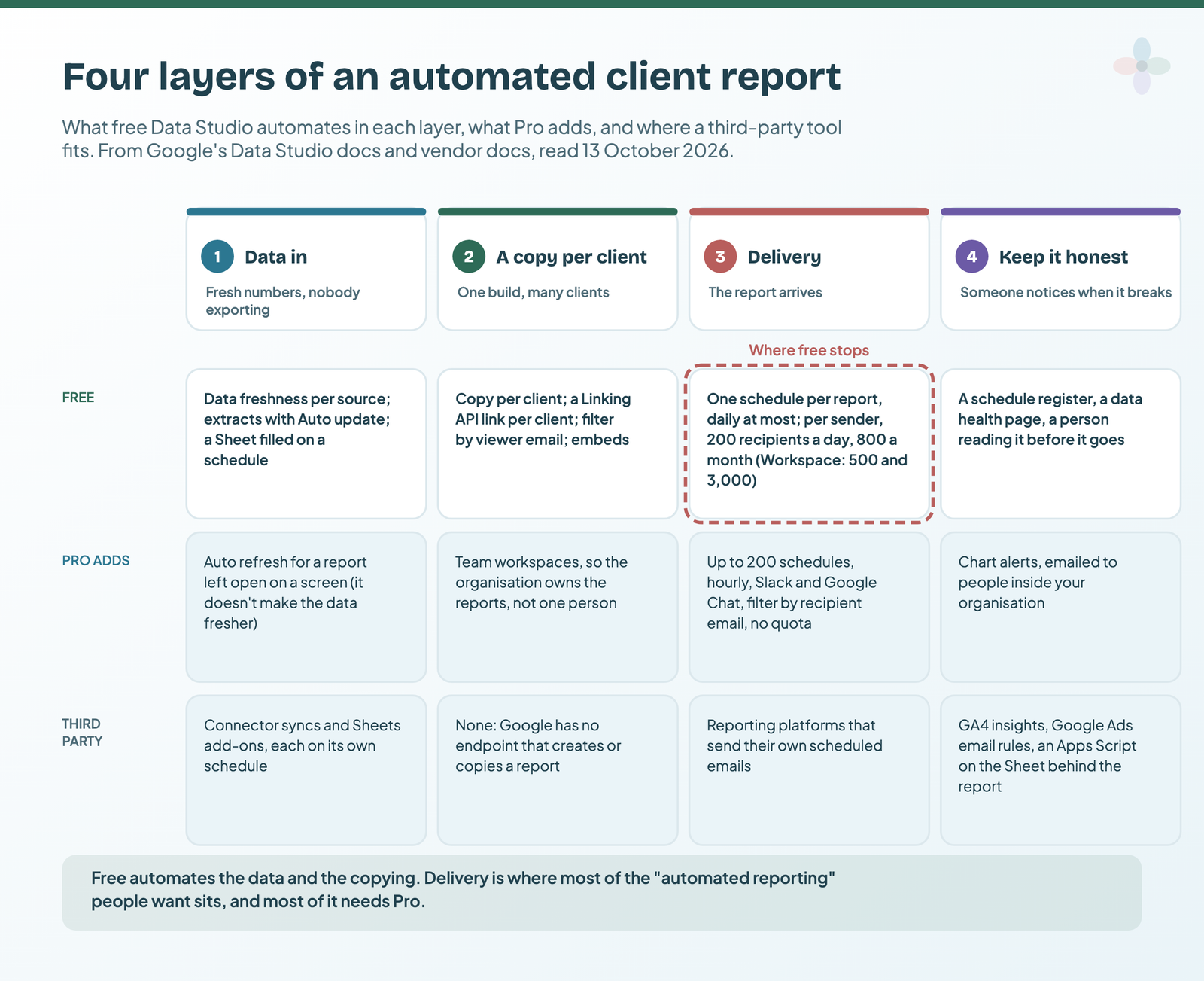
Free Data Studio automates the first two layers. The third is where free stops, and it’s the one most people mean by “automated”. Who owns each layer is a people question, covered in my piece on agency reporting operations.
Free vs Pro: what each tier automates
The line between free and Pro isn’t charts or connectors. It’s delivery.
| Capability | Free | Pro |
|---|---|---|
| Schedules per report | 1 | Up to 200, where the report owner has Pro |
| Most frequent send | Daily | Hourly |
| Send now, custom subject and message, inline preview | ✘ (removed 21 March 2025) | ✔, not for reports in “Owned by me” |
| Scheduled-email quota per sender | 200 recipients a day, 800 a month (Workspace: 500 and 3,000) | None |
| Recipients per schedule | 50 | 50 |
| Slack and Google Chat delivery | ✘ | ✔ |
| Filter each email by the recipient’s address | ✘ | ✔, email schedules only |
| Chart alerts | ✘ | ✔ |
| Auto refresh while a report is open | ✘ | ✔ |
| Data freshness per data source | ✔ | ✔ |
| Extracted data with Auto update | ✔ | ✔ |
| Filter by viewer email | ✔ | ✔ |
| Linking API (it’s a URL) | ✔ | ✔ |
| Personal report links (a private copy for whoever opens it) | ✘ | ✔ |
| Data Studio API | Workspace or Cloud Identity organisations only, on either tier | |
From Google’s Data Studio documentation, read 13 October 2026.
One catch under the Pro column: Pro features only work on reports kept in a Team Workspace or the Sandbox, not “Owned by me”. For what Pro costs and adds beyond automation, see Data Studio free vs Pro.
Layer 1: get the data in without anyone exporting it
Every Data Studio report already re-queries its sources on its own. What you control is how long it may answer from memory (data freshness, set per data source), whether to work from a snapshot (an extract), and whatever fills the Sheet or connector underneath.
Google Ads, Search Console and Google’s other marketing products refresh every 12 hours, and Google says that rate can’t be changed. Google Sheets defaults to every 15 minutes, and a blend refreshes at its fastest source. On BigQuery, every refresh is a billed query. Since 18 June 2026, editors can also let viewers press Refresh data. If a client asks why the report shows yesterday’s numbers, the answer is usually the platform’s processing lag or the cache, and why your report shows yesterday’s numbers walks through which.
To set it, edit the data source and click Data freshness. A connector vendor in the middle adds a second clock:
| Vendor | How its Data Studio connector gets data | What its plan changes |
|---|---|---|
| Windsor.ai | Query results cached for 6 hours; scheduled refreshes bypass the cache | Sync daily on Basic, up to hourly on Standard and Plus, every 15 minutes on Professional |
| Coupler.io | Its flow runs, then Data Studio pulls on its own cycle (Coupler’s docs say every 12 hours by default) | Manual on Free, daily on Starter and Active, hourly on Pro, 15 minutes on Custom |
| Supermetrics | Fetched when the report loads, is refreshed or is edited; its docs say Data Studio’s freshness setting has no effect | Sources, accounts and users, not freshness |
| Catchr | A live query when the report opens or refreshes | Not published |
| Porter Metrics | Live API data, with optional storage | Its Sheets add-on schedules hourly, daily or weekly |
From each vendor’s pricing page and docs, read 13 October 2026.
Two free tools fill the gaps. An extract is a snapshot of up to 100 MB (over that it fails) and 750,000 rows (over that it’s silently truncated), with no freshness setting at all: it updates on its Auto update schedule. It’s the fix for slow or quota-bound reports, covered in my Extract Data guide. And a Google Sheet can be filled on a timer by Apps Script or a connector add-on, which I set out in automating the Sheet behind your report (connecting it in the first place: Google Sheets in Data Studio). Choosing a connector is its own question: Data Studio connectors compared.
Layer 2: one build, a report for every client
There are four free routes to one report per client. None of them is an API that creates reports, because Google doesn’t offer one.
| Route | What it automates | The catch |
|---|---|---|
| A copy per client | Nothing: you copy and reconnect by hand | Every copy is maintained separately |
| A Linking API link per client | Opens a copy of your template with that client’s data swapped in | A person still clicks Edit and share to save it; no Google Ads swap |
| One report, filter by viewer email | Each signed-in viewer sees only their rows | Sign-in and consent; each data source needs an email column |
| An embed in a client portal | Shows the report inside your portal | Private embeds need a Google sign-in; the watermark stays; viewers can’t refresh |
From Google’s copy, Linking API, filter-by-email and embed documentation, read 13 October 2026.
The manual route is reusing one template across many clients, and what a copy carries with it depends on embedded vs reusable data sources. The Linking API is the scaled version of the same thing: a URL like this, written from Google’s Linking API reference and not tested here, opens an unsaved copy with one client’s GA4 property and Search Console site:
# Written from Google's Linking API reference, not tested here.
# Placeholders in capitals; join the lines with no spaces before use.
https://datastudio.google.com/reporting/create?
  c.reportId=TEMPLATE_REPORT_ID
  &r.reportName=Acme%20monthly%20report
  &ds.ds0.connector=googleAnalytics
  &ds.ds0.accountId=GA4_ACCOUNT_ID
  &ds.ds0.propertyId=GA4_PROPERTY_ID
  &ds.ds1.connector=searchConsole
  &ds.ds1.siteUrl=sc-domain%3Aexample.com
  &ds.ds1.tableType=SITE_IMPRESSION
  &ds.ds1.searchType=WEB
Whoever opens it needs view access to the template and access to the client’s data, and the copy belongs to whoever saves it. The Data Studio API, explained covers every connector it can swap, and has a free sheet that writes one link per client.
Filter by viewer email is the one-report route: tick it on the data source, point it at a column of addresses, and each signed-in viewer sees their own rows. It’s free. It also decides what the report shows, not who can reach the data, which row-level security with filter by email spells out.
For a portal, read how to embed a report in a client portal first: the portal’s login hides the page, not the report.
Layer 3: delivery, where free stops
On free, each report has one schedule, sent at most daily, from a personal-account sender capped at 200 recipients a day and 800 a month (500 and 3,000 on Workspace). The schedule dialog is at ⋮ → More share options → Schedule delivery, and on free its Settings tab has recipients, pages, start date, repeat and time. No subject, no message, no Send now.

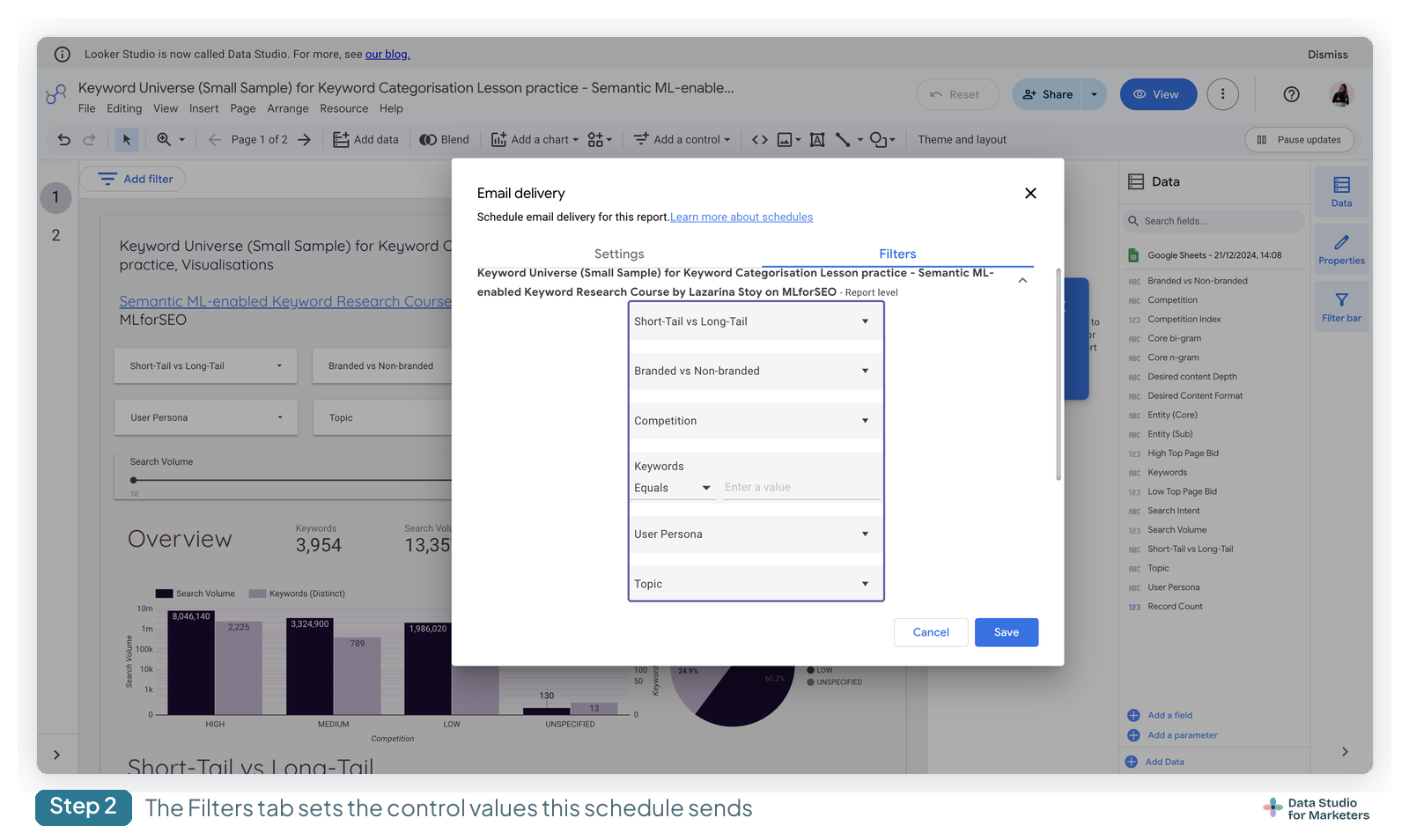
The Filters tab is there on free too, and it changes the filter and date range values for that schedule. But a free report has only one schedule, so the Filters tab sets the view for one send. It doesn’t let one report go out filtered differently to each client. For that there are two routes: one copy of the report per client, each with its own schedule, or Pro, where one report carries up to 200 schedules with their own filters, or one schedule filters each email by the recipient’s address.
A copy per client means every copy draws on the same sender’s quota, and Google offers no meter. Here’s how far it stretches, assuming three client contacts plus the schedule’s creator (who is always a recipient) on each send, all saved by one person. Google doesn’t say whether the creator’s own copy counts, so I’ve counted it.
| Clients | Cadence | Copies on free | Busiest day | Per month | Personal (200/800) | Workspace (500/3,000) |
|---|---|---|---|---|---|---|
| 5 | Weekly | 5 | 20 | 100 | Fits | Fits |
| 15 | Weekly | 15 | 60 | 300 | Fits | Fits |
| 30 | Weekly | 30 | 120 | 600 | Fits | Fits |
| 50 | Weekly | 50 | 200 | 1,000 | Over the month; day at the cap | Fits |
| 5 | Daily | 5 | 20 | 620 | Fits | Fits |
| 15 | Daily | 15 | 60 | 1,860 | Over | Fits |
| 30 | Daily | 30 | 120 | 3,720 | Over | Over |
4 recipients per send; weekly = 5 send days in the month, all on the same weekday; daily = 31. Quotas from Google’s scheduling documentation, read 13 October 2026.
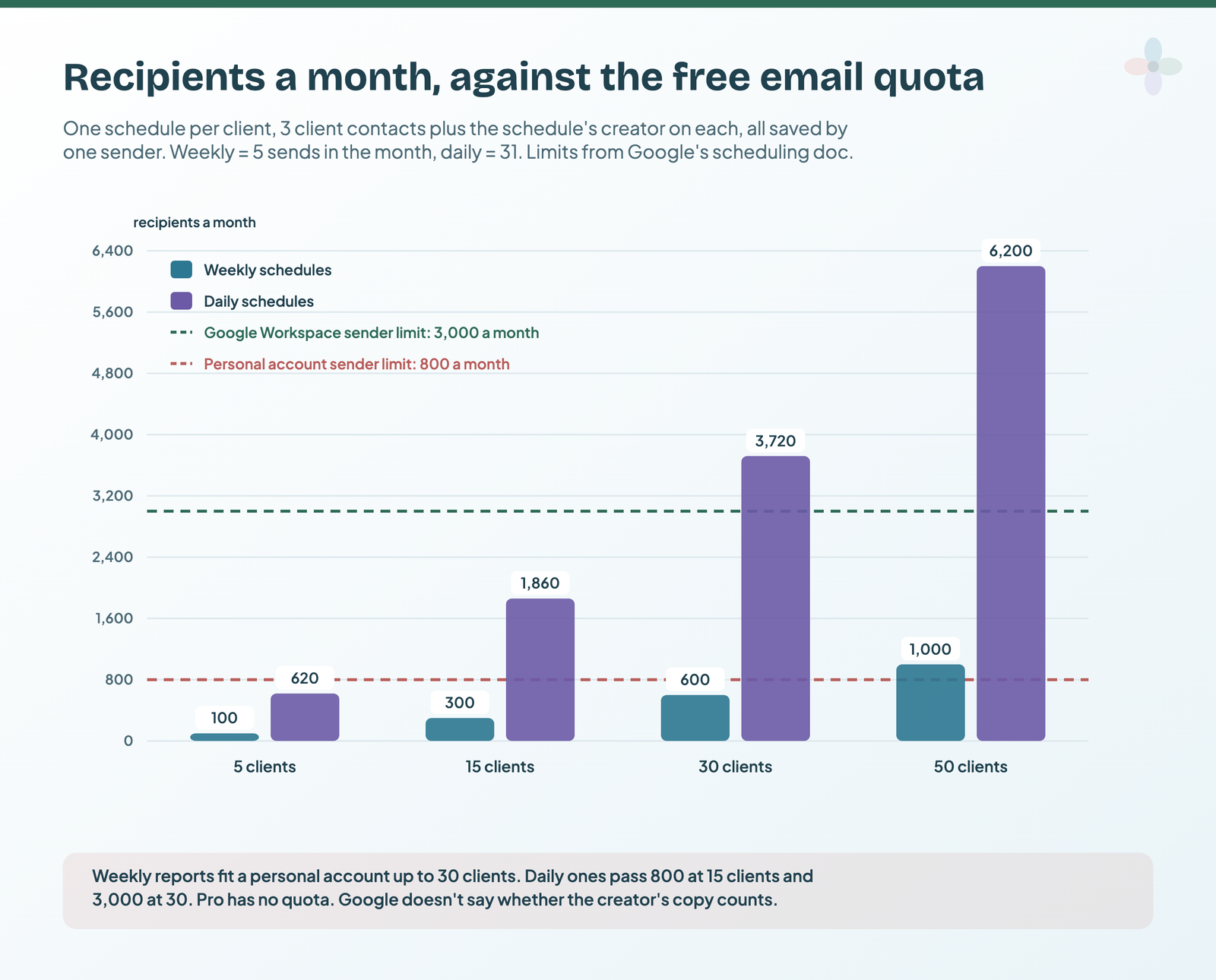
Past a limit, further emails from that sender simply don’t go. The fixes are fewer recipients, a second sender, a Workspace account, or Pro. Pro also adds Slack (up to 5 channels or 10 users per schedule) and Google Chat; Microsoft Teams isn’t in Google’s docs.
The step-by-step dialog is in how to share and schedule a report, and when an email doesn’t turn up, why your scheduled report didn’t arrive has the diagnosis.
Who can buy Pro, and how agencies get licences
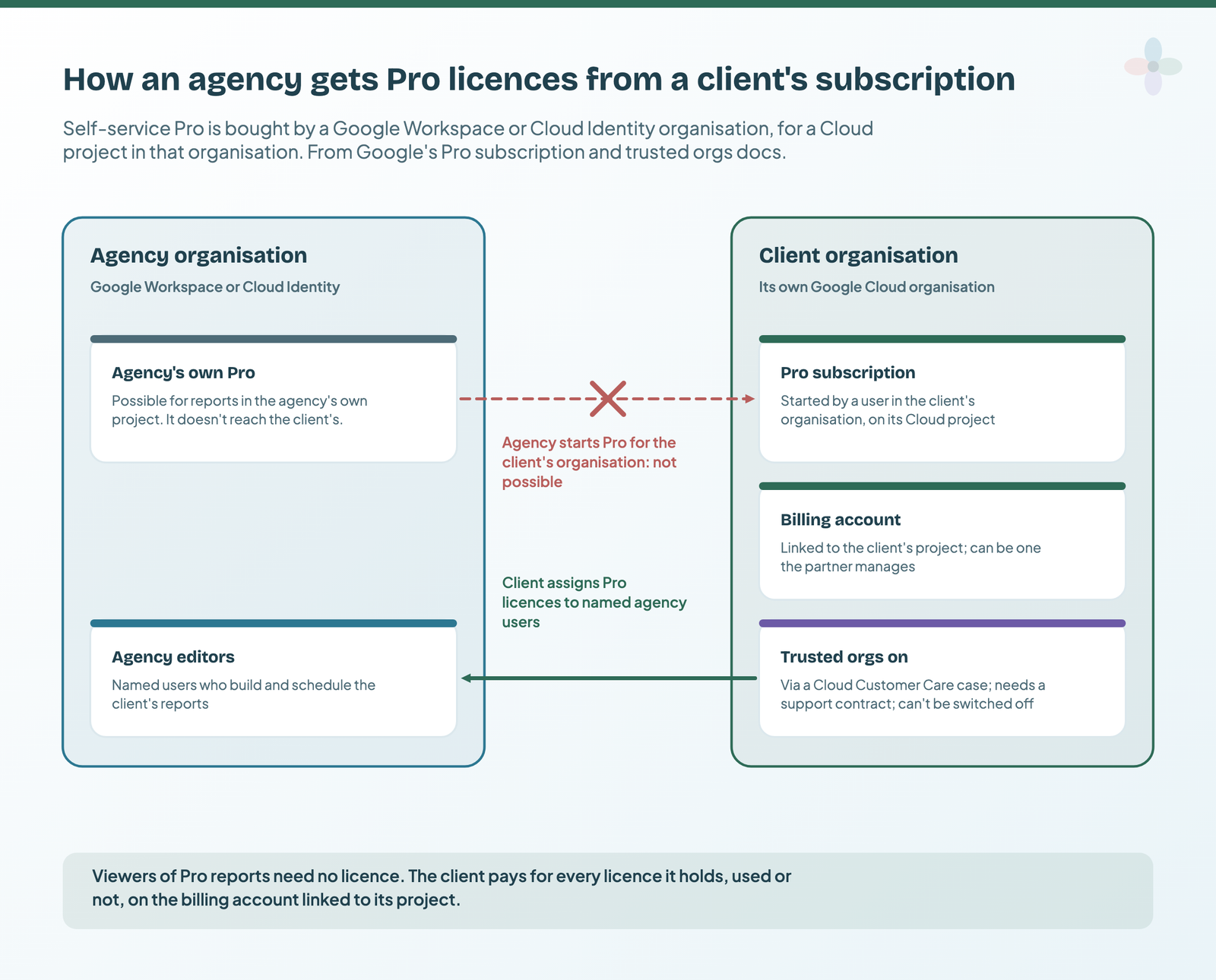
Self-service Pro is “available as a self-service upgrade for Google Workspace or Cloud Identity organizations”, so a freelancer on a personal Gmail account can’t subscribe. It’s $9 per user, per project, per month on Google’s pricing page (checked 13 October 2026; Google notes the per-user price varies with subscription length), billed for every licence whether it’s used or not. Viewers need no licence, so three report editors on one project come to $27 a month. There’s a 30-day trial, and billing starts automatically when it ends.
| Your setup | Can you get Pro? | How |
|---|---|---|
| Freelancer on personal Gmail | No | Copy per client on free, or move to Workspace first |
| Agency on Workspace | Yes, for its own organisation | Subscribe, then keep client reports in a Team Workspace |
| Working inside a client’s organisation | Through the client | The client subscribes and assigns licences to your users |
The third row is the agency question. A partner can’t start Pro for a project in a client’s separate Cloud organisation. Once the client has Pro, its admin can have trusted orgs switched on (a support case with Cloud Customer Care, which needs a support contract, and can’t be undone) and then assign licences to named agency users.
If you downgrade, the oldest schedule on each report stays active and the rest stop. Pro also moves report ownership from a person to the organisation, the subject of who owns your client reports.
Layer 4: keep an automated report honest
Automation fails quietly. A schedule runs as whoever last saved it, and stops if that account goes inactive or loses access. A report with an error doesn’t send at all. Scheduled PDFs always use US English formats for numbers, dates and currency. On the free version, a deleted user’s reports are permanently deleted after 20 days. And Pro’s alerts can only email people inside your organisation, so an agency can’t alert a client directly with them.
Five habits cover it on free:
- A schedule register: every schedule, who last saved it, and whose credentials each data source runs on.
- A data health page in every report: the last date each source has data, missing days, and an error tile per source. Adding a data health page has the formulas.
- Usage tracking: whether anyone opens the automated report.
- A human read before it goes: automation sends numbers; someone still checks them and writes the commentary.
- An offboarding check: when someone leaves, re-save their schedules from a lasting account before transferring what they own.
For alerts without Pro (GA4 insights, Google Ads email rules, an Apps Script on the Sheet), see Data Studio alerts and the free workarounds.
What Zapier, Make and the Data Studio API can (and can’t) do
Data Studio has no report events for an automation platform to trigger on, and no public endpoint that creates, copies, schedules or refreshes a report. The Data Studio API searches reports and data sources and changes who can access them, for Workspace and Cloud Identity organisations only. Make’s Data Studio app wraps those same search and permission methods, under the same Workspace requirement. A user asked on Google’s forum in June 2026 for create, copy and refresh methods; as of 13 October it had no reply from Google.
| Tool | Useful for | Can’t |
|---|---|---|
| Data Studio API | Listing a leaver’s reports; bulk sharing | Create, copy, schedule or refresh a report |
| Make | The same, without code; filling the Sheet a report reads | Touch a report’s schedule |
| Zapier | Filling the Sheet or table a report reads | Trigger on a report: there are no report events |
The pipeline at 5, 15 and 30 clients
| Situation | Data in | Copy per client | Deliver | Pro? |
|---|---|---|---|---|
| Freelancer, 5 clients, personal Gmail, Google data only | Native connectors at their defaults | A copy each | One weekly schedule per copy | Not available |
| Agency, 15 clients on Workspace, Google + Meta Ads | A connector for Meta, native for Google | A copy each, or Linking API links for the GA4 and Search Console sources | A schedule per copy, staggered; or Pro | Optional: per editor |
| Agency, 30 clients, weekly to 3–4 people each | Connectors, or a Sheet or BigQuery table per channel | Copies, or one report with filter by viewer email | Weekly fits one sender; daily (3,720 or more a month) passes Workspace’s 3,000, so Pro or a second sender | Likely |
| In-house team reporting to 5 regional managers | Native connectors | One report, filter by viewer email | One schedule to all five (same view) | Only for per-recipient emails |
At 30 clients and beyond, delivery is the deciding cost. An agency reporting platform that sends its own scheduled emails is a fair alternative to Pro plus a connector: DashThis starts at $54 a month billed monthly ($44 annually) for 3 dashboards, and AgencyAnalytics charges $25 per client per month billed monthly ($20 annually, discounted from 25 clients), both checked in the browser on 29 September 2026. Marketing reporting tools compared sets out when a platform is the better tool.
Templates and a workbook to plan it
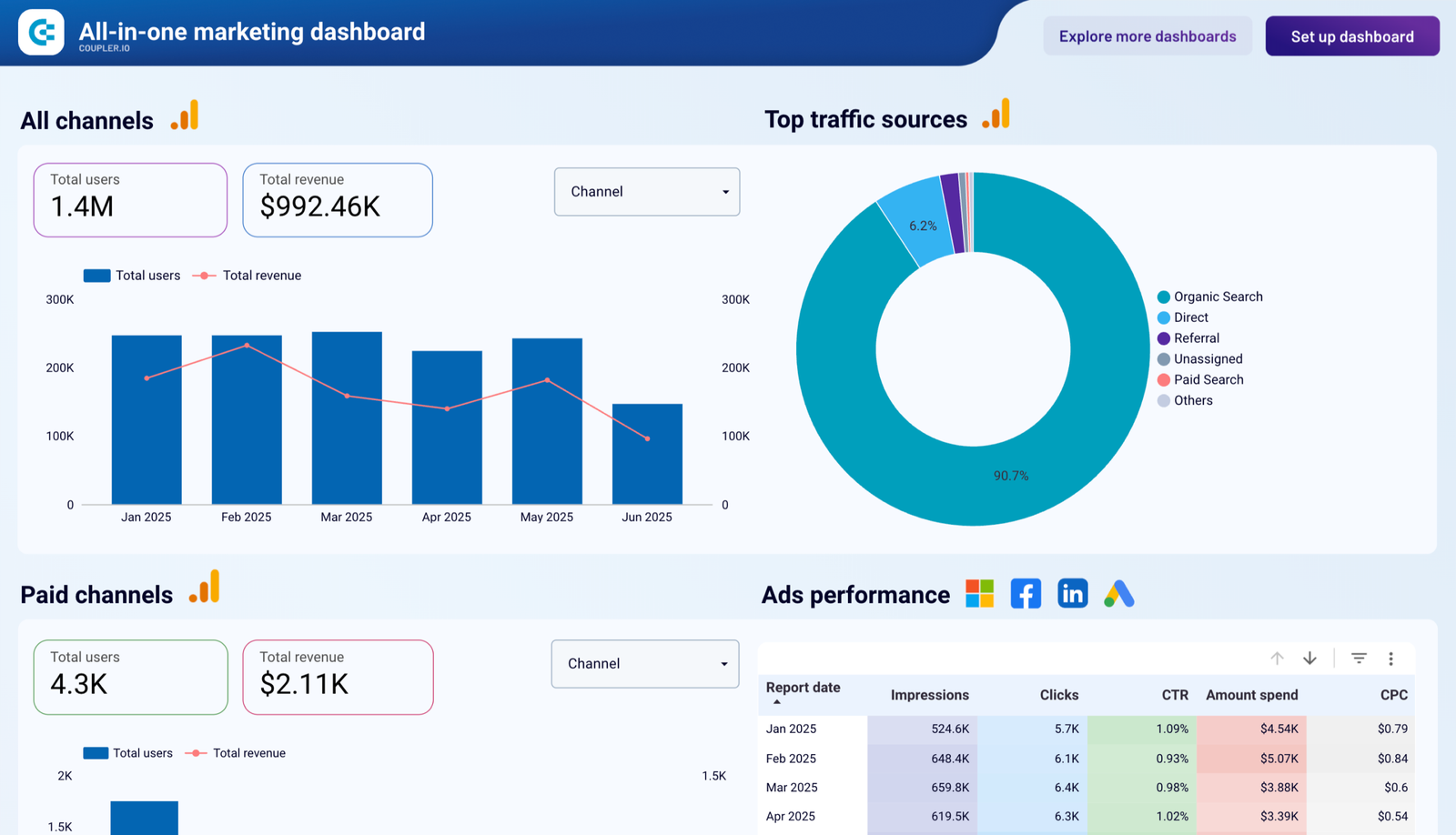
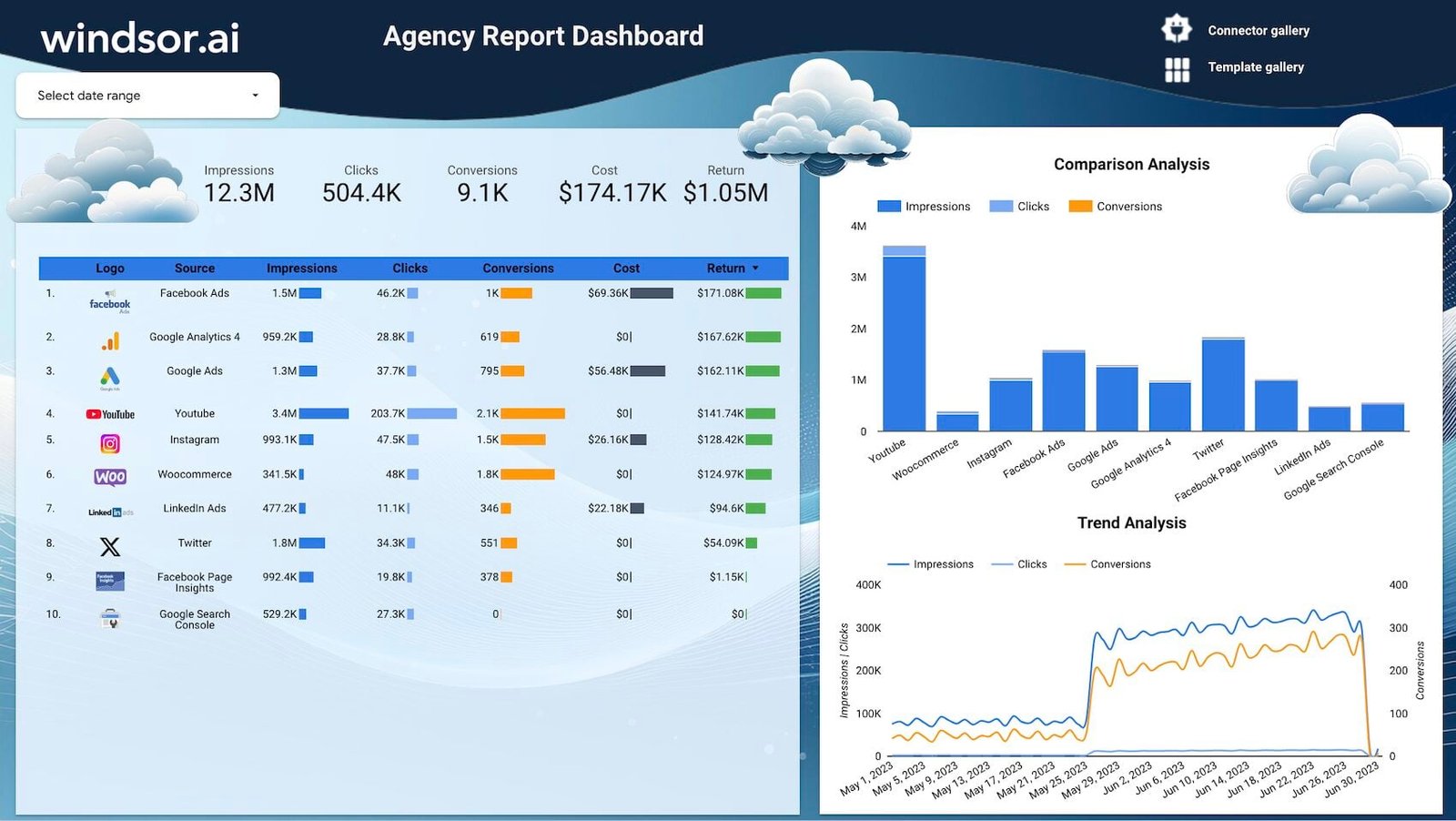
Start from a multi-client template, and plan senders before you build the second copy.
Where to go next
- How to share and schedule a Data Studio report: the dialog, step by step
- Why your report shows yesterday’s numbers: freshness and caching
- The Data Studio API, explained: and the Linking API
- Data Studio free vs Pro: what Pro costs
- Agency reporting operations: who owns which part
- Copy and reuse a Data Studio template: one build, many clients
Frequently asked questions
Can I send each client their own filtered Data Studio report on a schedule, for free?
No. A free report has one schedule. Use a copy of the report per client, each with its own schedule, or Pro (up to 200 schedules per report, or one schedule filtered by each recipient’s email).
How many scheduled emails can I send on free?
200 recipients a day and 800 a month per sender on a personal account; 500 and 3,000 on Workspace. Pro has no quota. There’s no way to check how close you are.
Can Data Studio send reports to Slack or Microsoft Teams?
Slack and Google Chat, on Pro only. Teams isn’t a documented destination.
Can I buy Data Studio Pro with a Gmail account?
No. Self-service Pro is for Google Workspace or Cloud Identity organisations.
Can Zapier or Make schedule or refresh a Data Studio report?
No. Make’s app covers asset search and permissions; nothing creates, schedules or refreshes a report.
Why did my automated report stop arriving?
Usually the person who last saved the schedule left or lost access. Re-save it as someone with access. The other causes are in the scheduled-report troubleshooting post.
Some links in this post are affiliate links: if you sign up through one, I may earn a commission at no extra cost to you. How I work with partners.