
If you already report in Data Studio, the cheapest sensible MCP server is usually the one your connector already includes: Windsor.ai and Porter Metrics put it on every plan including their free ones, Catchr, Coupler.io and Funnel.io on every plan, and Supermetrics through its AI chats destination or an Enterprise API plan. Google’s official GA4 and Google Ads servers are free but run on your own machine, read-only and one source each; Meta’s official server is hosted and can launch campaigns.
MCP (Model Context Protocol) is the plug an AI assistant like Claude, ChatGPT or Gemini uses to call tools, here, to query your ad and analytics accounts. This post puts every credible MCP route for marketing data on the same rows:
- a verdict table, and one 20-row table across the six connectors
- sources, AI clients and setup
- what each can change in your ad accounts, and who presses “confirm”
- the bill for a freelancer, an in-house team and agencies at 10 and 30 clients
- Google’s and Meta’s own servers, docs quality, and how to check an answer against your report
One thing up front: there’s no MCP server for Data Studio (formerly Looker Studio) itself. More on that below, and in my overview of AI in Data Studio.
Which MCP server fits your situation
The winner depends on three things: how many client accounts you have, whether you want the assistant to change anything, and whether it should share a bill with your Data Studio connector.
| Your situation | Shortlist | Why |
|---|---|---|
| Freelancer, 3 clients, read-only | Porter Metrics (free plan), Windsor.ai Basic, Catchr Starter | Porter’s free plan if 30 days of history is enough; Windsor Basic is $19/mo billed annually for 3 sources and 75 accounts |
| Agency, 10 clients, one bill for dashboards and assistant | Windsor.ai Standard, Catchr Momentum, Porter Metrics | All three keep the assistant on the plan that feeds Data Studio; $98.99–$180 a month billed monthly |
| Agency, 30 clients | Porter Metrics, Catchr Growth, Windsor.ai Plus | Porter’s price per account falls to $2.30 at 120 accounts; Catchr Growth plus two 10-account packs lands within $10 of it; Windsor Plus covers 200 |
| In-house, one brand, 6 sources | Porter Metrics, Windsor.ai Standard, Coupler.io Active | Few accounts, many source types: per-account pricing wins |
| Enterprise with a warehouse | Funnel.io, or BigQuery’s own MCP server | Workspace context (budgets, targets) at Funnel; SQL over your own tables at BigQuery |
| “I only need GA4” | Google’s official GA4 server | Free, read-only, maintained by Google; you run it yourself |
| The AI should change Meta campaigns, with Meta’s controls | Meta’s official server | Hosted, created campaigns start paused, business-level rules |
| No writes, guaranteed by design | Funnel.io, Coupler.io, Catchr, Google’s servers | None of them has a tool that changes an ad account |
From each vendor’s docs and pricing page, read 14 October 2026. Prices are worked out in the scenarios section.
Tools I don’t partner with (Porter, Funnel.io, Google and Meta) lead most of those rows. That’s where the evidence pointed.
How I compared them, and what I didn’t test
This comparison is written from documents, not from trials. On 14 October 2026 I read, for each vendor:
- the MCP docs and every per-client setup guide, plus the server’s own reference page where one exists
- the pricing page in both billing states, against the prices I keep for every connector
- the changelog or release notes, Google’s and Meta’s developer docs and GitHub repos
- review-site ratings and the forum threads I could reach (Reddit blocks my scripts, so those come from search snippets)
I haven’t run the same question through all six yet; I’ll add captures when I run the trials. The connector side (refresh, templates, Data Studio quirks) is in Porter vs Windsor vs Supermetrics.
What a marketing data MCP server actually does (and why there’s no Data Studio one)
An MCP server is a small service that tells an AI assistant which tools it can call (“run a report”, “list campaigns”) and runs them when asked. For marketing data there are three routes:
- An official server per platform. Google publishes GA4 and Google Ads servers you run yourself; Meta, TikTok and Google’s BigQuery host theirs. Free, narrow, one source each.
- A connector’s MCP server. One login reaches every source on your connector plan, on the same subscription that feeds your Data Studio reports.
- A reporting platform’s MCP server. AgencyAnalytics, DashThis, Databox and Whatagraph have one, but they replace Data Studio rather than feed it.
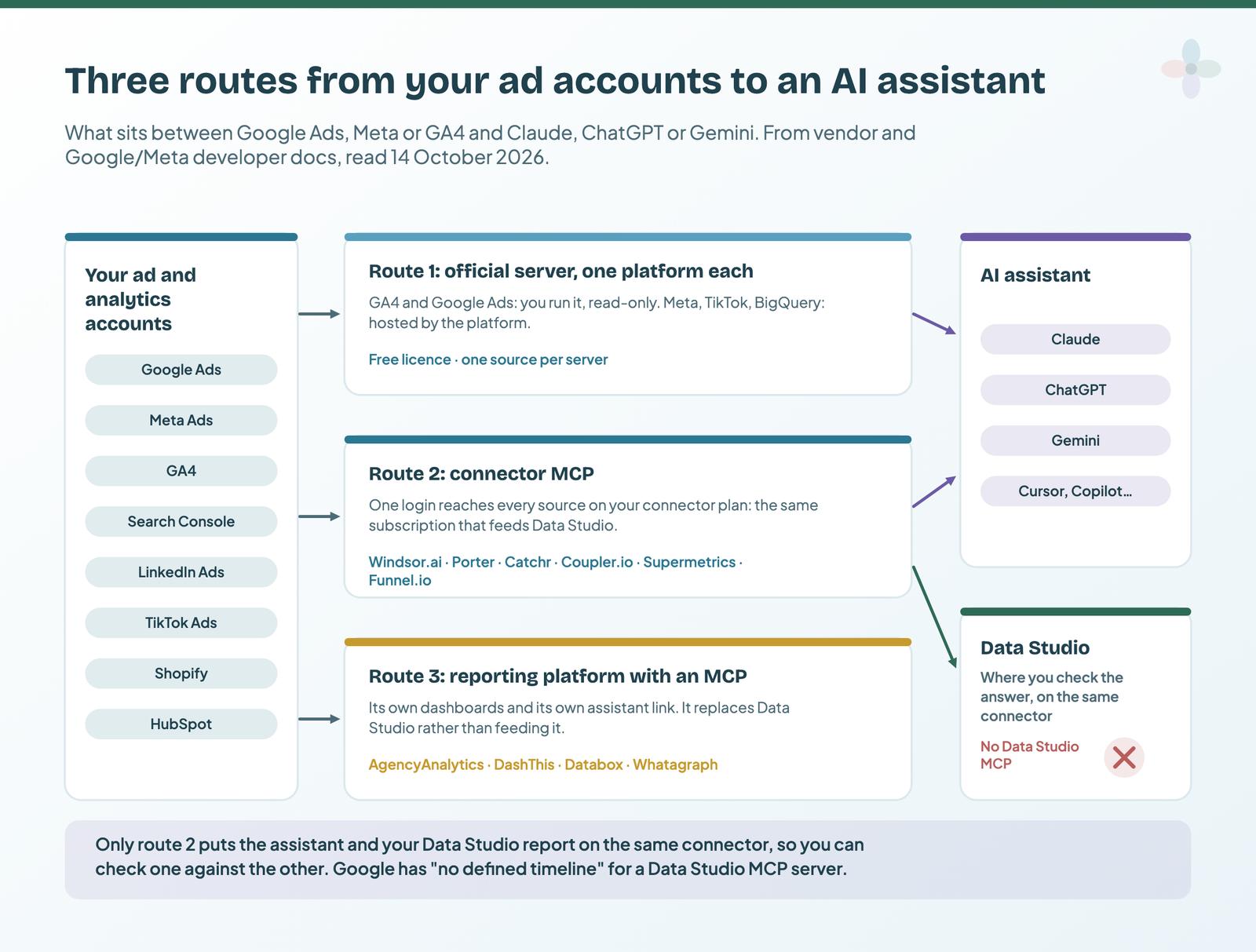
What about Data Studio itself? A Google staff member answered on Google’s developer forum on 1 September 2026: “due to shifts in strategic priorities, there is currently no defined timeline for the development of an MCP server for Data Studio.” Google’s Looker MCP server is in preview for Looker instances only, a different product (how the three Google names relate). The Data Studio API manages assets and permissions; it doesn’t return report data.
So the assistant talks to the sources, not to your report.
The six connector MCPs at a glance
They look alike in marketing copy. They differ on what the plan counts, write access, which clients have real setup docs, and whether the AI tool uses up a destination.
| Windsor.ai | Porter Metrics | Catchr | Coupler.io | Supermetrics | Funnel.io | |
|---|---|---|---|---|---|---|
| Endpoint | mcp.windsor.ai |
mcp.portermetrics.com/mcp |
api.catchr.io/mcp |
mcp.coupler.io/mcp |
mcp.supermetrics.com/mcp |
mcp.ai.funnel.io/mcp (EU: mcp.eu.ai.funnel.io/mcp) |
| Hosting | Hosted only | Hosted only | Hosted only | Hosted, or a self-hosted open-source server (4 read tools) | Hosted only | Hosted, global or EU |
| Sources claimed | 350+ (366 IDs listed) | 26–32 (pages differ) | 100+ | 400+ | 175 listed | Whatever the workspace connects |
| What the MCP sees | Every connected source and account | Every authorised source | The accounts you select | Only data flows sent to that AI tool | Your connected sources | The workspace, plus budgets, targets, metric definitions |
| AI tool uses a destination? | Not counted as a source | Not stated | Not stated | Yes | Yes (AI chats is the core destination) | No Flexpoints used |
| Clients with step-by-step guides | 11 + a generic guide | 4 | 2 | 9 | 3 ready-made | 7 |
| Auth | OAuth; API key fallback | OAuth, each source separately | OAuth (API key for Claude’s free desktop app) | OAuth; personal token for self-host | OAuth or API key | OAuth 2.0 |
| Read or write | Read + write | Docs disagree | Read | Read (can edit Coupler’s own flows) | Read + write (beta) | Read |
| Write actions | 139 across 19 connectors | 750+ operations in the server docs | None | None on ad platforms | Create, update, pause on 7 ad platforms | None |
| Write gate | Settings switch; AI client confirms | AI client confirms | — | — | Per-account opt-in, approval modes | — |
| New campaigns paused? | Yes | Yes | — | — | Yes, always | — |
| Audit trail | Audit log | Not stated | — | — | Campaign history with revert | — |
| MCP on a free plan? | Yes (Forever Free) | Yes (Free forever) | No free plan | Yes, but Free has 1 destination | No free plan | No free plan |
| Entry plan with MCP | Basic $19/mo annual, $23 monthly | $15 for 1 account, monthly | Starter $24 monthly, $239/yr | Starter $24/mo annual, $32 monthly | Starter €39/mo yearly, €49 monthly | Starter from €280/mo annual |
| Plan counts | Sources + accounts | Accounts | Platforms + accounts | Accounts + destinations | Sources × accounts each | Flexpoints |
| MCP limits | Not stated | Reads free; writes use Automation credits | “Unlimited users and requests” | Doesn’t use Coupler’s AI credits | 1,000 rows per query by default | 500 rows by default |
| Trial | 30 days | 14 days, no card | 14 days, no card | Free plan | 14 days, no card | Demo only |
| Security statement | SOC 2 Type II, GDPR | Logs never hold arguments or responses | None found | SOC 2 Type II | SOC 2 Type II, ISO 27001 | Data leaves only on your query |
| AI-training statement | None found | None found | None found | No training on your data | No training of public models | None found |
| MCP changelog | Weekly changelog, MCP since Jul 2025 | None; docs undated | None | None found | 191 versioned entries | One release note |
From each vendor’s docs and pricing page, read 14 October 2026. Supermetrics and Funnel.io: EU prices; limits vary by region.
Which sources each one reaches through MCP
For Windsor.ai, Porter, Supermetrics and Funnel.io, the MCP reaches the same catalogue as the connector. Coupler.io is the odd one out: the assistant “sees only the data sets from data flows that have that tool as a destination”, reading the last successful run, so you set up a flow per source first. The free official route runs out at LinkedIn, which has no official server.
| Source | Windsor.ai | Porter | Catchr | Coupler.io | Supermetrics | Funnel.io | Official server |
|---|---|---|---|---|---|---|---|
| GA4 | ✔ | ✔ | ✔ | ✔ via a flow | ✔ | if connected | ✔ Google, you run it |
| Search Console | ✔ | ✔ | ✔ | ✔ via a flow | ✔ | if connected | ✘ third-party only |
| Google Ads | ✔ + writes | ✔ | ✔ | ✔ via a flow | ✔ + writes | if connected | ✔ Google, read-only |
| Meta Ads | ✔ + writes | ✔ | ✔ | ✔ via a flow | ✔ + writes | if connected | ✔ Meta, hosted, writes |
| LinkedIn Ads | ✔ + writes | ✔ | ✔ | ✔ via a flow | ✔ + writes | if connected | ✘ none found |
| TikTok Ads | ✔ + writes | ✔ | ✔ | ✔ via a flow | ✔ + writes | if connected | ✔ TikTok, hosted |
| Microsoft Ads | ✔ + writes | ✔ | ✔ | ✔ via a flow | ✔ + writes | if connected | pilot, read-only |
| Shopify | ✔ | ✔ | ✔ | ✔ via a flow | ✔ | if connected | ✘ developer servers only |
| HubSpot | ✔ | ✔ | ✔ | ✔ via a flow | ✔ | if connected | ✔ HubSpot, hosted |
| BigQuery | ✔ | ✔ | destination only | not listed as a source | ✔ | if connected | ✔ Google, hosted |
From Windsor.ai’s and Supermetrics’ live MCP source lists, Porter’s MCP docs, Catchr’s and Coupler.io’s pricing-page source lists, and Google’s, Meta’s, TikTok’s, Microsoft’s and HubSpot’s developer pages, read 14 October 2026.
The connector catalogues themselves, source by source, are in Data Studio connectors compared.
Which AI clients work, and what setup looks like
All six are hosted and use OAuth, so setup is usually “add a connector URL, log in, pick accounts”. What differs is which clients have a real guide, and these catches:
- ChatGPT needs a paid plan for connectors, per Porter’s guide: “connectors aren’t available on the free tier”.
- Coupler.io’s directory connector can fail on Claude Free and Pro: it “may connect but its tools fail to load”. A custom connector works on all plans.
- Windsor.ai‘s launch post says Claude’s free plan works; its README says some clients need a paid plan. Ask Windsor.
| Client | Windsor.ai | Porter | Catchr | Coupler.io | Supermetrics | Funnel.io |
|---|---|---|---|---|---|---|
| Claude (web, desktop) | guide | guide | guide | guide | guide | guide |
| Claude Code | plugin | guide | — | guide | — | guide |
| ChatGPT | guide | guide | guide | guide | guide | guide |
| Gemini CLI / Enterprise | guide | — | named only | guide | Enterprise on request | — |
| Cursor | guide | — | — | guide | named only | guide |
| Microsoft Copilot | Copilot Studio | — | named only | Copilot Studio | guide | VS Code, Copilot Studio |
| n8n | guide | — | — | — | named only | — |
“Guide” = a step-by-step page in the vendor’s docs; “named only” = listed without steps. Read 14 October 2026.
For a terminal client like Claude Code, adding a hosted server is one line. Porter’s docs give this exact command; the others follow the same pattern with the endpoint each vendor publishes:
# Written from each vendor's docs, not tested here.
claude mcp add --transport http portermetrics https://mcp.portermetrics.com/mcp
claude mcp add --transport http catchr https://api.catchr.io/mcp
claude mcp add --transport http coupler https://mcp.coupler.io/mcp
claude mcp add --transport http funnel https://mcp.ai.funnel.io/mcp
# Windsor.ai's route for Claude Code is its plugin:
claude plugin install windsor-aiSupermetrics’ standalone endpoint needs an API-enabled plan (see pricing). Google’s GA4 server is a different job, a local Python install with a Cloud project, walked through in how to connect GA4 to Claude or ChatGPT.
Read-only or write: what each one can change in your ad accounts
This row deserves a meeting before you connect anything. Two connectors write to ad platforms, one has docs that disagree, three don’t.
- Windsor.ai lists 139 write actions across 19 connectors on its live
/actionsendpoint (its docs page says 137), including 34 on Google Ads, 20 on Meta and 12 on LinkedIn. A settings switch turns writes off “if you want read-only access”; per-action confirmation is left to the AI client, and writes go into an audit log. Some actions are final: deleting a Customer Match list “Cannot be undone”. Its Gemini and Cursor guides still say read-only. - Supermetrics can create, update, pause and remove campaigns, ad groups and ads on Google, Meta, Microsoft, TikTok, LinkedIn, ChatGPT and Snapchat Ads, in early access. It has the strictest gate here: per-account opt-in, approval modes from “No human approval” to “All live changes”, approval links that expire after 30 minutes, and a Campaign history you can revert from.
- Porter Metrics contradicts itself. Its help article says the MCP is read-only and “cannot change anything in your ad accounts”; its server docs list an
execute_actiontool over “750+ operations”, marked destructive and confirmed in the AI client. Writes are its Automation product, billed in AI credits (“1 AI credit = 1 completed task”, so pausing 50 campaigns is 50 credits). - Catchr says Claude gets “eight tools, and all eight of them read”, and “cannot create, pause, or edit a campaign”.
- Coupler.io queries are read-only, but the assistant can create and change Coupler’s own data flows and schedules. Funnel.io changes nothing: its tools “do not create or change data sources, fields, dashboards or other configuration”.
| Writes to ad platforms | Opt-in | Approval | Paused by default | Audit / undo | Destructive actions listed | |
|---|---|---|---|---|---|---|
| Windsor.ai | Yes, 19 connectors | Settings switch | AI client | Yes | Audit log | Yes |
| Supermetrics | Yes, 7 platforms (beta) | Per ad account | Server-side modes | Always | History + revert | Remove |
| Porter Metrics | Docs disagree | Not stated | AI client | Yes | Not stated | Marked destructive |
| Catchr · Coupler.io · Funnel.io | No | — | — | — | — | — |
| Meta (official) | Yes | Business-portfolio rules | AI client, before activation | Yes | Not stated | Activation spends budget |
| BigQuery (official) | execute_sql can write tables |
IAM deny | — | — | — | SQL |
From each vendor’s write-action docs, changelogs and Meta’s and Google’s developer pages, read 14 October 2026.
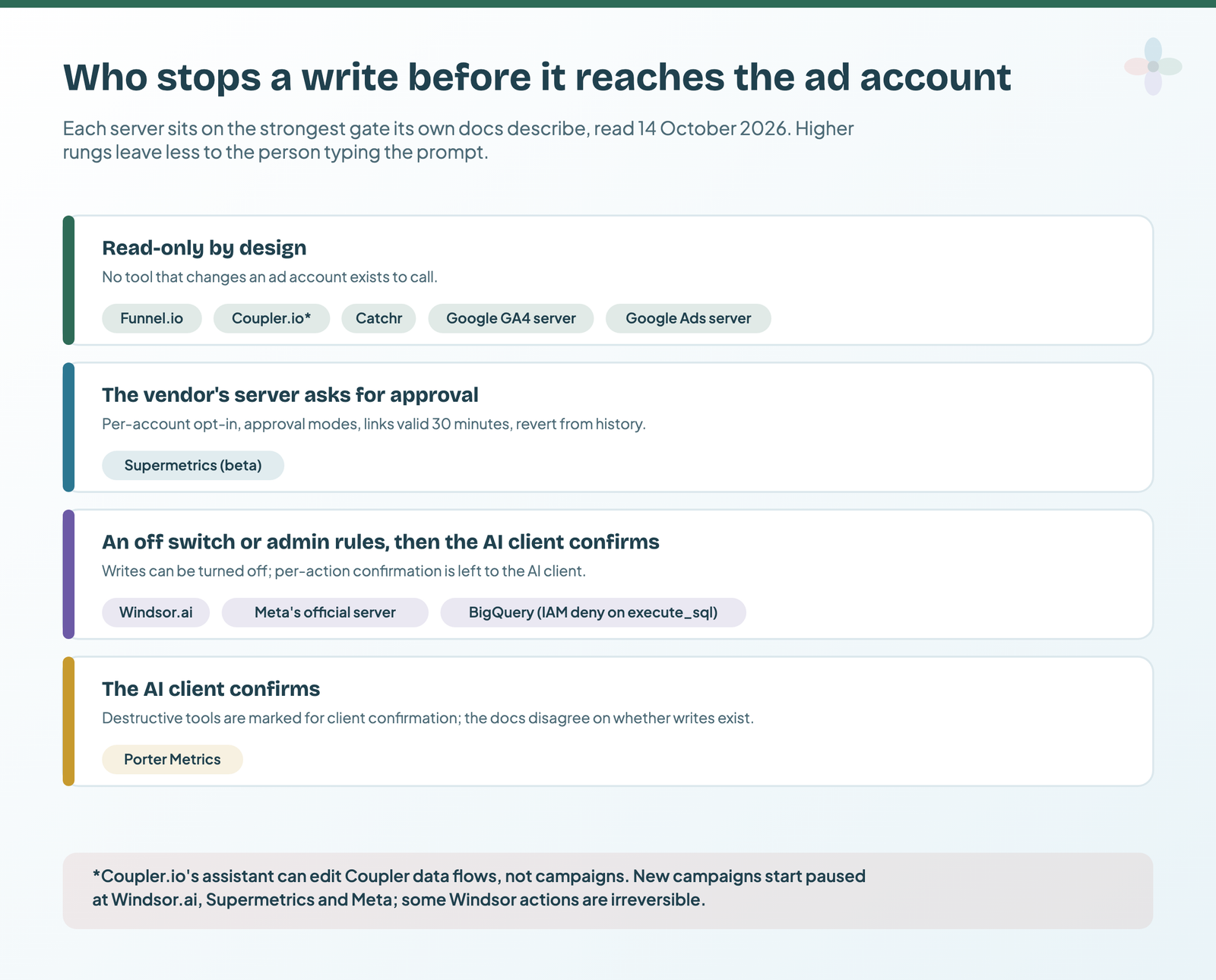
I’m not saying write access is bad: pausing twenty overspending ad sets from a chat is useful. I am saying “who approves” should be decided once, not discovered later. My piece on sending client data to AI assistants covers the agency policy side.
What each plan counts, and what you’d pay
None of the six meters MCP calls directly: you pay for what the plan already counts. Porter adds a second meter, for writes.
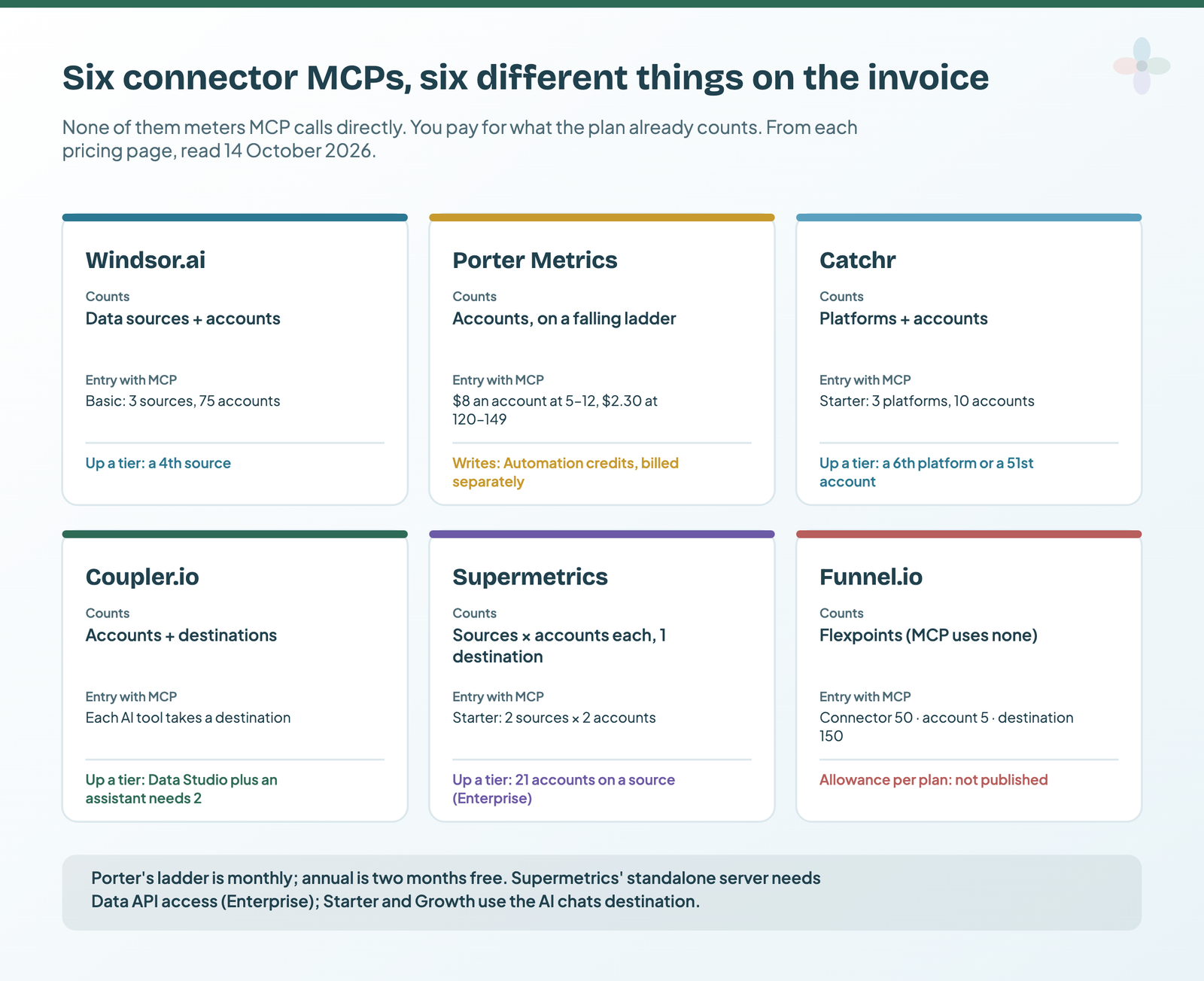
| Vendor | Cheapest plan with MCP | Billed annually | Billed monthly | What it includes | Extras |
|---|---|---|---|---|---|
| Windsor.ai | Forever Free · Basic | $0 · $19/mo | $0 · $23/mo | Free: 1 source, 1 account · Basic: 3 sources, 75 accounts | Next tier |
| Porter Metrics | Free · 1 account | $0 · $12.50/mo | $0 · $15/mo | Free: 30-day history · paid: per account, falling with volume | Writes: Automation credits, from $28/mo for 500 (billing state not stated) |
| Catchr | Starter | $239/yr | $24/mo | 3 platforms, 10 accounts | +$19.99 a platform, +$19.99 per 10 accounts (billing state not stated) |
| Coupler.io | Free · Starter | $0 · $24/mo | $0 · $32/mo | Free: 1 account, 1 destination · Starter: 3 accounts, 1 destination | +$4.49 an account annual, +$5.99 monthly |
| Supermetrics | Starter (via AI chats) | €39/mo | €49/mo | 2 sources × 2 accounts, 1 destination, 1 user | Destination +€49 yearly / +€62 monthly, source +€29 / +€37, ad account +€10 / +€13 |
| Funnel.io | Starter | from €280/mo | not published | Flexpoints; allowance not published | Quote |
Prices from each vendor’s pricing page, checked 14 October 2026. Supermetrics and Funnel.io: EU prices (Funnel’s US page shows $300); limits vary by region.
Two catches. Coupler.io counts the assistant as a destination: Data Studio plus Claude needs two; Starter has one. And Supermetrics’ standalone MCP server is “included in all Supermetrics plans that include Data API access”, which on today’s pricing page means Enterprise only. Starter and Growth reach it through the AI chats destination, their one core destination, so Data Studio becomes a paid extra. The full ladders are in Supermetrics pricing and Porter vs Windsor vs Supermetrics.
The bill for a freelancer, an in-house team and agencies at 10 and 30 clients
The assumptions, so you can swap in your own: a freelancer with 3 clients on Google Ads, Meta and GA4 (3 sources, 9 accounts); an in-house team with one brand on Google Ads, Meta, LinkedIn, GA4, Search Console and Shopify (6 sources, 6 accounts); agencies with 10 or 30 clients on Google Ads, Meta, GA4 and Search Console (4 sources, 40 or 120 accounts). Everyone wants two destinations: Data Studio and one assistant.
| Vendor | Freelancer, 3 clients | In-house, 1 brand | Agency, 10 clients | Agency, 30 clients |
|---|---|---|---|---|
| Windsor.ai | Basic: $19 · $23 | Standard: $99 · $118 | Standard: $99 · $118 | Plus (200 accounts): $249 · $299 |
| Porter Metrics | 9 × $8: $60 · $72 | 6 × $8: $40 · $48 | 40 × $4.50: $150 · $180 | 120 × $2.30: $230 · $276 |
| Catchr | Starter: $239/yr · $24 | Growth (6 platforms): $2,390/yr · $239 | Momentum + 1 pack: $790/yr + pack · $98.99 | Growth + 2 packs: $2,390/yr + packs · $278.98 |
| Coupler.io | Active (2 destinations): $99 · $132 | Active: $99 · $132 | Pro: $199 · $259 | Pro + 70 accounts: $513.30 · $678.30, or a Custom quote |
| Supermetrics | Starter + extras: €127–147 · €161–187 | Growth + destination: €308 · €386 | Growth + destination + accounts: €338–428 · €425–542 | Enterprise quote (past 20 accounts a source) |
| Funnel.io | From €280/mo billed annually; the setups use 345, 480, 550 and 950 Flexpoints, and Funnel doesn’t publish each plan’s allowance | |||
Per month, billed annually · billed monthly, unless marked. Catchr doesn’t say how its packs ($19.99 per 10 accounts) are billed. Prices from each pricing page, checked 14 October 2026; the arithmetic for every cell is in the companion Sheet.
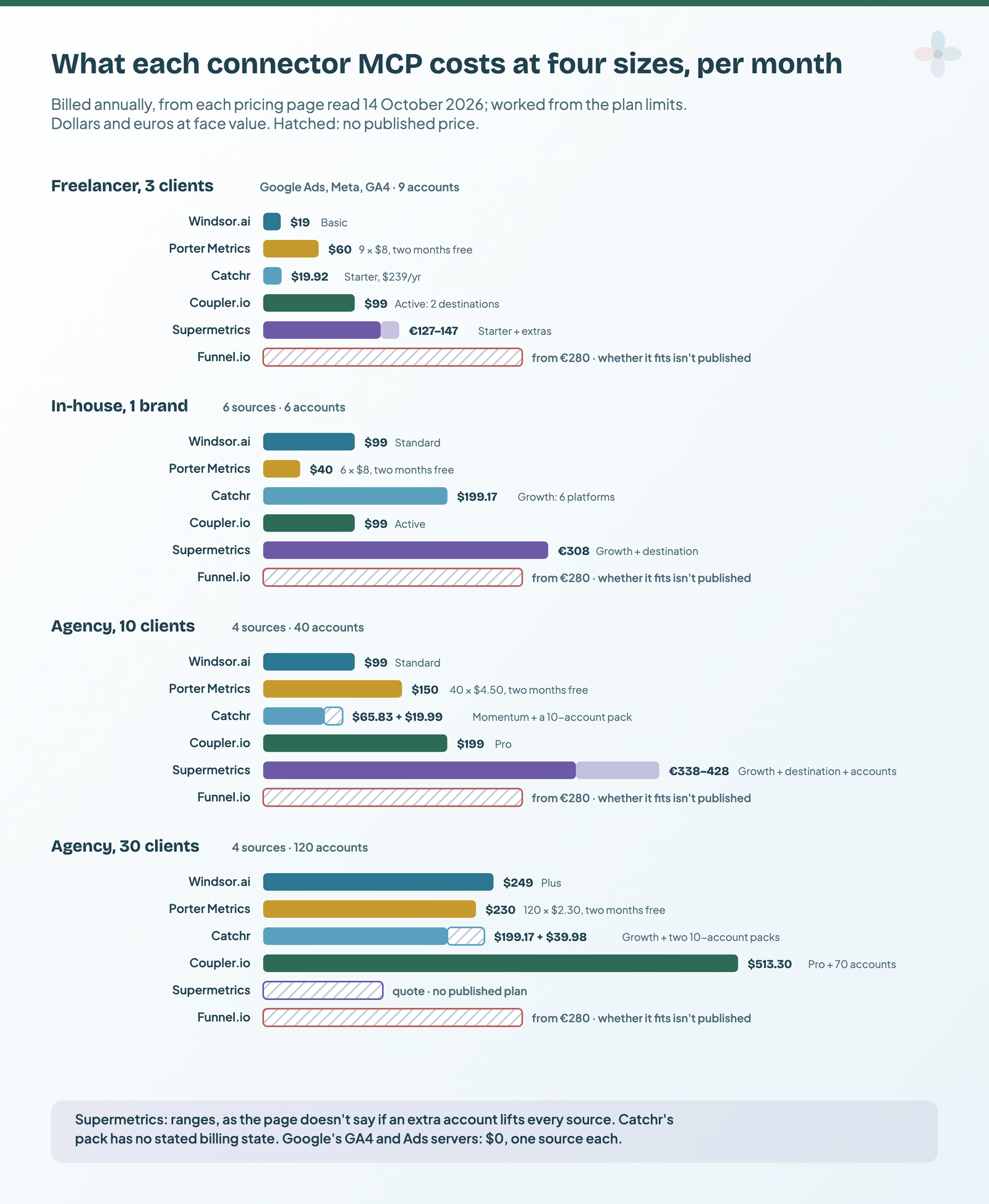
Three things fall out of it:
- Small setups favour Windsor.ai, Catchr and Porter, whose free plan costs nothing if 30 days of history (15 in AI chats) is enough.
- At 30 clients, Porter’s ladder and Catchr Growth with packs are within $10 of each other ($230 and about $239 billed annually), and Supermetrics leaves self-serve.
- The Supermetrics ranges are real uncertainty, not rounding. Its page doesn’t say whether one extra ad account lifts every source or only one, so I show both readings.
Under all of this sit Google’s GA4 and Google Ads servers: free apart from setup time, one source each. How the money side fits an agency’s reporting stack is in agency reporting operations.
Google’s and Meta’s own servers: free, official, and narrower
| Platform | Hosting | Read / write | Clients in the docs | Status | Cost stated? |
|---|---|---|---|---|---|
| GA4 | You run it (Python, a Cloud project) | Read-only | Gemini CLI, Gemini Code Assist, Claude Code | README says “(Experimental)” | Free, open source |
| Google Ads | You run it, locally or on your Cloud Run | “Strictly read-only” | Generic | Docs updated 30 Sep 2026 | Free, open source |
| BigQuery | Google-hosted | execute_sql can write |
Generic | Docs updated 13 Oct 2026 | Billed as BigQuery queries |
| Search Console | No official server; third-party only | ||||
| Meta Ads | Meta-hosted | Read + write | ChatGPT, Claude, Claude Code, Perplexity | Open beta since 29 Apr 2026 | Not stated |
| TikTok Ads | TikTok-hosted | Read + write | Not stated | Help page dated Aug 2026 | Not stated |
| Microsoft Advertising | Microsoft-hosted | Read-only | Not stated | Pilot | “Free to connect” |
| Amazon Ads | Amazon-hosted | Not stated | Not stated | Open beta for API partners | Not stated |
From Google’s, Meta’s, TikTok’s, Microsoft’s and Amazon’s developer and help pages, read 14 October 2026.
GA4: Google’s server is a local install with read-only access (“can’t edit your Google Analytics configuration or settings”). Google Ads: read-only, three tools, and you host it. Google’s own two sources disagree on credentials: the doc says developer tokens “were sunset on September 9, 2026, and are no longer required”, while the README still lists one as optional. Setup for both is in Google Ads and Search Console MCP servers. BigQuery is the hosted exception: Google runs it at bigquery.googleapis.com/mcp, results cap at 3,000 rows, and “the only MCP tool that isn’t read-only is execute_sql”.
Meta’s server: the official route that writes
Meta’s Ads MCP server is hosted at mcp.facebook.com/ads and launched on 29 April 2026 as an open beta. It can create campaigns, ad sets and ads (in a paused state) and activate them, and “your AI client asks for confirmation before activation”. Since 16 July 2026, people with full control of a business portfolio can set rules for what agents may do. Meta doesn’t state a price or rate limits. Setup and the third-party alternatives are in my Meta Ads MCP guide.
“Official” suits one source, no budget and someone technical to run it; not ten clients, LinkedIn, or one bill shared with your dashboards.
Other MCP servers worth knowing
| Tool | Feeds Data Studio? | Read / write | MCP plan and price | Consider it if |
|---|---|---|---|---|
| Power My Analytics | Yes | Read (writes “in final testing”) | Every plan, from $41.63/mo billed annually | you already use it for Data Studio |
| Dataslayer | Yes | Read | MCP-only €29/mo billed annually; Advanced €99 with 100 messages a month | you want the MCP without a full connector plan |
| Data Bloo | Yes | Read, 7 tools | Free plan (1 account per connector); paid from $8.33/mo billed annually | you use its Data Studio templates and connectors |
| Two Minute Reports | Yes, or Sheets | Not stated | All plans; Lite $81/mo annual, $97 monthly | Sheets is your main destination |
| Adverity · Improvado | Adverity: yes · Improvado: not stated | Adverity: beta · Improvado: read + write | Not stated (enterprise) | you’re already an enterprise customer |
| Pipeboard | No | Read + write across Meta, Google Ads, TikTok, LinkedIn, Microsoft | Free (30 runs a week, 2 ad accounts); Pro $29.90/mo | you want ad operations, not reporting |
| Markifact · Adspirer | No | Read + write with approval / paused | Markifact Pro $79/mo · Adspirer Plus $40/mo billed annually | same: campaign management from chat |
| AgencyAnalytics · DashThis · Databox · Whatagraph | No, they replace it | Mostly read; DashThis limited writes | Databox: Analyst, $71/mo billed annually; others in their plans or not stated | you’d move reporting into the platform |
From each vendor’s MCP docs and pricing page, read 14 October 2026.
The reporting platforms are a different decision: swapping Data Studio out. See marketing reporting tools compared, AgencyAnalytics alternatives and Data Studio vs Databox vs DashThis.
Docs, changelogs and what happens to your data
Without a trial, a dated changelog and per-client guides are the best signals you can check; the data-handling lines are what clients ask about.
| Windsor.ai | Porter | Catchr | Coupler.io | Supermetrics | Funnel.io | |
|---|---|---|---|---|---|---|
| Dedicated MCP docs | ✔ | ✔ one reference page | ✔ 3 help articles | ✔ | ✔ own docs site | ✔ |
| Per-client guides | 11 | 4 | 2 | 9 | 3 | 7 |
| Tool reference | ✔ | ✔ with read/write labels | ✘ | ✔ (self-hosted server) | ✔ | Partial |
| Dated changelog | ✔ weekly | ✘ undated | ✘ | ✘ | ✔ 191 entries to 13 Oct 2026 | One release note, Sep 2026 |
| Training statement | ✘ | ✘ | ✘ | ✔ no training | ✔ no public-model training | ✘ |
| Retention statement | ✔ memory ≤24h, disk 20 days unaccessed | ✔ logs hold no arguments or responses | ✘ | ✘ no period given | ✘ | ✔ nothing stored in the AI tool between sessions |
✔ = found in the vendor’s docs on 14 October 2026; ✘ = not found where I looked. Not a score.
Porter’s server docs are thorough but undated, and contradict its tutorials on writes. The questions to put to a vendor before client data goes through it are in what agencies check first.
What users say (so far)
Review sites rate the connectors, not their MCP servers, and the MCP features are 3 to 15 months old, so this is thin.
| Vendor | G2 | Capterra | Trustpilot |
|---|---|---|---|
| Windsor.ai | 4.4 (90) | not found | 3.5 (78) |
| Porter Metrics | 4.6 (288) | 4.5 (6) | no profile |
| Catchr | 4.5 (2) | 5.0 (1) | no profile |
| Coupler.io | 4.8 (104) | 4.9 (111) | no profile |
| Supermetrics | 4.4 (824) | 4.4 (109) | 1.5 (31) |
| Funnel.io | 4.5 (276) | 4.7 (19) | 2.1 (11) |
Rating (number of reviews), read 13 October 2026. These rate the whole product. Catchr’s counts are too small to mean anything.
What there is: 4 of 40 recent Windsor.ai Trustpilot reviews I coded praise using it with Claude or ChatGPT. Forum threads mostly ask whether connecting AI to marketing data is safe; one r/LookerStudio reply on connectors puts it as “to me all feels same”. The fuller review coding for each connector is in Supermetrics alternatives.
How to check the assistant’s numbers against your Data Studio report
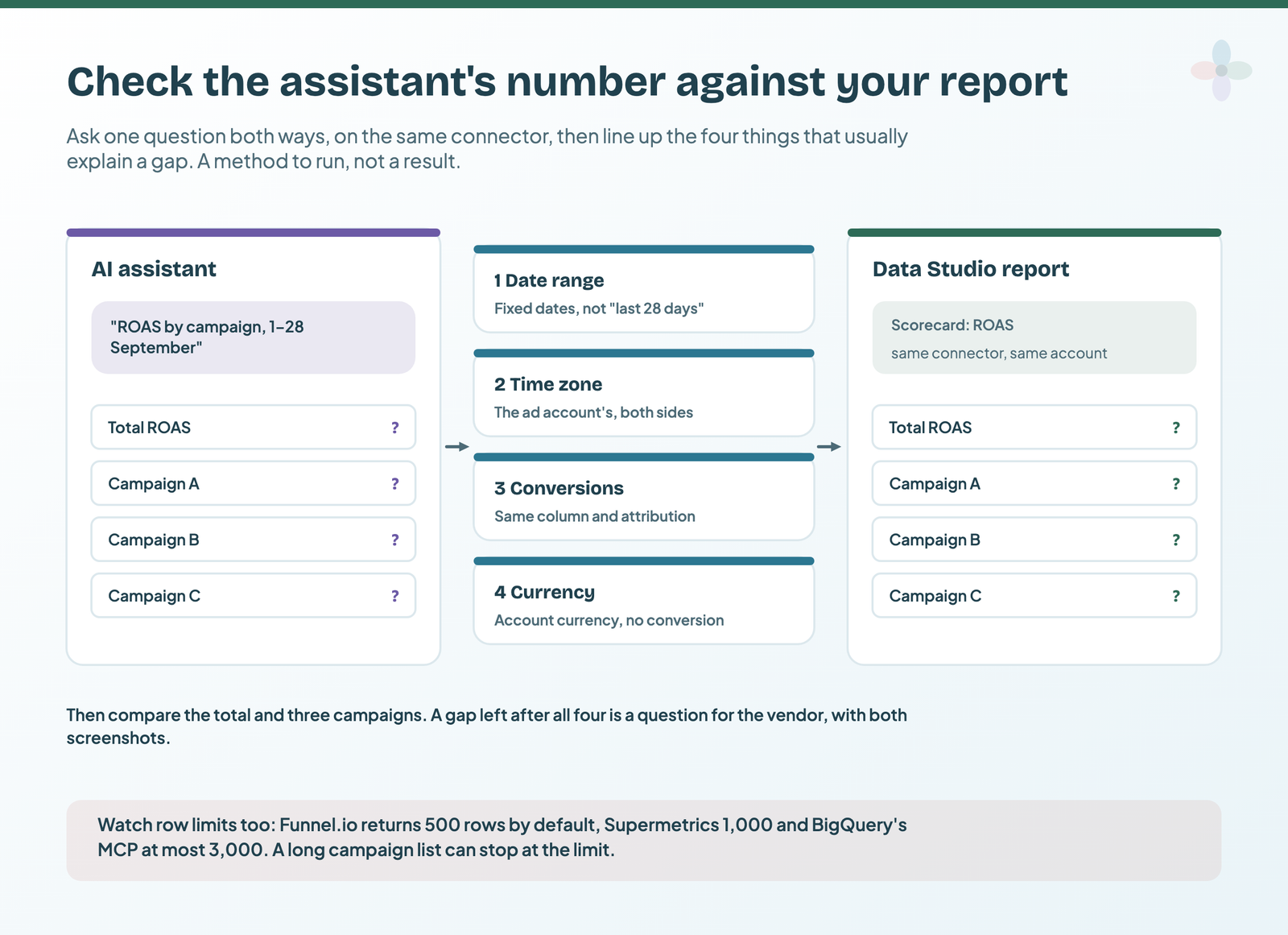
Before an assistant’s number goes into a client email, check it once against the report you already trust. I haven’t run this across all six yet.
- Ask with fixed dates. “ROAS by campaign, 1–28 September”, not “last 28 days”, which depends on when and where the question runs.
- Open the same view in Data Studio on the same connector and account: a scorecard for total ROAS and a table by campaign (the setup is in connect Google Ads to Data Studio).
- Match the date range with a fixed custom range (date range controls).
- Match time zone, conversion column and currency. Ask the assistant which conversion column and attribution it used.
- Compare the total and three campaigns. Write both numbers down; the companion Sheet has a log for it.
- Check row limits and freshness. Funnel.io returns 500 rows by default, Supermetrics 1,000, BigQuery’s server at most 3,000. A connector cache can also explain a gap (why a report shows yesterday’s numbers).
Once the numbers agree, writing the commentary around them is its own skill, covered in AI client report commentary; Chapter 24 of my ebook, Data Storytelling in Data Studio, adds how to keep that commentary in step with the data once the report refreshes.
Switching from one MCP to another
The MCP part moves in minutes; the connector underneath is the slow bit (rebuilding? copy and reuse a template):
- Swap the connector URL in your AI client, then re-authorise every source, account by account.
- Swap the data source in each Data Studio report to the new connector’s (how data sources work is in data source vs dataset). Field names differ, so charts may need fixing.
- Rewrite saved prompts and skills: tool names and field names change between vendors.
- Check the refund terms before you buy annual. Windsor.ai: “All sales are final… no refunds”. Porter refunds within 14 days.
Dashboards that run on the same connectors
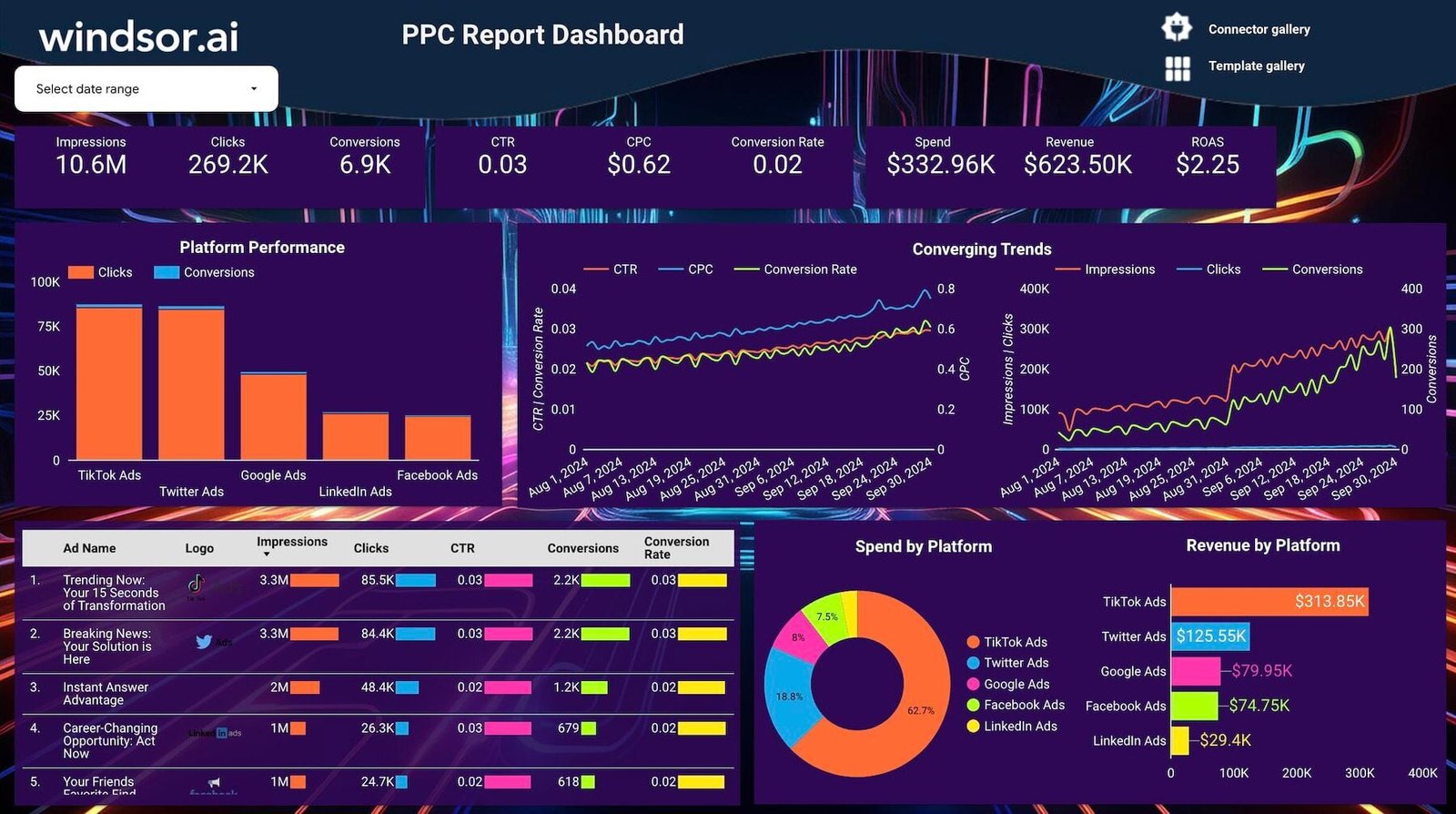
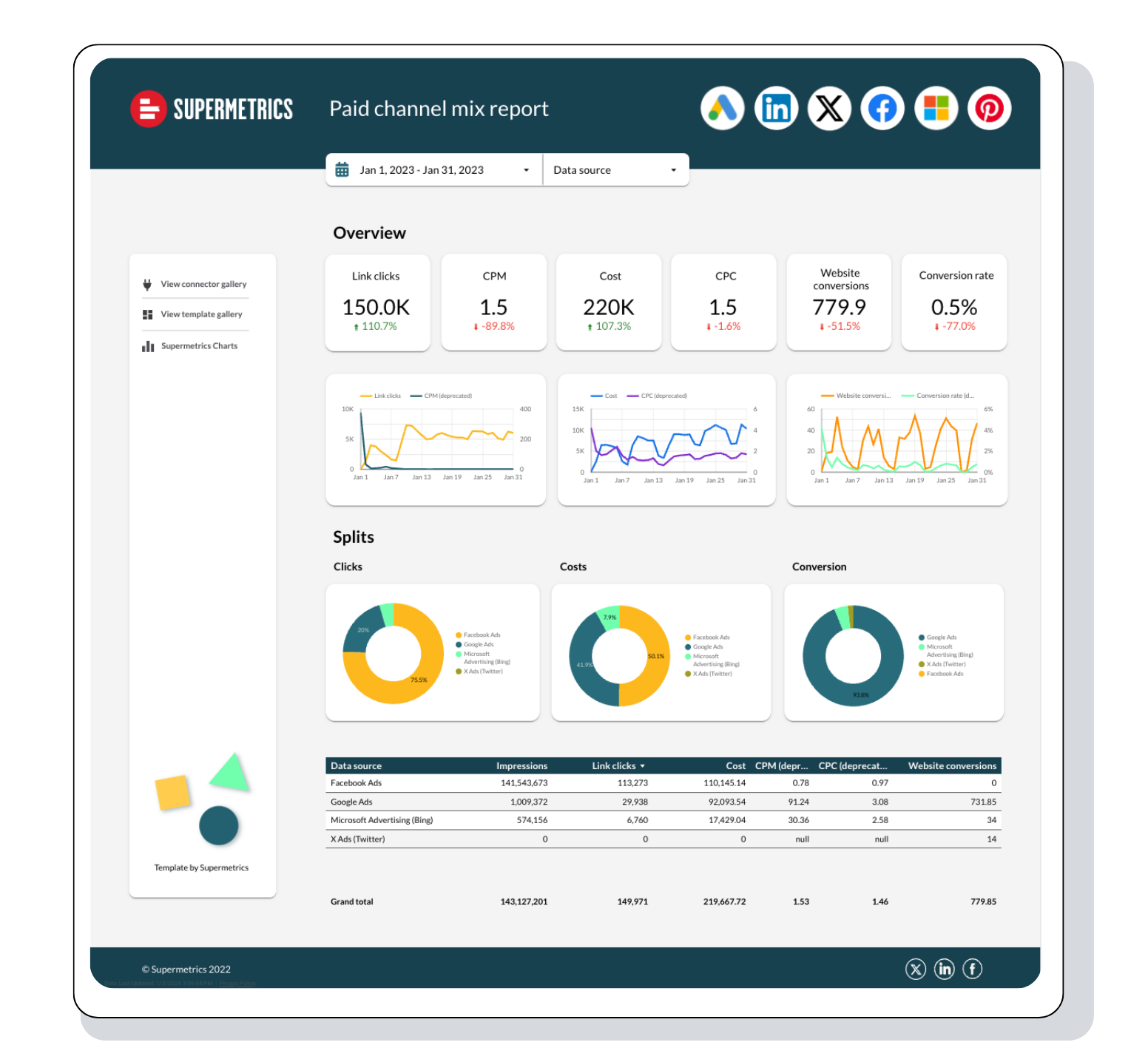
Pair the MCP with a report on the same connector, so assistant and dashboard read the same data.
Where to go next
- AI in Data Studio: what Gemini does, what’s free, and what to use instead
- Connect GA4 to Claude or ChatGPT: Google’s official server, step by step
- Google Ads and Search Console MCP servers: checked against your report
- Meta Ads MCP: Meta’s official server and the alternatives
- Sending client data to AI assistants: what agencies check first
- Porter vs Windsor vs Supermetrics: the connector side of the decision
Frequently asked questions
Is there an MCP server for Data Studio (Looker Studio)?
No. Google said on 1 September 2026 there is “no defined timeline” for one. Connect the assistant to your sources instead, ideally through the connector that feeds your reports.
Do I need a paid Claude or ChatGPT plan?
For ChatGPT, Porter’s guide says connectors need a paid plan. For Claude, Windsor.ai and Porter say the free plan works, but Coupler.io’s directory connector can fail on Free and Pro; its custom connector works.
Does using the MCP use up my connector’s AI credits?
Coupler.io: no. Funnel.io: no Flexpoints. Porter: reads no, writes use Automation credits. Supermetrics’ AI credits are tied to its Studio product and aren’t stated as MCP limits.
Can the assistant change my campaigns?
Only through a write-capable server with writes switched on: Windsor.ai, Supermetrics (beta), Meta’s official server, and possibly Porter, whose docs disagree. Funnel.io, Coupler.io, Catchr and Google’s GA4 and Ads servers can’t.
Is Supermetrics’ MCP included in Starter?
Through the AI chats destination, yes. The standalone server needs Data API access, which today’s pricing page shows on Enterprise only.
Is there an official Search Console MCP server?
No. Only third-party servers exist.
Some links in this post are affiliate links: if you sign up through one, I may earn a commission at no extra cost to you. How I work with partners.