
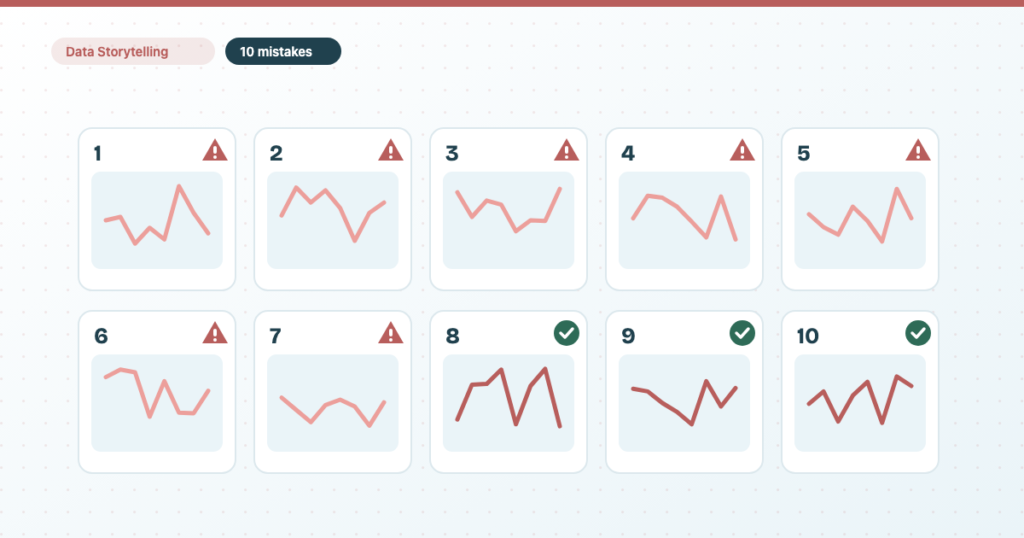
The ten data storytelling mistakes I see most often are: mixing up exploratory and explanatory analysis, not understanding your data, the wrong chart, a confusing colour scheme, the wrong report medium, too little context, not knowing your audience, no commentary, no next steps, and being afraid of the conversation. Every analyst and consultant makes some of them at some point in their reporting journey. I’ve made all ten.
Data storytelling turns raw data into a narrative that drives understanding and decisions, and it isn’t hard to bring into your consulting practice. It is, however, easy to fall into habits that undermine the credibility and clarity of what you’re presenting, even after years of doing it. For each mistake below I cover how it hurts your data story, how to recognise it, and what to do instead, with the Data Studio feature that helps where there is one. There’s a summary table at the end if you’d rather start there.
1. Not knowing the difference between exploratory and explanatory analysis
Not knowing the difference between exploratory and explanatory analysis does more damage to a data story than any chart choice. Before I explain why, here’s the difference.
What’s the difference between exploratory and explanatory data analysis?
Exploratory analysis is exploring and understanding the data without preconceived notions or a specific hypothesis in mind. It uncovers patterns, trends and relationships. Explanatory analysis explains a specific phenomenon or outcome, based on the data you have. Cole Nussbaumer Knaflic, author of Storytelling with Data: A Data Visualization Guide for Business Professionals, explains both brilliantly in her talk at Google.
Put in terms of the reporting medium: exploratory is sending your client a link to their Search Console, their GA4 property, a live Data Studio dashboard, or a third-party tool export. You can absolutely do this regularly. The point is that it lets them dig into the data, rather than you giving them insight, commentary or actions. When you do a monthly or quarterly report, on the other hand, you go through all the data at your disposal, the work you or your team completed and the results achieved; you analyse it, and ideally you put forward a data story that explains, enlightens, educates your audience and informs the next steps. You’d also do this when an external event hits. In SEO that’s an algorithm update, a new SERP feature, or an industry shift like the arrival of AI Overviews and ChatGPT search.
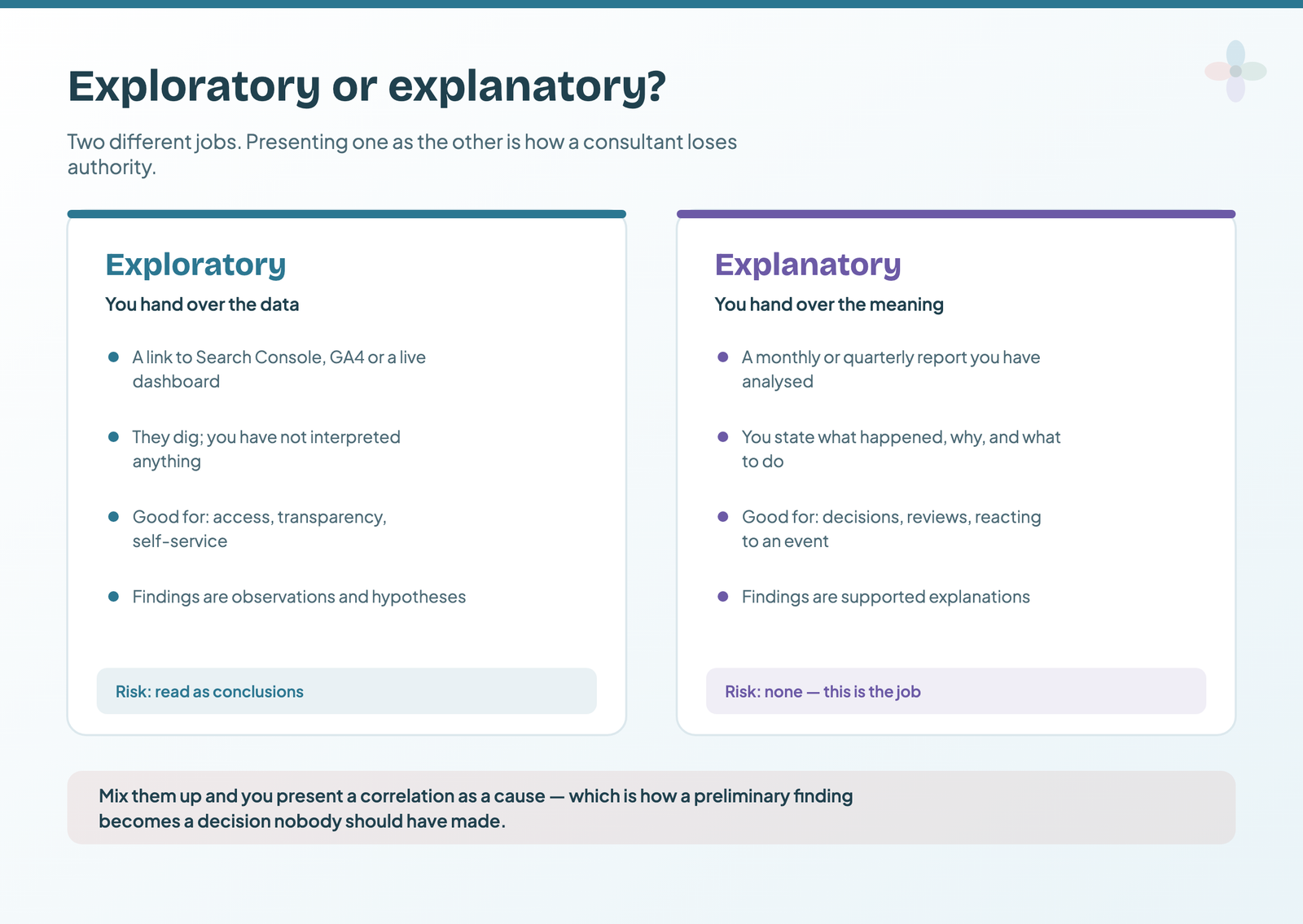
If you confuse exploratory findings with explanatory ones, or vice versa, it leads to confusion and a lack of clarity in your data story. Confusing the purpose of a dashboard with that of a static, point-in-time report can undermine your authority as a data consultant.
Presenting exploratory findings as explanations leads to causal inference problems. Exploratory analysis discovers patterns and relationships and often generates hypotheses, which explanatory analysis then tests. Explanatory analysis aims to establish causal relationships and explain observed outcomes. Present an exploratory finding as a causal explanation and you’ve turned a correlation into a conclusion that may be wrong or misleading.
Confusing the two leads to misleading interpretations. Exploratory analysis is flexible and open-minded: it tests many hypotheses and considers many factors. Explanatory analysis needs a focused, rigorous approach. Mix them up and you present preliminary findings or correlations as definitive explanations, which misleads your audience.
Mistaking one for the other loses the storyline. A data story needs a logical flow and a clear storyline. Exploration produces several hypotheses and fragmented findings; explanatory analysis narrows the focus into a coherent account. Fail to distinguish them, and your story lacks a narrative your audience can follow.
| Exploratory | Explanatory | |
|---|---|---|
| What you hand over | Access to the data: a dashboard link, a platform, an export | The meaning: what happened, why, and what to do next |
| When | Any time, as a standing resource | The monthly or quarterly report, and after an external event |
| Findings are | Initial observations and hypotheses | Supported explanations, with their evidence |
| In Data Studio | Detail pages with filter and date controls | A summary page with stated conclusions, read first |
How to avoid it: differentiate clearly between the two. When you present exploratory findings, give them context and label them as initial observations or hypotheses that need further investigation. Reserve explanatory analysis for causal relationships and well-supported explanations. In a Data Studio report, that usually means an explanatory summary page in front of the exploratory detail pages, the structure described in the guide to narrative frameworks and the martini-glass layout.
2. Not understanding your data
Every data story starts with the data. It’s your role as a data analyst, SEO analyst or consultant to analyse it before you choose your narrative. Not understanding your data hinders data storytelling in several ways, from a false interpretation to failing to recognise the context or the right next step.
It leads to inaccurate interpretation. Without a clear understanding of the data, you may misread or misrepresent what it holds, and draw conclusions or build narratives that are wrong. That undermines the credibility of everything else you present.
It leads to a lack of context. Understanding the context of your data is crucial. Without it, you miss the factors influencing the numbers (timeframes, external events, seasonality and others), and your story lacks depth.
It produces incomplete or incoherent storylines. A data story connects data points into a narrative with a setup, a conflict and a resolution. If you don’t understand the data, you’ll struggle to find the insights, patterns or relationships that build a compelling storyline, and you’ll end up with fragmented or confusing narratives. The biggest cost is that you won’t be able to inspire action.
It leaves you unable to answer questions, which erodes your perceived authority. Questions come up during any presentation. If you lack a deep understanding of the data, you’ll struggle to answer them accurately, and that undermines your credibility and leaves your audience unsatisfied.
Not knowing the full picture means missed storytelling opportunities. Data often hides valuable insights. If you don’t know it well, you miss the chance to inform, persuade or drive an outcome with them.
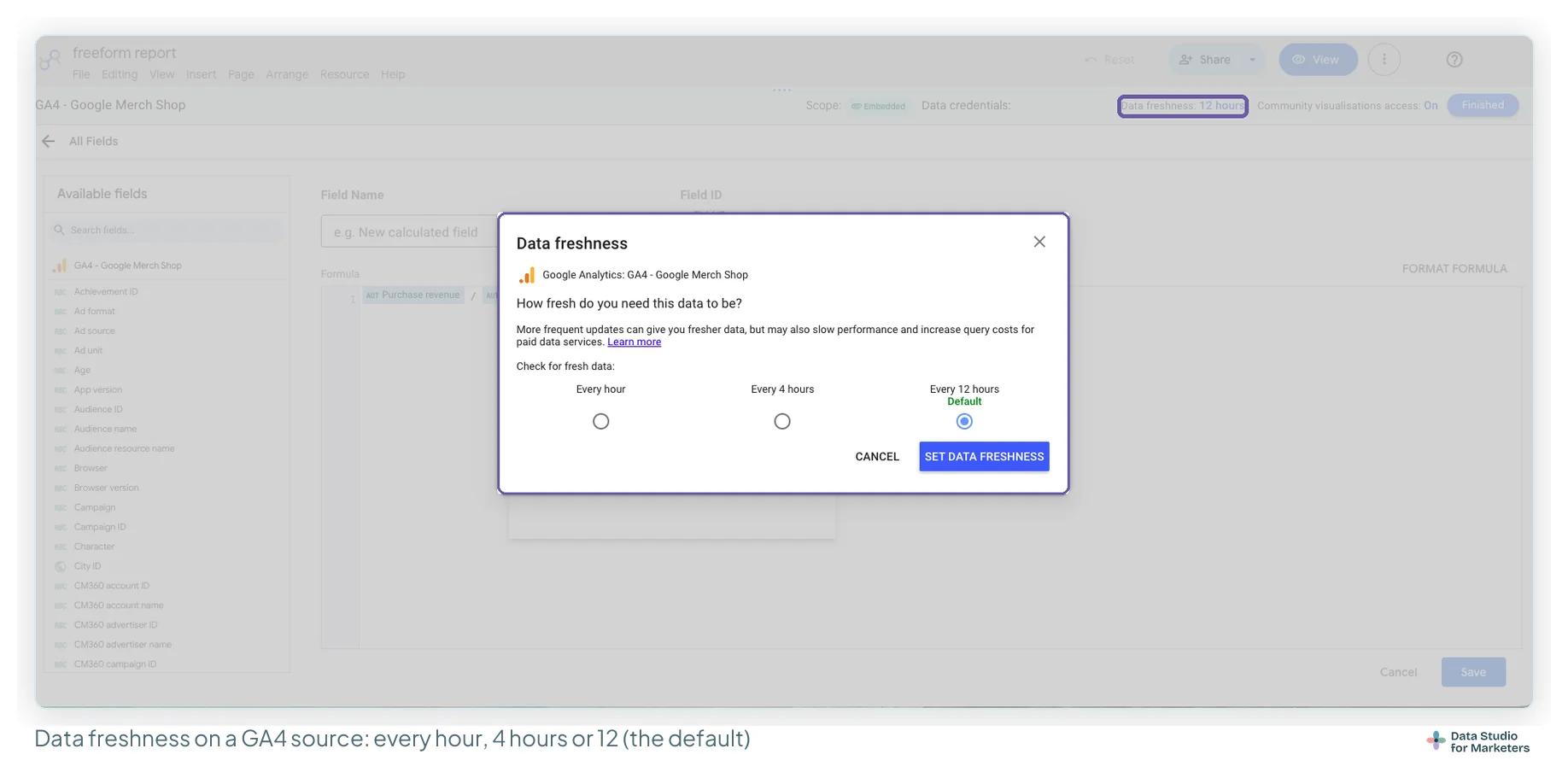
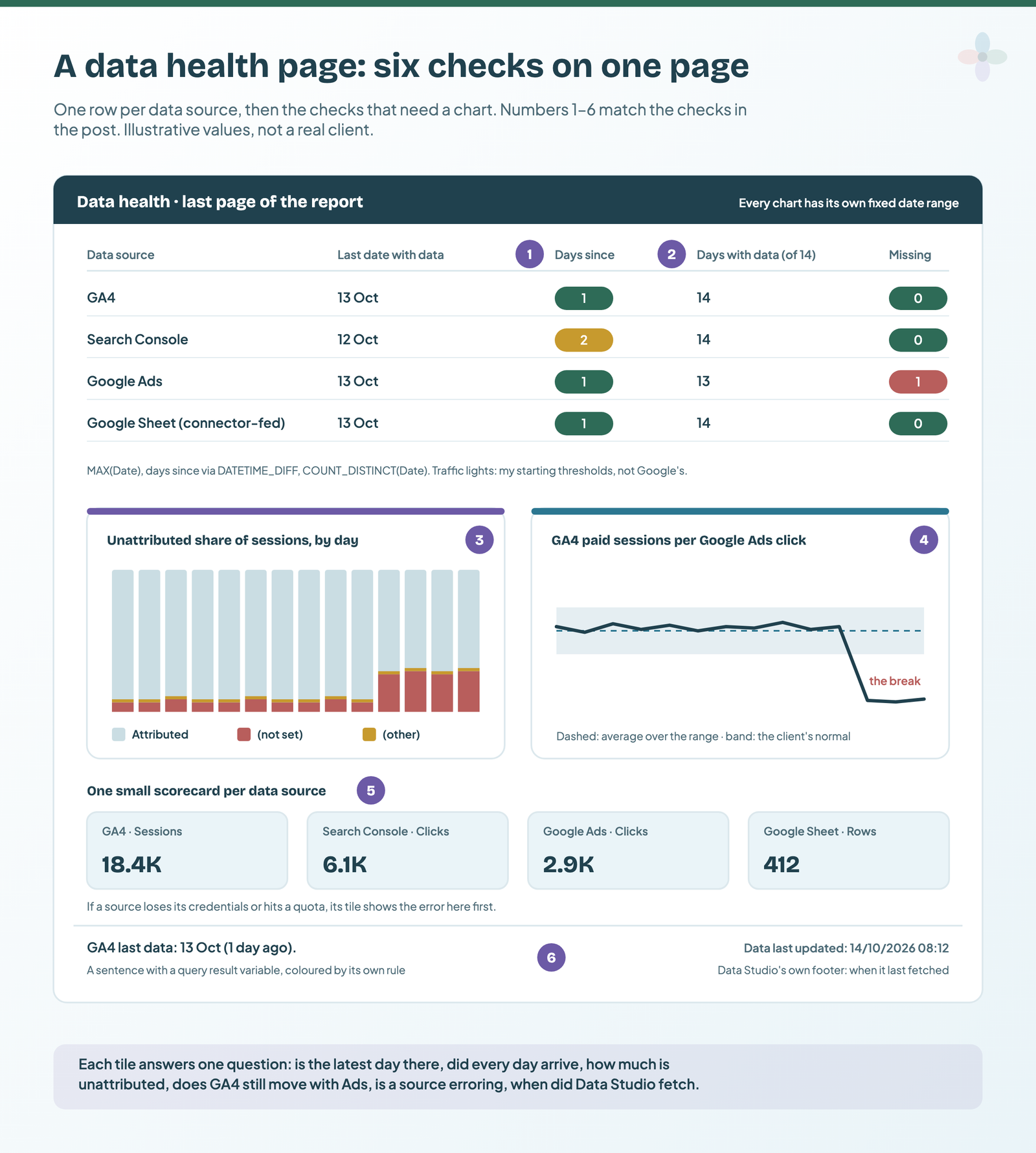
How to avoid it: invest time in understanding your data thoroughly. Explore its sources, quality, limitations and underlying context. Document all of it, and give your report supporting documentation. Apply the right analysis techniques and consult domain experts where you need to. In Data Studio, a data health page answers “can I trust these numbers today?” before anyone reads the story, and knowing how fresh each source is stops you explaining a dip that is really yesterday’s data still arriving.
3. Choosing the wrong charts and visualisations
Not understanding data visualisation principles and choosing the wrong chart will confuse your audience at best and mislead them at worst. Each chart you choose conveys a message on its own, so getting these choices right is key to a cohesive report.
An ineffective chart misrepresents the data. Different charts suit different types of data and the relationships you’re trying to show. The wrong one distorts the information and hides the real message.
It leads to confusion and misinterpretation. When a chart doesn’t carry the intended message, your audience struggles to grasp the key insight or draw an accurate conclusion.
It leaves the next steps unclear. Clear, concise communication is the core of storytelling. A visualisation that doesn’t convey the information clearly costs you engagement and the message.
It signals inefficient communication. The purpose of data visualisation is to simplify complex information. The wrong chart works against that, and the audience gets overwhelmed or can’t extract the insight.
It means missed insights. Different charts excel at different patterns. An inappropriate one can obscure or downplay the very finding that would have made the story.

The classic version of this mistake is a pie chart doing a bar chart’s job:
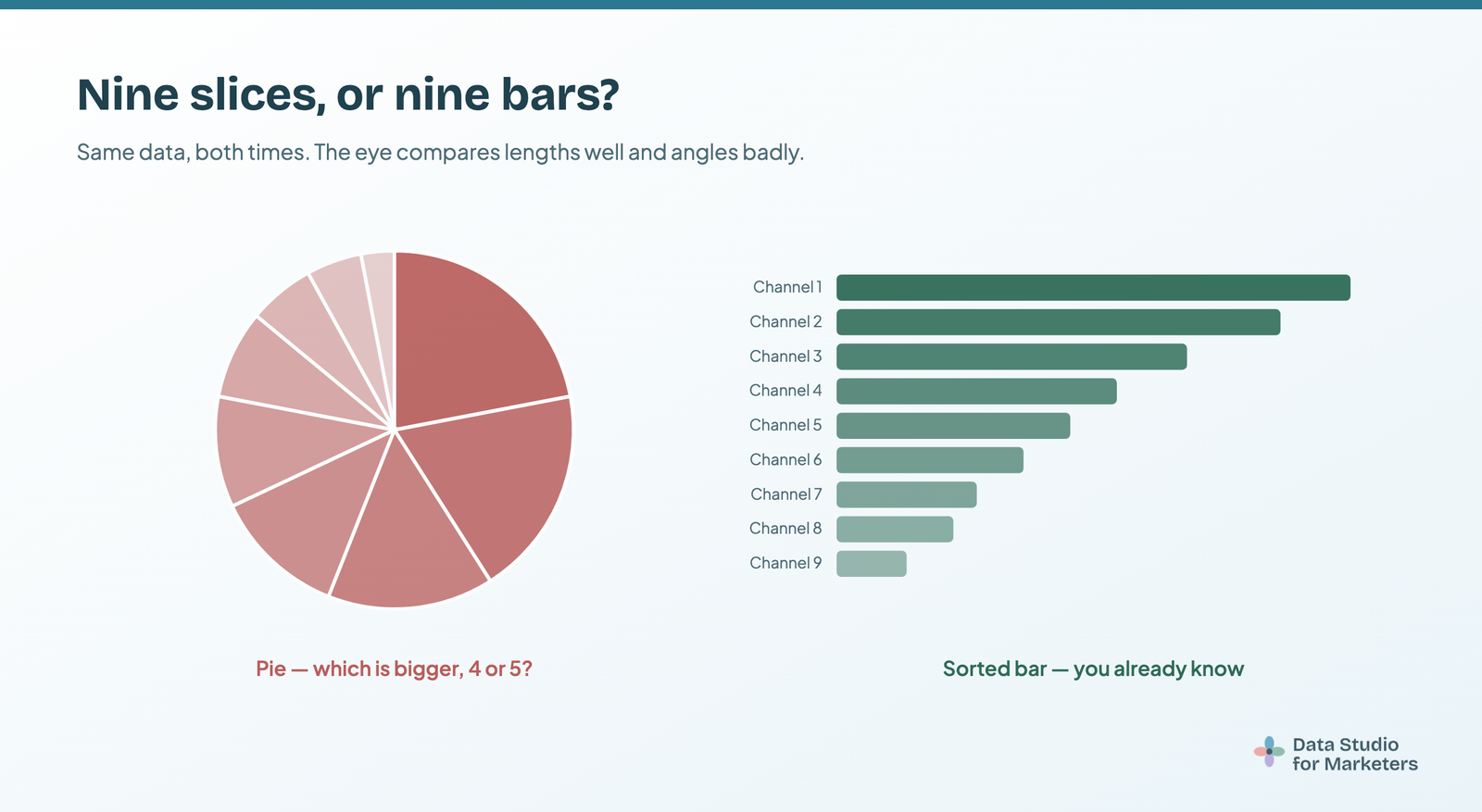
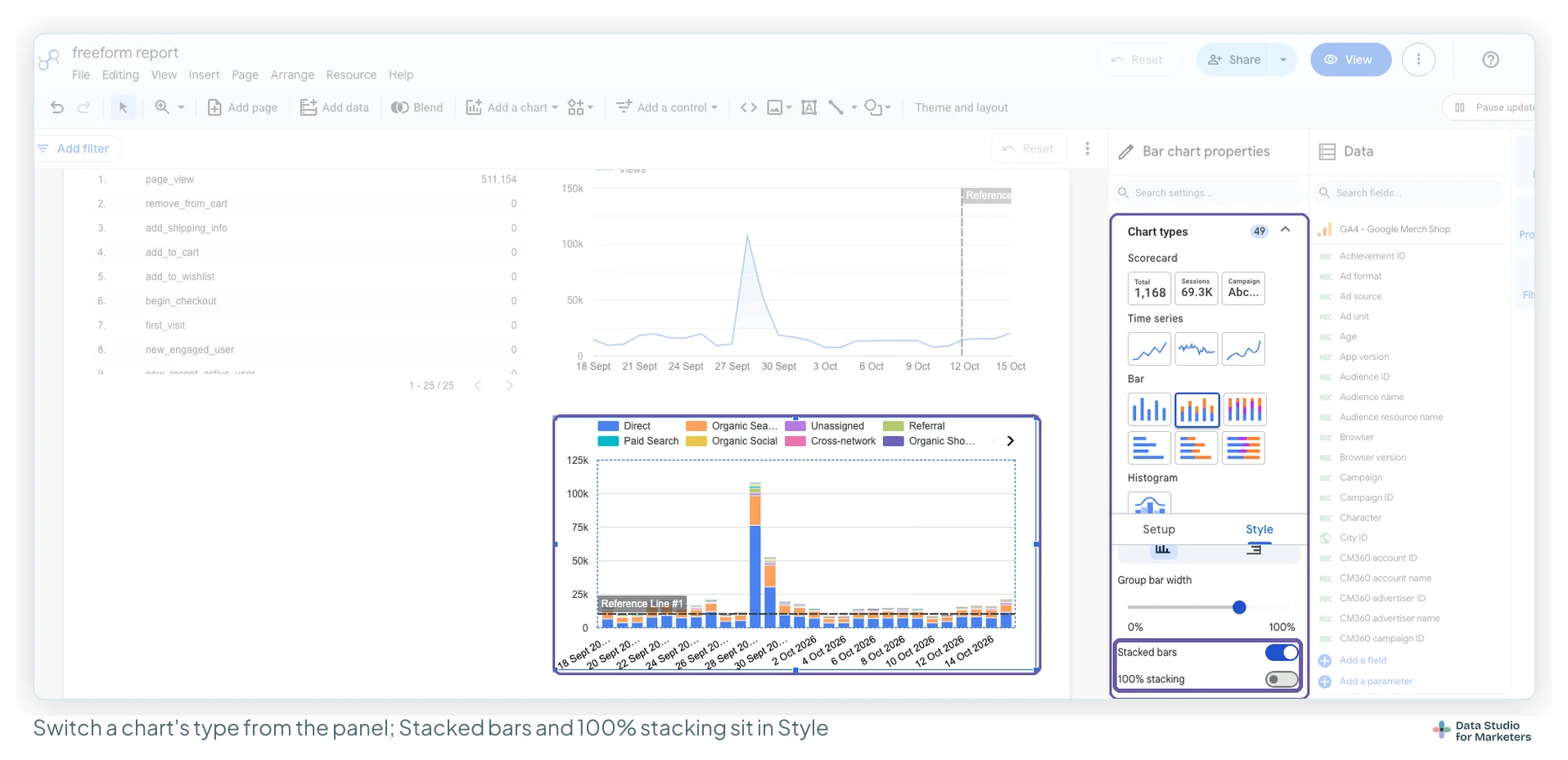
How to avoid it: get a good understanding of visualisation principles and techniques. Consider the data type, its relationship with other metrics, and the message you want to convey, then choose the chart that best represents the data for your storytelling goal. Ask others for feedback, or consult visualisation experts, to check your visuals help rather than hinder. And iterate: for recurring narratives and reports, try a few designs until you find the one that works for your stakeholder. Choosing a Data Studio chart from the shape of your data walks through every built-in chart and when it fits.
4. Choosing a confusing colour scheme
A confusing colour scheme can damage your data story in five ways.
It misrepresents the data. Colours represent categories and values. A confusing scheme distorts how the data is perceived, which leads to wrong interpretations, or to associations people have with certain colours depending on their culture. David McCandless’s Colours in Cultures infographic shows how differently the same colour reads from one country to the next.
It fails to differentiate the metrics that matter. An effective data story has a protagonist: a metric, or a set of metrics, such as traffic or user experience, that you follow through the story. A confusing scheme makes it hard to tell data series or categories apart, and the audience loses the relationships and patterns.
Colour chosen for design alone causes visual fatigue. A scheme without coherence or harmony overwhelms the reader. Too many clashing or poorly contrasting colours strain the eyes and pull focus from the insight.
It creates accessibility problems. Colours that are too similar, or lack contrast, exclude people with colour vision deficiencies from your story.
It loses emotional impact. Colour evokes emotion and carries meaning. Colours that clash with the message or tone dilute the emotional resonance of the story.
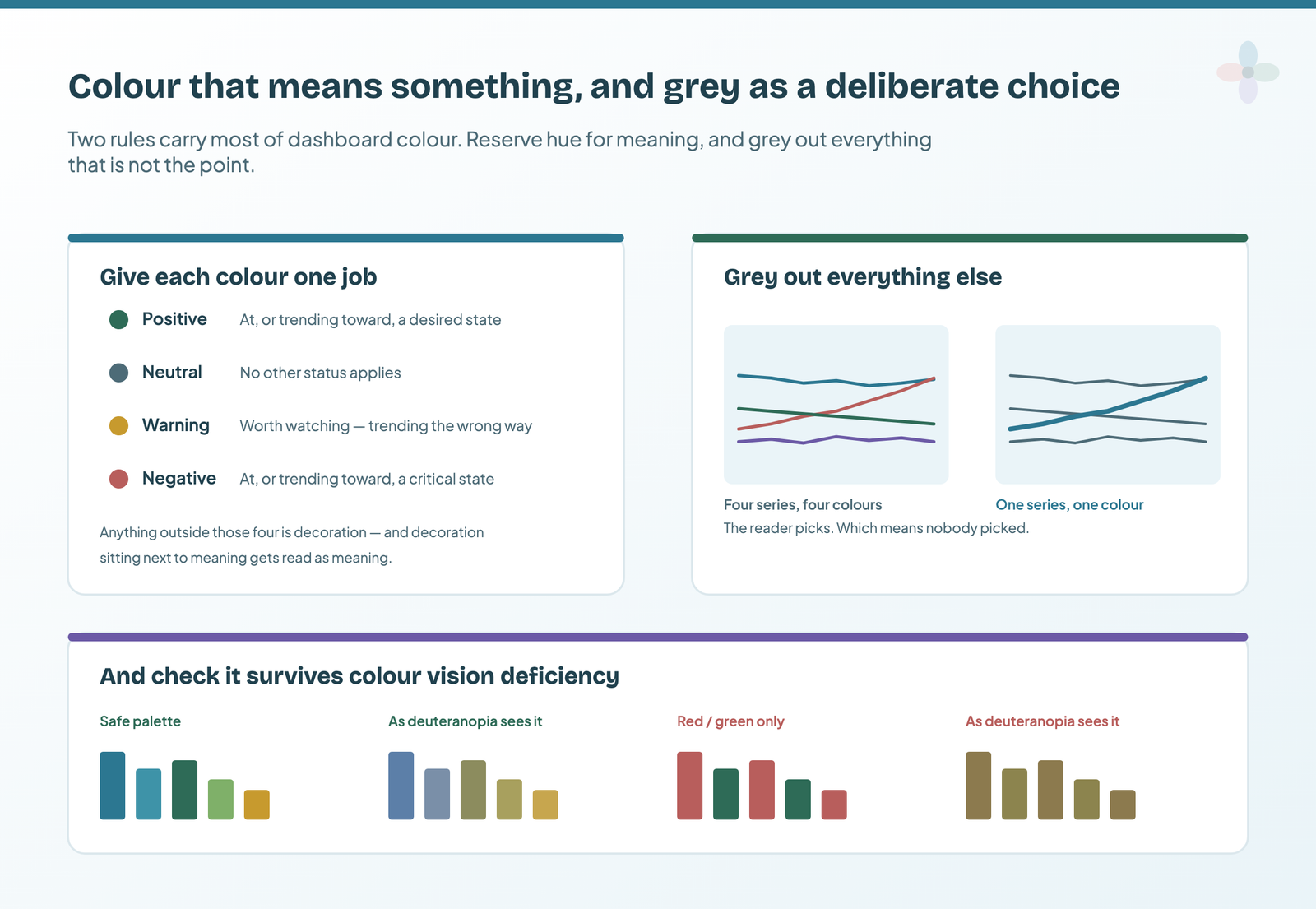
How to avoid it, when you choose a colour scheme for a data story:
- Use a limited, harmonious palette that adds clarity and differentiation.
- Ensure enough contrast that your protagonist metrics are easy to pick out.
- Consider the cultural and contextual associations of colours, so they match the message.
- Test the scheme for accessibility, so it works for every reader.
- Use colour psychology to support the emotional tone of the story.
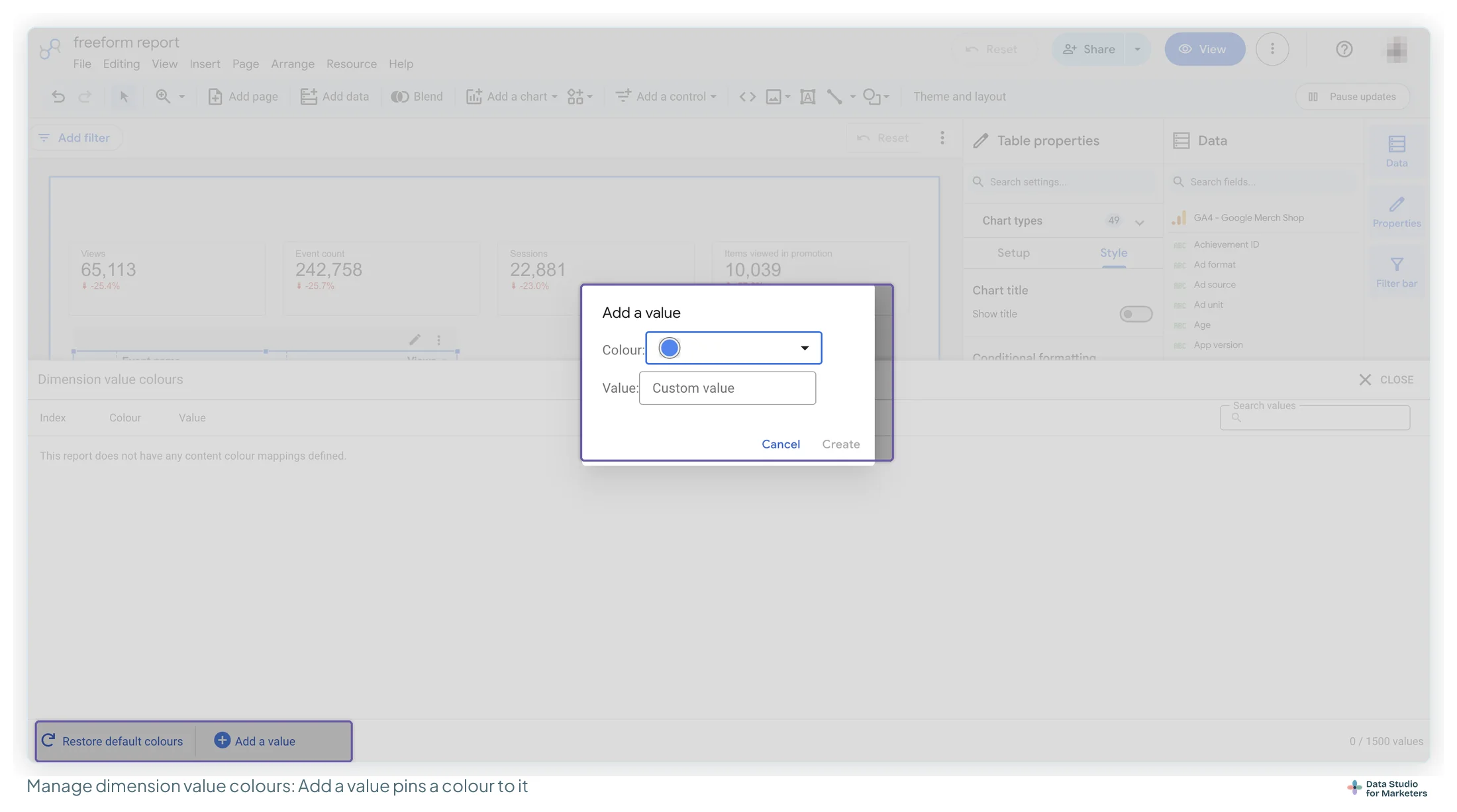
In Data Studio, fixing a colour to a dimension value (so “Organic” is the same colour on every chart) does a lot of this work for you, and the dashboard design principles guide covers the palette test.
5. Choosing an inappropriate report medium
I’ve already said that the type of report (exploratory or explanatory) influences the medium. So should your understanding of your stakeholders. The wrong medium undermines your storytelling in four ways.
The medium should follow the core of the analysis, or you risk limited engagement. Different stories need different mediums. A lengthy written report for a visually driven story limits engagement: the audience struggles to connect with it, loses interest, and the impact drops. This depends heavily on your stakeholder or client and their usual reporting and communication routine.
When I did organic marketing consulting for the teams of one large technology company, I knew how important written reports were in that organisation, and that they were its usual reporting routine. So I brought that into my reporting with those teams, even though it contradicted my usual practice with other clients at the time.
Different audiences have different preferences for consuming information, and a medium that ignores them makes it harder for them to connect with the story.
The wrong medium communicates inefficiently. A medium without interactivity for a complex dataset, for example, makes the insights hard to grasp, and the key message is lost.
It limits your impact. Mediums have different strengths: interactivity, visualisation, storytelling elements. Choose the wrong one and you can’t use its potential to engage, persuade or inspire action.
Some mediums make your story less memorable. An inappropriate medium may not leave a lasting impression, which limits the story’s long-term influence on decisions. Research from the visualisation community supports this. The largest-scale visualisation study at the time (Borkin et al., 2013), using 2,070 single-panel visualisations categorised by type, found that:
- colour influences memorability and how the data is perceived
- less common chart types, more tailored to the data story, are more memorable
Memorable isn’t the same as easy to read, so I treat the second finding as a reason to make the one chart that carries the story distinctive, not every chart in the report.
| Medium | Suits | Watch for |
|---|---|---|
| Live Data Studio report | Stakeholders who will dig, and questions answered in the room | It’s exploratory by default. Open on the summary page. |
| Reports that will be forwarded, or read later without you | Check it page by page before it goes. | |
| Deck | Senior audiences, or a report that is one item on a longer agenda | Screenshots go stale. Date them and link the live report. |
| Written report | Organisations whose decisions run on documents | Put the conclusion first; charts support the text. |
| Scheduled email | The same report to the same people every period | It sends the default view, so the default has to be the story. |
How to avoid it, when you choose a reporting medium:
- Understand your audience: their preferences, expectations and needs.
- Consider the nature of your story and the most effective way to convey its essence. Match the medium to the content.
- Explore the tools that support your medium, and use interactive features, visualisations or multimedia where they improve comprehension.
- Test it. Get feedback from a diverse group of stakeholders before you finalise, and refine the approach.
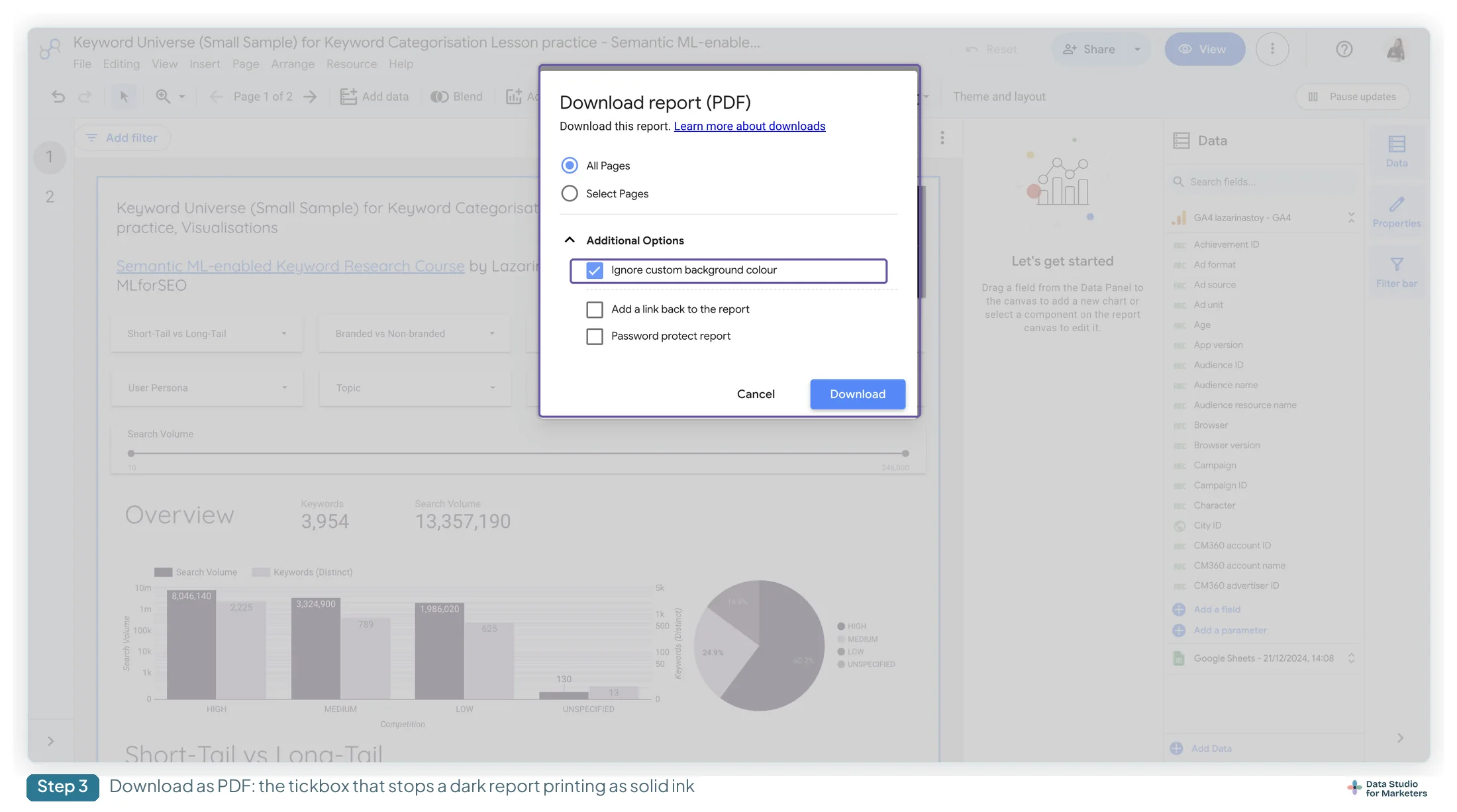
Presenting a Data Studio report to a client covers the settings behind each format, including the PDF options below.
6. Not providing enough context for your audience
Not providing enough context can mean not explaining how the report was built, how the data was gathered, what the metrics mean, and so on. In other words, a lack of documentation.
I’m not saying data documentation needs to be presented in person, or as part of the main event. I’m saying that somewhere, your stakeholders need a one-stop shop for all their questions on the data’s context, to get everyone up to speed.
Without context, the audience doesn’t understand the story. They may be unclear about its purpose, background or relevance, and end up confused or disengaged.
Without context, the audience misinterprets the story. Timeframes, and when and where the data was extracted from, change what the data means. Without them, people form incomplete or wrong interpretations, which lead to flawed decisions.
Without context on the metrics, stakeholders can’t relate to them. Context gives the audience a frame of reference to connect the story to their own work. This matters most when the story rests on metrics not everyone knows. How can you expect someone from engineering or product to engage with a story about bounce rate if they don’t know what it is or why it matters? Context also carries the underlying causes, trends and patterns; withhold it and you limit what the audience can take away.
Not knowing how the data was extracted, or the story built, increases scepticism. Without the necessary context, the audience may question the story’s credibility, see it as biased, and be less inclined to trust it.
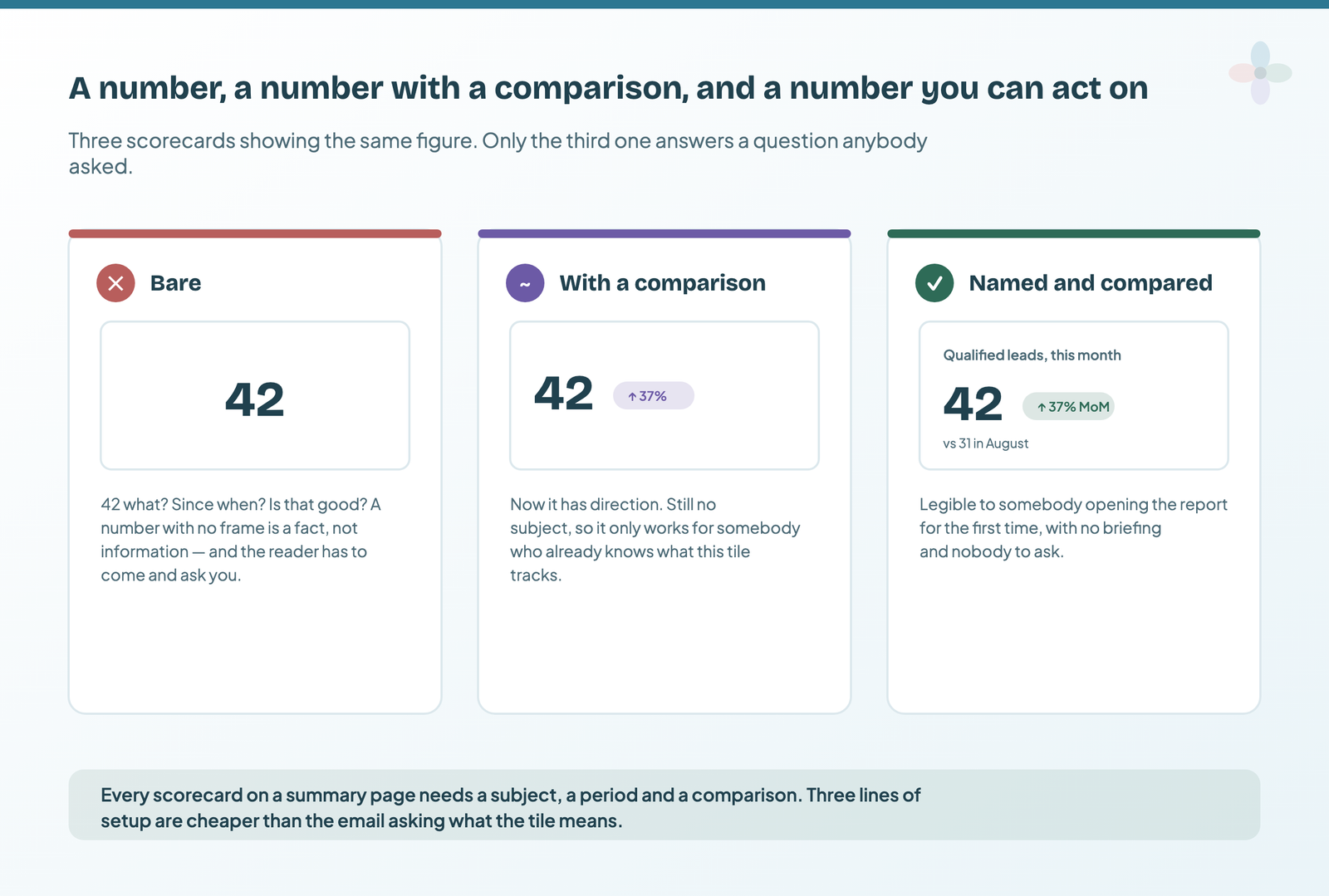
How to avoid it, provide enough context when you present a data story:
- State the purpose, background and objectives up front. Explain why the information matters to this audience.
- Share the contextual details that influence the data, such as timeframes, geography or historical trends.
- Be transparent about sources, limitations and biases, so the audience understands how far the data can be trusted.
- Connect the story to your audience’s experiences, challenges or goals, and show why the insight is relevant to their work.
- Give clear, actionable insights they can apply to decisions, and explain how the story contributes to an outcome.
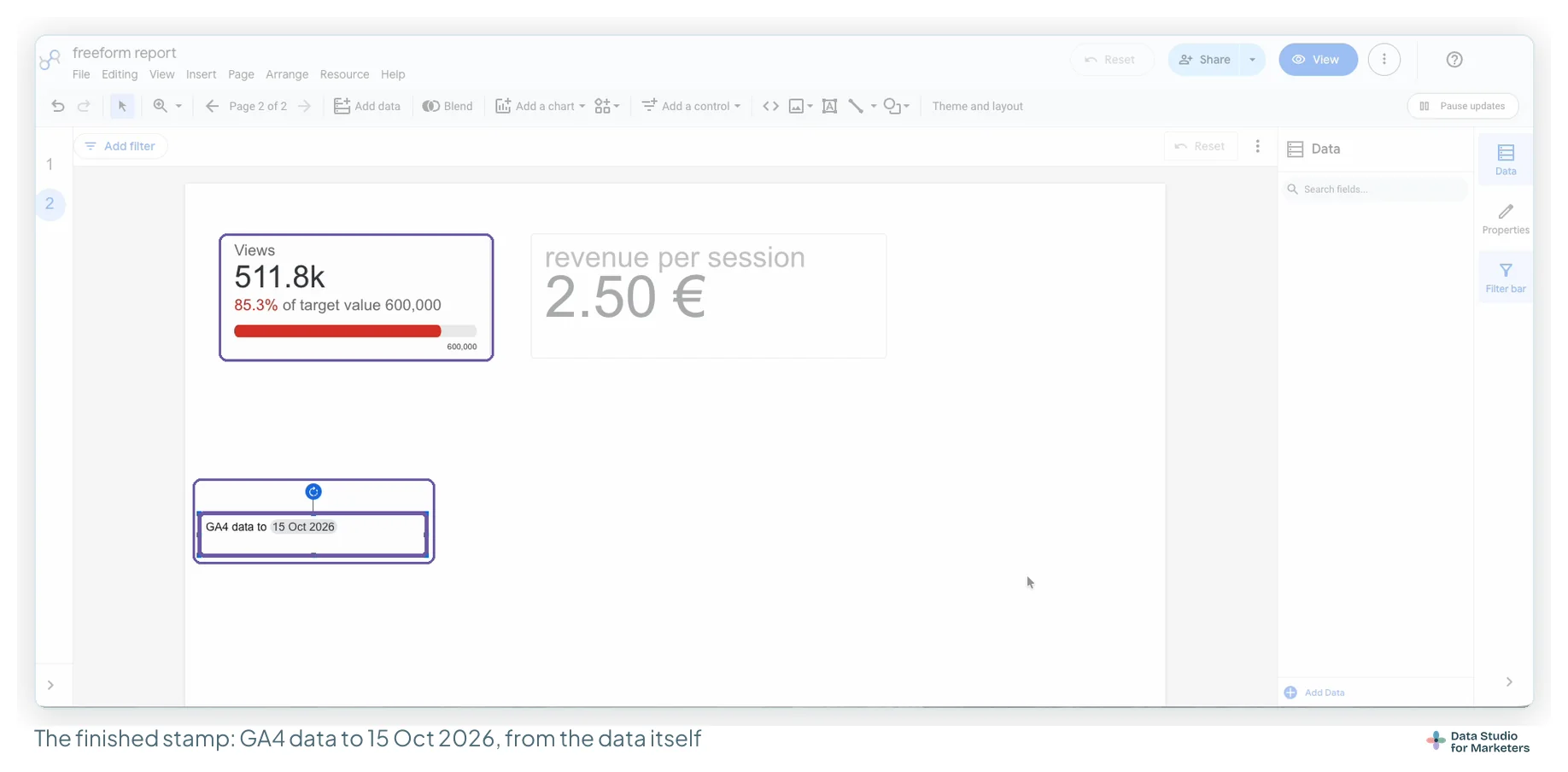
In Data Studio, a “data to” date on the page and a definitions page at the back are the cheapest versions of that one-stop shop. Choosing metrics that carry their own context covers which comparison to put beside each number.
7. Not knowing your audience well enough
Beating the wrong drum: advocating for the right outcome, to the wrong people. If you don’t know your stakeholders, you can’t communicate urgency to them; you’ll bore them and hurt your credibility.
It leads to ineffective communication and misalignment. Without a deep understanding of your audience, you can’t align the story with their needs, interests and preferences. Audiences differ in how familiar they are with data and in their subject expertise, so you end up with a mismatch between your message and what resonates, or with jargon, technical terms and complex visualisations that don’t suit their level.
It costs relevance. Knowing your audience lets you find the specific relevance of the story to their context. Miss their circumstances and you present data that isn’t meaningful to their situation, so they can’t see its value.
Data storytelling isn’t just presenting information; it’s forging a connection with your audience. When you don’t know them well, you miss the chance to address their concerns and tap into their aspirations.

| Persona | Cares about | Tell them |
|---|---|---|
| C-suite | Profitability, growth, user experience | The headline, its consequence, and the decision you need from them |
| Project lead | Delivery, implementation detail, technical requirements | What the finding means for the work, and who does what next |
| Team members | Their own tasks and whether their work moved the number | What changed because of their work, and the next task |
How to avoid it: invest time in getting to know your audience better.
- Find out who will be at your presentation, and their role, interests and needs.
- Develop personas for the segments of your audience (for example the c-suite, project leads, team members) and tailor your data stories to each group.
- Encourage feedback and have real conversations. Listen to their perspectives, challenges and expectations, and adapt your techniques, visualisations or narrative to them.
- Recognise that your audience evolves. Keep up with their changing needs and dynamics, and adjust your approach.
8. Not providing commentary or informed analysis of performance
Leaving out commentary or analysis of performance undermines the whole point of data storytelling.
Simply sending out a bland stats dump, whether it’s in a Data Studio dashboard or a fancy deck, is not the way to do storytelling with data.
Leaving your audience to derive the same insights as you leads to misalignment. Data alone doesn’t tell a story; it needs interpretation. Without commentary, your audience is left with raw numbers or visuals and no clear sense of what they mean, which ends in confusion or misinterpretation.
Presenting a data story without analysis is like making an omelette without eggs. Commentary and analysis identify the patterns, trends and outliers. Without them, the story lacks depth and the actionable takeaways stay hidden.
No insight means less persuasion and less action. A data story aims to influence perceptions or beliefs, but above all to drive decisions and action. Commentary and analysis shape that argument. Without them, the story has no compelling case and no call to action.
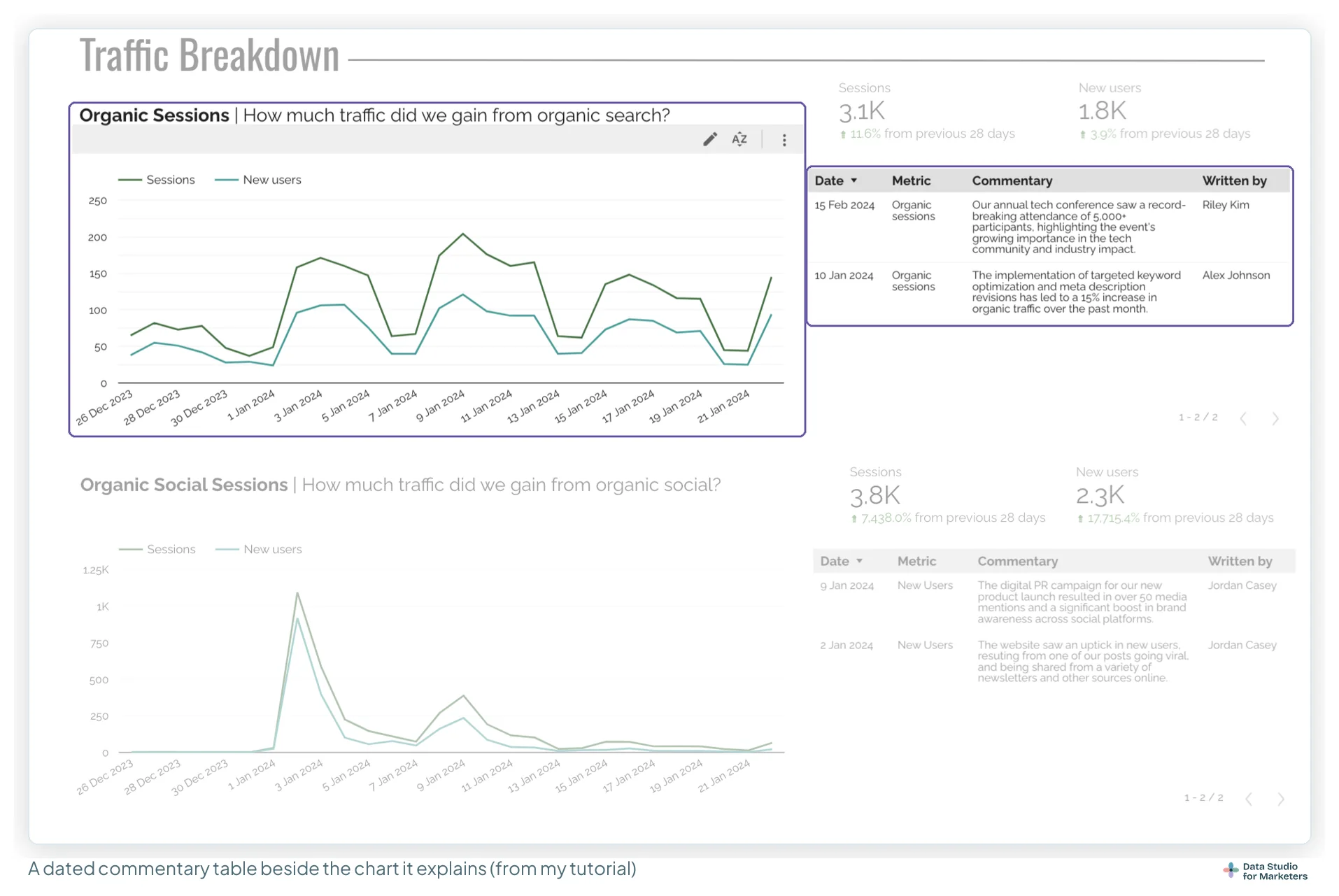
How to avoid it, make sure your data story carries commentary and analysis:
- Explain the background, objectives and significance of the data. Help your audience see why the metrics matter and how they relate to the wider goals.
- Analyse the data for the patterns, trends and relationships relevant to the story, and explain their implications.
- Clarify anomalies, outliers and unexpected results, with plausible explanations or hypotheses.
- Translate the data into actionable recommendations, connecting each metric to a specific action or strategy.
- Weave the analysis into a coherent, persuasive narrative that connects with your audience and moves them to act.
In Data Studio, expert commentary annotations keep the commentary next to the chart, and if time is what’s stopping you, an AI assistant can draft it as long as you check every number and every “why”.
9. Missing next steps: no way out of a catastrophe, no way to capitalise on success
A data story without next steps, one that offers no way out of a catastrophe and no way to capitalise on success, undermines your consulting.
Don’t leave your client to come up with their own action items or next steps. It’s your role as an analyst or consultant to present an analysis and recommend the next steps, especially when you’re presenting a data story.
Without actions, it isn’t data storytelling. A data story shouldn’t only present historical or current data; it should give a roadmap for the future. Without that guidance your audience feels lost, which leads to inaction, missed opportunities or poor decisions.
Missing next steps means missed chances to solve problems or build on success. Data stories often address problems. Offering no way out of a catastrophe leaves your audience helpless or frustrated, without direction. Equally, success should be celebrated, but also used to drive further growth. Without ways to capitalise on it, you risk stagnation.
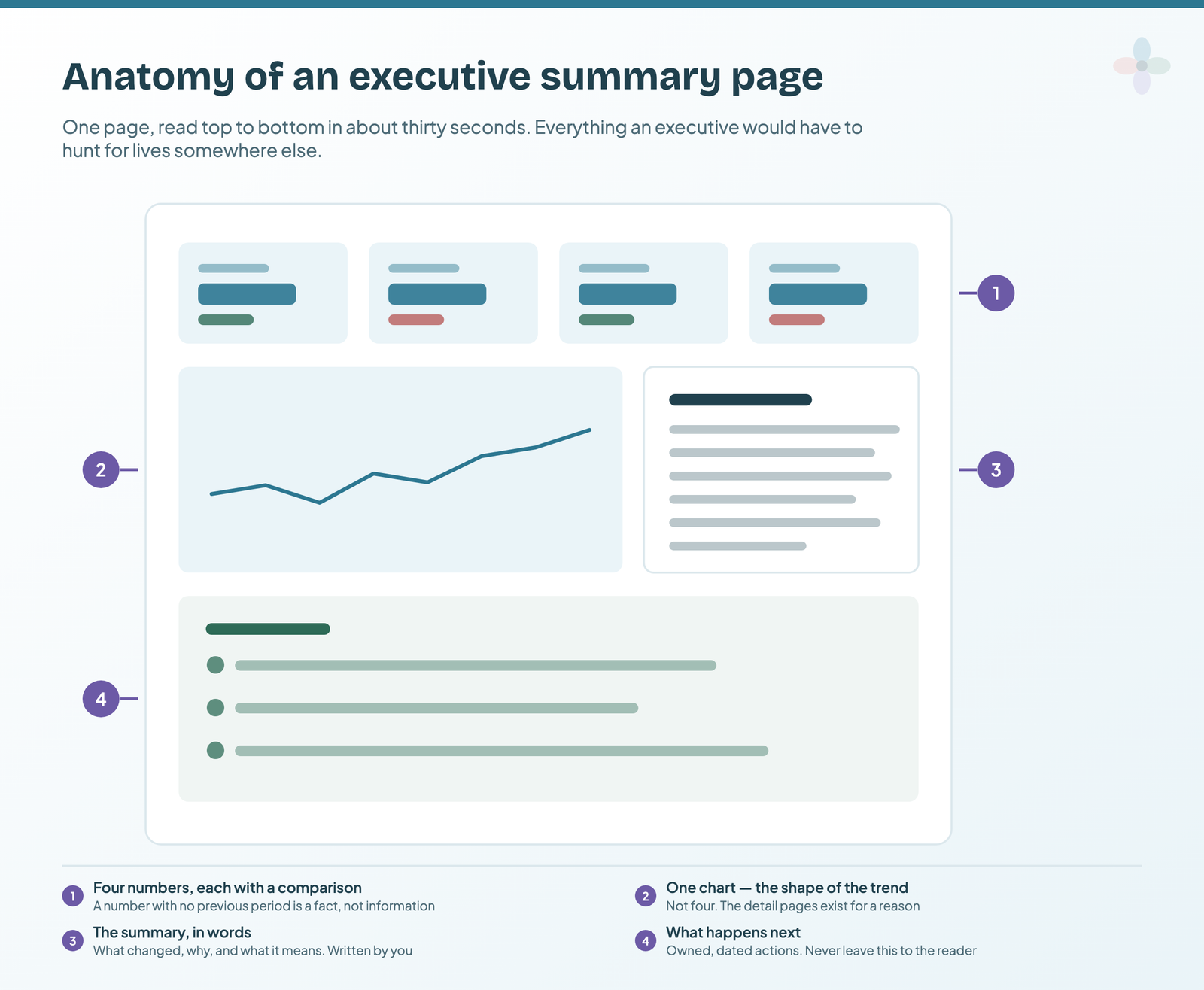
How to avoid it, when you include next steps in a data story:
- Give specific, actionable recommendations based on the insights, and outline the steps to address the challenge or the opportunity.
- Prioritise and sequence multiple next steps by urgency, feasibility or impact, so the order of actions is clear.
- In a catastrophe, present alternative scenarios or contingency plans. It gives the audience resilience and options.
- Support each step with practical guidance on implementation, including likely barriers and workarounds.
- Invite your audience to engage with the next steps, with room for discussion, feedback and joint problem-solving.
The executive summary page is where those actions live in a Data Studio report.
10. Being afraid of the conversation
Being afraid to start a conversation, or anticipating the response and not giving your audience a chance to respond, limits you as a data storyteller. It can mean sugarcoating performance, shying away from reporting on projects that didn’t go to plan, or skipping conversations because you think you already know how the call will go.
Being selective about the stories you tell hurts your authenticity. Data storytelling works best when it comes from a genuine place. If you’re afraid of the conversation, you hold back or filter your message.
Assuming you know how the presentation will go costs you impact. Conversations give you a deeper understanding of your audience’s perspectives, concerns and needs. Avoid them and you miss the reasons why certain projects are a “no”, and your storytelling stays incomplete, with the uncomfortable truths left unexplored.
Limiting your stories to your own sense of what matters limits your growth. Conversations bring feedback, constructive criticism and other perspectives that sharpen your storytelling and challenge your assumptions. Avoid them and you miss that growth.

How to avoid it, overcome the fear of telling difficult data stories:
- Acknowledge that it’s natural to feel apprehensive, especially on sensitive or complex topics. Embrace the vulnerability as a chance to grow.
- Create a safe, inclusive environment where open dialogue and different perspectives are welcome.
- Listen actively. Pay attention to the emotions and concerns behind the words, so you can respond to what your audience actually needs.
- Keep educating yourself on the topics you report on. The more you know, the more confident you’ll be in difficult conversations.
Embracing the conversation is an essential part of growing as a data storyteller. How to present a month where the numbers are bad has the practical version.
The ten data storytelling mistakes at a glance
Data storytelling takes a mix of skills: technical ones like data extraction and analysis, creative ones like visualisation, and soft skills like active listening and narrative design. Here’s every mistake in one table.
| Mistake | How to recognise it | What to do instead |
|---|---|---|
| Not knowing the difference between exploratory and explanatory analysis | Data for exploring presented as if it explained a specific outcome | Say whether you’re exploring patterns or explaining an outcome. Use exploratory analysis to generate hypotheses and explanatory analysis to test them. |
| Not understanding your data | Inaccurate interpretations, missing context, incoherent storylines | Learn the data’s sources, quality and context. Document what you find and consult domain experts. |
| Choosing the wrong charts and visualisations | Misrepresented data, confusion, no clarity | Learn visualisation principles, match the chart to your storytelling goal, and ask for feedback. |
| Choosing a confusing colour scheme | Misinterpretation and visual fatigue | Use a limited, harmonious palette with enough contrast, consider cultural associations, and test for accessibility. |
| Choosing an inappropriate report medium | Low engagement, ineffective communication | Choose the medium from your audience and the nature of the story, including interactivity and their preferences. |
| Not providing enough context | The story isn’t understood, or is misread | Give the background, explain sources and limitations, and connect the story to the audience’s experience. |
| Not knowing your audience well enough | Ineffective communication, no relevance | Understand your audience’s needs, preferences and challenges, and tailor the story to them. |
| Not providing commentary or informed analysis | Raw data without interpretation | Add analysis and commentary: patterns, explained anomalies, actionable insight. |
| No way out of a catastrophe, no way to capitalise on success | A story with no recommendations | Offer specific next steps, prioritised and sequenced. |
| Being afraid of the conversation | No authenticity, missed impact | Embrace the conversation, listen actively, and make it safe to talk openly. |
For me, the takeaways are that as a data storyteller you should be:
- adaptive and flexible in how and when you report
- precise and selective in the charts, visualisations, colours and report mediums you choose, based on the data and your audience
- intentional about what you include and exclude in your data story
- proactive in giving your stakeholders the context they need to understand it
Check your next data story before you send it
I built a checklist for my WTSFest 2023 talk on data storytelling: the questions I run a data story against before it goes out, area by area, from validating the data to the narrative and the visuals. It catches most of the mistakes above.
How to build a data story: the data, narrative and visuals checklist walks through the questions with examples.
Frequently asked questions
What should you avoid in a data story?
Overcomplicating it. The easier you make it for your audience to understand and get on board with your data story, the more likely they are to take it in and act on the next steps you recommend.
What are the common mistakes in data visualisation?
Choosing the wrong visuals, the wrong chart for your data type, or structuring the report incoherently. Also watch your language, especially in an explanatory report: chart titles and commentary influence how the data is perceived.
What are some of the challenges in storytelling with data?
Two that aren’t discussed often are about the presenter’s soft skills. One is being afraid to report poor or unexpected performance, in other words afraid of bringing bad news. The other is anticipating the response and shaping the narrative to it, by being combative from the start or downplaying parts of the performance. Both produce subjective data stories, and objectivity is key to successful data storytelling.
Where to go next in data storytelling
- Data storytelling for marketers: the full guide
- How to build a data story: the data, narrative and visuals checklist
- How to present a Data Studio report to a client
- Narrative frameworks, and which one your report needs
- Data Studio chart types, and how to choose one
- The “so what?” test for a dashboard